Laradock: a hundred PHP services behind one optional CLI
Full PHP development environment for Docker. Run Laravel, Symfony, CodeIgniter, Phalcon, WordPress, Drupal, Magento, Moodle, or any PHP project with 70+ pre-configured services: Nginx, Apache, PHP-FPM, MySQL, PostgreSQL, MongoDB, Redis, Elasticsearch & more.
At a glance
- What is it?
- Twelve thousand stars for a Docker Compose stack that will run your Laravel app on PHP 5.6 through 8.5, ship with a workspace container instead of a host toolchain, and still let you ignore the CLI entirely and read the compose files.
- Who is it for?
- Laradock has moved past the point where it was a Laravel convenience and become a general PHP development environment, which is both its strength and its cost: the surface is enormous and you are reading a lot of YAML to assemble a stack you could build in half the lines with plain Compose. What it buys you is genuinely large though.
- Can I use it commercially?
- Yes. MIT is a permissive licence: you can use, modify and sell software built on it, as long as you keep its copyright and licence notices.
- Is it still maintained?
- Yes. The repository last received commits 3 days ago.
- What is it written in?
- Mainly Dockerfile, according to GitHub's language statistics.
Answers come from the project's GitHub data, last synced on October 23, 2026, and from our analysis. They are not legal advice.
Star history
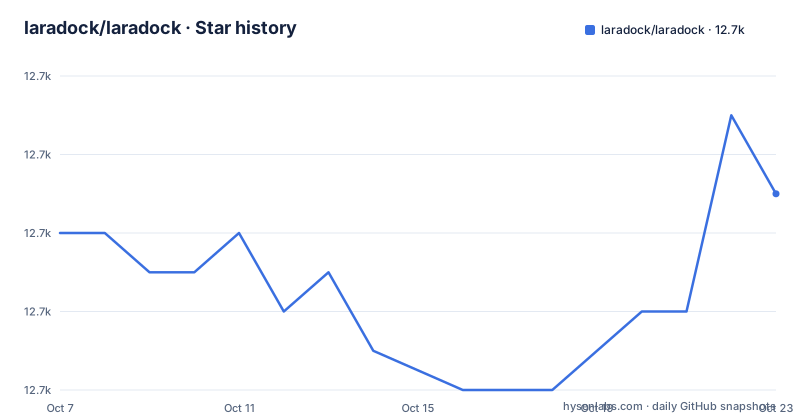
- laradock/laradock12,679 ★ · +1
| Repository | 2026-10-07 | 2026-10-23 |
|---|---|---|
| laradock/laradock | 12.7k | 12.7k |
1 Stars in the last 16 days, measured from the daily GitHub snapshot. Compare with other projects
Editorial analysis
Clone it into your project and run three commands
The quick start is deliberately minimal. Requires Docker with Compose v2.20 or later, then:
git clone https://github.com/Laradock/laradock.gitcd laradock./laradock startThe first run opens a wizard that asks for your framework, PHP version, stack and the tools you want in your dev shell. Every question comes with a sensible answer already selected, so holding Enter produces a working stack. After that, `start` just brings the stack up and prints its URLs and credentials.
The fourth step drops you into what the project calls the Laradock Workspace, a container with `php`, `composer`, `node` and `git` available:
./laradock workspaceThen you open `http://localhost`. The workspace container is the idea that matters most in this design. Instead of matching your host PHP version to the container, you run Composer and Artisan inside the container that has the right PHP, so a contributor on Windows and a contributor on macOS get byte-identical tooling.
`./laradock setup` reopens the wizard whenever you want to add a service, change PHP version, or add a tool such as Xdebug.
The CLI is a wrapper you are allowed to ignore
The README is unusually candid about its own tooling. The CLI is described as optional, transparent sugar: it prints every `docker compose` command it runs, keeps no state, and writes nothing except your `.env`. Unknown commands pass straight through, with `./laradock logs -f nginx` stated as equivalent to `docker compose logs -f nginx`.
That is a meaningful design choice in a project with 12,674 stars and 4,341 forks. Most compose templates eventually grow a wrapper that becomes the only supported interface, and the usual outcome is that a stack nobody can debug without the wrapper. Laradock keeps the compose files as the source of truth and treats the CLI as a convenience layer on top.
The scale is the other thing to understand. The description promises a full PHP development environment with 70+ preconfigured services, and the README says 100+. The repository tree is the evidence: separate directories for `adminer`, `aerospike`, `apache2`, `arangodb`, `beanstalkd`, `caddy`, `cassandra`, `certbot`, `chroma`, `clickhouse`, `couchdb`, `dragonfly`, `elasticsearch`, `flowise`, `frankenphp`, `grafana`, `graylog`, `haproxy`, `ide-theia`, `influxdb`, `jenkins`, `kafka`, `keycloak`, `kibana` and many more, each with its own compose file and defaults file.
The topic list gives the same picture from the other side, with one entry per framework it is known for: `docker-laravel`, `docker-symfony`, `docker-wordpress`, `docker-drupal`, plus the general `php-docker` and `php-environment` tags. The README links a supported projects page claiming 100+ frameworks and applications, including plain PHP.
Configuration lives in per service defaults files
The `.env.example` header explains the configuration model, and it changed recently enough that the file itself documents the upgrade path. Shared settings such as paths, PHP version and project name go in `.env`. Each service keeps its own pre-filled settings in its own folder, for example `mysql/defaults.env` and `nginx/defaults.env`, and you never need to copy or edit those. Your `.env` always wins over a `defaults.env`, and the example given is adding `MYSQL_PORT=3307` to override a port.
The upgrade note matters for anyone arriving from an older Laradock: an existing full `.env` still works exactly as before. That is a rare and genuinely useful promise from a project with this many users.
The compose file has been restructured the same way. Rather than one enormous file, `docker-compose.yml` declares two networks, a set of named volumes and then a long `include` list where each entry pulls in that service's own `compose.yml` with its `defaults.env` as the environment file. Only the services you enable are involved, which is how a stack with a hundred possible services stays fast to start.
The paths section shows what the defaults actually are: `APP_CODE_PATH_HOST` points at the code on your host, `APP_CODE_PATH_CONTAINER` is `/var/www`, the container flag is `:cached`, and `DATA_PATH_HOST` is `~/.laradock/data` with each database engine keeping its data in a subfolder. The comment on database versions is a warning worth reading: a server will not start against data created by a newer major version, so if a database container restarts in a loop after you change a `*_VERSION` value, set the version back or remove that engine's subfolder.
Multiple PHP versions and platform deploy configs
Two releases in July 2026 pushed the project in directions that matter for real teams. v20.3, published on 2026-07-13, added an opt-in `docker-compose.multi-php.yml` overlay that runs two or more PHP versions at once, with the example given being a legacy app on 7.4 next to a new project on 8.3. Each site is pointed at the version it needs in its nginx configuration, and the alternate services inherit the base php-fpm and workspace build arguments through Compose `extends`, so there is no duplicated configuration to maintain. Adding a third version is described as a copy and paste with one number changed.
The same release modernised the workspace image for Ubuntu 24.04 and hardened four builds against flaky upstream downloads, including an ioncube TLS certificate workaround pinned to a SHA-256 and resilience fixes for pecl installs. That is the sort of changelog entry that tells you what maintaining a hundred Dockerfiles actually costs.
v20.2, two days earlier, shipped production deploy configs. One drop-in file per platform under `production/providers/`, covering AWS ECS, AWS App Runner, Google Cloud Run, Azure Container Apps, Fly.io, Railway, Render, DigitalOcean, Heroku, Kamal, Kubernetes and a plain server. The production image itself was reworked and `nginx.conf` was folded into the compose file, with no breaking changes for existing `.env` and compose workflows.
The newest release, v20.4 on 2026-07-15, added two services that say where the project's attention is going. An opt-in `mcp` service puts a database MCP server in front of the stack so a coding agent can read your real schema, read-only by default: agents can `SELECT` but never `INSERT`, `UPDATE` or `DROP`. `MCP_DSN` points at MySQL, MariaDB, PostgreSQL or SQL Server, and it starts with `./laradock start mcp mysql` on port 8321. The other is Open WebUI, a chat front end for Ollama on port 8322, retargetable at LocalAI with one line in `.env`.
What the README does not settle
The README is a good advertisement with a clear shape: three commands to start, a wizard, a workspace container, a feature list and a documentation button. Everything that involves a real decision sits one hop away on laradock.io, including per service pages, the manual setup guide, the CLI reference, the Xdebug setup and the per platform production docs.
That split is fine for orientation and not fine for evaluation. The question that matters when choosing between Laradock and a hand written compose file is how much configuration you will inherit and how long you will spend understanding it, and the README cannot answer that. You can count the directories in the tree, but the useful number is how many of them you would actually enable.
Two other observations from the tree. The repository now ships instructions for coding agents: `AGENT.md`, `AGENTS.md`, `CLAUDE.md`, `GEMINI.md`, `.cursorrules`, `.windsurfrules` and `.clinerules`. A project with this much YAML configuration is exactly the kind that benefits from being described to an agent, and it is a sign the maintainers expect contributors to arrive through tools rather than by reading everything.
On maintenance, the numbers are healthy but the issue count is the thing to watch. 12,674 stars and 4,341 forks is a fork ratio above thirty percent, which usually means people clone it to modify a stack rather than to contribute to the project. There are 23 open issues and a last push on 2026-09-10, with the repository not archived and MIT licensed.
Editorial conclusion
Laradock has moved past the point where it was a Laravel convenience and become a general PHP development environment, which is both its strength and its cost: the surface is enormous and you are reading a lot of YAML to assemble a stack you could build in half the lines with plain Compose. What it buys you is genuinely large though. A wizard that gets you running without touching a file, a workspace container so nothing depends on your host toolchain, PHP versions from 5.6 to 8.5 in the same stack, and a deployment path that reuses the same compose files. Start with `./laradock start` and the wizard, run `./laradock setup` when you want to add a service, and if you prefer plain Compose, ignore the CLI entirely because the README says explicitly that nothing is hidden behind it.
Frequently asked questions
Can I run PHP in Docker?
That is what this project is for. Laradock clones into a PHP project, starts a stack with `./laradock start` through a wizard, and gives you a workspace container with `php`, `composer`, `node` and `git` inside. PHP versions from 5.6 to 8.5 are supported by setting `PHP_VERSION` in `.env` and rebuilding.
Is Docker Compose obsolete?
The README treats Compose as current, requiring v2.20 or later, and the CLI is explicitly a wrapper that prints every `docker compose` command it runs. Laradock also uses newer Compose features such as `include` for per service compose files and `extends` for the multi-PHP overlay, so a recent Compose is a requirement rather than a preference.
Do I have to use the Laradock CLI?
No. The README calls it optional, transparent sugar that keeps no state and writes nothing except your `.env`, and points to a manual setup guide for running `docker compose` directly against the same files. Unknown CLI commands pass straight through to Compose.
How do I run two different PHP versions at once?
Use the opt-in `docker-compose.multi-php.yml` overlay added in v20.3, then point each site at the version it needs in its nginx configuration. The alternate services inherit the base php-fpm and workspace build arguments through Compose `extends`, so adding another version is a copy and paste with one number changed.
Where do I change a service's configuration?
Put it in your `.env`, which always wins. Shared settings like paths and PHP version go there, and each service keeps its own pre-filled values in a `defaults.env` inside its folder that you never need to copy or edit. An existing full `.env` from an older Laradock keeps working as it did.
Official sources
Add this badge to your README
If you maintain this project, the badge below links readers to this analysis and shows its maintenance status from the daily GitHub snapshot. Paste the markdown into your README; add ?metric=license or ?metric=stars to the image URL for a different field.

[](https://hysenlabs.com/projects/laradock-laradock)Star history chart for your README
[](https://hysenlabs.com/projects/laradock-laradock)Was this useful?