cheat.sh: a curl-based cheat sheet service that aggregates community answers
the only cheat sheet you need
At a glance
- What is it?
- cheat.sh is a Python service that serves cheat sheets for commands and programming languages over HTTP, pulling from community repositories and StackOverflow. It is fast and universal, but its on-the-fly answers are not guaranteed to be correct.
- Who is it for?
- Adopt cheat.sh if you want instant, terminal-friendly access to community cheat sheets and are comfortable with answers that may be incomplete or wrong. Do not rely on it for authoritative documentation, especially for generated answers.
- Can I use it commercially?
- Yes. MIT is a permissive licence: you can use, modify and sell software built on it, as long as you keep its copyright and licence notices.
- Is it still maintained?
- Yes. The repository last received commits 53 days ago.
- What is it written in?
- Mainly Python, according to GitHub's language statistics.
Answers come from the project's GitHub data, last synced on November 14, 2026, and from our analysis. They are not legal advice.
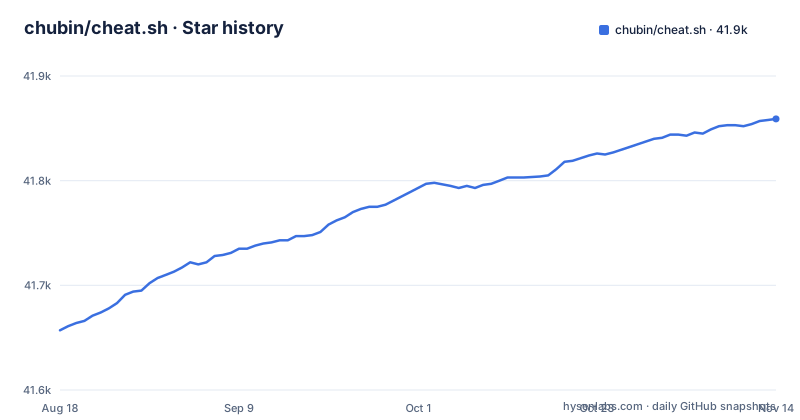
Star history
- chubin/cheat.sh41,859 ★ · +202
| Repository | 2026-08-18 | 2026-11-14 |
|---|---|---|
| chubin/cheat.sh | 41.7k | 41.9k |
202 Stars in the last 88 days, measured from the daily GitHub snapshot. Compare with other projects
Editorial analysis
A single HTTP endpoint for community cheat sheets
cheat.sh solves a simple but real problem: finding a concise answer for a command or a programming language question without leaving the terminal. Instead of opening a browser, searching a forum, and scrolling through ads, you run one curl command. The project aggregates existing community cheat sheet repositories and, when no direct cheat sheet exists, generates an answer from StackOverflow. The target user is a developer or sysadmin who wants a quick reminder, not a full tutorial. The README claims coverage of 56 programming languages, several DBMSes, and more than 1000 UNIX/Linux commands. It also claims responses within 100 ms.
How requests are routed: namespaces, search, and generated answers
The service uses URL paths as queries. A plain command name like /tar returns a cheat sheet from a repository. A language namespace like /go/Pointers returns a cheat sheet specific to that language. If no exact cheat sheet exists, the service generates one on the fly. The README explains that generated answers are based on available cheat sheets and StackOverflow. It explicitly warns that there is no guarantee the returned answer is a 100% hit. You can request alternative answers by appending /1, /2, and so on. The service also supports a search notation: ~snapshot finds cheat sheets related to snapshots. The special page :list shows available topics for a language, and :learn maps to the Learn X in Y project for language basics. This routing is simple and predictable, which is a strength.
Getting it running: curl, the cht.sh client, and installation
The simplest way to use cheat.sh is with curl. The README gives examples like curl cheat.sh/tar and curl cht.sh/python/lambda. Both HTTPS and HTTP work, and both the long and short domain names resolve to the same service. For a richer experience, there is a command line client called cht.sh. The README describes installation and tab completion for Bash and ZSH. It also mentions a stealth mode for invisible use. You can also self-host the service. The README mentions a Docker option under Self-Hosting. For editor integration, the README lists Vim, Emacs, Visual Studio Code, Sublime, IntelliJ IDEA, and QT Creator.
Formatting options and the limits of generated answers
Cheat sheets are returned as code, with comments formatted in the target language. You can strip comments with \?Q and disable syntax highlighting with \?T. These options combine, as in curl cht.sh/lua/table+keys\?QT. This is useful for pasting directly into a program. However, the on-the-fly generation is the weakest point. The README admits that generated answers may not be a 100% hit. The quality depends on the underlying StackOverflow questions and community cheat sheets. If you ask a niche question, you might get an irrelevant or outdated answer. The service also ignores special characters in queries, and it instructs users to separate words with +. For complex or nuanced topics, this is a real limitation.
A real alternative: tldr and man pages
cheat.sh does not maintain a knowledge base of its own. It provides unified access to community driven cheat sheet repositories and, when no cheat sheet exists for a programming language query, generates an answer from available cheat sheets and StackOverflow answers.
Maintenance, licensing, and self-hosting considerations
cheat.sh is licensed under the MIT license, which allows reuse and modification with minimal restrictions. The repository is not archived; the last push was 2026-09-22 and it has no GitHub releases. The README describes how to contribute cheat sheets and add new repositories. For self-hosting, the Docker option suggests you can run your own instance, but you would need to maintain it yourself. The dependency on external sources like StackOverflow means the service's behavior can change if those sources change. If you rely on cheat.sh for daily work, you should consider whether the public endpoint will remain stable or whether you need to host your own copy.
Editorial conclusion
Adopt cheat.sh if you want instant, terminal-friendly access to community cheat sheets and are comfortable with answers that may be incomplete or wrong. Do not rely on it for authoritative documentation, especially for generated answers. Before depending on it, verify that the specific cheat sheets you need exist, and check the self-hosting options if you require offline or private access. The service is MIT-licensed, so you can run your own instance, but maintenance is your responsibility.
Frequently asked questions
What is cheat sh?
cheat.sh is an HTTP service that returns cheat sheets as plain text over curl or a browser, covering 56 programming languages, several DBMSes and more than 1000 UNIX and Linux commands. It is described as returning answers within 100 ms as a rule, and it can also be self-hosted with Docker.
How to use cheat sh?
Put the command name in the URL path, such as `curl cht.sh/tar` or `curl cheat.sh/rsync`, and use `~` plus a keyword when you do not know the name, for example `curl cht.sh/~snapshot`. Language questions go in a per-language namespace such as `curl cht.sh/python/lambda`, and `curl cht.sh/go/:list` enumerates what is available for a language.
how to install cheat sh
No installation is needed to use the service, since it is reached over HTTP or HTTPS. There is also a separate command line client named `cht.sh` (the service can be installed for offline use too) with Bash and ZSH tab completion, a stealth mode and a Windows variant, and the installation command is given in the Installation section of the project README. Self-hosting is a Docker build that runs `python3 lib/fetch.py fetch-all` and serves on port 8002.
Official sources
Add this badge to your README
If you maintain this project, the badge below links readers to this analysis and shows its maintenance status from the daily GitHub snapshot. Paste the markdown into your README; add ?metric=license or ?metric=stars to the image URL for a different field.

[](https://hysenlabs.com/projects/chubin-cheat-sh)Star history chart for your README
[](https://hysenlabs.com/projects/chubin-cheat-sh)Was this useful?