Learn-Web-Hacking: A Sphinx-Built Web Security Notebook, Not a Course
Study notes for web hacking / web security.
At a glance
- What is it?
- LyleMi/Learn-Web-Hacking is a Chinese-language study notebook covering web protocols, common vulnerabilities, intranet penetration and defence, published as a Sphinx site under CC0-1.0. It is a reference to read and fork, not a guided training platform.
- Who is it for?
- Adopt it if you already know basic networking and want a single Chinese-language outline that runs from HTTP and TLS through SQL injection, Kerberos and honeypots, and you are willing to read it as notes rather than a course. Do not adopt it if you need exercises, a lab environment, English-first prose or graded feedback; the README offers none of those.
- Can I use it commercially?
- Yes. CC0-1.0 is a permissive licence: you can use, modify and sell software built on it, as long as you keep its copyright and licence notices.
- Is it still maintained?
- Yes. The repository last received commits 95 days ago.
- What is it written in?
- Mainly Python, according to GitHub's language statistics.
Answers come from the project's GitHub data, last synced on November 24, 2026, and from our analysis. They are not legal advice.
Star history
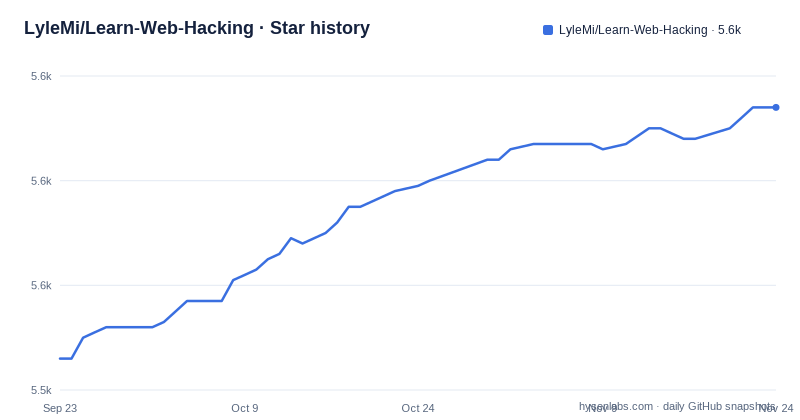
- LyleMi/Learn-Web-Hacking5,594 ★ · +48
| Repository | 2026-09-23 | 2026-11-24 |
|---|---|---|
| LyleMi/Learn-Web-Hacking | 5.5k | 5.6k |
48 Stars in the last 62 days, measured from the daily GitHub snapshot. Compare with other projects
Editorial analysis
What Learn-Web-Hacking actually is, and who the notes are written for
The README opens with the author's own account of the problem: web security knowledge is vast, and much of it is scattered, so without a clear thread to follow the learning process carries unnecessary weight. The notebook is the response to that. It is a set of study notes, organised into chapters and published as a Sphinx documentation site, with the online version hosted at websec.readthedocs.io. The stated audience is people starting out in network security, described in the preface as readers who want a thread through the material.
That framing matters for adoption. This is not a lab, not a course with assessments, and not a tool. There is nothing to install and run in order to learn from it, beyond the documentation build itself. The value is in the outline: twelve top-level parts that move from the evolution of web technology and network attack and defence, through computer networking and protocols, information gathering, common vulnerabilities, language and framework specifics, intranet penetration, cloud security, defence technology, authentication mechanisms, tools and resources, a quick-reference manual, and a final miscellaneous section covering code audit, WAF, fingerprints, Unicode, JSON, denial of service, mail security, APT and supply chain security.
A reader who wants a syllabus to work through will find one here. A reader who wants to be told what to do next, in order, with checkpoints, will not. The preface says the notes can be entered at any point and studied in a spiral, and can be used either as a whole or as a handbook. That is an honest description of what the repository contains.
How the notes are organised and how the Sphinx build turns them into a site
The repository is a documentation project, not an application. The top level holds README.md and README.en.md, a LICENSE, a Makefile, make.bat, requirements.txt, a locale directory and a source directory. The Makefile is a minimal Sphinx makefile with SOURCEDIR set to source and BUILDDIR set to build, and it defines targets for gettext extraction, a Chinese HTML build, an English HTML build, a combined build, and an English internationalisation update.
The data flow is the standard Sphinx one. Source files live under source; the build reads them and writes HTML into build. The language is selected at build time rather than at runtime: the html-zh target passes -D language=zh_CN and writes to build/html/zh_CN, while html-en passes -D language=en and writes to build/html/en. Translations are handled through gettext and sphinx-intl, with the locale directory holding the message catalogues and the i18n-en target running sphinx-intl update against the extracted gettext output for English. The requirements file lists sphinx, sphinx-rtd-theme and sphinx-intl, which is consistent with that arrangement.
The consequence for a reader is that the published site and the repository can diverge in language coverage. The Chinese build is the primary one; the English build exists as a target, but the presence of an i18n pipeline does not by itself mean every chapter has been translated. Anyone who needs the English version should check the built output rather than assume parity.
Installing the toolchain and building the notes locally
The README gives a short local build recipe. It clones the repository, installs the two packages named in the command, and runs make html. Note that the README's install line names sphinx and sphinx-rtd-theme, while requirements.txt also lists sphinx-intl; the extra package is only needed if you intend to work with the translation targets.
The README's commands are:
git clone https://github.com/LyleMi/Learn-Web-Hacking.git
cd Learn-Web-Hacking
pip install sphinx sphinx-rtd-theme
make html
After make html finishes, the generated site is written under the build directory, following the SOURCEDIR and BUILDDIR values in the Makefile. On Windows the repository ships make.bat alongside the Makefile, so the same build can be driven without a Unix make.
If you want the language-specific outputs rather than the default target, the Makefile exposes them directly. These targets also come from the repository's Makefile.
make html-zh
make html-en
make html-all
The first writes the Chinese HTML build, the second the English one, and the third runs both. For translation work, the Makefile defines a gettext target and an i18n-en target that chains gettext with sphinx-intl update -p build/gettext -l en. A first real use of the repository, then, is not running the notes but building them: clone, build, open the generated HTML, and read the chapter you came for.
Coverage is broad, and that breadth is also the main limitation
The outline is unusually wide for a single notebook. Under common vulnerabilities it lists SQL injection, XSS, CSRF, SSRF, command injection, directory traversal, file reading, file upload, file inclusion, XXE, template injection, XPath injection, logic and business flaws, configuration security, middleware, web cache deception and HTTP request smuggling. Under authentication it covers multi-factor authentication, SSO, JWT, OAuth, SAML, SCRAM, Windows authentication, Kerberos and NTLM. The tools and resources part is subdivided into seventeen categories, from information gathering and social engineering through fuzzing, exploitation, web persistence, lateral movement, cloud security, auditing, defence, operations and forensics.
The author is direct about the cost of that scope. The preface states that the notes were compiled from open source information, that errors or incomplete parts are inevitable given limited time and shallow learning, and that these are being corrected and supplemented gradually. That is the honest failure mode to plan around: a chapter may exist as a heading and a few paragraphs rather than a finished treatment. Nothing in the repository enforces completeness, and there is no release history to consult, since the repository has no published releases.
The second limitation is that this is a notebook, not a practice environment. There are no vulnerable applications to deploy, no exercises, and no verification that a reader has understood a technique. Someone who learns by doing will find the outline useful as a map and frustrating as a teacher. The third is language: the material is written in Chinese, and the English side is a build target with an internationalisation pipeline rather than a guarantee.
Finally, the README's own note states that the content is collected from open source information and that the techniques mentioned are intended for study and authorised testing only, that some content was omitted for public safety reasons, and that readers should comply with laws including the Cybersecurity Law of the People's Republic of China and the Regulations on Computer Software Protection, and not test unauthorised targets. That is a constraint on use, not a feature.
How it differs from PortSwigger Web Security Academy and OWASP material
The closest comparison is PortSwigger's Web Security Academy, which pairs explanations of vulnerability classes with hosted labs that the reader attacks in a browser. The difference in approach is structural: the Academy is a training platform where each topic ends in an exercise, and progress is measured by solving labs. Learn-Web-Hacking is a document. Its chapters explain and link out, and it assumes the reader will find or build their own targets. If your goal is to practise exploiting a vulnerability class under supervision, the Academy model fits better. If your goal is a Chinese-language reference that also covers intranet penetration, Kerberos and NTLM, cloud containers and defensive topics such as threat intelligence, ATT&CK, RASP and honeypots, the notebook covers ground the Academy does not attempt.
OWASP material sits differently again. The OWASP Top Ten and the Web Security Testing Guide are consensus artefacts maintained by a community, with a defined scope and review process. Learn-Web-Hacking is one author's notes, with contributions accepted through issues and pull requests and a contributor graph in the repository. That means faster coverage of whatever the author is currently studying, and less assurance that any given chapter has been reviewed by anyone else. Neither model is wrong; they answer different questions. A team writing an internal curriculum might use OWASP for the checklist and this notebook for the explanatory thread, but should not treat the notebook as an authority on its own.
Maintenance, licence and what CC0-1.0 means for reuse
The repository is not archived, and the last push was on 2026-08-21, which is recent enough that the project is being touched. The repository has no published GitHub releases, so versioning is by commit rather than by tagged version. Upgrading means pulling the branch and rebuilding; there is no package to update and no migration path to follow. The build dependencies are three Sphinx packages listed in requirements.txt, and the practical upgrade cost is whatever it takes to keep Sphinx and the Read the Docs theme working with the source files.
The licence is CC0-1.0, which the README links in full. CC0 is a public domain dedication rather than a permissive software licence, and it is unusual for a documentation project of this kind: it places the text as close to unrestricted as the author can manage, without the attribution requirement that CC BY would impose. For a team that wants to translate a chapter, fold sections into internal onboarding material, or republish with modifications, the licence terms are not the obstacle. This is not legal advice, and anyone embedding the content in a commercial product should read the LICENSE file and take their own view.
One practical point follows from the licence and the build setup together: because the source is plain Sphinx content under source/ and the translations live under locale/, forking the repository to maintain an internal variant is straightforward. You inherit the Makefile targets and the i18n pipeline rather than rebuilding them.
Editorial conclusion
Adopt it if you already know basic networking and want a single Chinese-language outline that runs from HTTP and TLS through SQL injection, Kerberos and honeypots, and you are willing to read it as notes rather than a course. Do not adopt it if you need exercises, a lab environment, English-first prose or graded feedback; the README offers none of those. Before relying on it, clone the repository, run make html, and check whether the chapter you need is written in full or only outlined, because the author states that errors and incomplete sections remain and are being corrected gradually.
Frequently asked questions
Can I learn hacking on my own using Learn-Web-Hacking?
The notebook is written for exactly that situation: the preface describes it as a thread through scattered material for readers starting out in network security, and says it can be entered at any point and studied in a spiral. What it does not provide is exercises or a practice environment, so self-directed study still requires you to find or build your own targets.
Is it illegal to learn hacking with material like Learn-Web-Hacking?
The README's note states that the techniques mentioned are intended for study and authorised testing only, that some content was omitted for public safety reasons, and that readers should comply with laws including the Cybersecurity Law of the People's Republic of China and the Regulations on Computer Software Protection, and not test unauthorised targets.
What are the 7 types of hacking covered in Learn-Web-Hacking?
The notebook does not use a seven-category scheme. Its common vulnerabilities chapter lists SQL injection, XSS, CSRF, SSRF, command injection, directory traversal, file reading, file upload, file inclusion, XXE, template injection, XPath injection, logic and business flaws, configuration security, middleware, web cache deception and HTTP request smuggling.
Official sources
Add this badge to your README
If you maintain this project, the badge below links readers to this analysis and shows its maintenance status from the daily GitHub snapshot. Paste the markdown into your README; add ?metric=license or ?metric=stars to the image URL for a different field.

[](https://hysenlabs.com/projects/lylemi-learn-web-hacking)Star history chart for your README
[](https://hysenlabs.com/projects/lylemi-learn-web-hacking)Was this useful?