CircuitVerse is a Rails app with a JavaScript circuit simulator bolted on
CircuitVerse Primary Code Base
At a glance
- What is it?
- CircuitVerse is the MIT licensed codebase behind a free online platform for building digital logic circuits, and it is a large hybrid: a Ruby on Rails server, a separate JavaScript simulator bundled with esbuild, a Vue frontend, Postgres, Redis and Sidekiq. The README is thin, so most of the setup detail lives in SETUP.md, the wiki and a Codespaces-based video guide.
- Who is it for?
- CircuitVerse fits contributors who want to work on a real digital logic simulator with a live web platform attached to it, and students who want to learn by reading how an interactive circuit editor is built, since the simulator source, the Rails models and the Vue frontend are all in one repository.
- Can I use it commercially?
- Yes. MIT is a permissive licence: you can use, modify and sell software built on it, as long as you keep its copyright and licence notices.
- Is it still maintained?
- Yes. The repository last received commits 2 days ago.
- What is it written in?
- Mainly JavaScript, according to GitHub's language statistics.
Answers come from the project's GitHub data, last synced on November 7, 2026, and from our analysis. They are not legal advice.
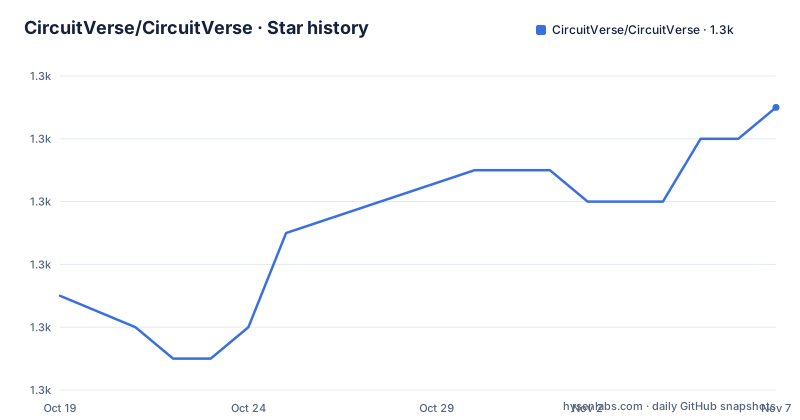
Star history
- CircuitVerse/CircuitVerse1,289 ★ · +6
| Repository | 2026-10-19 | 2026-11-07 |
|---|---|---|
| CircuitVerse/CircuitVerse | 1.3k | 1.3k |
6 Stars in the last 19 days, measured from the daily GitHub snapshot. Compare with other projects
Editorial analysis
The simulator is a separate JavaScript bundle inside a Rails app
CircuitVerse is described as a free, open-source platform which allows users to construct digital logic circuits online, with an accompanying Interactive Book that teaches the fundamentals of modern digital circuits. The repository is the primary code base, and the interesting thing about it is the shape of the hybrid.
The server is Ruby on Rails. The repository has a Gemfile, a Gemfile.lock, a Rakefile, config.ru, a config/ directory, db/, app/ and bin/, plus a .rspec file and a .rubocop.yml with a .rubocop_todo.yml, which is a standard Rails application skeleton. The Procfile and Procfile.dev files, and a Procfile.chrome.dev, point at the classic Heroku style process declaration.
The circuit simulator is a separate JavaScript program that happens to live in the same tree. The package.json lint script targets ./simulator, the documentation build runs jsdoc over simulator/src/*, and the library build is an esbuild step.
"build": "yarn build:js && yarn build:css",
"build:js": "node esbuild.config.js",
"lint": "eslint ./simulator",
"build:docs": "jsdoc simulator/src/* -c conf.json -t ./node_modules/better-docs"
So the simulator is not a script tag served from a CDN. It is a source tree compiled with esbuild into the Rails asset pipeline, and it is documented with JSDoc through a config file called conf.json. The documentation of the simulator is therefore generated from the same source that runs, which is a good sign for anyone reading the code.
There is a third front end as well. The build-vue-simulator script builds a Vue application in a directory called cv-frontend-vue with a Vite base of /simulator-v0/, which suggests a newer simulator front end being developed alongside the original one. The jest.config.js and jest.setup.js at the root are the JavaScript test configuration, while the .rspec file is the Ruby one, so the test suites are separate as well.
docker-compose brings up Postgres, Redis, Sidekiq and a solargraph socket
The docker-compose file at the root is the clearest single view of what the application needs in order to run, and it names four services beyond the web container.
The db service runs postgres:14 with a development database named circuitverse_development and PGDATA pointed at /var/lib/postgresql/data/pgdata, with the data on a named volume. The redis service runs redis:7.0-alpine. The sidekiq service runs bundle exec sidekiq -q default -q mailers behind a bin/docker/wait_for_setup script, and it depends on the database, Redis and mailcatcher, so background jobs and outgoing mail are part of the expected topology.
The web service runs with the sleep infinity command so you can exec into it, and it maps four ports.
    ports:
      - "3000:3000"
      - "3001:3001"
      - "3036:3036"
      - "3037:3037"
The environment block is instructive about which integrations are optional. REDIS_URL points at the redis service, CIRCUITVERSE_USE_SOLR is set to false, which turns off the Solr search backend, and DOCKER_ENVIRONMENT and DEV_CONTAINER are both set to true. The presence of a dedicated solargraph service running bundle exec solargraph socket on port 3002 is a development nicety rather than a runtime requirement.
A YAML anchor handles the shared configuration, since every service except db and redis uses the same build arguments and the same volume mounts, including the ruby_bundle volume that keeps the gem installation out of the host filesystem. The build arguments pass through the current user id and group id, plus the operating system and non-root user names, so the container runs as the same non-root user as your shell and files you edit in the repository are owned by you rather than by root.
The Dockerfile runs as a non-root user and installs a lot of system packages
The image is based on ruby:4.0.2, and the first thing it does is insist on build arguments. Each of the five arguments is checked with a test, so a build with a missing value fails immediately rather than producing a broken image.
ARG NON_ROOT_USER_ID
ARG NON_ROOT_GROUP_ID
ARG NON_ROOT_USERNAME
ARG NON_ROOT_GROUPNAME
ARG OPERATING_SYSTEM

RUN test -n "$NON_ROOT_USER_ID"
RUN test -n "$NON_ROOT_GROUP_ID"
RUN test -n "$OPERATING_SYSTEM"
RUN test -n "$NON_ROOT_USERNAME"
RUN test -n "$NON_ROOT_GROUPNAME"
The user creation is conditional on the operating system argument, and it is only created when the host uid and gid are not both zero, so a container run as root on the host still works while a developer with a normal account gets matching ownership inside the container.
The apt-get line is long and tells you what the application actually does. Besides the usual build tooling it installs libcairo2-dev, libpango1.0-dev, libjpeg-dev, libgif-dev, librsvg2-dev, imagemagick, shared-mime-info, libvips, libnotify-dev, git, chromium-driver and chromium. Those are the image and rendering libraries the application needs for circuit diagrams and exports, and Chromium with its driver is there for the browser-driven tests. Notably, yosys is installed, which is a synthesiser for hardware description languages, so there is a path from a drawn circuit to a netlist.
Node.js is then installed from the NodeSource repository at version 22.x, and yarn is installed globally, because the front end build needs it. There is a second image, Dockerfile.production, and a .dockerignore and a .devcontainer directory at the root, plus a Brewfile for macOS contributors and a .tool-versions file for version managers.
Authentication means five OAuth providers and a set of keys
The .env.example file is a good map of the external surface. It lists a client id and a client secret for Facebook, Google, GitHub and GitLab, a Slack issue hook URL, a Bugsnag API key, a reCAPTCHA site key and secret, and a set of SSO variables for an identity provider.
FACEBOOK_CLIENT_ID=<facebook-client-id>
FACEBOOK_CLIENT_SECRET=<facebook-client-secret>
GOOGLE_CLIENT_ID=<google-client-id>
GOOGLE_CLIENT_SECRET=<google-client-secret>
GITHUB_CLIENT_ID=<github-client-id>
GITHUB_CLIENT_SECRET=<github-client-secret>
GITLAB_CLIENT_ID=<gitlab-client-id>
GITLAB_CLIENT_SECRET=<gitlab-client-secret>
The SSO block is worth reading as a group. IDP_SSO_URL, IDP_FINGERPRINT, which is described as an SSO IdP fingerprint certificate, and CALLBACK_ADDRESS suggest a generic OpenID Connect style integration with a self-hosted identity provider, configured for a deployment rather than a local development machine.
The rest of the file covers the services a hosted instance needs: AWS S3 credentials for file storage, an ENABLE_OTEL switch, a New Relic licence key, a Sentry DSN, and an SMTP address with SMTP port for mail delivery, which pairs with the mailcatcher service in the compose file. The mailer is real, since Sidekiq has a dedicated mailers queue.
A contributor who wants to run the application locally does not need all of these, but the file is worth reading in full because it tells you which features are gated behind external accounts. A run without the OAuth secrets will have social login disabled, and one without SMTP will have no outgoing mail, which affects the invite and notification paths rather than the editor itself.
Lint, types and review are automated on several fronts
The repository configures a lot of tooling, and the list is a decent proxy for what the maintainers care about.
For JavaScript, there is an .eslintrc.json with an .eslintignore, a .babelrc, husky with a prepare script that installs the hooks, and commitlint with a commitlint.config.js, so commit messages are checked. The JavaScript tests run under jest. For Ruby, there is a .rspec, a .rubocop.yml with a .rubocop_todo.yml, a .erb-lint.yml for the view templates, a Steepfile for gradual type checking, a .solargraph.yml for the language server, and an .editorconfig. There is also a .hound.yml, which is a code review bot, and a .reviewdog.yml, a .qlty.yml for code quality analysis, and a .database_consistency.yml for checking that the schema and the models agree.
The CircleCI badge in the README and a coveralls coverage badge tell you that continuous integration runs on CircleCI with coverage reported to Coveralls. The .github/ directory holds the workflows, and a CODEOWNERS file assigns review responsibility by path, which is how a project with this many contributors keeps review load distributed.
Observability is instrumented in the application rather than bolted on. The .otel/ directory at the root and the ENABLE_OTEL switch in the environment file indicate OpenTelemetry support in the codebase, alongside the Sentry and New Relic integrations. There is a SECURITY.md, a CODEOWNERS file and a .github/ directory with templates.
The .devcontainer/ directory, the .vscode/ directory and the "Getting Started with CircuitVerse" video guide are the newest additions, and the video guide is described as covering an introduction to CircuitVerse and its technical structure, step-by-step setup using GitHub Codespaces, a high level walkthrough of the codebase directory structure and key files, and contribution guidelines. That last item is the tell: a project this size is onboarding contributors through Codespaces rather than through a local toolchain, which is a reasonable answer to the image's dependency list.
What the README does not tell you
The README is short, and it says so by delegation. Setup is in SETUP.md, contributing is in CONTRIBUTING.md, the code of conduct is in code-of-conduct.md, and there is a separate DEBUGGER-SETUP.md and LSP-SETUP.md, both of which tell you how to attach a debugger or a language server to the running application.
The documentation for users lives elsewhere entirely. The README links to docs.circuitverse.org and to the GitHub wiki, and to the Interactive Book at learn.circuitverse.org, which is where the teaching material on modern digital circuits is published. There is an apidoc/ directory in the repository, which is the generated API documentation, and a crowdin.yml file, so the user-facing interface is translated through Crowdin by contributors who do not speak every language.
The gap that matters for an evaluator is that the README does not describe the application architecture, the data model, or the shape of the simulator API. The package.json is version 1.0.0, which is a placeholder rather than a meaningful version, and the repository has no GitHub releases at all, so there is no tagged artefact to pin. The last push to master was on 2026-10-17, so the code is being worked on, but the versioning information a consumer would rely on does not exist.
If you are evaluating this as a platform to run rather than a codebase to contribute to, that is the material problem. The MIT licence and the code of conduct make contribution straightforward, and the docker-compose file makes a local run plausible, but the operational documentation is thin, and the configuration surface implied by the.env.example, the Solr toggle, the SSO variables and the file storage keys is larger than anything the README prepares you for.
How it differs from a desktop simulator
The comparison that matters is with the offline tools engineers and students use for digital logic, the kind that draw a schematic and simulate it on the same machine with no account and no server. CircuitVerse takes the opposite approach. The circuit is a document on a server, the simulation runs in the browser, and the value comes from what a hosted platform adds: sharing, version history, an interactive book, and the ability to open a circuit someone else published.
The difference in approach shows up in the technology choices. An offline simulator can be a native application or a local web app with no database. This one is a Rails application with Postgres, Redis, Sidekiq and mail delivery, because the documents need to be stored, the jobs need to be queued, and the notifications need to be sent. The cost of that choice is the setup burden, which the docker-compose file and the Codespaces video guide exist to absorb.
The second difference is the simulator's fate. In this architecture the simulator is compiled by esbuild from simulator/src into the application's assets, and its API is documented with JSDoc into a site served by the project. It is not published to npm as a reusable circuit simulation package with a version and a compatibility promise. A team that wants a circuit simulation engine inside their own web application is looking at something this repository does not offer.
The third difference is the synthesis path. The Dockerfile installs yosys, which is a synthesiser, so the platform can take a drawn circuit toward hardware rather than stopping at behavioural simulation. That is a capability the offline educational tools usually leave out, and it is the reason the application needs Chromium and the rendering libraries it installs.
Editorial conclusion
CircuitVerse fits contributors who want to work on a real digital logic simulator with a live web platform attached to it, and students who want to learn by reading how an interactive circuit editor is built, since the simulator source, the Rails models and the Vue frontend are all in one repository. It does not fit a team that wants a headless circuit simulation library to embed in a product, because the simulator is bundled as part of the web application rather than published as a standalone package, and it does not fit anyone who needs a fully documented install, since the README delegates setup to SETUP.md. Before contributing, read SETUP.md and the video guide, confirm you can run Postgres and Redis locally or use the docker-compose file, and check the .env.example because the app expects OAuth client credentials for Facebook, Google, GitHub, GitLab and an SSO provider, plus Sentry, New Relic, Bugsnag and reCAPTCHA keys.
Frequently asked questions
How do I set up CircuitVerse for local development?
The README points to SETUP.md for setup and CONTRIBUTING.md for contributing, and it also links a video guide that walks through setup using GitHub Codespaces, the directory structure and key files. A docker-compose file at the root brings up Postgres, Redis, Sidekiq, mailcatcher and a solargraph socket, with the web service mapping ports 3000, 3001, 3036 and 3037.
What is the CircuitVerse simulator built with?
The simulator is a separate JavaScript source tree inside the Rails application, under simulator/src. It is bundled with esbuild through node esbuild.config.js, linted with eslint, and documented with jsdoc using a conf.json configuration, while the front end of the application uses a separate Vue project built with Vite.
Which services does a CircuitVerse development environment need?
The docker-compose file defines postgres:14 for the database, redis:7.0-alpine, a sidekiq service running the default and mailers queues, a mailcatcher for outgoing mail, and a solargraph service for language server support. The web service sets CIRCUITVERSE_USE_SOLR to false, so the Solr search backend is not required for local development.
What license does CircuitVerse use and how do I contribute?
The project is licensed under the MIT License with a LICENSE file at the root, and the README points to CONTRIBUTING.md, the community code of conduct, a Slack workspace and the GitHub wiki. Contribution guidance is also covered in the Getting Started video guide.
Does CircuitVerse let you simulate a circuit down to hardware?
The Dockerfile installs yosys, a hardware synthesis tool, alongside Chromium and rendering libraries such as cairo, pango, imagemagick and vips. The project is presented as a platform for constructing digital logic circuits online, with the Interactive Book at learn.circuitverse.org teaching the fundamentals of modern digital circuits.
Official sources
Add this badge to your README
If you maintain this project, the badge below links readers to this analysis and shows its maintenance status from the daily GitHub snapshot. Paste the markdown into your README; add ?metric=license or ?metric=stars to the image URL for a different field.

[](https://hysenlabs.com/projects/circuitverse-circuitverse)Star history chart for your README
[](https://hysenlabs.com/projects/circuitverse-circuitverse)Was this useful?