Untitled Goose Tool exports cloud artifacts during an incident
Untitled Goose Tool is a robust and flexible hunt and incident response tool that adds novel authentication and data gathering methods in order to run a full investigation against a customer’s Azure Active Directory (AzureAD), Azure, and M365 environments.
At a glance
- What is it?
- Untitled Goose Tool is a CISA tool for running an investigation against a customer's Entra ID, Azure and M365 environments, and it was built for the case where nobody was ingesting logs into a SIEM in the first place. The design is defined by its permission model, which is read only, and by the fact that it also pulls telemetry out of Defender for Endpoint and Defender for IoT.
- Who is it for?
- Untitled Goose Tool fits an incident response team that has been called into a tenant where the logging was never collected, because the tool exists to answer questions after the fact rather than to prevent anything, and it fits a team that wants a repeatable collection procedure instead of a shell history.
- Can I use it commercially?
- Yes. CC0-1.0 is a permissive licence: you can use, modify and sell software built on it, as long as you keep its copyright and licence notices.
- Is it still maintained?
- Yes. The repository last received commits 25 days ago.
- What is it written in?
- Mainly Python, according to GitHub's language statistics.
Answers come from the project's GitHub data, last synced on November 7, 2026, and from our analysis. They are not legal advice.
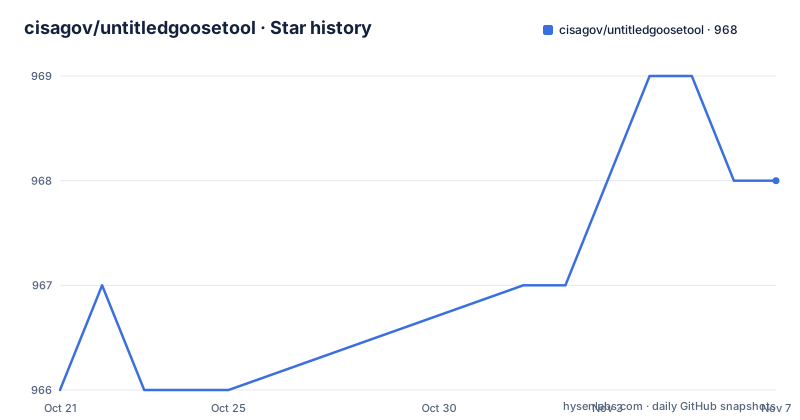
Star history
- cisagov/untitledgoosetool968 ★ · +2
| Repository | 2026-10-21 | 2026-11-07 |
|---|---|---|
| cisagov/untitledgoosetool | 966 | 968 |
2 Stars in the last 17 days, measured from the daily GitHub snapshot. Compare with other projects
Editorial analysis
A tool for the tenant nobody was logging
Untitled Goose Tool is described as a hunt and incident response tool that adds novel authentication and data gathering methods in order to run a full investigation against a customer's Entra ID, Azure and M365 environments, and it gathers additional telemetry from Defender for Endpoint and Defender for Internet of Things. The second sentence is the important one. It was designed to assist incident response teams by exporting cloud artifacts after an incident for environments that are not ingesting logs into a Security Information and Events Management system or another long term solution for logs. That is a narrower and more honest framing than a security platform, because the tool is aimed at the case where the answer to a question requires pulling data that nobody collected at the time. The project publishes a fact sheet of its own through CISA, which is the kind of document that tells you how a government tool is intended to be used and by whom.
The permission model is read only by design
The requirements section is the most useful part of the README, because it specifies exactly what access the tool needs. The guiding statement is that the following Entra ID and M365 permissions are required, and that they provide it read-only access to the tenant. The account should be cloud-only and not synchronised to the on-premise environment, so that the login stays the same across environments. The Exchange Online role assignments are View-Only Audit Logs, View-Only Configuration, View-Only Recipients and User Options. The service principal needs a long list of application permissions, and the shape of that list tells you what the tool reads: Log Analytics API Data.Read, a set of WindowsDefenderATP permissions covering advanced hunting, alerts, machines, software and vulnerabilities, and a broad set of Microsoft Graph permissions covering audit logs, consent requests, the directory, domains, identity providers, risky users and service principals, mailbox settings, policy, reports, role management, security actions, security alerts, security events and user authentication methods, plus Exchange.ManageAsApp for Office 365 Exchange Online. On the Azure side the roles are Reader, Storage Blob Data Reader and Storage Queue Data Reader, and public client flows have to be enabled for the service principal.
The service principal is scripted, and reversible
Setting up that principal by hand in the portal would be tedious, so the repository ships a PowerShell script, Create_SP.ps1, that creates a service principal with the needed permissions. The README notes the association of the Azure service principal with M365 can currently only be done through PowerShell, and that it is needed for some of the M365 log collection. The script is run with an application name and a create or delete flag, and the output includes the goosey conf command you need to run to build the configuration files with the right values:
PS > Write-Host "Creating a new Goose Application and Users"
PS > ./Create_SP.ps1 -AppName GooseApp -Create
and the same script deletes the application when the investigation is over, which matters more than it sounds. A service principal with directory-wide read permissions is a valuable target for an attacker, and a tool that is used against a customer tenant and then left behind is a liability the incident response team has to clean up. The delete mode is the difference between a tool you can deploy and a tool you can deploy and remove.
Configuration on disk, or prompts at the console
Configuration is built with a single command, goosey conf, which can take the tenant, the subscription and the application id as parameters or be run with no arguments and then filled in by hand. After it runs you have .auth, .conf, .auth_d4iot and .d4iot_conf files in the current directory, and the .auth file holds the account details in an INI style section with a username, a password, the application id and the client secret value rather than the secret id. The README offers a choice here that is worth taking seriously, because if you are not comfortable entering credentials into a file you can delete the .auth and .auth_d4iot files and the tool will prompt you for the credentials on the console instead. That is a small design decision with a real security consequence, since a file on disk with a service principal secret is exactly the artefact you do not want left on a jump box after an engagement.
Install paths, including a container
Installing from source is a clone and a pip install:
git clone https://github.com/cisagov/untitledgoosetool.git
cd untitledgoosetool
python3 -m pip install .
Python 3.9 or newer is required, with 3.12 recommended because it results in better logging, and on Windows the Microsoft Visual C++ redistributable package 14.x has to be installed first. Running it inside a virtual environment is recommended, and the README gives the commands for macOS, Linux and Windows. A Docker image is also supported, built from the Dockerfile in the repository and run with the work directory mounted:
docker build . -t goosey
docker run -it -v $PWD:/workdir goosey goosey honk --debug
That last line is also a hint about the command structure, since the console script is goosey and honk is one of its subcommands with a debug flag.
The command surface and the suggested workflow
The table of contents lists the subcommands, which is the fastest summary of what the tool can collect. There is config for the configuration files, GUI for the graphical interface, auth for authentication, csv for CSV output, honk for the collection run itself, and messagetrace for message trace data. The README also documents a recommended default workflow and a separate recommended workflow for a unified audit log call with time bounds, which is the second one worth reading, because a collection without a time window can be enormous in a tenant with a long retention. The known issues section exists, which is a good sign for a tool that has been run against real tenants, and the considerations section is where the operational guidance lives.
The dependency list and the state of the project
The requirements are pinned and they are dominated by the Azure SDK, with aiohttp and requests for the HTTP layer, msal, msal-extensions, msrest, msrestazure, oauthlib and PyJWT for authentication, keyring for credential storage, the azure-mgmt packages for compute, monitor, network, resource, security, storage and web, and azure-storage-blob for storage. Around those are the practical libraries, lxml for XML, openpyxl for spreadsheets, PySocks for proxies, portalocker for file locking during collection, zstandard for compression, colored and termcolor for terminal output, fire for the command line, tqdm for progress, and docstring-parser for the help system. The project is published under CC0-1.0, which is an unusual and generous choice for a government tool, and the repository carries a cyclonedx_output.json and an spdx_output.json, which are software bill of materials generated for the release. The Dockerfile has a second stage that installs the test requirements and copies the tests directory, and the setup file refuses to install on Python below 3.9 or at 3.14 and above.
Editorial conclusion
Untitled Goose Tool fits an incident response team that has been called into a tenant where the logging was never collected, because the tool exists to answer questions after the fact rather than to prevent anything, and it fits a team that wants a repeatable collection procedure instead of a shell history. It does not fit a first line defender who needs prevention, and it does not fit an environment where a service principal cannot be created, because the collection path depends on Graph and Defender permissions being granted. Before you run it, read the permission list end to end and create the service principal with Create_SP.ps1, decide whether you want credentials in a file or prompted at the console, and note the release state, where the setup file still reads 2.0.4 while the last tagged release is v2.1.0 from 2025-02-19 and the last push was on 2026-10-13.
Frequently asked questions
What is Untitled Goose Tool?
It is a CISA incident response tool that hunts and collects data from a customer's Entra ID, Azure and M365 environments, gathering extra telemetry from Defender for Endpoint and Defender for IoT, and it was designed for tenants that were not ingesting logs into a SIEM in the first place.
What permissions does Untitled Goose Tool need?
Read-only access: View-Only Audit Logs, View-Only Configuration, View-Only Recipients and User Options in Exchange Online, a set of application permissions for Log Analytics, WindowsDefenderATP and Microsoft Graph, Exchange.ManageAsApp for Office 365, and the Reader, Storage Blob Data Reader and Storage Queue Data Reader roles on the Azure subscription.
How do I install and configure it?
Clone the repository and run python3 -m pip install ., or build the Docker image. Then run goosey conf to generate the .auth, .conf, .auth_d4iot and .d4iot_conf files, and delete the .auth file if you would rather be prompted for credentials on the console.
How is the service principal created?
With the Create_SP.ps1 script in the repository, run with an application name and a create flag, and with a delete flag to remove the application when the investigation is finished. Public client flows have to be enabled for the principal.
Is Untitled Goose Tool still updated?
The repository is not archived and the last push was on 2026-10-13, with the last tagged release v2.1.0 from 2025-02-19 while the setup file still reads 2.0.4. The licence is CC0-1.0 and the release includes generated software bill of materials in CycloneDX and SPDX form.
Official sources
Add this badge to your README
If you maintain this project, the badge below links readers to this analysis and shows its maintenance status from the daily GitHub snapshot. Paste the markdown into your README; add ?metric=license or ?metric=stars to the image URL for a different field.

[](https://hysenlabs.com/projects/cisagov-untitledgoosetool)Star history chart for your README
[](https://hysenlabs.com/projects/cisagov-untitledgoosetool)Was this useful?