Cloud Hypervisor: a Rust VMM that makes an explicit tradeoff about device emulation
A Virtual Machine Monitor for modern Cloud workloads. Features include CPU, memory and device hotplug, support for running Windows and Linux guests, device offload with vhost-user and a minimal compact footprint. Written in Rust with a strong focus on security.
At a glance
- What is it?
- A virtual machine monitor built on rust-vmm crates for KVM and Microsoft Hypervisor, aimed squarely at cloud workloads rather than at the long device zoo QEMU carries.
- Who is it for?
- Cloud Hypervisor is the right shape of tool if your guests are modern cloud images speaking virtio, and the wrong shape if you need a DOS machine with an emulated Sound Blaster. The repository is unusually honest about where it stops: x86-64 and AArch64 are the supported architectures with a tracking issue for the gaps between them, riscv64 is experimental, and there are no published releases for anything older than the three the project tracks.
- Can I use it commercially?
- Not without permission. GitHub finds no licence file in the repository, and without a licence all rights are reserved by default: you may read the code but not reuse it. Check the README, or ask the authors, before using it.
- Is it still maintained?
- Yes. The repository last received commits 5 days ago.
- What is it written in?
- Mainly Rust, according to GitHub's language statistics.
Answers come from the project's GitHub data, last synced on October 25, 2026, and from our analysis. They are not legal advice.
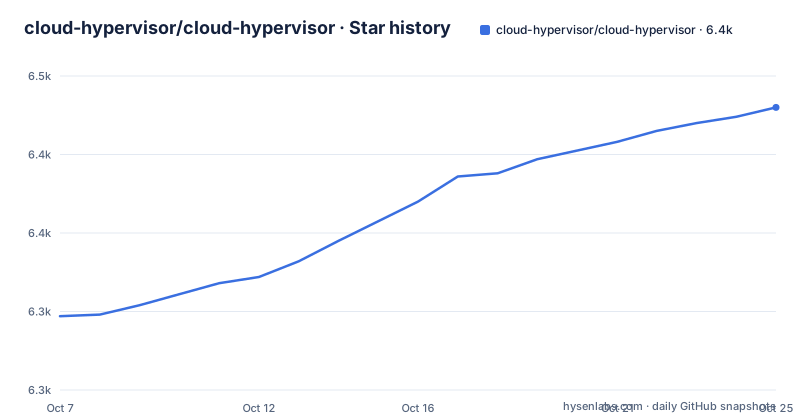
Star history
- cloud-hypervisor/cloud-hypervisor6,430 ★ · +133
| Repository | 2026-10-07 | 2026-10-25 |
|---|---|---|
| cloud-hypervisor/cloud-hypervisor | 6.3k | 6.4k |
133 Stars in the last 18 days, measured from the daily GitHub snapshot. Compare with other projects
Editorial analysis
Cloud workloads, defined narrowly and on purpose
The first thing the README does is define its scope, and the definition does most of the explanatory work. Cloud workloads means modern operating systems with most I/O handled by paravirtualised devices such as virtio, no requirement for legacy devices, and 64-bit CPUs. Everything else in the project follows from that sentence. If your guest is a cloud image, the narrowness costs you nothing. If your guest needs an emulated ISA that nobody has virtualised yet, it costs you everything.
The stated objectives list reads like a manifesto for removing code rather than adding it: minimal emulation, low latency, low memory footprint, low complexity, high performance, small attack surface, 64-bit support only, CPU, memory and PCI hotplug, and machine to machine migration. Small attack surface appears between high performance and 64-bit support, which reflects where the maintainers think the risk actually sits for a VMM.
Architecturally it is deliberately narrow in the same way. The primary targets are x86-64 and AArch64, with functionality differing between them in a tracked issue rather than being quietly papered over. riscv64 exists but is labelled experimental with limited functionality, and the README defers to a separate document for it. Supported guests are 64-bit Linux and Windows 10 or Windows Server 2019.
Two host hypervisors, and a kernel version you should care about
Cloud Hypervisor runs on KVM and on the Microsoft Hypervisor, which is the detail that distinguishes it from the Rust VMM projects that are KVM-only. The Microsoft Hypervisor path matters for anyone deploying on Hyper-V hosts, including Azure's own stack, and it is the reason the project describes itself as a VMM rather than a KVM front end.
On the host side, the README recommends kernel 5.13 for the KVM functionality and performance needed, and notes that most continuous integration currently runs on kernel 5.15. That is a real constraint rather than a formality: several of the newest features in the release notes lean on userfaultfd behaviour, and page fault handling is exactly the sort of thing that shifts between kernel versions.
For AArch64 there is a separate prerequisite, and it is not just the CPU. You need servers or development boards carrying the GICv3 interrupt controller. Projects that abstract over interrupt routing often hide this until runtime, so it is worth confirming the board before anything else.
Boot paths: direct kernel, firmware, and the cloud image workflow that actually works
Guests boot one of two ways. Direct kernel boot passes a kernel image to `--kernel`, and on x86-64 that kernel must be built with PVH support or be a bzImage. Firmware boot passes an image to `--firmware` instead and lets the guest's own bootloader run, which is what you want when you need to interact with GRUB or read firmware messages.
Two firmware options ship, and the README says which to reach for depends on the guest. Rust Hypervisor Firmware is a lightweight Rust-based PVH firmware, and edk2 UEFI is provided as a Cloud Hypervisor fork, named `CLOUDHV.fd` on x86-64 and `CLOUDHV_EFI.fd` on AArch64. The fork matters because it carries customizations needed to boot AArch64 guests here, and the README points at a separate document for how it differs from upstream tianocore/edk2.
The getting-started flow downloads an Ubuntu cloud image, converts it out of qcow2 because the VMM wants raw, and grabs the firmware:
$ wget https://cloud-images.ubuntu.com/focal/current/focal-server-cloudimg-amd64.img
$ qemu-img convert -p -f qcow2 -O raw focal-server-cloudimg-amd64.img focal-server-cloudimg-amd64.raw
$ wget https://github.com/cloud-hypervisor/rust-hypervisor-firmware/releases/download/0.4.2/hypervisor-fw
Because Ubuntu cloud images ship without a default password, a cloud-init disk is generated by a script in the repository and attached on the first boot only. It seeds the username and password `cloud/cloud123` and writes a network configuration from a test data directory, keyed to a MAC address you pass on the command line:
$ sudo setcap cap_net_admin+ep ./cloud-hypervisor
$ ./create-cloud-init.sh
$ ./cloud-hypervisor \
	--firmware ./hypervisor-fw \
	--disk path=focal-server-cloudimg-amd64.raw,image_type=raw \
		path=/tmp/ubuntu-cloudinit.img,image_type=raw \
	--cpus boot=4 \
	--memory size=1024M \
	--net "tap=,mac=,ip=,mask="
The setcap line is doing the work of granting tap device creation without running the whole binary as root, which is a nicer default than most quickstarts manage. Note that the same README block above it uses a different flag for the same networking idea, passing a MAC and a tap device name, so the exact form you use depends on whether you want the address configured or the interface discovered.
A workspace of twenty-three crates, edition 2024, minimum Rust 1.89.0
The repository tree is the clearest statement of scope. Alongside documentation and CI scaffolding sit crates for the architecture layer, block and network utilities, the device model, PCI, the VM allocator, VM device and VM migration layers, virtio devices, vhost-user block and network, a TPM component, a tracer, a rate limiter, an offload daemon, an API client, a fuzz directory, and the integration test infrastructure.
The release profile in the workspace manifest is tuned for footprint rather than for peak throughput, which is a deliberate choice consistent with the objectives:
[profile.release]
codegen-units = 1
lto = true
opt-level = "s"
strip = true
Whole-program link time optimization, a single codegen unit, optimization biased toward size, and symbol stripping. Any of those individually is unremarkable; together they describe a binary meant to be small and fast to boot.
The package metadata sets edition 2024 and a minimum Rust of 1.89.0, with a comment explaining the bump policy: the minimum is only raised when a dependency requires it, when a desirable feature has been stable for at least six months, or when a security issue is addressed by moving the toolchain. That policy is worth reading before you try to build this on a distribution's older toolchain.
Recent releases point at snapshot offload and encrypted migration
The three tracked releases show where the effort is going. v53.0, published on 2026-07-12, is mostly about moving snapshot and restore work off the critical path. It introduces an offloaded snapshot and restore daemon that lets an external process carry out the work, and extends the live migration protocol so page faults can be serviced from the source. That enables postcopy for remote live migration and on-demand paging for the daemon, both built on userfaultfd, which brings the daemon to parity with the built-in implementation.
The same release adds background prefaulting after a userfaultfd restore, so a guest can resume quickly and have its memory fully faulted in shortly afterwards, with the prefault thread count scaling to available parallelism. It also encrypts live migration data with mutual TLS, and adds VFIO migration v2 for same-host snapshot and restore of migrated devices.
v52.0, published on 2026-05-14, is the heavier release for anyone running this in anger, because it fixes a use-after-free in the virtio-block asynchronous I/O completion path, tracked as GHSA-f47p-p25q-83rh and CVE-2026-45782. The same fix was cut as the point release v51.2 the same day, which is a sensible response and a good argument for watching releases rather than tracking the main branch.
v52.0 also brings KVM SEV-SNP support, so AMD confidential guests run on KVM rather than only on the Microsoft Hypervisor, using guest_memfd to back private memory and an IGVM-packaged firmware to bring the guest up on real hardware. Measured boot is complete for those guests, with the kernel, command line and initrd reflected in the launch measurement and a signed SNP ID block passed through so a guest or a remote attestor can verify the launch. It also adds VFIO passthrough via iommufd and vfio-cdev, which is how device assignment avoids a userspace helper.
Where this sits against Firecracker and crosvm
The README has a section on its relationship with the Rust VMM project, and a subsection comparing differences with Firecracker and crosvm, but that comparison is brief and does not walk the differences line by line. What can be said from the repository itself is the shape of the choice. All three come out of the same ecosystem of rust-vmm crates and share the same assumption that device models are written in Rust rather than inherited from C.
The distinguishing commitment here is breadth of host support, with both KVM and MSHV, plus confidential computing through SEV-SNP with measured boot, and a migration story that includes both postcopy and mutual TLS. The costs are equally visible: narrower device support than a general-purpose VMM, an experimental riscv64 port, and architecture gaps between x86-64 and AArch64 that the project tracks openly in an issue rather than resolving quietly.
The 222 open issues against 6250 stars is a normal ratio for infrastructure of this size, and the repository carries a dedicated `SECURITY.md`, a `CODEOWNERS` file, a `MAINTAINERS.md`, and a `fuzz/` directory. That last one matters more than it looks: fuzzing a VMM is not optional work, and its presence alongside the userfaultfd and async I/O changes in recent releases suggests the maintainers treat memory safety defects in the device model as the real threat model.
Editorial conclusion
Cloud Hypervisor is the right shape of tool if your guests are modern cloud images speaking virtio, and the wrong shape if you need a DOS machine with an emulated Sound Blaster. The repository is unusually honest about where it stops: x86-64 and AArch64 are the supported architectures with a tracking issue for the gaps between them, riscv64 is experimental, and there are no published releases for anything older than the three the project tracks. Start from a prebuilt static binary and a cloud image rather than from source, because the workspace has twenty-three default members and a minimum Rust of 1.89.0, and read the linked documentation for architecture differences before assuming parity. The v53.0 snapshot daemon and mutual TLS migration are the pieces most worth watching, since they are where the project is pushing past Firecracker-class simplicity.
Frequently asked questions
What is a cloud hypervisor?
A virtual machine monitor designed to run the kind of guest a cloud service provider operates: modern operating systems, 64-bit only, with most I/O handled by paravirtualised virtio devices and no need for legacy hardware emulation. Cloud Hypervisor is one such project, written in Rust and built on the rust-vmm crates.
How to install a cloud hypervisor?
The README recommends a prebuilt binary rather than a build: use `cloud-hypervisor-static` for x86-64 or `cloud-hypervisor-static-aarch64` for AArch64. Packages for some Linux distributions are also published through the Open Build Service, and the host kernel should be 5.13 or newer, with AArch64 boards needing GICv3.
Can Cloud Hypervisor boot a UEFI guest on AArch64?
Yes, using the edk2 firmware from Cloud Hypervisor's own fork rather than upstream tianocore/edk2, since the fork carries customizations needed for AArch64 guests. The firmware image is named `CLOUDHV_EFI.fd` on AArch64 and `CLOUDHV.fd` on x86-64, and prebuilt binaries are published on the fork's releases page.
Does Cloud Hypervisor support live migration between hosts?
Machine to machine migration is one of the project's stated objectives, and v53.0 extended the migration protocol so page faults can be serviced from the source. That enables postcopy for remote live migration, and the same release added mutual TLS encryption for migration data.
Which guest operating systems does Cloud Hypervisor support?
The README lists 64-bit Linux and Windows 10 or Windows Server 2019. Guests can boot either directly from a kernel image passed to `--kernel`, or through firmware passed to `--firmware`, with x86-64 kernels needing PVH support or being a bzImage.
Official sources
Add this badge to your README
If you maintain this project, the badge below links readers to this analysis and shows its maintenance status from the daily GitHub snapshot. Paste the markdown into your README; add ?metric=license or ?metric=stars to the image URL for a different field.

[](https://hysenlabs.com/projects/cloud-hypervisor-cloud-hypervisor)Star history chart for your README
[](https://hysenlabs.com/projects/cloud-hypervisor-cloud-hypervisor)Was this useful?