zerobrew: a Rust client for Homebrew packages that trades disk space and brew compatibility for install speed
A 5-20x faster experimental Homebrew alternative
At a glance
- What is it?
- zerobrew installs Homebrew packages on macOS and Linux with a uv-style store and a zb command. Its own benchmarks show large speedups, but the gains depend on bandwidth and ported post-install steps, and its brew alias deliberately leaves out taps, casks and search.
- Who is it for?
- zerobrew suits developers who install and reinstall the same Homebrew formulae often, on CI runners or fresh machines, and who have the disk space for a store that keeps unpacked kegs. It does not suit anyone who depends on casks, custom taps, brew search or brew services, because the brew entrypoint refuses those with a compatibility error.
- Can I use it commercially?
- Yes. Apache-2.0 is a permissive licence: you can use, modify and sell software built on it, as long as you keep its copyright and licence notices.
- Is it still maintained?
- Yes. The repository last received commits 16 days ago.
- What is it written in?
- Mainly Rust, according to GitHub's language statistics.
Answers come from the project's GitHub data, last synced on November 21, 2026, and from our analysis. They are not legal advice.
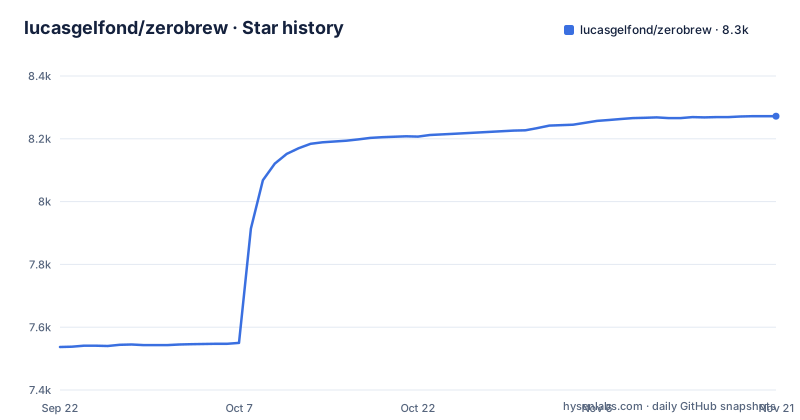
Star history
- lucasgelfond/zerobrew8,272 ★ · +735
| Repository | 2026-09-22 | 2026-11-21 |
|---|---|---|
| lucasgelfond/zerobrew | 7.5k | 8.3k |
735 Stars in the last 60 days, measured from the daily GitHub snapshot. Compare with other projects
Editorial analysis
A store that keeps unpacked kegs, paid for in disk space
zerobrew describes itself as bringing uv-style architecture to Homebrew packages on macOS and Linux, and calls itself experimental. It is a Rust workspace of three crates, zb_core, zb_io and zb_cli, at version 0.4.2 with a minimum Rust version of 1.96. The release profile builds with opt-level 3, fat LTO, a single codegen unit, panic set to abort and stripped symbols.
The design choice that makes warm installs fast is also its main cost. When you uninstall a package with brew, Homebrew keeps the downloaded bottle. zerobrew keeps the bottle and also the unpacked keg in its store, so reinstalling skips the unpack. The project names this as the main tradeoff: warm installs use more disk. If you work on a machine with a small SSD, plan to run cleanup, which maps to zb gc and removes only unreferenced store entries, so anything still in use stays on disk.
The headline speedups depend on your connection and on ported post-install steps
The project measured 100 packages on 2026-10-23 with zerobrew 0.4.2 against Homebrew 7.0.10 on macOS 26.6.2, using a MacBook Pro with an M3 Pro and 18 GB of RAM on a wired link of about 436 Mbit/s. Overall, cold installs took 853s with Homebrew and 109s with zerobrew, 7.8x faster; warm installs took 756s and 29.9s, 25x faster. The median package was 7.5x faster cold and 62x faster warm.
Two caveats come from the same results. Cold installs are bound by the network: a run two days earlier on about 80 Mbit/s came out at 3.7x cold overall, with go and llvm limited to download speed. Homebrew's total barely moves with bandwidth, while zerobrew's is mostly bandwidth. Second, post-install steps still run. Since 0.4.2, zerobrew builds the ca-certificates bundle in process, which removed an 8 second step from most packages. fontconfig's fc-cache is not ported yet (issue #448), which keeps fontconfig, harfbuzz, cairo and pango under 10x warm.
The brew alias is opt-in and refuses to shadow real Homebrew
zerobrew's own command is zb. If you want scripts and muscle memory that type brew to reach it, you opt in:
zb install-alias brew
brew install jq
zb install-alias brew --remove
This creates a brew symlink pointing to zb-brew next to the zb binary, and that directory has to be on PATH. You can also turn it on at install time:
curl -fsSL https://zerobrew.rs/install | bash -s -- --brew-compatThe safeguards are conservative. Enabling the alias refuses to proceed if an existing Homebrew or another brew entrypoint is on PATH or in the standard Homebrew locations, and it never replaces an existing file. Removing it deletes only zerobrew's own symlink. If zb-brew is missing, the fix is to reinstall zerobrew. In practice this means you cannot run zerobrew's brew alias and a real Homebrew side by side under the same name.
Taps, casks, search and services fail with a compatibility error
The brew entrypoint supports install, uninstall, list, info, outdated, upgrade, doctor, bundle and update, using the arguments and output that zb supports. It does not try to emulate the rest. search, services and tap are not implemented, nor are the --cask flag and list --formula; each fails with a compatibility error.
The consequences are concrete. A setup script that taps a third party repository before installing will stop at the tap line. Anything installed as a cask stays outside zerobrew's reach. If you rely on brew services to run a database in the background, that command is not there. Two commands also mean something narrower than you may expect: update refreshes the formula index and does not update zerobrew itself, and cleanup runs zb gc. Migration has its own rule: zb migrate requires real Homebrew on PATH and refuses the zerobrew entrypoint.
Everyday commands, including Brewfile bundles
For the formulae it does handle, the zb command line covers the common loop of installing, exporting, checking and upgrading:
zb install jq                   # install one package
zb install wget git             # install multiple
zb bundle                       # install from Brewfile
zb bundle install -f myfile     # install from custom file
zb bundle dump                  # export installed packages to Brewfile
zb bundle dump -f out --force   # dump to custom file (overwrite)
zb uninstall jq                 # uninstall one package
zb outdated                     # list packages with newer versions
zb upgrade                      # upgrade all outdated packages
zb upgrade jq wget              # upgrade spec
Brewfile support is what makes zerobrew usable for reproducing a machine: zb bundle reads a Brewfile and zb bundle dump writes one, with -f for a custom path and --force to overwrite. The limit carries over from the previous section. If your Brewfile lists casks or taps, those entries belong to features zerobrew does not implement, so a Brewfile written for Homebrew is not automatically a Brewfile zerobrew can finish.
Shell configuration changes only through the installer or zb init
The standalone installer edits your shell config. When it finishes, you restart the terminal or run the source command it prints:
curl -fsSL https://zerobrew.rs/install | bashThe other routes are stricter. Automatic initialization, through --auto-init or ZEROBREW_AUTO_INIT=true, and zb reset create data directories without touching shell configuration. To configure your shell you run zb init explicitly, or zb init --no-modify-path to leave your shell files alone. For people who manage dotfiles by hand, this separation matters: you can let zerobrew set up its directories in automation without it rewriting your profile, and add the PATH entry yourself. The repository also ships install.sh and install-completions.sh at the top level.
The original lucasgelfond tap is frozen; the project moved to zerobrewhq
The project now lives under the zerobrewhq organisation, and installing through Homebrew uses its tap:
brew install zerobrewhq/tap/zerobrewIf you installed from the old lucasgelfond/zerobrew tap, it is no longer updated, so you will stay on an old version until you switch:
brew uninstall zerobrew
brew untap lucasgelfond/zerobrew
brew install zerobrewhq/tap/zerobrew
The cachebag/zerobrew and zerobrewhq/zerobrew taps were moved to zerobrewhq/tap and keep updating without action. Updating depends on how you installed: rerun the curl installer and check zb --version, or for the Homebrew route run:
brew update && brew upgrade zerobrewReleases are frequent and still pre 1.0: v0.4.0+dev on 2026-10-12, v0.4.1 on 2026-10-15 and v0.4.2 on 2026-10-21, with the last push on 2026-11-02. The repository carries LICENSE-APACHE.md, LICENSE-MIT.md and LICENSE-HOMEBREW.
Editorial conclusion
zerobrew suits developers who install and reinstall the same Homebrew formulae often, on CI runners or fresh machines, and who have the disk space for a store that keeps unpacked kegs. It does not suit anyone who depends on casks, custom taps, brew search or brew services, because the brew entrypoint refuses those with a compatibility error. Before switching, check which tap you installed from, decide whether the installer may edit your shell config, and treat the project's own benchmark as a measurement on one fast connection rather than a promise for yours.
Frequently asked questions
What is a good alternative to Homebrew on macOS?
zerobrew is an experimental alternative that installs Homebrew packages through its own zb command with a uv-style store. In its own benchmark of 100 packages it was 7.8x faster cold and 25x faster warm, but it does not support casks, taps, search or services.
Is it worth installing Homebrew on a Mac?
zerobrew's standalone installer gives you Homebrew packages through zb without installing Homebrew itself. Real Homebrew is still needed on PATH if you want to run zb migrate.
Do I have Homebrew installed on my Mac?
zerobrew checks this when you enable its brew alias: it refuses to proceed if an existing Homebrew or other brew entrypoint is on PATH or in the standard Homebrew locations, and it never replaces an existing file.
Official sources
Add this badge to your README
If you maintain this project, the badge below links readers to this analysis and shows its maintenance status from the daily GitHub snapshot. Paste the markdown into your README; add ?metric=license or ?metric=stars to the image URL for a different field.

[](https://hysenlabs.com/projects/lucasgelfond-zerobrew)Star history chart for your README
[](https://hysenlabs.com/projects/lucasgelfond-zerobrew)Was this useful?