RenoDX: shader, swapchain and overlay mods layered on Reshade
Renovation Engine for DirectX Games
At a glance
- What is it?
- RenoDX is a Reshade add-on toolset for DirectX games that swaps shaders, injects buffers, draws overlays and upgrades swapchains without patching version specific executables. It suits players who want frame level control and developers who would rather not maintain per game binaries.
- Who is it for?
- Adopt RenoDX if you already run Reshade on a 64 bit DirectX title and want shader, overlay and swapchain work without writing your own add-on. Leave it if you want an installer, because the README documents none.
- Can I use it commercially?
- Yes. MIT is a permissive licence: you can use, modify and sell software built on it, as long as you keep its copyright and licence notices.
- Is it still maintained?
- Yes. The repository last received commits 1 day ago.
- What is it written in?
- Mainly HLSL, according to GitHub's language statistics.
Answers come from the project's GitHub data, last synced on November 15, 2026, and from our analysis. They are not legal advice.
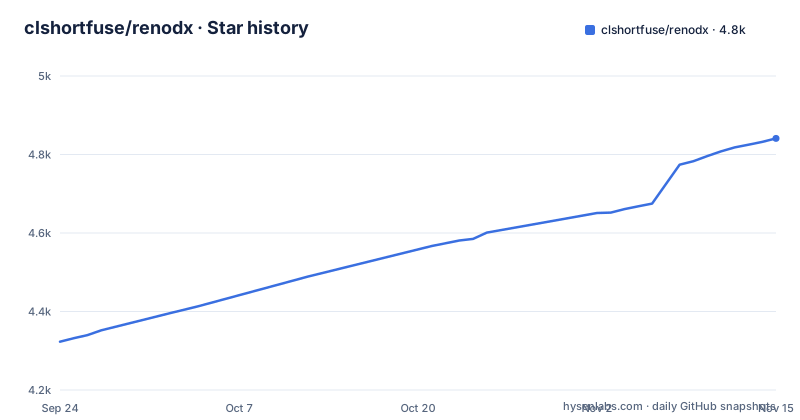
Star history
- clshortfuse/renodx4,841 ★ · +518
| Repository | 2026-09-24 | 2026-11-15 |
|---|---|---|
| clshortfuse/renodx | 4.3k | 4.8k |
518 Stars in the last 52 days, measured from the daily GitHub snapshot. Compare with other projects
Editorial analysis
RenoDX taps DirectX through Reshade instead of patching game executables
The central design decision is stated in one line of the README: because RenoDX uses Reshade's add-on system, compatibility is expected to be pretty wide, and using Reshade removes the need to patch version specific exe files. That single choice explains most of what the project does. There is no per title injector, no offset table to maintain against a game's main executable, and therefore no build tied to a particular game patch. The add-on sits inside the Reshade runtime that already hooks the DirectX API, so the work happens at the API boundary rather than at the binary level.
What arrives through that boundary is a list of concrete capabilities: replace shaders, inject buffers, add overlays, upgrade swapchains, upgrade texture resources, and write user settings to disk. Six verbs, each with a different cost and a different failure mode. Shader replacement is the cheapest to reason about, since it replaces a resource the game already asks for. Buffer injection and overlay drawing add new per frame work.
The add-on binary is the unit of distribution, not the game mod
Prebuilt add-ons are published directly from the project's GitHub Pages site rather than from a mod manager. Three utilities are listed: renodx-fpslimiter.addon64, renodx-devkit.addon64, and decomp.exe, described as a Shader Model 6.0 plus decompiler. Every one is an .addon64 file except the decompiler, which is a plain Windows executable. The naming makes the assumption plain: these are 64 bit binaries loaded into a 64 bit process.
That has a consequence for anyone trying to predict support. A title that does not run on DirectX has no path through these binaries, and no other graphics API appears anywhere in the capability list. The repository itself is built around the 64 bit assumption the file names state. The workflow badges are clang-x64, ninja-x64 and visual-studio-x64, so three toolchains, one architecture.
Building from source runs through CMake presets rather than a documented install target
The repository is laid out for people who compile add-ons, not only for people who download them. CMakeLists.txt sits at the root with a CMakePresets.json beside it, and two Windows entry points named build.cmd and make-sln.cmd stand in for the usual configure step. Alongside those sit .clang-format, .clang-tidy and .clangd, and the workflow badges at the top of the README name clang-x64, ninja-x64 and visual-studio-x64 builds.
That is a real difference from a typical mod manager, and it cuts both ways. A user who wants to change one constant can build the tree; a user who wants to tweak an add-on has no documented single command to do it, because the README documents no install target at all. CMakePresets.json is where a build configuration would live, and inspecting it is the practical route to finding what the presets set.
Fetching an add-on is a manual download, because the README documents no install command
There is no install line anywhere in the README: no package manager entry, no installer, no flag. The project's answer is that you obtain the binaries from its utility page. For an FPS limiter, the file to take is this:
https://clshortfuse.github.io/renodx/renodx-fpslimiter.addon64Developers building their own add-ons take the devkit from the same place instead:
https://clshortfuse.github.io/renodx/renodx-devkit.addon64Load order and the invocation that registers an add-on with Reshade are not given, so a reader who wants RenoDX to act on a specific game is left to place the file where Reshade looks and confirm it loaded. The Shader Model 6.0 decompiler is a separate download and is a Windows executable, so it behaves like an ordinary tool you run once against a shader rather than something that stays resident.
Overlays and injected buffers bill you every frame the game is running
Injecting buffers and adding overlays are the two capabilities that cost something continuous. An overlay has to be submitted and drawn on every presented frame, and injected buffers occupy memory that the game would otherwise use for its own resources. On a machine that is already near a memory or frame time budget, either can turn a smooth run into a stuttering one.
Swapchain and texture upgrades carry a different kind of risk. They sit on the presentation path, which is where DirectX version differences and engine specific assumptions live. A shader that renders correctly under one swapchain upgrade may not under another.
Writing user settings to disk is the only persistence RenoDX names
Of the six listed capabilities, writing user settings to disk is the one that touches your system rather than the game's rendering. Expecting a general configuration file here would be a mistake: this is a graphics mod tool, and the settings it persists belong to the add-on. The repository reinforces that framing with a renodx-metadata-schema.json at the root, a file that describes the shape of mod metadata rather than a general preference store.
The repository is MIT licensed, which answers the redistribution question for anyone shipping a mod built on the devkit. Whether a given shader or overlay build is permitted by a game's own terms is a separate matter, and the README takes no position on it.
RenoDX against plain Reshade: a toolset versus a hook library
The real alternative is plain Reshade with no RenoDX layer. Reshade provides the DirectX interception and the add-on loading mechanism; RenoDX is a set of add-ons built on top of it that arrive already compiled, already targeting 64 bit DirectX, and already covering the common ground of a limiter, a devkit and shader decompilation. That is a difference in starting point rather than in capability. Write your own add-on and you own the maintenance; install RenoDX's and you inherit a binary whose source sits in the same tree as the devkit.
The trade is legible. RenoDX collapses the distance between a fresh clone and a running shader replacement. Read the repository layout as the summary of that trade: docs/DEVKIT_MCP.md describes a live devkit and MCP workflow for people who will write code, while docs/CONTRIBUTING.md is the path for changing the tree. Both audiences are served.
Editorial conclusion
Adopt RenoDX if you already run Reshade on a 64 bit DirectX title and want shader, overlay and swapchain work without writing your own add-on. Leave it if you want an installer, because the README documents none. Read the load order documentation for your own Reshade setup first, then check that the add-on binary you actually want, such as renodx-fpslimiter.addon64, is on the project's utility download page before spending an evening on setup.
Frequently asked questions
What is RenoDX used for?
RenoDX is a toolset for modding DirectX games. It can replace shaders, inject buffers, add overlays, upgrade swapchains, upgrade texture resources, and write user settings to disk.
How much does RenoDX cost?
The repository is released under the MIT license, and the utility add-ons are published as direct downloads from the project's GitHub Pages site rather than sold.
How do I install RenoDX?
The README gives no install command. It points at downloadable utilities on the project site, including renodx-fpslimiter.addon64 and renodx-devkit.addon64, and does not document how an add-on is registered with Reshade.
How do I use RenoDX?
RenoDX runs as a Reshade add-on rather than as a standalone injector, which is why the README expects wide compatibility. It taps DirectX without patching version specific exe files.
Official sources
Add this badge to your README
If you maintain this project, the badge below links readers to this analysis and shows its maintenance status from the daily GitHub snapshot. Paste the markdown into your README; add ?metric=license or ?metric=stars to the image URL for a different field.

[](https://hysenlabs.com/projects/clshortfuse-renodx)Star history chart for your README
[](https://hysenlabs.com/projects/clshortfuse-renodx)Was this useful?