ch32fun skips the HAL so a CH32V003 blinky fits in 500 bytes
Open source minimal stack for the ch32 and ch5xx WCH RISC-V Microcontrollers
At a glance
- What is it?
- ch32fun is a development environment for WCH RISC-V microcontrollers built around one self-contained source and header pair, plus minichlink, a libusb programmer that also doubles as a gdbserver and a fast printf channel. It is aimed at people who would rather read the technical reference manual than a vendor HAL.
- Who is it for?
- Embedded developers targeting a CH32V003 or a sibling WCH part who are willing to work from the technical reference manual will find ch32fun more legible than the vendor HAL, and minichlink removes the need for WCH's own flashing tool. Anyone who needs a vendor-supported toolchain with a warranty behind it, or who needs malloc from the framework, should look elsewhere, since ch32fun deliberately ships neither.
- Can I use it commercially?
- Yes. MIT is a permissive licence: you can use, modify and sell software built on it, as long as you keep its copyright and licence notices.
- Is it still maintained?
- Yes. The repository last received commits 16 days ago.
- What is it written in?
- Mainly C, according to GitHub's language statistics.
Answers come from the project's GitHub data, last synced on October 23, 2026, and from our analysis. They are not legal advice.
Star history
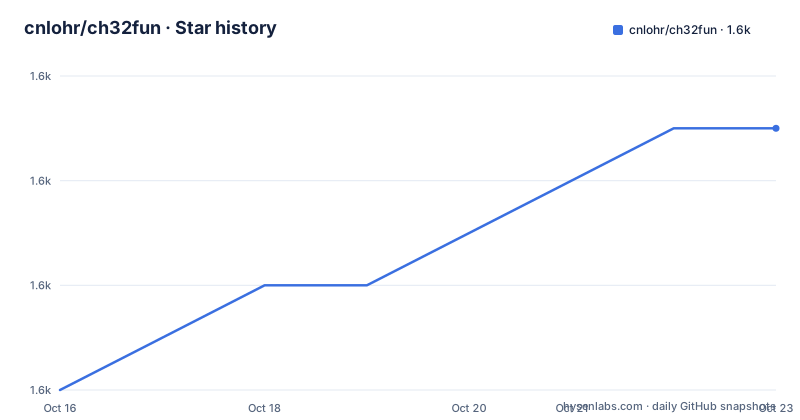
- cnlohr/ch32fun1,633 ★ · +5
| Repository | 2026-10-16 | 2026-10-23 |
|---|---|---|
| cnlohr/ch32fun | 1.6k | 1.6k |
5 Stars in the last 7 days, measured from the daily GitHub snapshot. Compare with other projects
Editorial analysis
The argument against the vendor HAL
The CH32V003 is a cheap part with a RISC-V EC core running at 48MHz, 16kB of flash and 2kB of RAM, and it ships in SOP-8, QFN-20 and SOIC packages. The WCH evaluation kit for it is described in the README as massive, and the development environment as weighty. ch32fun exists to reverse that ratio.
The stated goal is to develop the tooling and environment for efficient use of the part while avoiding complicated HALs. The mechanism is direct: rather than abstracting the hardware, you work from the TRM, the technical reference manual, and the datasheet. The consequence is measurable in one number the README gives, that blinky is only 500 bytes with ch32fun, boots faster, and is significantly simpler overall.
The whole framework is a folder named `ch32fun` containing a single self-contained source file and header file for compiling apps for the CH32V003. That is the entire runtime. If you are coming from an STM32 HAL project, the amount of code between you and the silicon is now roughly nothing.
There is a second piece in the box that is worth as much as the framework itself. `misc/libgcc.a` is an extra copy of libgcc, shipped so unusual RISC-V build chains can link.
minichlink: one programmer tool for six kinds of hardware
minichlink is a programmer that talks to WCH CH-Link hardware over libusb, which is what makes it cross platform rather than Windows only. The hardware it drives covers a wide range:
- the official WCH Link-E Programmer - an STM32F042 programmer, NHC-Link042 - an ESP32S2 programmer, esp32s2-funprog - an Arduino based interface, Ardulink - the CH32V003 based programmer used for any SWD or SWIO board via the rv003usb rvswdio programmer - the built-in USB ISP bootloader present on all WCH chips that have a USB peripheral
Two of those capabilities matter more than the flashing. minichlink has a gdbserver built into it, which the README says works with `gdb-multiarch` as well as in Visual Studio Code, so debugging does not need a second piece of hardware. And there is printf over the programming interface, also over single wire, at about 400kBaud.
The debug printf channel is the one the README leads with. You can try the debugprintf project or call `SetupDebugPrintf()` and use printf normally. The throughput given is around 36kBytes per second, and the README shows it being piped through `pv` to measure:
./minichlink -T | pv > /dev/null
Found ESP32S2 Programmer
 536KiB 0:00:15 [36.7KiB/s] [        <=>                     ]
That figure is from the project author's own machine, so treat it as an order of magnitude rather than a promise.
Building and flashing: cd into an example and make
Setup instructions live in the project wiki rather than the README, which points to the Installation page there. The actual build of an example is as short as it gets:
cd examples/blink
make
The README explains how to read the output, which is worth doing once because the numbers are easy to misjudge. `text` is code, `data` is constants and initialisation values, `bss` is uninitialised values, and `dec` is the sum of the three, reflecting the number of bytes in flash the program will occupy.
Two artifacts come out, and they serve different purposes. The generated `.bin` is what minichlink consumes. The `.hex` file is compatible with the official WCH flash tool, so you are not locked out of the vendor path even while using this one.
If you are using an editor language server, clangd cannot find `ch32fun.h` until a compile database exists. The fix is to clean the example and build it through bear, which records the compiler invocations:
make clean
bear -- make build
That produces `compile_commands.json` with the include paths from the makefiles. Two conveniences wrap it: `make clangd` does the clean and the bear build in one step for the current example, and `build_all_clangd.sh` does it for all examples at once.
PlatformIO support, and a trap in the default build
PlatformIO is used for CI on this repository, and it also works as an editor integration. The README is explicit that you do not need it: a template project under `examples/template/.vscode` sets up VSCode without PlatformIO at all.
If you do use PlatformIO, you clone the repository, open it in VSCode with the extension installed, and use the project environment switcher at the bottom of the VSCode taskbar to pick a specific example such as `blink`.
That switcher matters more than it sounds. Without selecting an environment, a Build compiles all examples, which is almost never what you want while iterating on one program.
For a new project, the framework name to select in the PlatformIO Home New Project wizard is `ch32v003fun`. The equivalent command line form is short:
pio init -b genericCH32V003F4P6 -O "framework = ch32v003fun"Adding your own code to an existing ch32fun project is a different route, by expanding the environments in `platformio.ini`. The underlying platform is `platform-ch32v` from Community-PIO-CH32V.
The repository manifest describes itself as the most lightweight framework for CH32V003, CH32V10x, CH32V30x and CH32X035, with version 0.0.0 and a URL that still points at the older `ch32v003fun` repository name.
malloc is deliberately absent
This is the most argued design decision in the project and the README explains it directly. Because ch32fun targets a wide variety of chips, choosing a malloc implementation is hard: compare the CH32V003 with 2kB of RAM against the CH585 with 128kB of RAM, and the right answer varies wildly. The project decided it is better not to decide for you.
So there is no malloc and no free in the framework. You can allocate statically, use fixed size lists, or link a heavier implementation. The README suggests three: tinyalloc, libmemory, and mameMalloc, described as extremely lightweight but less common.
That is a defensible position for a framework whose selling point is not deciding things for you, but it does mean a project that arrives with a library expecting the C allocator will not link. Budget for choosing and vendoring an allocator on day one.
The same philosophy runs through the other omissions. There is no HAL, so there are no HAL convenience calls. The examples are fewer than the HAL's and the README says so, while noting that many are compatible with other processors.
Family coverage is wide, tested coverage is not
The support list is long: ch32x035, ch32v002, ch32v004, ch32v005, ch32v006, ch32v007, ch32v103, ch32v203, ch32v208, ch32v303, ch32v305, ch32v307, and more recently ch570, ch572, ch571, ch573, ch581, ch582, ch583, ch584, ch585 and ch591, ch592. The README adds that obscure parts like ch32m030, ch641, ch643 and ch645 should also work, and asks for test reports on those.
That last sentence is the honest summary of the support policy. The claim is a best effort, and the maintainer is asking you to confirm it.
GDB is a specific case. The README says GDB is mostly tested on the 003 but works to a limited degree on the other processors. So the debugging story that is strongest on the cheapest chip weakens considerably as you move up the family.
The repository layout encodes the coverage, which is useful for judging maturity of any given part. There are separate example trees for the different families: `examples/`, `examples_ch5xx/`, `examples_h41x/`, `examples_l103/`, `examples_usb/`, `examples_v10x/`, `examples_v20x/`, `examples_v30x/`, `examples_x00x/` and `examples_x035/`. A family with a substantial tree is one that has been worked on.
Within `examples/` the granularity goes down to peripherals: `adc_dma_opamp`, `adc_injection`, `bldc_gimbal`, `branchless_gpio_lib`, `cap_touch_adc`, `cap_touch_exti`, `color_lcd`, `dma_gpio_ws2812`, `dma_scheduled_io`, `dma_spi`, `external_crystal`, `exti_pin_change_isr`, `cpp_virtual_methods` and `constructors`. If a peripheral you need has no example here, you are writing that part yourself from the TRM.
Editorial conclusion
Embedded developers targeting a CH32V003 or a sibling WCH part who are willing to work from the technical reference manual will find ch32fun more legible than the vendor HAL, and minichlink removes the need for WCH's own flashing tool. Anyone who needs a vendor-supported toolchain with a warranty behind it, or who needs malloc from the framework, should look elsewhere, since ch32fun deliberately ships neither. Before adopting, check that your exact part is in the supported list and build the blink example with make, because support for anything other than the 003 is described as limited and untested.
Frequently asked questions
How small is a ch32fun blinky compared to a HAL one?
The README states that blinky is only 500 bytes with ch32fun, boots faster, and is significantly simpler overall than using the vendor HAL.
Does ch32fun include malloc?
No. The project deliberately leaves malloc and free unimplemented because the right choice varies between a 2kB CH32V003 and a 128kB CH585. Allocate statically, use fixed size lists, or link something like tinyalloc or libmemory.
How do I debug a CH32V003 with ch32fun?
minichlink has a gdbserver built in, which works with gdb-multiarch and with Visual Studio Code. It also offers printf over the programming interface at roughly 400kBaud, around 36kBytes per second.
Can I flash a ch32fun build with the official WCH tool?
Yes. The build produces a .bin for minichlink and a .hex that is compatible with the official WCH flash tool.
How do I set up a new PlatformIO project for ch32fun?
Set the Framework to ch32v003fun in the PlatformIO Home New Project wizard, or run pio init -b genericCH32V003F4P6 -O "framework = ch32v003fun" from the command line.
Official sources
Add this badge to your README
If you maintain this project, the badge below links readers to this analysis and shows its maintenance status from the daily GitHub snapshot. Paste the markdown into your README; add ?metric=license or ?metric=stars to the image URL for a different field.

[](https://hysenlabs.com/projects/cnlohr-ch32fun)Star history chart for your README
[](https://hysenlabs.com/projects/cnlohr-ch32fun)Was this useful?