Lemurs: a customizable Unix TUI login manager
A customizable TUI display/login manager written in Rust 🐒
At a glance
- What is it?
- Lemurs is a Rust-based terminal display and login manager for GNU/Linux and BSD systems. It authenticates through PAM, launches filesystem-defined X11 or Wayland sessions, and suits administrators who manage session startup through scripts and TOML.
- Who is it for?
- Adopt Lemurs if you administer a Unix system and want a configurable terminal login screen for several X11 or Wayland environments. Do not choose it if you need a graphical session chooser, support outside the documented Unix systems, or a deployment where startup services and PAM cannot be modified.
- Can I use it commercially?
- Yes. Apache-2.0 is a permissive licence: you can use, modify and sell software built on it, as long as you keep its copyright and licence notices.
- Is it still maintained?
- Yes. The repository last received commits 23 days ago.
- What is it written in?
- Mainly Rust, according to GitHub's language statistics.
Answers come from the project's GitHub data, last synced on November 7, 2026, and from our analysis. They are not legal advice.
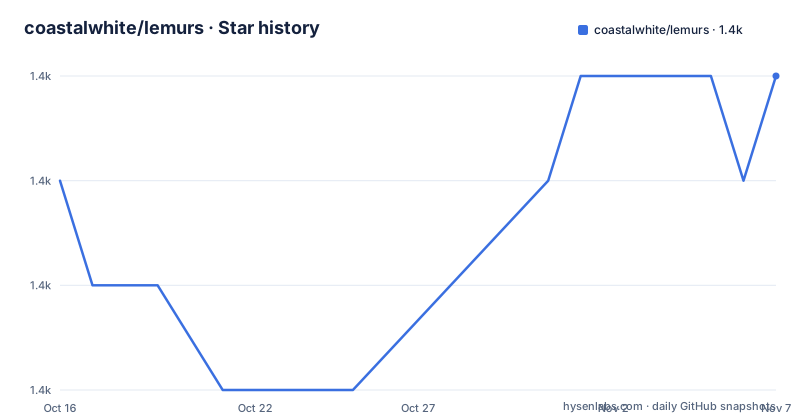
Star history
- coastalwhite/lemurs1,362 ★ · +1
| Repository | 2026-10-16 | 2026-11-07 |
|---|---|---|
| coastalwhite/lemurs | 1.4k | 1.4k |
1 Stars in the last 22 days, measured from the daily GitHub snapshot. Compare with other projects
Editorial analysis
Lemurs places PAM authentication before X11 and Wayland startup
Lemurs addresses the login point before a graphical desktop session begins. A display manager normally handles that transition: it authenticates a user, presents session choices, and starts the selected environment. Lemurs implements this role as a Terminal User Interface for most GNU/Linux and BSD distributions, with support for systems that use SystemD and systems that do not.
The intended user is an administrator who already manages Unix startup components and desktop software. Lemurs does not bundle a window manager, compositor, X server, or desktop shell. Its purpose is narrower. It provides authentication and session selection, then delegates execution to scripts prepared by the administrator. This makes it relevant to users of minimal window-manager setups such as BSPWM and Sway, provided they are comfortable maintaining files below `/etc/lemurs`.
Authentication goes through Pluggable Authentication Modules, or PAM. Lemurs therefore depends on the host's PAM configuration and installed modules rather than maintaining its own account database. The repository layout shows separate `src/auth/pam.rs` and `src/auth/utmpx.rs` files. That separation indicates that PAM interaction and UTMPX login records are handled as distinct responsibilities. A broken PAM policy should therefore be investigated as part of the host's authentication stack, not as a Lemurs username list.
Post-login behavior has its own module tree. Based on the repository layout, `src/post_login/env_variables.rs` handles environment settings, while `src/post_login/x.rs` contains Xorg-specific logic. The project also includes virtual-terminal handling in `src/chvt.rs`. This architecture makes sense for a login manager because it must coordinate authentication, terminal state, environment construction, and graphics startup without assuming a single display stack.
Arch Linux installation starts the lemurs.service unit
The README gives a packaged installation path for Arch Linux. Install Lemurs from the `extra` repository. The command below also disables `display-manager.service` and enables `lemurs.service`, following the README's documented sequence.
sudo pacman -S lemurs
sudo systemctl disable display-manager.service
sudo systemctl enable lemurs.service
On Arch Linux, the expected result is that the `lemurs.service` unit is enabled. The README notes that disabling `display-manager.service` is unnecessary if you do not yet have a window manager. This is an operational change, not merely an application installation. If another display manager remains enabled and also owns the login path, the boot flow may conflict with Lemurs.
For source installation, the README says to use `install.sh` on a Unix machine. The script compiles a release build with Cargo, creates `/etc/lemurs`, disables the previous display manager, copies the SystemD service, and enables it. The repository's documented prerequisites are Cargo and an already available window-manager setup.
The source package declares Rust edition 2021 and `rust-version = "1.84.0"`. `Cargo.toml` identifies version `0.4.0`. Arch users taking the repository package do not need to compile this release themselves, while source users must satisfy the declared Rust version before invoking the documented script. After the first reboot, the README says Lemurs should appear.
Creating the first runnable Lemurs sessions
Lemurs discovers sessions through executable files, not through a session-definition format in the TUI. Xorg launch scripts belong in `/etc/lemurs/wms`. Wayland compositor scripts belong in `/etc/lemurs/wayland`. According to the README, the filename becomes the name shown in the environment switcher, and both directories can contain multiple entries at once.
For an Xorg environment, add a script named `bspwm` in the Xorg directory. This documented example starts `sxhkd` in the background, then replaces the script process with `bspwm` through `exec`.
#! /bin/sh
sxhkd &
exec bspwm
The script must be executable. The README gives this permission command, and the filename should match the session name shown after reboot.
sudo chmod 755 /etc/lemurs/wms/bspwmFor Wayland, the README's Sway example uses a script named `sway` in `/etc/lemurs/wayland`. It also states that Sway must be installed and that the user must belong to the `seat` group.
#! /bin/sh
exec sway
Make the Wayland script runnable with the corresponding command.
sudo chmod 755 /etc/lemurs/wayland/swayAfter reboot, the README says `bspwm` and `sway` should appear as selectable names. The examples reveal an important boundary. Lemurs can discover and launch these files, but it does not guarantee that the referenced software is installed, correctly configured, or permitted by the host. A broken session command belongs in the environment script and its output log.
Lemurs TOML variables separate reusable values from interface settings
By default, Lemurs reads `/etc/lemurs/config.toml`, although the `--config` option accepts another path. The repository's `extra/config.toml` file contains the available options and serves as the default configuration. This is the primary place to inspect exact setting names and defaults because the README does not reproduce the complete configuration schema.
A second TOML file can hold reusable values. By default it is `/etc/lemurs/variables.toml`; the `--variables` option selects another location. Values from that file can be referenced inside the main configuration. This is more than simple string concatenation because the documented example substitutes strings and a Boolean into typed settings.
The following `variables.toml` defines a replacement character, a title switch, a title, and a title color.
replacement_char = "+"
show_pw_title = true
password_title = "Password :)"
title_color = "white"
The corresponding `config.toml` refers to those keys with `$` prefixes. This reference block belongs in `/etc/lemurs/config.toml` unless an alternate configuration path is selected.
[password_field]
content_replacement_character = "$replacement_char"

[password_field.style]
show_title = "$show_pw_title"
title = "Wow a $password_title"
title_color = "$title_color"
According to the README, Lemurs interprets those references as the following effective values.
[password_field]
content_replacement_character = "+"

[password_field.style]
show_title = true
title = "Wow a Password :)"
title_color = "white"
This structure is useful when several interface settings share a value. It also creates another configuration path to inspect. An unresolved variable or incorrect type is best diagnosed with `--show-config` before rebooting into the login screen.
Previews and separated logs expose startup failures
Lemurs includes commands for inspecting configuration and displaying the terminal interface without using the complete production flow. Running `lemurs --show-config` prints all settings, including defaults, in TOML form. This is the documented first check when a configuration file appears not to have the intended effect.
The `--preview` option starts a preview instance. According to the README, it also creates a `lemurs.log` file in the current working directory.
lemurs --show-config
lemurs --preview
Previewing can confirm whether the terminal interface renders, but the README does not claim that it authenticates a production login or fully validates the selected X11 or Wayland session. The session scripts and host startup path still require separate verification.
Production logging is divided by process responsibility. `/var/log/lemurs.log` records Lemurs control flow. `/var/log/lemurs.client.log` receives the environment's `stdout` and `stderr`, including output from scripts in the `wms` and `wayland` directories. `/var/log/lemurs.xorg.log` receives the X server's output and applies only to X11 sessions. These files give administrators a practical way to determine whether failure occurred in Lemurs, a launch script, or the X server.
Logging can be turned off with the documented flag.
lemurs --no-logThe README says this option can be added to the service-manager script to disable logging globally. That is useful when log collection is managed elsewhere, but it also removes the three diagnostic sources described above. Configuration paths have the same operational dependency: the default files live under `/etc/lemurs`, while `--config <path/to/config.toml>` and `--variables <path/to/variables.toml>` select alternatives.
Lemurs licensing and release maintenance boundaries
The repository is not archived, and its last push was on 2026-10-16. The most recent listed release is `v0.4.0`, dated 2025-02-22, while `Cargo.toml` also declares version `0.4.0`. Those facts show repository activity after that release, but they do not establish how frequently new releases are published.
Lemurs is distributed under a dual license. `Cargo.toml` states `MIT or APACHE`, and the repository contains `LICENSE-MIT` and `LICENSE-APACHE`. Organizations redistributing the binary or incorporating the source need to preserve and comply with the terms of the selected license. This article does not interpret the legal obligations. The dual-license files are the controlling project sources for that assessment.
An upgrade can affect more than the Rust crate. New behavior may involve PAM integration, environment construction, post-login X11 logic, terminal rendering, SystemD service behavior, or the configuration schema. `Cargo.lock` and the modular source tree provide the inputs needed for source review. System configuration does not necessarily change with each crate release, so the README does not document a migration schedule for `/etc/lemurs`.
The README also does not document an automatic rollback after `install.sh` disables the previous display manager. An installer should retain knowledge of the former service state before running the source setup script. Upgrade planning should compare `extra/config.toml` in the newer source with the deployed `/etc/lemurs/config.toml`, then use `lemurs --show-config` to inspect the effective settings. The release files and service definition are the project-specific facts to inspect before changing the active login manager.
Editorial conclusion
Adopt Lemurs if you administer a Unix system and want a configurable terminal login screen for several X11 or Wayland environments. Do not choose it if you need a graphical session chooser, support outside the documented Unix systems, or a deployment where startup services and PAM cannot be modified. Verify first that the target distribution packages PAM correctly, that each `/etc/lemurs` script launches successfully, and that disabling the previous display manager does not remove your only working startup path.
Frequently asked questions
Does Lemurs support both X11 and Wayland?
Yes. The README places Xorg scripts in `/etc/lemurs/wms` and Wayland compositor scripts in `/etc/lemurs/wayland`. It also states that multiple environments can exist at the same time.
How do I install Lemurs on Arch Linux?
The README documents installation from the `extra` repository with `sudo pacman -S lemurs`. It then documents disabling `display-manager.service` and enabling `lemurs.service`.
How do I add an X11 or Wayland session to Lemurs?
Create a runnable script in `/etc/lemurs/wms` for Xorg or `/etc/lemurs/wayland` for Wayland. The script filename is shown in the environment switcher, and the README documents `sudo chmod 755` for setting permissions.
How does Lemurs authenticate users?
Lemurs uses Pluggable Authentication Modules, or PAM. The repository layout places PAM interaction in `src/auth/pam.rs` and separates UTMPX handling into `src/auth/utmpx.rs`.
How can I inspect the effective Lemurs configuration?
Run `lemurs --show-config` to print settings, including default values, in TOML. The README also documents `lemurs --preview` for checking the interface created by the configuration.
Official sources
Add this badge to your README
If you maintain this project, the badge below links readers to this analysis and shows its maintenance status from the daily GitHub snapshot. Paste the markdown into your README; add ?metric=license or ?metric=stars to the image URL for a different field.

[](https://hysenlabs.com/projects/coastalwhite-lemurs)Star history chart for your README
[](https://hysenlabs.com/projects/coastalwhite-lemurs)Was this useful?