watchexec coalesces file events, then hands your command a list of paths
Project brief: Executes commands in response to file modifications. watchexec is a simple, standalone tool that watches a path and runs a command whenever it detects modifications.
At a glance
- What is it?
- watchexec is a Rust tool that watches a path and runs a command when it detects modifications, with no language runtime of its own. The interesting parts are the coalescing step that decides when to run, the eleven crate workspace behind the binary, and how much of the documentation lives outside the root page.
- Who is it for?
- watchexec fits a developer who wants one command re-run on save without a language runtime, an xargs pipeline or a wrapper script, and who is willing to read the CLI crate's own documentation for the full flag list. It does not fit a pipeline that needs to count individual writes, a project whose changes live in files the extension filter or the ignore files exclude, or a reader who expects the release binary to carry symbol names in a crash report.
- Can I use it commercially?
- Yes. Apache-2.0 is a permissive licence: you can use, modify and sell software built on it, as long as you keep its copyright and licence notices.
- Is it still maintained?
- Yes. The repository last received commits 1 day ago.
- What is it written in?
- Mainly Rust, according to GitHub's language statistics.
Answers come from the project's GitHub data, last synced on November 14, 2026, and from our analysis. They are not legal advice.
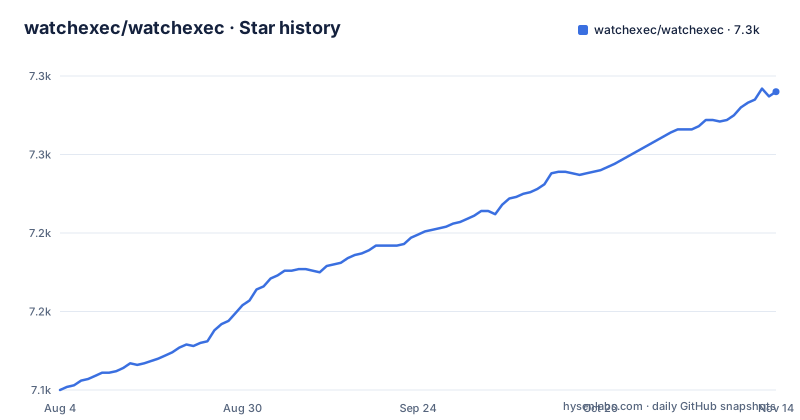
Star history
- watchexec/watchexec7,290 ★ · +190
| Repository | 2026-08-04 | 2026-11-14 |
|---|---|---|
| watchexec/watchexec | 7.1k | 7.3k |
190 Stars in the last 102 days, measured from the daily GitHub snapshot. Compare with other projects
Editorial analysis
Bursts of file events arrive as one command run
watchexec watches a path and runs a command whenever it detects modifications, but a filter sits in front of that detection: multiple filesystem events are coalesced into one. The reason given is concrete, editors that save through a swap or backup file would otherwise produce a burst of events for a single save. An editor that writes a temporary file, moves it into place and deletes the original emits several of those events for one keystroke, which is why the coalescing step exists. So the unit of work is the coalesced batch, not the individual write. Two consequences for anyone building on it. You cannot use the number of runs to count how many times a file changed, since a save touching several files arrives as one run. And a command that needs to know what moved reads that from the paths watchexec provides, in environment variables or on STDIN, not from a log of raw events. Two further defaults are worth knowing before you tune anything. The watch root is the current directory and every subdirectory under it, and the tool asks for no language runtime at all: it is not tied to any particular language or ecosystem, which is why the same invocation drives an npm build, a Python server or a compiler of your own.
The option list lives in the CLI crate, not on the root page
The root README is short on purpose and it names where the detail went. Usage examples, the installation options and the feature list all sit in the CLI crate's own README under crates/cli, and the manual page is doc/watchexec.1.md. The same detail is reachable offline through three flags named on the root page: `watchexec -h`, `watchexec --help` and `watchexec --manual`. For someone scripting the tool that matters, because the flags you need for filtering, restarting and process handling are documented in a separate file inside the same repository rather than on the page you land on first. The offline manual is the one to reach for on a machine with no network access. Nothing on the root page enumerates those flags: the two quick start commands are the only usage shown there, and the full feature list is a link onward.
Extension filters decide what counts as a change at all
Both quick start commands filter by extension. `watchexec -e js,css,html npm run build` watches JavaScript, CSS and HTML files in the current directory and all subdirectories, and runs the build when a change is detected. `watchexec -r -e py -- python server.py` calls or restarts a Python server when any Python file in that tree changes. The second example also places `--` between watchexec's own options and the command, which is the conventional way to stop option parsing; the root page does not spell out why it is needed. The practical consequence is that a file whose extension is not on your list changes on disk without triggering anything, and the ignore files are the other half of the story: watchexec loads .gitignore and .ignore files, so a matching file that is ignored stays invisible to it. Both filters have to line up with your layout.
Eleven workspace members, and the install pulls one of them
The root Cargo.toml declares a workspace of eleven members, and they are not all parts of the command line tool. crates/lib is the library for building more specialised watchexec-powered tools, crates/cli is the binary you install, crates/events and crates/signals hold the event and signal types, and crates/supervisor is the process lifecycle manager, described as the exec part of watchexec. Underneath sit the two filterer crates, crates/ignore-files for finding, parsing and interpreting ignore files, crates/project-origins for locating a project's origin directory, plus crates/bosion and crates/test-socketfd. So `cargo install watchexec-cli` installs the command and pulls in only what that command needs, while anyone embedding the watcher writes against crates/lib instead. The tree also carries bin/, completions/ and doc/ at the top level, which is where shell completions and the manual page live. Workspace wide configuration sits alongside them: .cargo/, .rustfmt.toml, .editorconfig and .gitattributes, with Cargo.lock committed so a build from source resolves to the same dependency versions the project used.
Release builds keep line numbers and drop symbol names
The release profile in the root Cargo.toml is worth reading before you file a bug with a stack trace. It sets lto = true and codegen-units = 1, then debug = 1 with the comment for stack traces, and strip = "symbols". Those last two pull in opposite directions on purpose. debug = 1 keeps line level information so a crash can be mapped back to source, while strip = "symbols" removes the symbol table from the binary. Both the dev and the release build-override profiles force opt-level 0, codegen-units 1024, no debug information, no debug assertions, no overflow checks and no incremental compilation.
Four install routes, four different costs
There are four ways in, and each moves a different cost onto the reader. A package manager covers Arch, Debian, Homebrew, Nix, Scoop and Chocolatey, with the list behind doc/packages.md and versions tracked on Repology. Binstall fetches a prebuilt binary with `cargo binstall watchexec-cli`, a line the project annotates to say it does not contain a typo. A pre-built binary package is published on the Github releases page, which is also where the versioned tags live, and those tags are named for the command line tool: CLI v2.8.0 on 6 October 2026, CLI v2.7.4 on 2 October 2026 and CLI v2.7.3 on 15 September 2026. From source the command is `cargo install --locked watchexec-cli`, where the locked flag pins the versions in Cargo.lock so your build matches the one the project ships. The binary routes skip a Rust toolchain; the source route skips a binary you did not build.
cargo watch is struck through and the replacements are named
The downstream list carries one struck-through entry: cargo watch, the specialised watcher for Rust and Cargo projects, shown the way a project marks something it no longer offers. The rest of the list covers the setups that gap left, mostly by pointing at other people's tools: ghciwatch for Haskell projects, cargo lambda for Rust powered AWS Lambda functions, create-rust-app for Rust and React web apps, devenv.sh for a nix based developer environment, dotter for dotfiles, and tectonic, a TeX and LaTeX typesetting system. The Augment list fills different gaps: checkexec runs only when source files are newer than a target file, just is offered as a modern alternative to make, and systemfd handles socket passing in development. The release plumbing is visible too, with release-plz.toml and cliff.toml sitting next to Cargo.lock at the top level, which is what turns a merged change into a version and a changelog entry. Alongside them are CONTRIBUTING.md, SAFETY.md and CITATION.cff, and a LICENSE file holding the Apache 2.0 terms the project is released under. Activity is recent rather than historical: the last push to the default branch main is dated 2 November 2026, nearly four weeks after the CLI v2.8.0 tag.
Editorial conclusion
watchexec fits a developer who wants one command re-run on save without a language runtime, an xargs pipeline or a wrapper script, and who is willing to read the CLI crate's own documentation for the full flag list. It does not fit a pipeline that needs to count individual writes, a project whose changes live in files the extension filter or the ignore files exclude, or a reader who expects the release binary to carry symbol names in a crash report. Before wiring it in, check the extension list and the .gitignore behaviour against your layout, read crates/cli for the options, and note that releases are versioned for the CLI alone.
Frequently asked questions
How can I monitor file changes in Linux?
watchexec watches the current directory and all subdirectories for changes and runs a command when it detects modifications. It runs on OS X, Linux and Windows, requires no language runtime, and loads .gitignore and .ignore files while it watches.
How does watchexec handle a process I want to watch in Linux?
It does not monitor a running process. It watches files and manages the command it starts, using process groups to keep hold of forking programs, with process lifecycle handling in the watchexec-supervisor crate and process groups available through the process wrap project.
How do I install watchexec on Linux?
Four routes are given: a package manager for Arch, Debian, Homebrew, Nix, Scoop and Chocolatey, a prebuilt binary through Binstall with cargo binstall watchexec-cli, a pre-built binary package from the Github releases, or a source build with cargo install --locked watchexec-cli.
Why does watchexec restart once when I save a file?
Multiple filesystem events are coalesced into one, which is aimed at editors that save through swap or backup files. Your command then receives the paths that changed through environment variables or STDIN rather than a log of every event.
Where are the watchexec command line flags written down?
In the CLI crate's own README under crates/cli, plus the offline manual reached with watchexec --manual and the manual page at doc/watchexec.1.md. The root README shows two quick start examples and links onward to the rest.
Official sources
Add this badge to your README
If you maintain this project, the badge below links readers to this analysis and shows its maintenance status from the daily GitHub snapshot. Paste the markdown into your README; add ?metric=license or ?metric=stars to the image URL for a different field.

[](https://hysenlabs.com/projects/watchexec-watchexec)Star history chart for your README
[](https://hysenlabs.com/projects/watchexec-watchexec)Was this useful?