uv: A Rust-Based Python Package Manager That Replaces Half Your Toolchain
An extremely fast Python package and project manager written in Rust.
At a glance
- What is it?
- uv is a single Rust binary that handles project management, scripting, tool installation, and Python version management. It is fast, but its breadth of features raises questions about lock-in and migration effort.
- Who is it for?
- Adopt uv if you want one tool to replace pip, pip-tools, pipx, poetry, pyenv, and virtualenv, and you value speed and a unified workflow. Be cautious if you rely on pip behaviour beyond what uv's pip-compatible interface covers; the README calls it a drop-in replacement for common pip, pip-tools and virtualenv commands.
- Can I use it commercially?
- Yes. Apache-2.0 is a permissive licence: you can use, modify and sell software built on it, as long as you keep its copyright and licence notices.
- Is it still maintained?
- Yes. The repository received new commits within the last day.
- What is it written in?
- Mainly Rust, according to GitHub's language statistics.
Answers come from the project's GitHub data, last synced on November 13, 2026, and from our analysis. They are not legal advice.
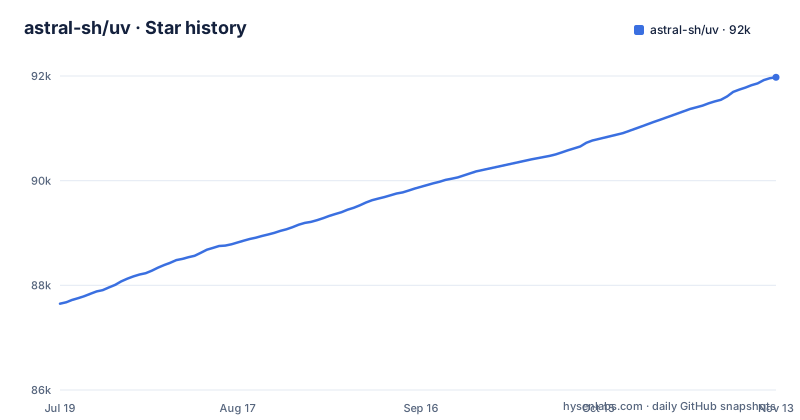
Star history
- astral-sh/uv91,975 ★ · +4,325
| Repository | 2026-07-19 | 2026-11-13 |
|---|---|---|
| astral-sh/uv | 87.7k | 92k |
4,325 Stars in the last 117 days, measured from the daily GitHub snapshot. Compare with other projects
Editorial analysis
What uv Replaces and Who It Serves
The README is blunt: uv aims to replace pip, pip-tools, pipx, poetry, pyenv, twine, virtualenv, and more. That is a wide net. The target user is a Python developer who currently juggles multiple tools for different tasks: a package manager for dependencies, a tool runner for CLI apps, a Python version switcher, and a project scaffold. uv collapses those into one binary. The project is backed by Astral, the same company behind Ruff, which gives it institutional momentum but also means you are betting on a commercial vendor's roadmap. The speed claim, 10-100x faster than pip, appears in the README and links to a BENCHMARKS.md file. For a developer tired of waiting on pip resolves, that headline alone is the draw. But the scope is the real story: uv is not just a faster pip, it is a different way to structure Python workflows.
The Universal Lockfile and Resolution Mechanism
The core mechanism is a universal lockfile, which the documentation describes as supporting platform-independent resolutions. That means uv resolves dependencies once and produces a lock file that works across operating systems and Python versions. This is a departure from pip's requirements.txt, which often contains environment-specific markers. The README shows uv lock resolving 2 packages in 0.33ms and uv sync in 0.70ms, but those are toy examples. The real value is in the resolver's ability to handle complex dependency trees without re-resolving for each platform. The README also mentions alternative resolution strategies and dependency version overrides, which suggests a flexible resolver, but the exact algorithm is not detailed in the README. What is clear is that uv computes a resolution graph that is not tied to the current machine, which is a significant architectural choice. It trades off the simplicity of pip's per-environment resolution for a more complex, but more reproducible, model.
Installation and First Commands
Installation is straightforward. On macOS and Linux, you run curl -LsSf https://astral.sh/uv/install.sh | sh. On Windows, you use PowerShell with irm https://astral.sh/uv/install.ps1 | iex. Alternatively, pip install uv or pipx install uv works. The standalone installer supports uv self update, which is convenient but means the binary can change without a formal package manager involved. The README shows the project workflow: uv init example creates a project, uv add ruff creates a virtual environment, resolves, and installs in under a second. uv run ruff check executes the tool. uv lock and uv sync manage the lockfile and environment. For scripts, uv add --script example.py requests injects inline metadata into the file, and uv run example.py executes it in an isolated environment. For tools, uvx pycowsay runs a package in an ephemeral environment, and uv tool install ruff installs it persistently. The commands are intuitive and the README examples are clear. The key point is that uv handles the entire lifecycle, from project creation to publishing, though the publish guide is only mentioned, not shown.
Python Version Management as a Built-in
uv includes a Python version manager, which is a bold move. The README shows uv python install 3.12 3.13 3.14 installing three versions in 972ms on macOS. That is fast, but the real feature is uv venv --python 3.12.0 creating a virtual environment with a specific version, and uv run --python [email protected] -- python --version running a script under PyPy without a separate install step. uv python pin 3.11 writes a .python-version file that scopes the Python version to the directory. This replaces pyenv entirely. The trade-off is that uv manages its own Python builds, which may not match system-installed versions or those from python.org. If you have a corporate Python distribution or need a specific build with custom patches, uv's managed versions may not suffice. The speed of installation is impressive, but the control is different. You are trusting uv to fetch the right interpreters.
The pip-Compatible Interface and Its Limits
uv offers a pip-compatible interface for migration. The README claims it is a drop-in replacement for common pip and pip-tools commands. uv pip compile with --universal produces a platform-independent requirements file. uv venv creates a virtual environment. uv pip sync installs from a requirements file. This is the safest entry point for existing projects. However, the term 'drop-in' is generous. The README mentions advanced features like dependency version overrides and alternative resolution strategies, which are not in standard pip. That makes uv's resolver more capable than pip in some respects. The pip interface is a bridge, but it is not a perfect mirror.
Disk Cache and Performance Trade-offs
uv uses a global cache for dependency deduplication, which the README says is disk-space efficient. The README's example shows uv sync checking 1 package in 0.02ms after a lock. The README's demo caption says it is installing Trio's dependencies with a warm cache.
The Wrong Tool: When uv Fails You
uv is not the right tool for every scenario. The README's focus on speed and breadth means it may overreach. Also, uv's script support relies on inline metadata, which is a PEP 723 convention. If your team uses a different script dependency mechanism, uv run will not work. The tool install feature is similar to pipx. The Rust binary is fast, but it is also a single point of failure: if uv has a bug in its resolver, you have no fallback to pip's resolver without switching tools entirely. The README's claim to replace twine is also a stretch, as publishing is a separate concern that uv only touches lightly.
Alternatives and the Migration Path
The most direct alternative is Poetry, which also provides a lockfile and project management. Poetry uses a pyproject.toml and a poetry.lock. The key difference is that Poetry is a Python package itself, so it runs in the same interpreter as your project, while uv is a standalone Rust binary. That means uv does not depend on the Python version you are managing, which is an advantage. Another alternative is rye, which the README mentions as similar. pip-tools is a lighter alternative: it only compiles requirements, not full project management. The migration path from pip to uv is via the uv pip interface, which the README explicitly supports. That is the least disruptive route. You can keep your existing requirements.in files and switch to uv pip compile. For full project management, you would need to migrate to a pyproject.toml and uv's project commands, which is a bigger change.
Editorial conclusion
Adopt uv if you want one tool to replace pip, pip-tools, pipx, poetry, pyenv, and virtualenv, and you value speed and a unified workflow. Be cautious if you rely on pip behaviour beyond what uv's pip-compatible interface covers; the README calls it a drop-in replacement for common pip, pip-tools and virtualenv commands. Before switching, verify that your project's build backend and dependency metadata are compatible with uv's resolver, and test the universal lockfile on all target platforms. Also confirm that your CI pipeline can accommodate uv's self-update behavior and that your team accepts the Rust binary distribution model.
Frequently asked questions
what is astral sh uv
uv is an extremely fast Python package and project manager written in Rust, with its documentation at docs.astral.sh/uv. It is described as a single tool to replace pip, pip-tools, pipx, poetry, pyenv, twine, and virtualenv, and it is backed by Astral, the creators of Ruff and ty.
Is Astral SH safe?
The README describes installing it by piping a script into your shell, with curl -LsSf https://astral.sh/uv/install.sh | sh on macOS and Linux, or from PyPI with pip install uv or pipx install uv. The project is dual licensed as MIT OR Apache-2.0, supports macOS, Linux, and Windows, and publishes its own security policy.
install astral sh uv
On macOS and Linux use curl -LsSf https://astral.sh/uv/install.sh | sh. On Windows use powershell -ExecutionPolicy ByPass -c "irm https://astral.sh/uv/install.ps1 | iex". Or install from PyPI with pip install uv, or pipx install uv. Only the standalone installer can then run uv self update.
what is ghcr io astral sh uv
That is the container image the project publishes, and the project's own Dockerfile copies the uv binary out of it to bootstrap the build. The README's documented install paths are the standalone shell and PowerShell installers or PyPI, and the installation documentation is said to cover alternative methods.
astral sh uv vscode
The repository ships uv.schema.json at the top level, a JSON schema for uv's own configuration, along with AGENTS.md, agents/, .codex/, and .config/. The README does not describe a Visual Studio Code extension for the project.
Official sources
Where developers are discussing it
Posts on Hacker News, dev.to and Lobsters that link to this repository, found by our scan of those communities. 1 in the last 30 days; newest first.
- Building a $0 VPS on Google Cloud: DietPi, Tailscale, IPv6, and the traps I hitdev.to · Oct 25, 2026 · 4 points · 2 comments
Add this badge to your README
If you maintain this project, the badge below links readers to this analysis and shows its maintenance status from the daily GitHub snapshot. Paste the markdown into your README; add ?metric=license or ?metric=stars to the image URL for a different field.

[](https://hysenlabs.com/projects/astral-sh-uv)
[](https://hysenlabs.com/projects/astral-sh-uv)Star history chart for your README
[](https://hysenlabs.com/projects/astral-sh-uv)Was this useful?