AI DevKit: A Local Control Plane for Your Growing Fleet of Coding Agents
The control plane for AI coding agents.
At a glance
- What is it?
- AI DevKit is a TypeScript CLI that unifies configuration, supervision, memory, and communication across Claude Code, Codex, Gemini CLI, and other coding agents. It targets teams whose multi-agent setup has become unmanageable, but its value depends on your willingness to adopt its workflow skills.
- Who is it for?
- Adopt AI DevKit if you run two or more coding agents and you are tired of maintaining separate CLAUDE.md, .cursor/rules, and MCP configurations. It is also a fit if you want a shared, searchable memory that does not bloat every prompt.
- Can I use it commercially?
- Yes. Apache-2.0 is a permissive licence: you can use, modify and sell software built on it, as long as you keep its copyright and licence notices.
- Is it still maintained?
- Yes. The repository last received commits 4 days ago.
- What is it written in?
- Mainly TypeScript, according to GitHub's language statistics.
Answers come from the project's GitHub data, last synced on October 22, 2026, and from our analysis. They are not legal advice.
Star history
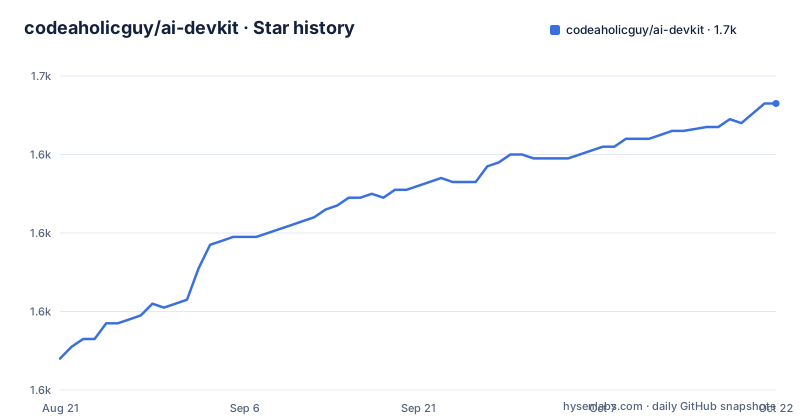
- codeaholicguy/ai-devkit1,653 ★ · +65
| Repository | 2026-08-21 | 2026-10-22 |
|---|---|---|
| codeaholicguy/ai-devkit | 1.6k | 1.7k |
65 Stars in the last 62 days, measured from the daily GitHub snapshot. Compare with other projects
Editorial analysis
The Problem: Scattered Agents, No Shared Operating Layer
The README paints a familiar picture: a developer starts with one assistant, then adds a second, then a third. Each tool has its own config file, its own MCP servers, and its own terminal tab. There is no single place to see what is running, no way to route a test failure from one agent to another, and no shared memory. Each session starts from zero, so yesterday's convention about DTOs is forgotten today. AI DevKit positions itself as the layer that fixes this. It is for developers whose AI coding setup has grown into what the README calls a small, messy team of agents. The tool does not replace any agent. It sits on top, giving them a common config, a console, a memory store, and a communication path.
How It Works: One Config, One Console, Addressable Agents
The core mechanism is a CLI called ai-devkit. You run npx ai-devkit@latest init, and a wizard asks which agents you use. It then writes a single .ai-devkit.json file that becomes the source of truth. From that file, it generates per-agent configs like .claude/settings.json or .cursor/rules, installs skills, and wires up MCP servers. The second piece is the console. ai-devkit agent list shows running sessions across providers, and agent console opens a live TUI dashboard. The third piece is communication. The agent send command routes prompts, logs, or stdin to a running agent, with a --wait flag to block for a response and --group to target a saved set of agents. The README even shows piping npm test output directly into an agent via --stdin. This is a control plane in the literal sense: it supervises, addresses, and directs agents that otherwise run in isolation.
Memory That Is Retrieved, Not Carried
A key design choice is memory. AI DevKit stores project decisions, conventions, and fixes in a local SQLite database. The CLI provides memory store and memory search commands. The memory is exposed through MCP, so agents can query it on demand. The README's example stores a convention about API handlers returning DTOs with tags and a repo scope, then searches for it before related work. The point is to avoid context bloat. Instead of stuffing every project rule into every prompt, the agent retrieves relevant facts only when a task needs them. This is a sound approach, but it depends on two things: the agent actually choosing to call the MCP tool, and the developer remembering to store conventions in the first place. The README does not describe any automatic extraction from past sessions, so the memory is only as good as what you put in.
Getting Started: The Init Wizard and What It Generates
The entry point is a single command: npx ai-devkit@latest init. The README claims a 30-second start. The wizard asks you to pick your agents and then writes project-local files. The generated structure shows a .ai-devkit.json at the root, per-agent directories like .claude/ or .cursor/ with skills and settings.json, and a docs/ai/ tree with folders for requirements, design, planning, and implementation. The docs folders correspond to the dev-lifecycle skill's phases. You can re-run init anytime your agent list changes. There is also a template path: save templates/senior-engineer.yaml locally and run ai-devkit init --template ./senior-engineer.yaml to bundle built-in skills with curated additions from Anthropic and Vercel. The README mentions the template includes TDD, frontend design, webapp testing, and doc co-authoring, though the list is truncated. The generated files are project-local, which means you can review and commit them, a good property for teams that want auditability.
The dev-lifecycle Skill: Turning Agents into an Engineering Team
The anchor skill is dev-lifecycle. It guides an agent through six phases: requirements, design, planning, implementation, testing, and review. The README says it prevents the agent from diving into code without a plan and producing the wrong thing. Other skills plug into that flow: verify blocks completion claims unless there is fresh test or build evidence, tdd pushes test-first work, structured-debug keeps debugging reproducible, and security-review, document-code, and simplify-implementation add focused passes when needed. The verify skill is particularly interesting because it directly addresses the README's complaint about agents saying "I've successfully implemented the feature" with a red build. The skills are composable, meaning you can combine them per task. This is a workflow opinion, not just a tool. It forces a process on agents that some developers may find heavy for small changes. The README acknowledges this by saying the control plane is useful on its own, and skills are for larger or riskier changes.
Limitations and Failure Modes
The README is honest about one limitation: agent groups and --wait are supported only where the underlying agent supports them. That means the cross-agent communication feature is not uniform across providers. If your agent does not support groups, the --group flag will not work. Another limitation is that memory requires manual storage. There is no automatic capture of decisions from past sessions, so the database can easily become stale. The skills are also an opinionated workflow. If you prefer a more free-form approach, the dev-lifecycle phase structure will feel like overhead. The README does not mention any conflict resolution when multiple agents write to the same repo, nor does it describe how the console handles agents that crash. The project is also young, with releases at 0.56.0, so the API may change. The license is listed as unknown in the repository metadata, though the README shows an MIT badge link. That discrepancy is worth checking before adoption.
Alternatives and the Difference in Approach
The obvious alternative is to use each agent's native configuration and a terminal multiplexer like tmux. That approach gives you no unified config, no shared memory, and no cross-agent communication. You would manage CLAUDE.md, .cursor/rules, and AGENTS.md separately, and copy test output between sessions by hand. AI DevKit's difference is the single .ai-devkit.json that reconciles those files, plus the MCP-exposed SQLite memory. Another alternative is a custom MCP server that you build yourself to give agents shared memory. That solves memory but not the console or the send command. AI DevKit bundles all three into one CLI. The trade-off is that you adopt a specific workflow and a new dependency. If you already have a working setup with one agent, the cost of adding this layer may exceed the benefit.
Maintenance and Upgrade Cost
The release cadence is active: three CLI releases in one week, from 0.54.0 to 0.56.0. That means fixes and features land quickly, but it also means you should pin the version you use. The init command is designed to be re-run, which reduces upgrade pain for configuration, but the CLI itself may introduce breaking changes before 1.0. The generated files are project-local and committed, so you can diff changes after each re-run. The memory database is local SQLite, so there is no server to maintain, but you do need to back it up if you care about the stored conventions. The license is a question mark. The repository metadata says unknown, while the README displays an MIT badge. You should confirm the actual license file in the repository before using it in a commercial product. The project depends on MCP, so you also inherit the maintenance burden of MCP server configurations across agents.
Editorial conclusion
Adopt AI DevKit if you run two or more coding agents and you are tired of maintaining separate CLAUDE.md, .cursor/rules, and MCP configurations. It is also a fit if you want a shared, searchable memory that does not bloat every prompt. Do not adopt it if you are happy with a single agent and a single terminal, or if you refuse to standardize on a workflow like dev-lifecycle. Before you commit, verify that the init wizard supports every agent you actually use, check how agent send handles agents that do not support groups or --wait, and inspect the generated .ai-devkit.json and skill files to confirm they match your security and review expectations. The project is under active release cadence, so pin the CLI version you adopt and re-run init when your agent list changes.
Frequently asked questions
What license is AI DevKit released under?
The sources disagree. The repository is recorded as Apache-2.0, while the root package.json declares MIT and the readme badge links to the MIT text. The two carry different obligations, so confirm which one applies before deriving work from it.
Where does AI DevKit store agent memory?
In a local SQLite database through @ai-devkit/memory, exposed to agents over MCP and to a person through the CLI. Entries carry a title, content, tags and a scope written as repo:owner/name. Retrieval is the point, so agents search for context instead of carrying it in every prompt.
Which coding agents does AI DevKit support?
The readme names Claude Code, Codex CLI, Gemini CLI, opencode, Pi, Cursor, GitHub Copilot and Devin, alongside other coding agents. init writes a per-agent directory such as .claude, .cursor or .codex with skills and a settings.json wiring MCP servers, and the root ships .claude-plugin, .codex-plugin and .cursor-plugin manifests.
Can AI DevKit control an agent from a phone?
A channel feature is documented for that purpose, with the readme describing piping a session through Telegram. The command given for it is incomplete, reading ai-devkit channel start telegr, so the accepted channel name has to come from the CLI rather than from the documentation.
How does AI DevKit stop an agent from claiming work is done?
The verify skill blocks completion claims that lack fresh test or build evidence, and dev-lifecycle walks requirements, design, planning, implementation, testing and review in order. tdd and structured-debug cover the neighbouring cases of behaviour changes and non-reproducible debugging.
Official sources
Add this badge to your README
If you maintain this project, the badge below links readers to this analysis and shows its maintenance status from the daily GitHub snapshot. Paste the markdown into your README; add ?metric=license or ?metric=stars to the image URL for a different field.

[](https://hysenlabs.com/projects/codeaholicguy-ai-devkit)Star history chart for your README
[](https://hysenlabs.com/projects/codeaholicguy-ai-devkit)