next-devtools-mcp is a proxy, and two of its four tools do nothing themselves
Next.js Development for Coding Agent
At a glance
- What is it?
- A Model Context Protocol server that finds a running Next.js dev server and relays its built-in endpoint, plus two gateways that only tell an agent where to look. The docs service it used to be moved into the framework itself, and the notes explain how to migrate.
- Who is it for?
- Use this server if you run Next.js 16 or newer and want your agent to see real build errors, routes and dev logs instead of guessing from source, and install it with the version left open so your client tracks the latest. Two things to know before you rely on it.
- Can I use it commercially?
- Not without permission. GitHub finds no licence file in the repository, and without a licence all rights are reserved by default: you may read the code but not reuse it. Check the README, or ask the authors, before using it.
- Is it still maintained?
- Yes. The repository last received commits 60 days ago.
- What is it written in?
- Mainly TypeScript, according to GitHub's language statistics.
Answers come from the project's GitHub data, last synced on November 14, 2026, and from our analysis. They are not legal advice.
Star history
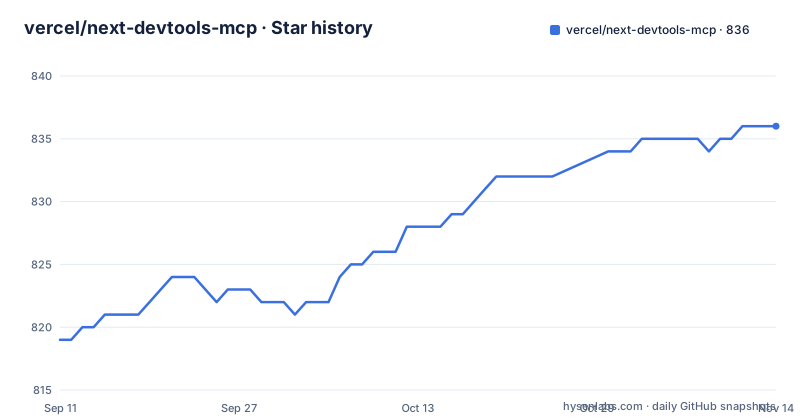
- vercel/next-devtools-mcp836 ★ · +17
| Repository | 2026-09-11 | 2026-11-14 |
|---|---|---|
| vercel/next-devtools-mcp | 819 | 836 |
17 Stars in the last 64 days, measured from the daily GitHub snapshot. Compare with other projects
Editorial analysis
The docs service moved into the framework
The server used to carry documentation and migration workflows, and it no longer does. A note near the top says so plainly and gives the reason twice over: recent Next.js releases bundle their own documentation inside the package, and the upgrade and Cache Components workflows are distributed as agent skills instead of from here. The path for those bundled documents is inside the installed framework, under its dist docs directory, and they are described as matching the version you have rather than the version on the website. The note also points at a migration section for people arriving from the 0.3 line, which matters because the tool list people remember from that version includes things this one has handed back to the framework. The result is a smaller server with a narrower job: it relays the dev server, and it tells you where the rest of the information now lives.
Two of the four tools only hand over instructions
The tool table has four rows and two of them are labelled as gateways rather than capabilities. One points the agent at the version-matched documentation inside the installed framework. The other points it at a separate browser automation command line tool published under another organisation, and tells the agent how to install and run it. Neither executes anything on the agent's behalf, and the reason given is speed: running the thing directly is quicker than routing it through a protocol server. That is an honest trade, but it means the tool count overstates what the package does. Of the four, two reach into a running dev server and return data, and two are pointers. If you are evaluating the package by counting tools, count two.
The docs tool can tell you it has nothing for you
Read carefully, the documentation tool never fetches documentation. It checks whether the installed framework release ships documents on disk, and if it finds them it returns reading instructions. If the release does not, which the page says includes early 16 point releases, it offers the public documentation site as a fallback and asks the agent to confirm every API against the version actually installed. If a dependency is missing entirely, that case gets installation guidance instead of a document path. Below version 16, the tool points at a codemod command instead. That last sentence is where the page stops: the recommendation names the codemod package and its runner and then ends, so the specific invocation and any arguments it would take are not given.
The tool names belong to Next.js, not to this server
Discovery is the first tool and it takes no parameters. It scans common ports for running development servers, checks the built-in endpoint each one exposes, and returns JSON listing every server it found with its port, process id and URL, plus the tools that server offers. The tools it lists are the framework's, and the page is explicit that which ones appear varies by version. On a given release you can expect current build, runtime and type errors, a path to the development log file covering both the browser console and server output, page metadata describing routes and components, project metadata covering structure, configuration and the server URL, and a lookup that resolves a Server Action identifier to the file it came from. The second tool then calls one of those by port and name. None of those names are this package's API, so a framework upgrade is also an API change here.
Upstream requests carry a deadline and cancellation propagates
The call tool takes a port, a tool name and an optional arguments object, and the example passes a port and a name with nothing else. What is more interesting is what the server does around that call. Every upstream request has a 60-second deadline, and the deadline covers reading the response body as well as receiving the headers, so a server that streams headers and then stalls cannot pin a process open. Cancelling the protocol request also aborts the network work behind it, rather than leaving a request running against the dev server after the agent has given up. Discovery has the same discipline from the other direction: response bodies that were opened only to work out whether the endpoint speaks the expected protocol are released rather than held. Those are small design decisions, and they are the difference between a proxy that is safe to leave running and one that is not.
Windows on Codex needs two variables and a longer timeout
The per-client instructions are the longest part of the page, and eight clients are named: a terminal coding agent, two AI coding tools, Cursor, the Gemini command in both project and user scope, another IDE, VS Code with Copilot, and Warp through its settings pane. Each gets a different command to register the server, and the shared shape is a command of npx with arguments pinning the package at its latest version, so the client is left tracking new releases. One client has an extra requirement. On Windows 11 the Codex configuration file needs two environment variables and a longer startup budget:
env = { SystemRoot="C:\\Windows", PROGRAMFILES="C:\\Program Files" }
startup_timeout_ms = 20_000
Without them the server process fails to start for reasons that have nothing to do with the protocol, which is the kind of failure that costs an afternoon.
The install command is one line for every client
The route that avoids all eight client sections is a separate installer package:
npx add-mcp next-devtools-mcp@latestOne flag skips the prompt and registers the server in every agent it detects on the machine, and another installs it globally so it applies to all projects rather than the current one. The manual alternative is a small JSON object naming the server, the command and the arguments, and the same object is repeated inside the client sections, which is why the note about staying on the latest version appears right after it. The runtime requirements are modest: Node at version 20.19 or a newer long-term support release, either package manager, and a Next.js 16 or newer dev server already running for the two tools that talk to it.
The package ships compiled output and the manifest is ahead of the last tag
A few facts come from the manifest rather than the page. The files array contains one entry, the compiled output directory, so the published tarball has no TypeScript source in it, and the build script is a plain compiler invocation with no bundler, so what you install is what the compiler emitted. The manifest version reads 0.4.1 while the newest tagged release is 0.4.0, dated 2026-06-24, and the last commit to the repository is dated 2026-09-15, which means a quarter of work sits between the last release anyone can install and the source at the tip. Releases are cut with a changeset tool and a changelog sits at the root, so the next tag should pick that work up. Dependency pinning is mixed, with the protocol SDK, the process finder, the port lookup and the validation library all held at exact versions while the HTTP client uses a range, and the declared package manager is a single pnpm version even though the requirements accept either package manager.
Editorial conclusion
Use this server if you run Next.js 16 or newer and want your agent to see real build errors, routes and dev logs instead of guessing from source, and install it with the version left open so your client tracks the latest. Two things to know before you rely on it. The docs tool reads whatever your installed release bundles, so on an early 16 point release it will hand the agent a fallback website and tell it to verify against your version. And the tool names it exposes come from Next.js, not from this project, so an upgrade to the framework can add, rename or drop them, which is worth checking when an agent call starts failing.
Frequently asked questions
What does the next-devtools-mcp server actually connect to?
To a running Next.js 16 or newer development server, via the built-in endpoint the framework exposes at /_next/mcp. It discovers servers by scanning common ports and then relays calls to that endpoint.
Why are two of the next-devtools-mcp tools called gateways?
The docs tool and the browser automation tool do not run anything themselves. They return instructions telling the agent where the version-matched documentation lives or how to run the browser CLI directly, which the page says is faster than proxying through the protocol.
Where does next-devtools-mcp get its documentation?
From the installed framework, which bundles markdown docs under its dist docs directory. If a release ships none, including early 16 releases, the tool falls back to the public documentation site and tells the agent to verify APIs against the installed version.
Which tools does a Next.js dev server expose to the agent?
Whichever the running framework version provides: current build, runtime and type errors, a path to the development log file, page and project metadata, and a lookup resolving a Server Action id to its source file. The set varies by version.
What extra setup does Codex need on Windows 11?
The configuration file needs two environment variables, SystemRoot and PROGRAMFILES, and a startup timeout of 20,000 milliseconds, because the server process cannot start without them.
Is the next-devtools-mcp source included in the published package?
No. The manifest lists only the compiled output directory in its files array, and the build is a plain TypeScript compile. The manifest version also reads 0.4.1 while the newest tag is 0.4.0.
Official sources
Add this badge to your README
If you maintain this project, the badge below links readers to this analysis and shows its maintenance status from the daily GitHub snapshot. Paste the markdown into your README; add ?metric=license or ?metric=stars to the image URL for a different field.

[](https://hysenlabs.com/projects/vercel-next-devtools-mcp)Star history chart for your README
[](https://hysenlabs.com/projects/vercel-next-devtools-mcp)Was this useful?