Code Maze Guides: 800 runnable .NET samples, one folder each
Source code for 800+ C# and .NET articles from code-maze.com. Every article is a runnable solution, most with tests.
At a glance
- What is it?
- CodeMazeGuides is the repository behind the code-maze.com blog, holding one self-contained solution per article with tests for most of them, organised by topic. It suits a .NET developer who wants working code for a specific API rather than a prose tutorial, and the whole repository is far too large to clone in full.
- Who is it for?
- Adopt CodeMazeGuides as a reference shelf rather than a dependency, because every article is a self-contained solution with its own project file and tests, which means you can copy a working example of a specific API without reconstructing it from prose. Do not clone the whole repository for a single article, because the README explicitly says the full repository is large and gives a sparse checkout recipe instead.
- Can I use it commercially?
- Yes. MIT is a permissive licence: you can use, modify and sell software built on it, as long as you keep its copyright and licence notices.
- Is it still maintained?
- Yes. The repository last received commits 1 day ago.
- What is it written in?
- Mainly C#, according to GitHub's language statistics.
Answers come from the project's GitHub data, last synced on November 7, 2026, and from our analysis. They are not legal advice.
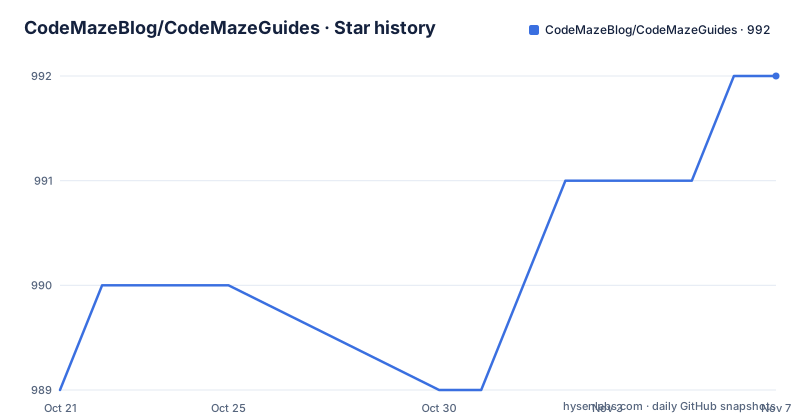
Star history
- CodeMazeBlog/CodeMazeGuides992 ★ · +3
| Repository | 2026-10-21 | 2026-11-07 |
|---|---|---|
| CodeMazeBlog/CodeMazeGuides | 989 | 992 |
3 Stars in the last 17 days, measured from the daily GitHub snapshot. Compare with other projects
Editorial analysis
One article, one solution, one folder
CodeMazeGuides holds the source code for 800+ C# and .NET articles from code-maze.com, and the rule the README states is that every article gets its own runnable solution, most with tests.
The repository layout makes the structure concrete:
CodeMazeGuides/
├── <topic>/                  # one folder per topic, e.g. aspnetcore-webapi
│   └── <article-folder>/     # one folder per article
│       ├── <Project>.sln     # its own solution
│       ├── <Project>/        # the example code
│       └── Tests/            # tests, in most articles
└── .github/workflows/        # PR build: builds and tests changed projects
So an article is not a fragment in a shared project. It is a solution with its own file, its own code folder and, in most cases, its own test project. And each article is self-contained, so you never need to build the whole repository.
That design is the difference between this and a typical sample repository. A shared sample project accumulates a solution file with 200 references and a package reference graph that breaks when one dependency moves. Here, the blast radius of a broken example is one article, and the pull request workflow builds and tests only the changed projects, which is what makes a repository this size viable at all.
The blog itself is described as being written with simplicity and pragmatism in mind, with hands-on articles that focus on the core of each topic and show working code rather than theory alone. The MIT licence says the code can be used freely in your own projects.
The quick start, and the sparse checkout that saves the clone
The quick start is five commands in a single block.
git clone https://github.com/CodeMazeBlog/CodeMazeGuides.git
cd CodeMazeGuides/<topic>/<article-folder>
dotnet build
dotnet run
dotnet test
The only prerequisite is the.NET SDK, and the instruction about it is precise: each project states its target framework in its.csproj file, so you install the version that project asks for. That is a real consideration with 800 projects, since they were written across many.NET versions and the SDK you have may not be the one a given project targets.
The tip below the quick start is the practical advice. The full repository is large, and to get only one article you use a sparse checkout:
git clone --filter=blob:none --sparse https://github.com/CodeMazeBlog/CodeMazeGuides.git
cd CodeMazeGuides
git sparse-checkout set <topic>/<article-folder>
The filter and the sparse flag together mean the clone does not fetch the file contents of the parts you do not want, and the sparse-checkout command then narrows the working tree to one article. For a developer who only wants the ASP.NET Core Web API example, that is the difference between a short download and a very long one.
The three dotnet commands are the whole workflow: build to check it compiles, run to see the thing work, and test to run the tests that came with it. The presence of dotnet test in the sequence is a statement about the repository's quality bar, since the tests are what makes the samples trustworthy rather than merely illustrative.
The topic map, and where the projects actually are
The browse by topic section gives a table per category with the number of article projects in each folder, and the distribution is informative about what a.NET developer actually reads.
Under the C# language heading, the counts are C# basics 45, C# intermediate 48, C# advanced 28, strings 39, LINQ 20, numbers 19, classes structs and records 11, async programming 11, exception handling 10, methods 9, threads 7, operators 5 and refactoring 5.
Collections has collections 24, arrays 24, lists 16 and dictionaries 9. ASP.NET Core and Blazor has ASP.NET Core Web API 56, ASP.NET Core features 52, authentication and authorization 23, Blazor features 11, Blazor libraries 2, query strings 6 and Angular 1.
Data and serialization has JSON 29, Entity Framework Core 28, files and streams 23, date and time 22, XML 6, Dapper 4, MongoDB 3 and searching 1.
Architecture and design has architectural patterns 13, design patterns 12, dependency injection 11, DI tools 3, microservices 2 and domain-driven design 1.
Libraries, tooling and operations has client libraries 60, testing 32, logging 13, projects 13, performance 9, Visual Studio 5, base libraries 3, platform-specific code 3,.NET CLI 2 and deployment 2.
And algorithms, AI and more has algorithms 13, machine learning 5, images 3 and AI 1.
Two observations follow. The web API and general ASP.NET Core folders are among the largest, which matches where the mass of.NET work has been. And the client libraries folder at 60 is the single largest topic of all, which tells you the library ecosystem coverage is deliberate rather than incidental.
The top level of the repository is the same list as folders, one per topic, from angular/ and aspnetcore-features/ through to visual-studio/ and xml-csharp/, which means the folder names are the topic names in the tables.
What the blog side brings, and what a reader should expect
The repository exists to serve the blog, so understanding the blog explains the shape of the code.
Code Maze is described as a blog about C# and .NET written with simplicity and pragmatism in mind, and the articles are hands-on, focusing on the core of each topic and showing working code rather than theory alone. The repository holds that code, and the README says the article links to its exact folder, so the path from a search result to a running project is one click.
That framing sets expectations about what you will find in a folder. These are demonstration projects, not a framework and not a library. They exist to show one API working, which means they are deliberately narrow, they are dated to the article, and they are not maintained as products. The exception is that most of them carry tests, which is what turns a snippet into something you can trust the behaviour of.
The surrounding ecosystem is the same one the articles sit in. There is a courses site, a YouTube channel, an issue tracker for reporting broken examples, and a link back to the blog from every repository page. The topics attached to the repository name the stack: aspnetcore, blazor, csharp, dotnet, efcore, code-samples and tutorials.
The site itself is at code-maze.com, and the repository description says the source code for the articles, with the last push to the main branch on 2026-10-19, which tells you the collection is being added to continuously rather than being an archived dump of a few years of writing.
The PR build, and what happens when an example breaks
The contributing section addresses a specific problem that a repository of this kind inevitably runs into.
Found a bug in an example, or does a project not build on a newer.NET version? Open an issue or send a pull request, and the PR build checks every changed project automatically.
That is the mechanism that keeps eight hundred examples working against a moving.NET release. Without it, the repository would accumulate a tail of projects that stopped compiling at some point in the past, and the value of the collection would decay as developers found that half the samples no longer built. The workflow at.github/workflows/ builds and tests only what changed, which is what makes the check affordable to run on every pull request.
The wording of the contribution invitation is also revealing. Asking whether a project builds on a newer.NET version treats version drift as an expected, reportable condition rather than a defect, and asking for a pull request to fix it invites the reader to do the work of updating the example.
The support model is straightforward. The blog is free and the courses keep it that way, and there is a note that a star on the repository helps other developers find it, alongside links to the blog, the courses and a YouTube channel.
There are no GitHub releases, and the project has no version of its own, which is consistent with the design. The unit of delivery is an article folder, not a package you can depend on.
Editorial conclusion
Adopt CodeMazeGuides as a reference shelf rather than a dependency, because every article is a self-contained solution with its own project file and tests, which means you can copy a working example of a specific API without reconstructing it from prose. Do not clone the whole repository for a single article, because the README explicitly says the full repository is large and gives a sparse checkout recipe instead. Before you run anything, read the target framework stated in the project's .csproj file and install that SDK version, since the projects span different framework versions, and expect the examples to reflect the article's original .NET version rather than the newest one.
Frequently asked questions
How do I get one article's code from CodeMazeGuides?
Use a sparse checkout: `git clone --filter=blob:none --sparse https://github.com/CodeMazeBlog/CodeMazeGuides.git`, then `cd CodeMazeGuides` and `git sparse-checkout set <topic>/<article-folder>`. The full repository is large, and the README gives this recipe specifically to avoid cloning it. A full clone followed by `dotnet build`, `dotnet run` and `dotnet test` in the article folder works too.
What does each article folder in CodeMazeGuides contain?
Each article is self-contained with its own solution file, a project folder holding the example code, and a Tests folder in most articles. The repository layout is one folder per topic, for example aspnetcore-webapi, and one folder per article inside it, and you never need to build the whole repository.
Which topics does the Code Maze Guides repository cover?
The tables count projects per topic. C# language topics run from basics with 45 projects through intermediate with 48 and advanced with 28, plus strings, LINQ, numbers, records, async, threads, exceptions and refactoring. Collections has 24, ASP.NET Core Web API has 56 and ASP.NET Core features 52, Entity Framework Core has 28, JSON 29, testing 32 and client libraries 60, with architecture patterns, dependency injection, algorithms, machine learning and AI also present.
What happens if an example no longer builds on a newer .NET version?
The contributing section says to open an issue or send a pull request, and the PR build workflow builds and tests every changed project automatically, so the collection does not silently rot against a moving .NET release. The licence is MIT and the code can be used freely in your own projects.
Official sources
Add this badge to your README
If you maintain this project, the badge below links readers to this analysis and shows its maintenance status from the daily GitHub snapshot. Paste the markdown into your README; add ?metric=license or ?metric=stars to the image URL for a different field.

[](https://hysenlabs.com/projects/codemazeblog-codemazeguides)Star history chart for your README
[](https://hysenlabs.com/projects/codemazeblog-codemazeguides)Was this useful?