Tri Inspector for Unity 6: attributes, drawers, and inspector workflows
Free inspector attributes for Unity [Custom Editor, Custom Inspector, Inspector Attributes, Attribute Extensions]
At a glance
- What is it?
- Tri Inspector is an MIT-licensed Unity package that adds inspector attributes, specialized field controls, validation, and inline editing. Version 2.0 is built on UI Toolkit, targets Unity 6, and remains marked as a preview release.
- Who is it for?
- Adopt Tri Inspector 2.0 if your team already uses Unity 6 and wants attribute-based inspector customization without building each drawer from scratch. Do not adopt it as the default for a stable 1.x workflow while 2.0 remains a preview.
- Can I use it commercially?
- Yes. MIT is a permissive licence: you can use, modify and sell software built on it, as long as you keep its copyright and licence notices.
- Is it still maintained?
- Yes. The repository last received commits 11 days ago.
- What is it written in?
- Mainly C#, according to GitHub's language statistics.
Answers come from the project's GitHub data, last synced on November 7, 2026, and from our analysis. They are not legal advice.
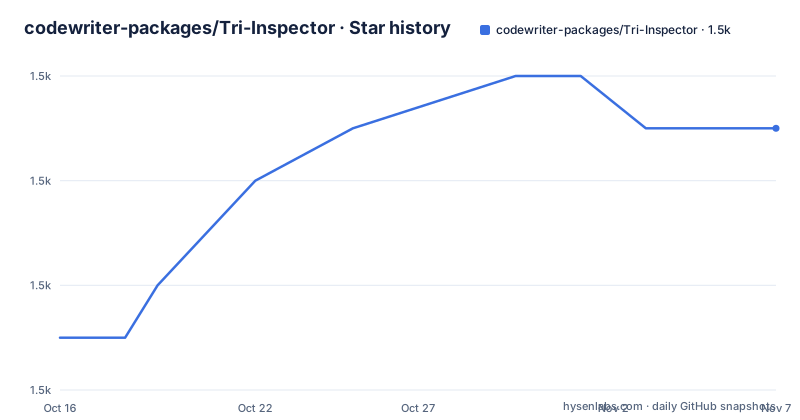
Star history
- codewriter-packages/Tri-Inspector1,461 ★ · +4
| Repository | 2026-10-16 | 2026-11-07 |
|---|---|---|
| codewriter-packages/Tri-Inspector | 1.5k | 1.5k |
4 Stars in the last 22 days, measured from the daily GitHub snapshot. Compare with other projects
Editorial analysis
Why Tri Inspector targets Unity editor customization
Tri Inspector solves a specific Unity Editor problem: the default inspector does not give every serialized field a control that matches its meaning. A scene name should be selected from build settings, a required reference should produce a visible error when it is missing, and a numeric range should be edited with a bounded control instead of a raw number box. Tri Inspector packages those decisions as attributes attached to fields and properties.
The intended users are Unity developers who want richer authoring interfaces for designers, technical artists, and other people working inside the Inspector. It can expose a non-serialized property with `[ShowInInspector]`, prevent editing with `[ReadOnly]`, and attach validation or explanatory UI without requiring a separate custom inspector for every component.
The repository description calls these inspector attributes and attribute extensions, but the README shows a wider scope. It includes specialized drawers, inline asset inspection, dictionary display, list reordering, and prefab workflow support. That distinction matters when evaluating the package. Tri Inspector is not only a collection of labels or metadata. It changes how Unity presents and edits fields in the editor.
Version 2.0 is specifically aimed at Unity 6 and above. The package manifest declares Unity `6000.0`, so a project using an older Unity release should not assume compatibility with the 2.0 line.
How UI Toolkit changes Tri Inspector 2.0
The README states that version 2.0 was rebuilt around Unity's UI Toolkit and that its rendering pipeline was rewritten from the previous IMGUI backend. The practical consequence is a new editor integration path rather than a small attribute library update. The package includes runtime, editor, editor samples, editor extras, and editor integration directories, which is consistent with a package that contains both runtime-visible metadata and Editor-specific drawing code.
A typical field flow starts with a C# field or property carrying a Tri Inspector attribute. The package recognizes that attribute and asks the relevant drawer to render the field. The exact internal dispatch code is not documented in the README, so the repository layout supports this architectural description but does not establish further implementation details. In particular, the README does not document the names of interfaces, classes, or callbacks responsible for attribute resolution.
Version 2.0 also adds behavior that matters beyond visual styling. The README says modified properties are highlighted, can be reverted, and apply correctly across prefab instances and variants. It also states that `[TableList]` rows can be dragged and reordered, and that dictionaries can be displayed and edited across supported Unity versions. Starting with Unity 6.6, the README says Unity itself fully serializes dictionaries.
That last point is a useful boundary. Before Unity 6.6, Tri Inspector can display and edit dictionaries according to the README, but the project does not claim that Unity's native serializer provides the same support. Teams designing data around dictionaries should verify their target editor version before choosing the package.
Tri Inspector attributes for validation and field choices
The package's main advantage is that field behavior is declared close to the data definition. `[Required]` marks a field as required and shows an error when it is not assigned. The README also documents an optional fix action that can run custom logic, such as assigning a discovered reference automatically. That makes the attribute more than a visual warning, although the exact method signature is not included in the README.
`[ValidateInput]` runs a custom validation method whenever the field changes and displays an error or warning in the Inspector. This is appropriate for constraints that depend on the current value, such as a value relationship or a project-specific rule. The README does not specify the exact callback signature, return type, or supported target types, so those details need to be checked in the package documentation or source before implementation.
`[Dropdown]` replaces the default field input with predefined choices. The README says the values may be static constants or generated at runtime. `[Scene]` uses a related specialization: it renders a string as a scene picker populated from project build settings. The package also documents `[Layer]`, `[AnimatorParameter]`, and `[MaterialProperty]` drawers for their corresponding Unity data.
For numeric fields, `[Slider]` provides fixed or dynamic minimum and maximum bounds. `[MinMaxSlider]` maps a Vector2 field to a lower and upper range control. These drawers are useful when an unrestricted numeric input would make invalid authoring easier. They also introduce design decisions: a range is only helpful if the bounds match the underlying data contract. The README does not document behavior for non-numeric targets or invalid dynamic bounds.
`[InlineEditor]` embeds the full Inspector for a referenced asset below the parent Inspector. `[Preview Mesh]` adds an interactive 3D mesh preview below a GameObject field. These features target authoring workflows where selecting a second object and switching context would slow down inspection or adjustment.
The built-in Samples Window as the first practical use
The clearest documented first use is not to create a component from scratch. The README instructs users to open `Tools/Tri Inspector/Samples`, which opens the built-in Samples Window. The window organizes attributes by category and provides live sample fields. Selecting a sample displays its source code, allowing the user to see the attribute usage without leaving the Editor.
A new user should open that window, select `[ShowInInspector]`, and compare the displayed sample with a private or otherwise hidden field in their own component. Then inspect `[ReadOnly]` and `[Required]` to see how the same underlying C# field can be exposed, protected, or checked. This is a practical way to learn the package because the README does not provide a full installation command or a complete code listing.
The repository includes `package.json`, `Editor.Samples/`, `Editor/`, `Runtime/`, and `Editor.Integrations/`, but the README does not document whether installation should be performed through OpenUPM, the Unity Package Manager URL, or a local package checkout. It does, however, identify the OpenUPM package name as `com.codewriter.triinspector` and link to the OpenUPM page. The package manifest also declares the dependency `com.unity.localization` at version `1.0.0`.
The first verified actions are to inspect the package's installation page or repository instructions, confirm that `com.unity.localization` can be resolved, and then use `Tools/Tri Inspector/Samples` after the package appears in Unity.
Prefab support and the 2.0 preview trade-off
The prefab workflow support is the most concrete editor-lifecycle feature described for version 2.0. According to the README, modified properties are highlighted, revertable, and applied correctly across prefab instances and variants. That claim addresses a common failure mode in custom inspectors: a drawer may appear to work on a prefab instance while failing to preserve override state or making revert behavior unclear.
The README does not document a rollback command or a supported recovery procedure for a bad prefab change. It does not provide a list of known bugs, compatibility exceptions, or test coverage. The warning that 2.0 is a preview release is therefore significant. The project explicitly tells users who need a stable experience to install the latest `1.x.x` release from the `1.x.x` branch.
That choice affects adoption. Teams with established Unity tooling, serialized assets, and a need for predictable editor behavior may prefer the stable 1.x line. Teams already on Unity 6 who need the rewritten UI Toolkit backend or the newer prefab and dictionary behavior can evaluate 2.0, but should treat it as preview software rather than a settled upgrade path.
The README also says version 2.0 includes new styles for lists, groups, and info boxes. Those visual changes can affect custom Inspector layouts, screenshots, onboarding documentation, or editor extensions that depend on the previous presentation. The documentation does not describe a compatibility layer for older custom drawer implementations, so that is another item to verify in the source before upgrading.
Tri Inspector compared with writing custom Unity inspectors
The real alternative is implementing custom inspectors and property drawers directly in a Unity project. Unity's editor APIs can provide a custom `Editor` or `PropertyDrawer` for a type or attribute. That approach gives the project full control over rendering and behavior, while Tri Inspector supplies reusable attributes and drawers that can be attached to fields.
The trade-off is scope. Tri Inspector is useful when the desired behavior is close to its documented set, including required fields, validation, dropdowns, sliders, scene selection, read-only display, inline asset inspection, and list presentation. Writing a custom drawer may be clearer when a project needs a domain-specific control that is not represented by those attributes, or when the Inspector must coordinate tightly with another editor extension.
Tri Inspector also has a package-level dependency on Unity's localization package. A project can therefore face dependency and upgrade questions that a small local custom drawer would avoid. The README does not document whether optional integrations with Odin Inspector or Odin Validator are required for core features, so those integrations should not be assumed to be part of the base workflow.
The MIT license permits use and modification under its terms, but teams should still review `LICENSE.md` for their distribution and notice obligations. The license does not remove the need to test serialized data, prefab overrides, and editor UI behavior in the target Unity version.
Maintenance, releases, and upgrade boundaries
The repository is not archived, and the last push was on 2026-09-24. That indicates a recently updated project, but release cadence is not a substitute for compatibility testing. The latest listed releases are `1.15.1` on 2025-10-01, `1.15.0` on 2025-09-20, and `1.14.1` on 2024-07-19. The repository's package manifest currently declares version `2.0.0`, matching the preview line described in the README.
The upgrade path is not a simple version-number change for teams that need stable behavior. The README directs users to the `1.x.x` branch when they want the latest stable release, while the 2.0 warning explicitly notes that the preview may contain bugs. It does not document a migration guide, automated migration tool, or list of breaking changes for custom Inspector extensions.
The MIT license supports adoption under its stated conditions, while the package dependency on `com.unity.localization` and the Unity `6000.0` requirement affect compatibility. An editor package can also affect serialized data and prefab workflows, so upgrading should be evaluated as an editor tooling change rather than only as a dependency update.
Editorial conclusion
Adopt Tri Inspector 2.0 if your team already uses Unity 6 and wants attribute-based inspector customization without building each drawer from scratch. Do not adopt it as the default for a stable 1.x workflow while 2.0 remains a preview. Before choosing it, verify the Unity version, the required attribute set, the localization dependency, and whether your project accepts preview-release behavior.
Frequently asked questions
How do I install Tri Inspector for Unity?
The README does not give a concrete installation procedure. It identifies the OpenUPM package name as `com.codewriter.triinspector` and links to its OpenUPM page; follow that project installation path and verify the declared `com.unity.localization` dependency.
What Unity version does Tri Inspector 2.0 require?
Tri Inspector 2.0 requires Unity 6 and above. The repository package manifest declares Unity `6000.0`, while the README describes the package as a preview release.
Where can I see examples of Tri Inspector attributes?
Open `Tools/Tri Inspector/Samples` in Unity. The built-in Samples Window provides categorized examples, live Inspector fields, and the source code for each sample attribute.
Can Tri Inspector edit dictionaries in Unity?
The README states that dictionaries can be displayed and edited across all supported Unity versions. Starting with Unity 6.6, it also states that Unity itself fully serializes dictionaries.
Does Tri Inspector support prefab overrides and variants?
The 2.0 README states that modified properties are highlighted, revertable, and applied correctly across prefab instances and variants. It does not document additional rollback procedures or known limitations.
Official sources
Add this badge to your README
If you maintain this project, the badge below links readers to this analysis and shows its maintenance status from the daily GitHub snapshot. Paste the markdown into your README; add ?metric=license or ?metric=stars to the image URL for a different field.

[](https://hysenlabs.com/projects/codewriter-packages-tri-inspector)Star history chart for your README
[](https://hysenlabs.com/projects/codewriter-packages-tri-inspector)Was this useful?