UIEffect v5: stacking grayscale, blur and dissolve filters on Unity UI, and what each install route costs
UIEffect is an open-source package that allows you to intuitively apply rich UI effects directly from the Inspector or via code. Combine various filters, such as grayscale, blur, and dissolve, to decorate your UI with a unique visual style!
At a glance
- What is it?
- mob-sakai/UIEffect is an MIT licensed Unity package that applies filter combinations to UI elements from the Inspector or from code. This piece walks through its component model, its four install routes and the version pinning traps in them, and the v4 to v5 split.
- Who is it for?
- UIEffect fits Unity projects on 2020.3 or later that want layered UI filters, tweened effects and TextMeshPro support without writing shaders. Install it through OpenUPM or a git URL pinned to a release tag such as 5.11.7.
- Can I use it commercially?
- Yes. MIT is a permissive licence: you can use, modify and sell software built on it, as long as you keep its copyright and licence notices.
- Is it still maintained?
- Yes. The repository received new commits within the last day.
- What is it written in?
- Mainly C#, according to GitHub's language statistics.
Answers come from the project's GitHub data, last synced on November 14, 2026, and from our analysis. They are not legal advice.
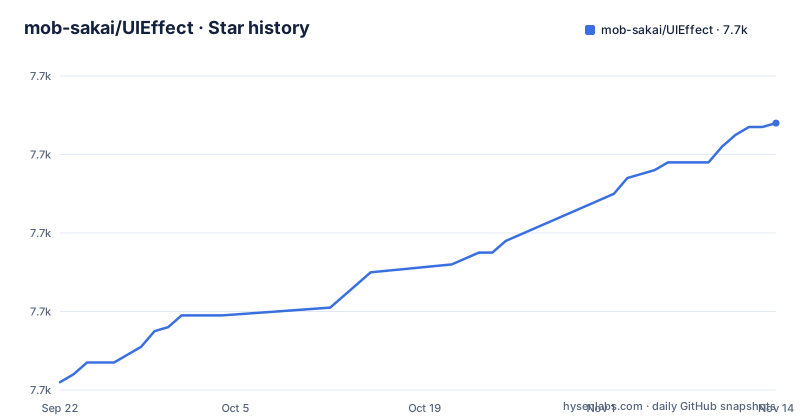
Star history
- mob-sakai/UIEffect7,728 ★ · +66
| Repository | 2026-09-22 | 2026-11-14 |
|---|---|---|
| mob-sakai/UIEffect | 7.7k | 7.7k |
66 Stars in the last 53 days, measured from the daily GitHub snapshot. Compare with other projects
Editorial analysis
Filters stacked on a single UIEffect component
The core of v5 is one component, UIEffect, that holds several filter groups at once. Its settings are split into a Tone Filter, Color Filter, Sampling Filter, Transition Filter and Detail Filter, plus Target Mode, Blend Type, Shadow Mode, Gradation Mode, Edge Mode and Flip. Grayscale, blur and dissolve come from combining these groups and their parameters, and everything is adjustable in the Inspector without code.
Two companion components extend it. UIEffectTweener plays, stops, pauses and resumes an effect. UIEffectReplica copies one effect onto many UI elements, so a shared look is set once rather than per element. Effects can also be driven by AnimationClips, and through Timeline with ControlTrack and UIEffect Tracks.
Only the shader variants you use get built
UIEffect builds only the shader variants actually in use, and the stated payoff is shorter build times. The package also works under URP, HDRP and VR, and offers presets that apply both at runtime and in the editor.
UIEffect also has its own Project Settings entry, split into Settings, Editor and Shader sections. The consequence for a team is that the set of effects in a build is tied to what the project uses. An effect configured only at runtime from code, never placed in a scene or preset, is the case to check in your own build before release, since the variant stripping is what keeps build times down.
Four install routes, and only OpenUPM is built around updates
UIEffect v5 requires Unity 2020.3 or later. OpenUPM is the preferred route because updates arrive as they are released. With openupm-cli installed, run this in the project directory:
openupm add com.coffee.ui-effectTo move to a specific version, append it:
openupm add [email protected]That example pins 5.9.0, which is older than the current 5.11.7 release, so substitute the version you actually want. Updates also work from Window > Package Manager.
A bare git URL leaves the version floating
Without OpenUPM, add the package through Window > Package Manager with + > Add package from git URL, using https://github.com/mob-sakai/UIEffect.git?path=Packages/src, or edit Packages/manifest.json directly:
{
  "dependencies": {
    "com.coffee.ui-effect": "https://github.com/mob-sakai/UIEffect.git?path=Packages/src",
    ...
  }
}
That URL carries no version suffix, so it follows the repository rather than a release. To pin, append #{version}, for example #5.9.0. Releases have been frequent: 5.11.5 on 2026-07-23, 5.11.6 on 2026-08-17 and 5.11.7 on 2026-08-27, the same day as the last push. Two machines resolving an unpinned URL weeks apart can end up on different code.
The embedded package trades updates for editable source
The fourth route is to download Source code (zip) from the GitHub Releases page, extract it, and move the Packages/src directory into your project's Packages directory. You may rename src. This is the recommended route if you plan to fix bugs or add features, because the source lives in your project.
The cost is that nothing updates it for you. Updating means downloading again and replacing the contents, which overwrites any local fixes you made unless you carry them forward by hand.
v5 is a separate line from v4
The main README covers v5 only; v4 has its own README on the upm branch. For projects moving across, v5 offers optional v4 compatible components so an upgrade can start with minimal changes, and there is a dedicated Upgrading from v4 to v5 section. These compatibility components are an import, not a default, so a v4 project dropped onto v5 without them will not find its old components.
TextMeshPro, SoftMask and ShaderGraph support are separate imports
Several integrations ship as additional resources you import, not as part of the base install. TextMeshPro is supported, including the <font> and <sprite> tags. SoftMaskForUGUI support is optional and pairs UIEffect with that package for soft masks on UI elements. ShaderGraph support is optional and adds a Canvas (UIEffect) sub target. Custom shaders have their own usage section too. If one of these integrations does nothing after install, check that its resources were imported. A WebGL demo is hosted at https://mob-sakai.github.io/UIEffect/ for previewing effects before installing.
Editorial conclusion
UIEffect fits Unity projects on 2020.3 or later that want layered UI filters, tweened effects and TextMeshPro support without writing shaders. Install it through OpenUPM or a git URL pinned to a release tag such as 5.11.7. Teams still on v4 should read the v4 README and plan the upgrade around the optional compatibility components before switching, and anyone on Unity older than 2020.3 cannot use v5 at all.
Frequently asked questions
What is the UI effect package UIEffect?
UIEffect is an open-source Unity package by mob-sakai that applies filters such as grayscale, blur and dissolve to UI elements, either from the Inspector or from code. It is MIT licensed.
What kind of Unity UI does UIEffect work with?
UIEffect decorates Unity UI elements, including TextMeshPro text with <font> and <sprite> tags, and works under URP, HDRP and VR. It requires Unity 2020.3 or later.
What is UIEffect's latest version and how is it installed?
The latest UIEffect release is 5.11.7, published on 2026-08-27. It installs through OpenUPM as com.coffee.ui-effect, through a git URL in Package Manager or manifest.json, or as an embedded package.
Official sources
Add this badge to your README
If you maintain this project, the badge below links readers to this analysis and shows its maintenance status from the daily GitHub snapshot. Paste the markdown into your README; add ?metric=license or ?metric=stars to the image URL for a different field.

[](https://hysenlabs.com/projects/mob-sakai-uieffect)Star history chart for your README
[](https://hysenlabs.com/projects/mob-sakai-uieffect)Was this useful?