Collapse: a HoYoverse game launcher with region conversion and delta patching
An Advanced Launcher for miHoYo/HoYoverse Games
At a glance
- What is it?
- Collapse started as an alternative launcher for Honkai Impact 3rd and grew into a client for every currently released miHoYo game, plus external games through its plugin system. This looks at what it does that the official launchers do not, and what the Windows-only build costs you.
- Who is it for?
- Collapse fits a Windows player of Honkai Impact 3rd, Genshin Impact or the other miHoYo titles who wants region conversion, cache downloads, delta-patched updates and repair tools that the official launcher does not expose. It does not fit a macOS or Linux player, since the ready-to-use build requires Windows 10 1809 build 17763 or later, and it is the wrong choice for a user who only wants the official launcher with its own account and store flow.
- Can I use it commercially?
- Yes. MIT is a permissive licence: you can use, modify and sell software built on it, as long as you keep its copyright and licence notices.
- Is it still maintained?
- Yes. The repository received new commits within the last day.
- What is it written in?
- Mainly C#, according to GitHub's language statistics.
Answers come from the project's GitHub data, last synced on November 7, 2026, and from our analysis. They are not legal advice.
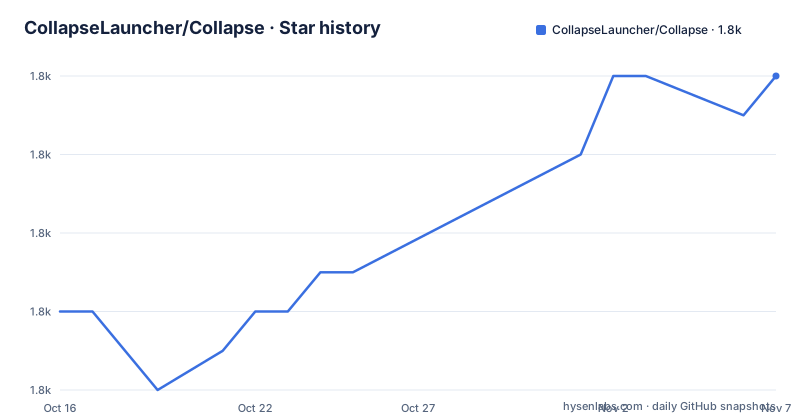
Star history
- CollapseLauncher/Collapse1,792 ★ · +6
| Repository | 2026-10-16 | 2026-11-07 |
|---|---|---|
| CollapseLauncher/Collapse | 1.8k | 1.8k |
6 Stars in the last 22 days, measured from the daily GitHub snapshot. Compare with other projects
Editorial analysis
It began as a Honkai Impact 3rd alternative launcher
Collapse was originally designed for Honkai Impact 3rd, and the name explains why. The word came from the Honkai Impact translation in Chinese and Japanese, from the characters meaning collapse, and the naming carried the original intent of being an alternative, enhanced launcher for that one game.
The project has since grown into a game client for all currently released miHoYo Games, and the project documentation goes further, saying it handles external games through its plugin system. The audience is players, and specifically players who have run into the official launcher's limits.
The feature list for Honkai Impact 3rd is where the intent is clearest. The project enumerates capabilities that the official launcher does not have: caches download, described as updating settings in-game; game data repair with less bandwidth required than the in-game repair; changing graphics and audio settings without opening the game; multi-region game download support, so different versions of the game can be downloaded and launched; conversion from Steam to the global version without re-downloading the whole game, and conversion between global and SEA versions; multi-session download for faster installation; multi-thread game extraction; a delta-patch update mechanism for smaller updates; and the ability to select the graphics API, DirectX 11 or DirectX 12.
For Genshin Impact the documented additions are narrower but specific: choosing the voice-line language during the first installation, and repairing the game files including caches, cutscenes, audio pack and persistent files outside the game.
The plugin system is what turns a launcher into a client
The architectural decision that matters most for the project's future is the plugin system, and it is the reason the scope can grow beyond a fixed list of games.
Everything else in the project is game-specific knowledge: how a region manifest is fetched, how a delta patch is assembled, how a repair pass is computed. If that knowledge is hard coded per game, the launcher is a fixed product with a fixed feature set and a new game means a new release. With a plugin system, the launcher becomes a host, and the game-specific parts become plugins.
The repository layout backs this reading. The solution file `CollapseLauncher.sln` sits alongside a set of shared libraries named with a `Hi3Helper` prefix, including `Hi3Helper.Plugin.Core`, `Hi3Helper.Core`, `Hi3Helper.Http`, `Hi3Helper.Win32`, `Hi3Helper.TaskScheduler`, `Hi3Helper.Sophon`, `Hi3Helper.EncTool`, `Hi3Helper.SharpDiscordRPC`, `Hi3Helper.LocaleSourceGen` and `Hi3Helper.SourceGen`. A dedicated `Hi3Helper.Plugin.Core` project, sitting alongside a shared HTTP layer and a task scheduler, is the shape of a plugin host rather than a monolithic application.
The naming is a legacy of the project's history, and it is worth remembering that the prefix predates the multi-game scope. The Windows specific pieces are named for the same reason, with `Hi3Helper.Win32` and a separate `H.NotifyIcon` project for the tray icon.
The cost of the plugin approach is that the documentation for what a plugin can do is not in this repository. The project points readers to a features page on its own website for the supported feature list, and the repository does not carry a plugin authoring guide.
Delta patching and region conversion are the two hard features
Two of the documented features are worth understanding, because they are the ones that change what a download costs you.
The delta-patch update mechanism applies differences to an existing installation rather than fetching a whole new package, which is what makes updates smaller. The project links to a wiki page on updating a game region with a delta patch. This is the feature that matters most for a player with limited bandwidth, and it is the one the official launcher does not offer.
Region conversion is the other. The documentation lists conversion from the Steam version to the global version without re-downloading the whole game, and conversion between global and SEA versions in either direction. Combined with multi-region download support, the launcher treats the region of an installation as a mutable property rather than something fixed at purchase.
The performance oriented features sit alongside these. Multi-session download splits the download across sessions for speed, and multi-thread game extraction parallelises the unpacking step, which on a large installation is often as slow as the download itself.
The graphics API selection is where the documentation shows its own caution. DirectX 11 is offered with feature level 10.1, 11.0 and 11.1, and DirectX 12 is offered with a bracketed warning that it may crash the game in newer stages. That is a useful detail to know before you switch a working installation to the newer API.
A Windows application, distributed as two installers
The ready-to-use build has hard system requirements. The documentation states Windows 10 1809 Update, build 17763, or later, or Windows 11 on any build. There is no macOS or Linux artefact in the release list, and the technologies in the repository reflect that: the primary language is C#, the project topics name net8 and winui, and the tree contains `Hi3Helper.Win32`, an `H.NotifyIcon` tray icon project, a `ClearCache.bat` script and an `InnoSetupHelper` directory for the installer.
The distribution is two installers from the same version. The stable build is downloaded from the `CL-v1.84.6` release tag, and the preview build from `CL-v1.84.6-pre`, and both notes give the same version, 1.84.6, released on August 26th, 2026. The release tags follow a `CL-v` prefix.
The build system is visible in the workflows. A `build.yml` workflow carries a canary badge, a Qodana scan workflow is present, and a separate release repository syncs artefacts to GitLab, to CNB, to Cloudflare R2 and to DigitalOcean. There is also a `GenerateDependencyTable.ps1` script and two generated dependency images at the root, which suggests the dependency graph of this many projects is tracked deliberately rather than by hand.
Where Collapse is the wrong tool
The boundary is platform and scope, and both are hard edges rather than rough ones.
On platform, a player on macOS or Linux cannot use the ready-to-use build. The project is a Windows application built on WinUI and.NET 8, with a Windows specific helper library, a batch file for cache clearing and a native dependency helper set. The subject of the launcher, the games, run on Windows, so this is unsurprising, but it does mean the tool is not cross platform in any sense.
On scope, the enumerated feature set in the repository documentation is specific to Honkai Impact 3rd and Genshin Impact. The project states it is a client for all currently released miHoYo games, and the fuller feature list is published on the website rather than in the repository, so an evaluation of, say, Honkai: Star Rail or Zenless Zone Zero has to be done against that page rather than against this documentation.
There is a third limit that is easy to misread as a design choice. The release naming shows a reactive maintenance pattern, with an EMERGENCY HOTFIX tag on 1.84.6 and a stable release carrying a codename, Columbina, on 1.84.5. A launcher that ships emergency hotfixes alongside preview builds is a launcher that reacts to upstream game changes, which is reassuring for longevity and means your version will be replaced regularly.
Finally, the plugin system that gives the project its reach is also its largest undocumented surface. If your interest is extending the launcher rather than using it, the repository does not tell you what a plugin may do.
MIT licensing, third party notices, and a community around the launcher
The licence is MIT, with the `LICENSE` file at the repository root, and the project carries the paperwork that usually goes with it: a `THIRD_PARTY_NOTICES.md` file for the bundled components, a `PRIVACY.md`, a `SECURITY.md`, and a `CONTRIBUTING.md`.
Those last two are worth a second look. A launcher that downloads and repairs game installations has privileged access to the game directory, and a project that ships a privacy statement and a security policy is telling you where it stands on both. FOSSA badges are present in the readme for licence and security analysis, which is the kind of automated check that is common in projects that vendor a lot of third party code, which this one does, given the compression, Discord RPC, image colour extraction and archive reading projects in the tree.
The community infrastructure is unusually complete for a launcher. Localisation runs through Transifex, with the readme available in German, French, Indonesian, Japanese, Portuguese, Russian and Chinese. There is a Discord server, a Trello board for the tracker, a code of conduct, and a contributor configuration file.
On releases, the cadence is regular and fast. 1.84.6 stable and 1.84.6 preview were both published on 2026-08-26, and 1.84.5 stable on 2026-08-25. The last push to the repository was on 2026-10-18, so the source is moving even though the newest tagged build is from August.
Editorial conclusion
Collapse fits a Windows player of Honkai Impact 3rd, Genshin Impact or the other miHoYo titles who wants region conversion, cache downloads, delta-patched updates and repair tools that the official launcher does not expose. It does not fit a macOS or Linux player, since the ready-to-use build requires Windows 10 1809 build 17763 or later, and it is the wrong choice for a user who only wants the official launcher with its own account and store flow. Before you switch, check the stable release rather than the preview one, since both 1.84.6 builds were published on the same day and the feature list is published on the project website rather than in the repository.
Frequently asked questions
Which games does Collapse Launcher support?
The project states it is a game client for all currently released miHoYo Games, and originally for Honkai Impact 3rd, with external games handled through its plugin system. The detailed feature list is published on the project website rather than in the repository.
What are the system requirements for Collapse Launcher?
The ready-to-use build requires Windows 10 1809 Update, build 17763, or later, or Windows 11 on any build. The project is a C# application on .NET 8 and WinUI, and the repository contains Windows specific helper projects and an InnoSetup based installer.
What is the difference between the stable and preview builds of Collapse Launcher?
Both are published for the same version, with the stable installer linked from the CL-v1.84.6 release and the preview installer from CL-v1.84.6-pre, and both notes give 1.84.6 released on August 26th, 2026. A canary build workflow also runs in CI, so the project maintains several release channels.
Can Collapse Launcher convert a Steam version of Honkai Impact 3rd to the global version?
Yes. The documented features include conversion from the Steam version to the global version without re-downloading the whole game, conversion between global and SEA versions, and a delta-patch update mechanism for smaller updates, along with multi-region download support.
What licence is Collapse Launcher released under?
MIT, with the licence text in the LICENSE file at the repository root, alongside THIRD_PARTY_NOTICES.md, PRIVACY.md, SECURITY.md and CONTRIBUTING.md. The readme also carries FOSSA badges for licence and security analysis of the dependencies.
Official sources
Add this badge to your README
If you maintain this project, the badge below links readers to this analysis and shows its maintenance status from the daily GitHub snapshot. Paste the markdown into your README; add ?metric=license or ?metric=stars to the image URL for a different field.

[](https://hysenlabs.com/projects/collapselauncher-collapse)Star history chart for your README
[](https://hysenlabs.com/projects/collapselauncher-collapse)Was this useful?