Compiler Explorer: running compilers in the browser, and on your own machine
Run compilers interactively from your web browser and interact with the assembly
At a glance
- What is it?
- Compiler Explorer turns source code into an interactive view of compiler output, and the same repository can be run locally. Here is what the project actually ships, how to start it, and where it stops being the right tool.
- Who is it for?
- Adopt Compiler Explorer if you need to see what a specific compiler and flag combination does to a small, self-contained piece of code, and run it locally when you need your own compilers or extra language tools such as the demanglers for rust, d and haskell that live in the separate compiler-explorer-tools repository.
- Can I use it commercially?
- Yes. BSD-2-Clause is a permissive licence: you can use, modify and sell software built on it, as long as you keep its copyright and licence notices.
- Is it still maintained?
- Yes. The repository received new commits within the last day.
- What is it written in?
- Mainly TypeScript, according to GitHub's language statistics.
Answers come from the project's GitHub data, last synced on November 13, 2026, and from our analysis. They are not legal advice.
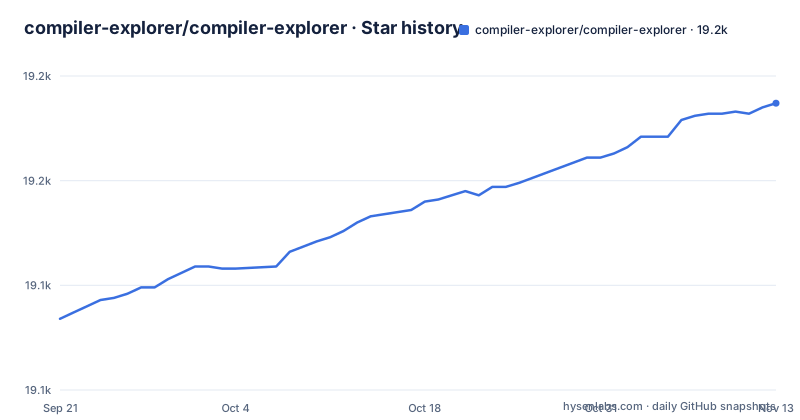
Star history
- compiler-explorer/compiler-explorer19,187 ★ · +103
| Repository | 2026-09-21 | 2026-11-13 |
|---|---|---|
| compiler-explorer/compiler-explorer | 19.1k | 19.2k |
103 Stars in the last 53 days, measured from the daily GitHub snapshot. Compare with other projects
Editorial analysis
What Compiler Explorer is for, and who actually needs it
Compiler Explorer is an interactive compiler exploration website. You edit code in one pane and see how that code looks after being compiled in real time. The project lists C, C++, C#, F#, Rust, Go, D, Haskell, Swift, Pascal, ispc, Python, Java and more than thirty other supported languages, with multiple compilers supported for each language. The README describes the origin directly: it started in 2012 to show how C++ constructs are translated to assembly code, initially as a tmux session with vi in one pane and watch gcc -S foo.cc -o - in the other. That origin explains the shape of the tool. It is a viewing instrument, not a build system.
The audience is therefore narrower than the language list suggests. Someone arguing about whether a compiler emits a branch or a conditional move benefits immediately. Someone teaching what a move constructor compiles to benefits. Someone trying to build and run a multi-file application with external dependencies does not, because the interface is built around compiling a snippet and reading the output. The README points to a document in docs/WhatIsCompilerExplorer.md and a talk for the fuller case, which is a reasonable sign that the maintainers know the tool needs explaining rather than assuming it is obvious.
The mechanism: a Node.js service, a config directory and one compiler per pane
The repository is written in TypeScript on Node.js, with app.ts as the entry point and a package.json whose engines field requires node >=22.22.1. The server is Express-based, and the UI layout is configurable through GoldenLayout, which is why panes can be rearranged and added without the page being rewritten.
Configuration is file-based rather than database-backed. The README states that configuring Compiler Explorer is achieved via configuration files in the etc/config directory, that values are key=value, and that options in a {type}.local.properties file override anything in the {type}.defaults.properties file. So a local override for the C++ setup goes in a c++.local.properties file next to the defaults. The repository also carries a .gitignore to ignore those local files, which tells you the intended workflow: defaults are committed, your machine-specific compiler paths are not.
Language support is defined in code, not only in config. The README says the language ids and aliases live in lib/languages.ts, and that restricting the running instance to a single language is done by passing an id or alias from that file. That is a real constraint worth knowing: if you want to add a language, you are editing a TypeScript file, not dropping in a config entry.
Some languages need extra tools to demangle them, for example rust, d or haskell. The README is explicit that such tools are kept separately in the compiler-explorer-tools repository. That separation matters for anyone deploying locally, because a working Compiler Explorer install without the tools repository will compile Rust and then show mangled symbols.
Running Compiler Explorer locally with make
The README gives a short path for Linux. Assuming a compatible node is installed, running make ought to get you up and running with an Explorer on port 10240 on your local machine. The Makefile confirms the target: default is run, and the node resolution is handled by etc/scripts/find-node, which caches its result in .node-bin.
Start with:
makeAfter the Makefile installs third-party libraries via npm, the server should be reachable at http://localhost:10240/. If node is missing or too old, the README says the project tries to resolve the pinned version through nvm, fnm, nodenv or asdf, and that you can force a specific install by pointing NODE_DIR at it.
To load only one language, pass it through EXTRA_ARGS. The README gives this exact example for C++:
make EXTRA_ARGS='--language c++'Multiple --language arguments are allowed, and the value must be one of the ids or aliases defined in lib/languages.ts. This is the fastest way to cut startup work if you only care about one toolchain.
For development, the README suggests make dev for automatic reloading on file changes and shorter startup times, with npm run dev as a fallback if make dev does not work on your machine. The Makefile also shows a watcher that includes etc/config/*, so config edits are picked up without a restart in that mode. When making UI changes, note that the README points contributors at docs/TestingTheUi.md, the UI Testing Checklist.
The public instance, the API and the MCP server
The project's homepage is godbolt.org, and the README says the public site serves over 3,000,000 compilations per week. That number is a scale figure quoted by the project, not a quality measure, and it is the main reason the hosted instance is usually the correct starting point: you get the compiler selection without maintaining any of it.
The API is discoverable from the site itself. The README links https://godbolt.org/api/languages as the source for the supported language list, which means the language inventory is queryable rather than only documented in prose. If you are writing tooling against Compiler Explorer, that endpoint is the one the project itself treats as authoritative.
The repository also depends on @modelcontextprotocol/sdk, and the dependency list includes AWS SDK clients for DynamoDB, EC2, S3, SQS and SSM, plus Sentry for both browser and node. The AWS dependencies are the tell that the hosted deployment is a real cloud service with queueing and object storage behind it, not a single process. If you are self-hosting for a small team, you are not reproducing that architecture, and you should not expect the same operational characteristics.
Where Compiler Explorer is the wrong tool
The most common mistake is treating it as a runtime. Compiler Explorer compiles and shows output; the README's framing is compiling in real time and interacting with the assembly. Programs that need to read files, open sockets, take more than a moment to run, or link against a large dependency tree are outside what the interface is built for. The project does ship an examples/ directory with per-language subdirectories including c++, c, ada and many others, and there is a request template for libraries, but that is a curated set, not an arbitrary package manager.
The second limitation is toolchain fidelity. The compilers you see on the hosted site are the ones the project has configured, and the README points out that demanglers for rust, d and haskell live in a separate tools repository. If your question depends on an exact compiler build, a patched toolchain or a vendor fork, the hosted instance cannot answer it, and you are back to a local install with your own compilers registered in etc/config.
The third is that the project is a website with a UI, and the UI is the product. Anything you want to automate at scale is better served by the API, and anything you want to run as part of a build is better served by invoking the compiler yourself. Compiler Explorer is a place to look at things, and it is good at exactly that.
Alternatives and how they differ in approach
The nearest alternative for the core use case is the compiler itself. Running gcc -S foo.cc -o - in a terminal, which is literally how the project began, gives you the same assembly with no browser, no server and no configuration. The difference is interaction: Compiler Explorer keeps the source and the output side by side, lets you switch compilers and flags without retyping a command, and adds visualisations and tools that a raw invocation does not have. If you are checking one flag once, the command line is faster. If you are exploring, the site is faster.
For the hosted-service role specifically, the honest alternative is a local build of Compiler Explorer itself, which the README supports as a first-class path with make and port 10240. That is not really a competitor so much as the same project under your control, and it is the right answer when the constraint is compiler availability or data leaving your network rather than features.
For editors, the comparison is Compiler Explorer against an IDE integration. The difference in approach is that an IDE shows you output for the project you are already building, with your real flags and your real dependencies, while Compiler Explorer shows you output for a snippet you paste, with flags you choose explicitly. The snippet is the point: it removes everything except the construct you are investigating. It is also the limit, because the snippet is not your program.
Licence, maintenance and what a fork costs
Compiler Explorer is BSD-2-Clause. That is a permissive licence, and the practical implication for a team considering a fork or an internal deployment is that you can redistribute and modify it, subject to keeping the copyright notice and the licence text. This is not legal advice; read LICENSE in the repository and, if the deployment matters commercially, have someone qualified confirm what your obligations are.
Maintenance signals are mixed in a specific way. The repository is not archived, and the last push was on 2026-11-02, so the project is under current development. The repository has no published GitHub releases, which fits a project whose version field in package.json is 0.0.3: the hosted site is the product, and there is no tagged release cadence to track. Upgrading therefore means tracking main rather than bumping a version, and the engines field pins node >=22.22.1, so a node upgrade on your side can be a prerequisite for pulling in changes.
The upgrade cost is dominated by the dependency surface. The dependency list includes AWS SDK clients, Sentry, Express 5, Monaco, Bootstrap 5 and a GoldenLayout fork published as @compiler-explorer/golden-layout. A GoldenLayout fork is the kind of dependency that makes upstream merges awkward, because the layout library is central to the UI and the project is carrying its own version. If you fork Compiler Explorer and later want to merge upstream work, expect that fork to be one of the friction points.
Editorial conclusion
Adopt Compiler Explorer if you need to see what a specific compiler and flag combination does to a small, self-contained piece of code, and run it locally when you need your own compilers or extra language tools such as the demanglers for rust, d and haskell that live in the separate compiler-explorer-tools repository. Do not adopt it as a build system, a debugger or a way to run programs that need a full toolchain, project layout or long execution, because the site is designed around compiling and inspecting output. Before you commit to a local deployment, verify the node version pinned in .node-version is available on your PATH, that make completes and serves the app on port 10240, and that the compilers you care about are present, since the project does not bundle every compiler it can display.
Frequently asked questions
What does Compiler Explorer do?
It is an interactive compiler exploration website where you edit code and see how that code looks after being compiled in real time. It supports C, C++, C#, F#, Rust, Go, D, Haskell, Swift, Pascal, ispc, Python, Java and more than thirty other languages.
How do I run code in Compiler Explorer?
You edit code in the editor pane and the site compiles it, showing the resulting assembly or other output in a second pane. The README describes the workflow as editing code and seeing how that code looks after being compiled in real time, and the hosted instance is at godbolt.org.
Who created Godbolt Compiler Explorer?
The package.json lists Matt Godbolt as the author, with [email protected] and https://xania.org. The README says the project was started in 2012 to show how C++ constructs are translated to assembly code.
How to see assembly in Compiler Explorer?
Compiling a snippet shows the compiler output in a pane, which is the assembly view for languages such as C and C++. The README describes the project as showing how code looks after being compiled in real time, and links docs/WhatIsCompilerExplorer.md for a fuller explanation.
How to use Compiler Explorer?
Open godbolt.org, pick a language and compiler, edit code in the editor pane and read the compiled output beside it. The README also points to docs/WhatIsCompilerExplorer.md and several videos for a fuller walkthrough.
What is Compiler Explorer?
It is a website, and a repository you can run yourself, that compiles code interactively and shows the result, most often assembly. The README says it started in 2012 to show how C++ constructs are translated to assembly code.
Official sources
Add this badge to your README
If you maintain this project, the badge below links readers to this analysis and shows its maintenance status from the daily GitHub snapshot. Paste the markdown into your README; add ?metric=license or ?metric=stars to the image URL for a different field.

[](https://hysenlabs.com/projects/compiler-explorer-compiler-explorer)Star history chart for your README
[](https://hysenlabs.com/projects/compiler-explorer-compiler-explorer)Was this useful?