create-t3-turbo: one Turborepo, three apps, and a setup that starts with deleting one
Clean and simple starter repo using the T3 Stack along with Expo React Native
At a glance
- What is it?
- A TypeScript Turborepo starter that puts a Next.js 15 app, a Tanstack Start app, and an Expo SDK 54 app into one pnpm workspace, and leaves the auth schema, the database driver, and the OAuth callback shape as decisions you have to settle before anything runs.
- Who is it for?
- create-t3-turbo fits a team that already wants Next.js or Tanstack Start, Turborepo, pnpm, Supabase, and Better Auth living in one repository, and that will spend its first hour deleting a web app, renaming the @acme scope, and generating auth tables. A solo project that wants one deployable app inherits a monorepo and an edge bound database for no gain.
- Can I use it commercially?
- Yes. MIT is a permissive licence: you can use, modify and sell software built on it, as long as you keep its copyright and licence notices.
- Is it still maintained?
- Yes. The repository last received commits 1 day ago.
- What is it written in?
- Mainly TypeScript, according to GitHub's language statistics.
Answers come from the project's GitHub data, last synced on November 21, 2026, and from our analysis. They are not legal advice.
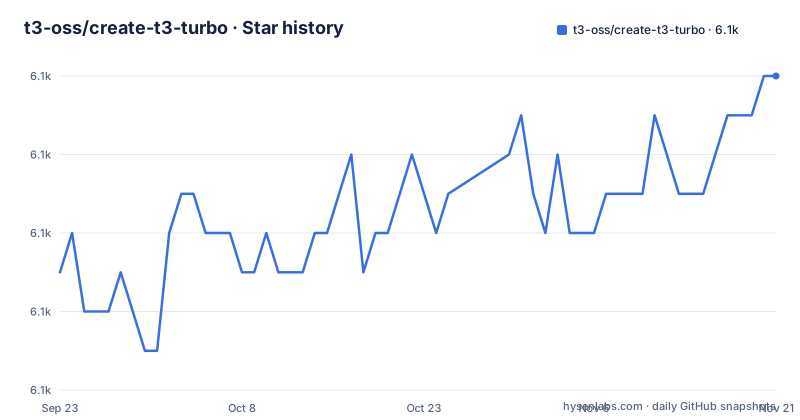
Star history
- t3-oss/create-t3-turbo6,114 ★ · +5
| Repository | 2026-09-23 | 2026-11-21 |
|---|---|---|
| t3-oss/create-t3-turbo | 6.1k | 6.1k |
5 Stars in the last 59 days, measured from the daily GitHub snapshot. Compare with other projects
Editorial analysis
Two web apps ship in the repo, and the guide says to delete one
Two web apps sit inside the repo, and the setup notes tell you to throw one away. `apps/nextjs` carries Next.js 15, React 19, Tailwind CSS v4, and an end to end typesafe API server and client. `apps/tanstack-start` carries Tanstack Start v1 as a release candidate, React 19, Tailwind CSS v4, and the same end to end API pairing. The note above step one of the quick start says you can pick either one and delete the other folder before setup starts. Nothing automates that deletion, so an untouched clone carries two web targets, two dependency trees, and two build configurations where only one will ever serve traffic.
The root scripts give you a way to narrow the watch to a single app while both folders are still on disk:
"dev": "turbo watch dev --continue",
"dev:next": "turbo watch dev -F @acme/nextjs...",
The Expo app is a third target whose dev script has to be pointed at a simulator by hand, which is the step most clones hit right after this one.
The @acme scope is baked into root scripts, not just folder names
Every internal package ships under the `@acme` scope, and the documentation tells you to find and replace it with something like `@my-company` or `@project-name`. That rename is wider than the folder names. Root scripts filter on the scoped names: `db:push` runs `turbo -F @acme/db push`, `db:studio` runs `turbo -F @acme/db studio`, `auth:generate` runs `pnpm -F @acme/auth generate`, and `dev:next` watches `-F @acme/nextjs...`. Leave any one of those filters pointing at `@acme` after the rename and the task matches no workspace in the graph.
Ordering matters for the same reason. The documented auth step is written as `pnpm --filter @acme/auth generate`, so the placeholder scope has to survive until that command runs, or the filter has to be corrected by hand afterwards.
Auth tables do not exist until the Better Auth CLI writes them
Authentication runs on Better Auth, and the starter deliberately ships without the tables behind it. Step two of the quick start runs the Better Auth CLI so a Drizzle schema can be generated for the auth tables before any auth feature is used. The CLI reads its configuration from `packages/auth/script/auth-cli.ts`, a file parked in `script/` instead of `src/` on purpose, so other parts of the codebase cannot import it by accident. The output lands at `packages/db/src/auth-schema.ts`, inside the `@acme/db` package, as a Drizzle compatible schema.
pnpm --filter @acme/auth generateRuntime auth configuration lives somewhere else entirely, at `packages/auth/src/index.ts`. The practical consequence is that a fresh clone has an auth module pointing at tables that do not exist yet, and generation is a mandatory step between dependency install and the first login screen.
The db package is edge bound to the Vercel Postgres driver
The `db` package is preconfigured for Supabase and is edge bound with the Vercel Postgres driver, which is not a neutral default you can ignore. Pointing it at anything else means touching three files: the schema at `packages/db/src/schema.ts`, the client at `packages/db/src/index.ts`, and `packages/db/drizzle.config.ts`. Leaving the edge driver behind has a fourth step, removing `export const runtime = "edge";` from every page and API route.
The example environment file encodes the same assumption in one long connection string, a Supabase pooler host, port 6543, and a `workaround=supabase-pooler.vercel` query parameter. Auth secrets sit beside it, with an `AUTH_SECRET` you generate through `openssl rand -base64 32` and empty Discord OAuth fields described as working out of the box.
AUTH_SECRET='supersecret'
AUTH_DISCORD_ID=''
AUTH_DISCORD_SECRET=''
OAuth from the phone needs a public URL it can keep
Sign in from the Expo app is the part with no offline answer. Two routes are given, and the difference is whether your callback URL survives the day.
The recommended one is Better Auth's auth proxy plugin. Deploying the Next.js app means auth requests get forwarded to a proxy server that handles the OAuth flow and redirects back, which gives you a stable publicly accessible URL that does not change per deployment and does not depend on a port. That stability is the entire point: if port 3000 is taken and the web app starts on 3001 instead, the proxy keeps working with no edit to the OAuth provider.
The alternative is registering your local IP, something like `192.168.x.y:$PORT`, with the provider. That breaks whenever you change networks, and it is not viable at all on providers that accept a single callback URL per app, GitHub named as the example. Without a deployed proxy, you are maintaining that address by hand.
Engine pins and a postinstall linter shape the first install
The engines block is narrow. Node is pinned to `^22.21.0` and pnpm to `^10.19.0`, with pnpm 10.19.0 declared as the package manager and an `.nvmrc` at the root for anyone who would rather read the version than set it. The installation note points at that block before anything else.
The install also runs a check you did not ask for. The `postinstall` script invokes `pnpm lint:ws`, which is `pnpm dlx sherif@latest`, a workspace dependency linter resolved on demand. Formatting and linting are wired the same way, as turbo tasks that pass a cache flag and a cache location under `.cache/`, so a first run of `pnpm i` reaches for tooling beyond the declared dependencies before any application code exists.
npx create-turbo@latest -e https://github.com/t3-oss/create-t3-turbo
pnpm i
cp .env.example .env
pnpm db:push
The Expo dev script must be aimed at a simulator before pnpm dev works
Running `pnpm dev` at the root does not open a simulator on its own. The Expo app ships a `dev` script that you point at a platform by hand, one line in `apps/expo/package.json`.
+ "dev": "expo start --ios",The iOS path needs XCode and the XCommand Line Tools installed first. There is also a one time catch: if you have just installed or updated XCode, open the simulator manually by running `npx expo start` from `apps/expo` and pressing `I` to launch Expo Go, and only then go back to the root for `pnpm dev`. The Android route swaps in Android Studio tools and its own flag.
Two native build scripts sit next to the watch tasks rather than replacing them: `expo run:ios` and `expo run:android`, wired as `ios` and `android` at the root.
What the starter cannot supply for you
Several things are simply not here. There are no GitHub releases, so there is no version stream to depend on and upgrades are a commit you choose yourself, with the last push to the default branch dated 2026-11-02.
Tanstack Start v1 is a release candidate while the Next.js app sits on a stable major, so picking one app does not mean picking the same risk level as the other. The CI configuration is described as a workflow with pnpm cache setup.
And none of the decisions that shape your architecture arrive preanswered: the auth table shape is generated from your own Better Auth configuration, the database driver is Supabase with the Vercel Postgres driver and an edge runtime export, and the OAuth callback model is a deployed proxy or a hand maintained local IP. Those three choices are the work you inherit.
Editorial conclusion
create-t3-turbo fits a team that already wants Next.js or Tanstack Start, Turborepo, pnpm, Supabase, and Better Auth living in one repository, and that will spend its first hour deleting a web app, renaming the @acme scope, and generating auth tables. A solo project that wants one deployable app inherits a monorepo and an edge bound database for no gain. Before you commit, check that your Node and pnpm fall inside the pinned ranges, and that your database driver and OAuth callback shape are ones you can live with.
Frequently asked questions
What is a T3 stack?
In create-t3-turbo the stack is concrete rather than defined in the abstract: Turborepo workspaces holding a Next.js 15 app, a Tanstack Start v1 release candidate app, and an Expo SDK 54 app built on React Native 0.81 and React 19, all styled with Tailwind CSS v4, with Better Auth for login and tRPC calls typed end to end.
What does T3 mean on a turbo?
Inside create-t3-turbo, turbo refers to Turborepo, the task runner behind the root scripts. `turbo watch dev --continue` drives the development loop across workspaces, `turbo run build` handles builds, and filters such as `-F @acme/nextjs...` restrict a task to one app.
What is T3 software?
create-t3-turbo is a TypeScript starter template from t3-oss under the MIT license, with its documentation site at https://turbo.t3.gg. It is a repository you copy or initialize through the Turbo CLI, not a library you add to a project you already have.
How do I install T3 code?
Initialize from the template with `npx create-turbo@latest -e https://github.com/t3-oss/create-t3-turbo`, then run `pnpm i`, copy `.env.example` to `.env`, push the Drizzle schema with `pnpm db:push`, and generate the auth schema with `pnpm --filter @acme/auth generate`. Node `^22.21.0` and pnpm `^10.19.0` are required.
Official sources
Add this badge to your README
If you maintain this project, the badge below links readers to this analysis and shows its maintenance status from the daily GitHub snapshot. Paste the markdown into your README; add ?metric=license or ?metric=stars to the image URL for a different field.

[](https://hysenlabs.com/projects/t3-oss-create-t3-turbo)Star history chart for your README
[](https://hysenlabs.com/projects/t3-oss-create-t3-turbo)Was this useful?