lazy.nvim: the plugin manager Neovim configs are built around
💤 A modern plugin manager for Neovim
At a glance
- What is it?
- A Lua plugin manager whose interesting decisions are partial clones, bytecode caching and a lockfile, with almost all of the real documentation living off the README.
- Who is it for?
- lazy.nvim has made itself the plugin manager that serious Neovim configurations are written against, and the feature list explains why: startup cost, dependency ordering and reproducible installs are all handled without a compiler toolchain or manual intervention. The catch is that the README is a signpost, not a manual, so the configuration questions that matter, lockfile policy, spec priority and event tuning, live on lazy.folke.io.
- Can I use it commercially?
- Yes. Apache-2.0 is a permissive licence: you can use, modify and sell software built on it, as long as you keep its copyright and licence notices.
- Is it still maintained?
- Yes. The repository last received commits 116 days ago.
- What is it written in?
- Mainly Lua, according to GitHub's language statistics.
Answers come from the project's GitHub data, last synced on October 23, 2026, and from our analysis. They are not legal advice.
Star history
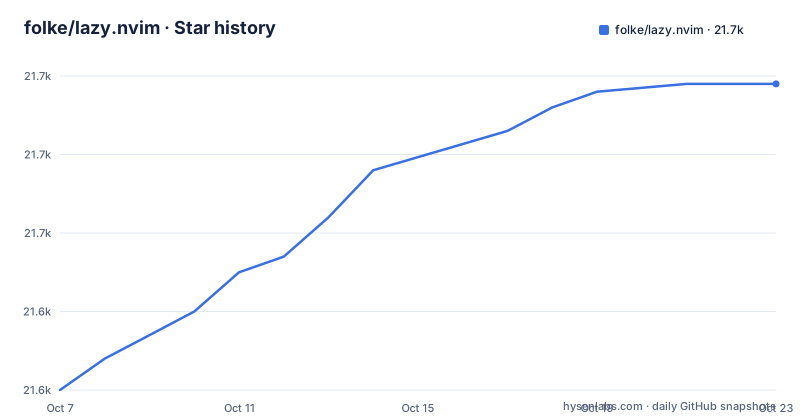
- folke/lazy.nvim21,669 ★ · +39
| Repository | 2026-10-07 | 2026-10-23 |
|---|---|---|
| folke/lazy.nvim | 21.6k | 21.7k |
39 Stars in the last 16 days, measured from the daily GitHub snapshot. Compare with other projects
Editorial analysis
A feature list that reads like a performance budget
Most plugin managers for editors are described by what they can fetch. lazy.nvim is described by what it refuses to do at startup. The list in the README includes fast startup times thanks to automatic caching and bytecode compilation of Lua modules, async execution for improved performance, and no need to manually compile plugins. Three of those four are about time, which is the resource Neovim users actually notice.
Automatic bytecode compilation is the quiet one. Lua modules can be compiled to bytecode ahead of time, and doing it automatically means you never run a compile step for a plugin that ships uncompiled Lua. Async execution covers the other case, the network calls to check for updates and fetch plugin code, which otherwise block the first frame of the editor.
The requirements list is short and specific, which makes it easy to know whether you can run it: Neovim 0.8.0 or newer built with LuaJIT, and Git 2.19.0 or newer for partial clone support. A Nerd Font is optional. luarocks is needed only if you install rockspecs, and the README notes you can remove `rockspec` from `opts.pkg.sources` to turn that off.
Partial clones instead of shallow ones, and why that matters
The README lists partial clones instead of shallow clones as a headline feature. The distinction is not pedantic. A shallow clone asks Git for the tip of a branch, which leaves you with no history and no way to check out an older commit. A partial clone asks for the tip plus filters on blob data, so you get the working tree and the commit graph without the entire history of large files.
For a plugin manager that installs a hundred repositories on a fresh machine, that difference compounds. It also matters for the pin story, because having history locally means a branch, tag, commit or full Semver range can all be resolved locally instead of forcing a fresh fetch. The README advertises commit, branch, tag, version and full Semver support, and partial clones are what make that cheap.
The minimum Git version in the requirements exists for this reason. On Git older than 2.19.0 the filter protocol is not available, so this is the one hard version floor in the whole project.
Lazy-loading keyed to the things you actually do
The loading story has two halves, and the README names both. The first is automatic lazy-loading of Lua modules, which means a plugin's `require` is intercepted so the module is loaded the first time something needs it. The second is lazy-loading on events, commands, filetypes and key mappings, which is the older approach: the plugin loads when a trigger fires.
The event-based side is where the performance story lives. A plugin that only needs to run on TypeScript files can declare a TypeScript filetype trigger, and until you open a TypeScript buffer it costs nothing. The feature list separately calls out that colorschemes are automatically lazy-loaded, which matters because a colorscheme is one of the few plugins that must be available synchronously at startup.
The list also mentions automatic installation of missing plugins before Neovim starts, so you can start using the editor immediately rather than waiting for a first-run sync. Combined with a managed lockfile, that behaviour is what makes the manager feel like a package manager rather than a git wrapper.
The lockfile, the UI and the parts of the README that are just links
Three features are less about speed and more about trust. A lockfile named `lazy-lock.json` keeps track of installed plugins, update checking is automatic, and commit, branch, tag, version and Semver are all supported. A statusline component shows the number of pending updates, which is a small touch that answers the question most managers raise: how far behind is my config.
Manage all your Neovim plugins with a powerful UI is the first item in the list, and it is the one feature the README does not describe. There is no screenshot of the interface, no list of commands, no explanation of the picker. Documentation for that lives on the site.
The README itself ends after the feature list and requirements with a single line pointing at the documentation website, with three links at the top for Install, Configure and Docs. That is an honest structure, and it is also the main thing to know before you start: the repository is the code and the changelog, the website is the manual. Profiling tools and dev options for local plugins appear in the list too, and again the details are elsewhere.
What the repository itself shows
The tree is the part you can read without leaving GitHub, and it says a lot. There is `bootstrap.lua` at the root, which is the single file the documentation tells people to add to a Neovim config, and a `lua/` directory holding the manager itself. A `doc/` directory holds the help pages, a `tests/` directory sits next to it, and `scripts/` is where the maintenance tooling lives.
The development configuration is unusually complete. There is `selene.toml` for the Lua linter, `stylua.toml` plus a `.styluaignore` for formatting, `.markdownlint.yaml` and `.markdownlint-cli2.yaml` for the documentation, `.editorconfig` for whitespace, and `.neoconf.json` for the Neovim configuration of the project itself. A `.busted` entry points at the Lua testing framework, and `vim.yml` is there to pin the Neovim version used for development. There is also a `manifest` file and a `CHANGELOG.md` and `TODO.md`.
The metadata shows a project with real momentum. The last push was on 2026-06-29, and the release feed shows v11.17.5 published on 2025-11-06, with entries that are ordinary bug fixes such as luarocks dependency name parsing. The repository is not archived, and 21,575 stars with 592 forks against 67 open issues suggests a large user base that still files focused bug reports.
Where it sits against the alternatives
There are several older Neovim plugin managers, and the honest comparison is about what each one asks you to maintain. The older approach usually means vendoring a plugin directory into your config, or running a script that clones and copies files. Both work, and both leave you without a lockfile unless you build one yourself.
What lazy.nvim adds is a declarative spec per plugin: what it is, when it loads, what it depends on, and which version range you accept. The README's mention of correct sequencing of dependencies and configurable in multiple files is the practical content of that model. Multi-file configuration matters more than it sounds, because a config that has grown past a few hundred lines in a single file becomes the thing you stop reading.
The feature it does not claim is a GUI or a marketplace. There is no plugin catalogue in the description, no ratings, no one-click install from a website. Everything is expressed in Lua in files you keep under version control, which means the diff when something breaks is readable and the whole configuration can be shared as text.
Editorial conclusion
lazy.nvim has made itself the plugin manager that serious Neovim configurations are written against, and the feature list explains why: startup cost, dependency ordering and reproducible installs are all handled without a compiler toolchain or manual intervention. The catch is that the README is a signpost, not a manual, so the configuration questions that matter, lockfile policy, spec priority and event tuning, live on lazy.folke.io. Start from the bootstrap file in the repository root, keep your configuration split across readable files, and commit lazy-lock.json before you understand the pinning rules.
Frequently asked questions
How to use lazy in nvim?
Clone or point your config at the manager through the `bootstrap.lua` file in the repository root, then describe plugins as Lua specs. The README's Getting Started section sends you to the documentation site for the installation steps and the configuration model, because the repository itself deliberately stops after the feature list and requirements.
What is the difference between LazyVim and LazyNvim?
They are different layers. lazy.nvim is the plugin manager itself, a Lua library that installs, pins and lazy-loads plugins, and its repository is the code for that. LazyVim refers to a distribution built on top of such a manager, a preconfigured Neovim setup that chooses plugins and keybindings for you. The lazy.nvim repository does not cover any distribution.
Where can I find lazy nvim?
The documentation website at lazy.folke.io is the place to start, with separate pages for installation and configuration linked from the top of the README. The source lives at github.com/folke/lazy.nvim, where the root `bootstrap.lua` is the entry point and the `lua/` directory holds the implementation. It is distributed under the Apache 2.0 license.
Official sources
Add this badge to your README
If you maintain this project, the badge below links readers to this analysis and shows its maintenance status from the daily GitHub snapshot. Paste the markdown into your README; add ?metric=license or ?metric=stars to the image URL for a different field.

[](https://hysenlabs.com/projects/folke-lazy-nvim)Star history chart for your README
[](https://hysenlabs.com/projects/folke-lazy-nvim)Was this useful?