ctrld: a configurable DNS forwarding proxy that speaks DoH, DoT, DoQ and DoH3
A highly configurable, multi-protocol DNS forwarding proxy
At a glance
- What is it?
- ctrld is a Go DNS forwarding proxy for networks and routers, built to put legacy plain DNS clients on encrypted upstreams and to steer queries by subnet, MAC address or domain. It is a forwarder rather than a resolver, which is exactly what makes it easy to drop onto a router and exactly what limits what you can do with it.
- Who is it for?
- Adopt ctrld when the devices on your network cannot speak encrypted DNS themselves and you need one place to decide which upstream answers which client, which is the classic router, smart TV or legacy appliance case. It forwards queries to upstream resolvers and supports optional local response caching.
- Can I use it commercially?
- Yes. MIT is a permissive licence: you can use, modify and sell software built on it, as long as you keep its copyright and licence notices.
- Is it still maintained?
- Yes. The repository last received commits 3 days ago.
- What is it written in?
- Mainly Go, according to GitHub's language statistics.
Answers come from the project's GitHub data, last synced on November 6, 2026, and from our analysis. They are not legal advice.
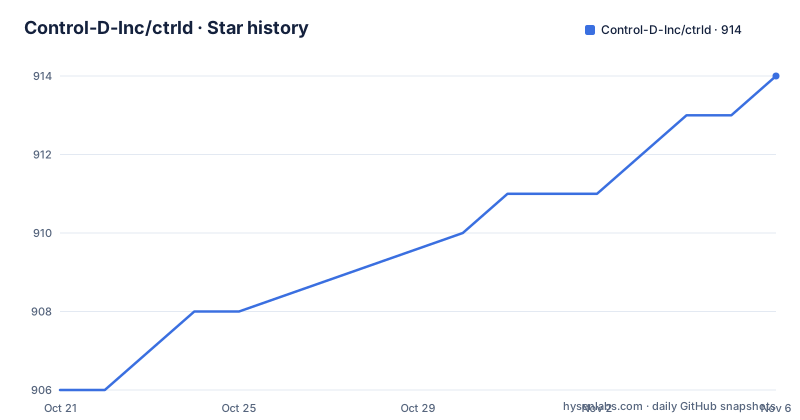
Star history
- Control-D-Inc/ctrld914 ★ · +8
| Repository | 2026-10-21 | 2026-11-06 |
|---|---|---|
| Control-D-Inc/ctrld | 906 | 914 |
8 Stars in the last 16 days, measured from the daily GitHub snapshot. Compare with other projects
Editorial analysis
A forwarder, not a resolver, and that boundary defines everything
ctrld is described in one line as a highly configurable, multi-protocol DNS forwarding proxy, and the word forwarder is doing real work in that sentence. The daemon accepts DNS queries from ordinary clients, then passes them onward to an upstream it selects, and returns the answer it gets back. It never becomes the authority for a name. The short version of the idea in the README is "Proxy legacy DNS traffic to secure DNS upstreams in highly configurable ways", and the practical reading is that ctrld is a translator between networks full of devices that only speak plain DNS on port 53 and upstreams reachable over DNS-over-HTTPS, DNS-over-TLS, DNS-over-HTTP/3 or DNS-over-QUIC. A smart TV, a legacy router or an older operating system cannot be persuaded to use DoT, but it will happily talk to a proxy that does the encryption on its behalf. That is the whole reason this kind of tool exists, and it is why the deployment target is often a router rather than a workstation.
Policy keys on subnet, MAC address and FQDN rather than a single upstream
The configuration model is where the project earns its keep. There can be multiple listeners for incoming queries, multiple upstreams with fallbacks, and DNS query steering driven by network policy. The steering keys are specific: a network CIDR, a MAC address, or an FQDN. That covers the three practical cases of a segmented office where one subnet should resolve through a different provider, a device that must always reach a particular resolver, and a hostname pattern that should be answered locally. On top of that sits policy driven domain based split horizon DNS with wildcard support, which lets a rule send everything under a domain such as an internal zone to a local DNS server while the rest of the internet goes elsewhere. Split horizon is the feature that turns a proxy into a useful piece of network infrastructure, because it lets internal names resolve on internal servers without touching the public namespace. The client discovery that supports it draws on DHCP, mDNS, ARP, NDP and hosts file parsing, so a LAN inventory can be assembled from several sources rather than one.
Running as a service rewrites the DNS configuration of every interface
This is where you should read carefully, because the service mode is more invasive than running the binary by hand. The documented behaviour is that service mode creates a ctrld.toml file in the C:\ControlD directory on Windows or /etc/controld/ almost everywhere else, starts the system service, and configures the listener on all physical network interfaces, with the service starting on OS boot. On the way out, running ctrld stop restores DNS to its original state and ctrld uninstall removes the service entirely, which is a well thought out exit path. The mechanism for getting there is also specific rather than magical: ctrld attempts to interface with dnsmasq, or with Windows Server, whenever possible and sets itself as the upstream while running on port 5354, and on FreeBSD based systems it terminates dnsmasq and unbound so it can listen on port 53 directly. The consequence for a sysadmin is that the proxy takes over a service you already depend on, and the takeover rules differ per operating system.
The CLI is a set of lifecycle verbs rather than a config file editor
The command surface is small and shaped around the service lifecycle, which tells you what the author expected this to be used for. The self documenting help output lists the verbs directly:
  run         Run the DNS proxy server
  start       Quick start service and configure DNS on interface
  stop        Quick stop service and remove DNS from interface
  restart     Restart the ctrld service
  reload      Reload the ctrld service
  status      Show status of the ctrld service
  uninstall   Stop and uninstall the ctrld service
  service     Manage ctrld service
  clients     Manage clients
  upgrade     Upgrading ctrld to latest version
  log         Manage runtime debug logs
A separate `clients` verb sits alongside the lifecycle ones, and there are also `upgrade` and `log` verbs for the self-update path and runtime debug logs. Global flags are few: a silent mode, a verbose counter where one flag is basic logging and two is debug level, and a version flag. The presence of `clients` as a first class command is a hint about direction of travel. When Control D upstreams are used on a router type device, the daemon relays your network topology to Control D, including LAN IPs, MAC addresses and hostnames, and you can then see LAN devices in the web panel, view analytics and apply unique profiles to them. The open source daemon is therefore the local half of a hosted product, and that shapes which features get attention.
Installing: one shell command, a container, or a Go build
There are three documented paths and you can pick according to how much you want to control. The quickest on any UNIX-like platform pipes an installer script from the vendor API:
sh -c 'sh -c "$(curl -sL https://api.controld.com/dl)"'Windows administrators are given a PowerShell equivalent that writes the script to a temporary file and runs it:
(Invoke-WebRequest -Uri 'https://api.controld.com/dl/ps1' -UseBasicParsing).Content | Set-Content "$env:TEMPctrld_install.ps1"; Invoke-Expression "& '$env:TEMPctrld_install.ps1'"If you would rather not run a fetched script, there is a published image on Docker Hub:
docker run -d --name=ctrld -p 127.0.0.1:53:53/tcp -p 127.0.0.1:53:53/udp controldns/ctrld:latestThe Go path needs go1.21 or later according to the build instructions, and the module itself declares go 1.23.0 with toolchain go1.23.7, so a bare go1.21 install will not be enough in practice:
go build ./cmd/ctrldPre-compiled binaries for each platform are also published in the Releases section, which is the option with the least risk of an unexpected toolchain download.
First run: a foreground proxy, a generated config, and a dig test
The basic run mode is the least invasive way to see whether any of this suits your network. Run it in the foreground and, if no config file exists yet, a default one is generated for you. On Windows the documented command is ctrld.exe run, and on Linux or macOS it is run with elevated privileges because the daemon wants to take the DNS port:
sudo ctrld runThe verification step is a plain query against the local listener, and the README shows the expected shape of the answer:
  $ dig verify.controld.com @127.0.0.1 +short
  api.controld.com.
  147.185.34.1
If that name resolves, you are using the default Control D upstream. From that point the generated config file is yours to edit, and a change only takes effect when you restart the server. Note the split between the two modes in practice: `run` leaves your system DNS settings alone and gives you a proxy to point one client at, while `start` installs a service, rewrites the DNS configuration on your interfaces and survives reboots. Testing with `run` first is the cheap way to find out whether the upstream and policy behaviour suit you before you let it own the interfaces.
Where ctrld is the wrong tool
A forwarding proxy has a specific set of things it cannot do, and reaching for it outside that set produces disappointing results. It does not serve zones, so there is no authoritative answer to give a client that is not a forward. It does not implement a filtering layer, so blocklists and category policies have to live in whatever upstream you point at. It can cache DNS responses locally when `cache_enable` is configured, using upstream TTLs by default; caching is off by default. It can also read DHCP information for LAN client discovery. If the requirement is that a network must not resolve adult domains, or that a hostname must be served by us with our own records, a forwarder is the wrong shape of tool, because the decision has to happen at the upstream rather than in front of it. The second limitation is operational. The service mode takes over the DNS configuration on all physical network interfaces and, on FreeBSD, stops dnsmasq and unbound to take port 53. On a machine where those services matter, that handover is the risk, and the documented mitigation is limited to the stop and uninstall commands.
A Go codebase with per-platform files, Prometheus metrics and MIT terms
The implementation gives a fair sense of the engineering. The repository root is a flat Go package with the protocol handlers in separate files, `doh.go`, `doq.go` and `dot.go`, alongside `resolver.go`, `config.go`, `nameservers.go` and `staticdns.go`, and the platform differences are handled with build-tagged files such as `nameservers_linux.go`, `nameservers_darwin.go`, `nameservers_bsd.go`, `nameservers_windows.go` and the matching `client_info_*.go` and `desktop_*.go` variants. The dependency list is conventional and mostly well known: miekg/dns v1.1.58 for DNS parsing, quic-go v0.54.0 for the HTTP/3 and QUIC transports, pelletier/go-toml/v2 for the config format, spf13/cobra and viper for the command line, kardianos/service for the system service wrapper, minio/selfupdate for the upgrade verb, and prometheus/client_golang v1.19.1 for the metrics exporter. LAN discovery pulls in insomniacslk/dhcp, mdlayher/ndp, jaytaylor/go-hostsfile, josharian/native, fsnotify, vishvananda/netlink and godbus/dbus, and tailscale.com v1.74.0 is also in the module, though the documentation given does not describe a public Tailscale mode. Licensing is MIT, so commercial use is allowed as long as the copyright notice is preserved. On maintenance, the last push was on 2026-10-22, with tagged releases v1.5.6 on 2026-08-24, v1.5.7 on 2026-09-01 and v1.5.8 on 2026-10-07, so the release line is moving within a 1.5 series rather than jumping majors, and the `upgrade` verb plus the self-update dependency indicate upgrades are expected to be handled by the tool itself.
Editorial conclusion
Adopt ctrld when the devices on your network cannot speak encrypted DNS themselves and you need one place to decide which upstream answers which client, which is the classic router, smart TV or legacy appliance case. It forwards queries to upstream resolvers and supports optional local response caching. Check whether your authoritative DNS, filtering and DHCP requirements are met by ctrld and the services you pair with it. Verify first that the upstream you want actually exists in your config, that the listener and the dnsmasq or Windows Server handover on your platform behaves as the README describes, and that your routing policy keys, whether network CIDR, MAC address or FQDN, are the ones you can actually maintain as the LAN changes.
Frequently asked questions
Which DNS protocols does ctrld support?
All of the common ones, according to the README: UDP 53, DNS-over-HTTPS, DNS-over-TLS, DNS-over-HTTP/3 and DNS-over-QUIC. It acts as a proxy, so clients can keep speaking plain DNS while the upstream leg is encrypted.
How do I install ctrld on Linux or macOS?
The quickest documented route is a shell command that pipes an installer from the vendor API, and a Docker image is published as `controldns/ctrld`. You can also build it from source with `go build ./cmd/ctrld`, though the module declares go 1.23.0 with toolchain go1.23.7 while the build instructions mention go1.21 or later.
Does ctrld work on routers such as OpenWRT or pfSense?
Yes, the README lists supported router firmware including Asus Merlin, DD-WRT, Firewalla, FreshTomato, GL.iNet, OpenWRT, pfSense and OPNsense, Synology and Ubiquiti devices. On FreeBSD based systems it terminates dnsmasq and unbound so it can listen on port 53 directly.
What is the difference between `ctrld run` and `ctrld start`?
`ctrld run` runs the proxy in the foreground and generates a default config if none exists, leaving the system DNS settings alone. `ctrld start` installs a system service, creates a ctrld.toml file in /etc/controld/ or C:\ControlD, configures the listener on all physical network interfaces and starts on OS boot, and `ctrld stop` restores the original DNS state.
Can ctrld steer different clients to different DNS upstreams?
Yes, network policy driven steering is a core feature, keyed on network CIDR, MAC address or FQDN, with multiple upstreams and fallbacks, and policy driven split horizon DNS with wildcard support for sending a domain pattern to a local DNS server.
Official sources
Add this badge to your README
If you maintain this project, the badge below links readers to this analysis and shows its maintenance status from the daily GitHub snapshot. Paste the markdown into your README; add ?metric=license or ?metric=stars to the image URL for a different field.

[](https://hysenlabs.com/projects/control-d-inc-ctrld)Star history chart for your README
[](https://hysenlabs.com/projects/control-d-inc-ctrld)Was this useful?