expo-libvlc-player: A Native VLC Bridge for Expo SDK 57
LibVLC Player for Expo
At a glance
- What is it?
- This Expo module wraps LibVLC for Android and iOS, giving React Native apps a full-featured media player with recording, snapshots, and PiP. It targets Expo SDK 57+ and React Native 0.86+, with clear version constraints and a config plugin.
- Who is it for?
- Adopt expo-libvlc-player if you are on Expo SDK 57+ and need LibVLC's broad codec support, recording, or snapshot capabilities that standard Expo video components lack. Avoid it if you are on an older SDK or need a pure-JavaScript solution, since it requires native builds and a config plugin.
- Can I use it commercially?
- Yes. MIT is a permissive licence: you can use, modify and sell software built on it, as long as you keep its copyright and licence notices.
- Is it still maintained?
- Yes. The repository last received commits 1 day ago.
- What is it written in?
- Mainly Kotlin, according to GitHub's language statistics.
Answers come from the project's GitHub data, last synced on October 22, 2026, and from our analysis. They are not legal advice.
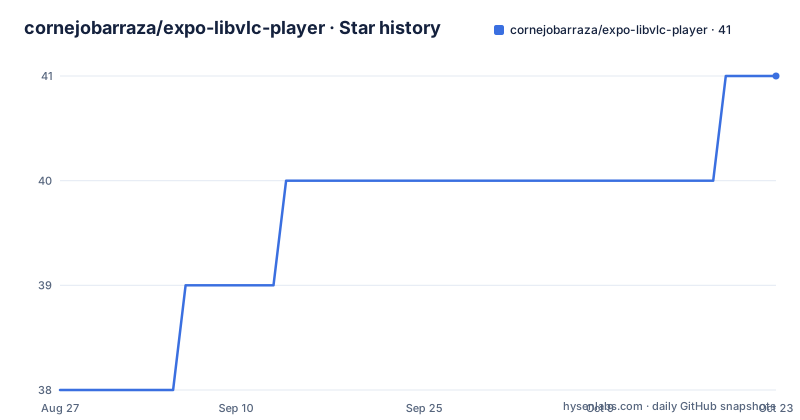
Star history
- cornejobarraza/expo-libvlc-player41 ★ · +3
| Repository | 2026-08-27 | 2026-10-22 |
|---|---|---|
| cornejobarraza/expo-libvlc-player | 38 | 41 |
3 Stars in the last 56 days, measured from the daily GitHub snapshot. Compare with other projects
Editorial analysis
What This Module Solves for Expo Developers
Expo's built-in video component covers basic playback, but it does not expose the full codec library or advanced controls that LibVLC provides. This project bridges that gap by bringing LibVLC, a mature open-source media framework, into Expo as a native module. It is aimed at developers who need playback of formats that the default Expo player may not handle, or who require functions like recording, snapshots, and Picture-in-Picture without leaving the Expo ecosystem. The README explicitly scopes it to Expo SDK 57 and React Native 0.86 or newer, so it is not a drop-in for older projects. That version lock is a deliberate trade-off: you get a current native API, but you must be willing to upgrade your whole toolchain.
How the Module Wraps LibVLC
The package exposes two main surfaces: a React component called LibVlcPlayerView and a native module called LibVlcPlayerModule. The view takes a source prop, which can be a require() result, as shown in the README's basic example. The module provides imperative functions such as triggerNetworkAlert() and isPictureInPictureSupported(). The view's ref offers playback controls: play(), pause(), stop(), seek(), record(), snapshot(), and postAction(). The seek function accepts a number and an optional type parameter that can be "time" or "position", defaulting to time. The record function starts or stops recording when given a directory path or undefined. These functions return Promises, which means the API is asynchronous, likely to match the underlying native callbacks. The design keeps the native LibVLC interactions behind a thin bridge, so React Native code never touches the Kotlin or Swift internals directly.
Installation and Configuration Steps
The README gives a straightforward install command: npm install expo-libvlc-player. For bare React Native projects, you must first have the expo package installed and configured, per the linked Expo docs. Android requires no extra configuration, which is a relief given that many native modules need manual gradle edits. iOS requires running npx pod-install after installing the npm package. For TV support, you set the EXPO_TV environment variable and run npx expo prebuild --clean. The config plugin is where you control platform-specific settings. In app.json, you add the plugin with a localNetworkPermission string and a supportsPictureInPicture boolean. The plugin modifies the iOS Info.plist and Android manifest accordingly. If you leave supportsPictureInPicture undefined, the plugin leaves the configuration untouched, which is a sensible default for avoiding surprises.
Platform Minimums and Build Requirements
The supported versions table is explicit: Android and Android TV require API 7 or higher, which is unusual because Android 7 is API 24, not 7. The README says "Android / Android TV | 7+", which likely means Android 7.0 (API 24), not API level 7, but the ambiguity is worth noting. iOS and Apple TV require 16.4 or later. The example app.json also shows you must set compileSdkVersion, targetSdkVersion, and buildToolsVersion to 36 for Android, and deploymentTarget to 16.4 for iOS, using the expo-build-properties plugin. These are hard requirements, not suggestions. If your project targets older devices or uses an older SDK, you will hit build failures. The README hints that older Expo SDK versions may work by changing compilation settings, but it does not provide details, so you are on your own there.
Picture-in-Picture and Local Network Permissions
The config plugin handles two iOS-specific and Android-specific features. For PiP, setting supportsPictureInPicture to true adds android:supportsPictureInPicture on Android and the audio key to UIBackgroundModes on iOS. The module exposes isPictureInPictureSupported() to check device capability at runtime. This is not a guarantee that PiP will work with every media source; it only checks the system flag. The localNetworkPermission string sets NSLocalNetworkUsageDescription on iOS, and the module has triggerNetworkAlert() to force the privacy prompt. That function is useful for apps that stream from local network devices, but it is an iOS-only concern. The README does not mention an Android equivalent, so Android apps may not need it or may handle permissions differently. This asymmetry is a limitation to plan for if you target both platforms.
Known Limitations and Wrong-Tool Scenarios
The module is tied to specific SDK versions, so it is the wrong choice for a project that cannot upgrade to Expo SDK 57. The README's note about older versions is vague and untested, so you should not rely on it. Another limitation is that the view's functions require a ref to the component, which adds complexity compared to a declarative API. The postAction and postLogin functions suggest there is dialog handling for network authentication, but the README truncates before explaining them fully. That incomplete documentation is a real gap. Also, the module does not appear to include any fallback for unsupported codecs or DRM; LibVLC itself has limitations, but the README does not address them. If you only need simple MP4 playback, this module is overkill compared to Expo's built-in video, and the native build overhead may not be worth it.
Alternative Approaches and Their Differences
The most direct alternative is expo-video, the official Expo module, which uses platform-native players (AVPlayer on iOS, ExoPlayer on Android). It supports common formats and streaming protocols, but it does not offer recording or snapshot functions. Another alternative is react-native-video, a popular community module that also wraps native players and has a larger ecosystem. The key difference is that react-native-video does not bundle LibVLC, so it relies on the platform's default codec support, which may be narrower. If you need the full VLC feature set, such as recording or handling unusual container formats, this module is the only one in the Expo ecosystem that directly exposes LibVLC. If you do not need those features, the official expo-video is simpler and better maintained, with no extra config plugin required.
Maintenance, Licensing, and Upgrade Cost
The repository shows recent releases with version numbers like v57.0.23, and the last push was in August 2026, which indicates active maintenance as of that date. The versioning scheme ties releases to the Expo SDK version, so upgrading Expo SDK will likely require a corresponding module update. The license is MIT, which is permissive and allows commercial use with attribution, but you should read the full license text for any conditions. The config plugin and the version-specific build settings mean that an Expo SDK upgrade is not just a package bump; you may need to adjust compileSdkVersion and deploymentTarget in your app.json. That is a concrete cost to budget for. The README does not list any known issues or migration guides, so you will have to rely on release notes and community reports.
Editorial conclusion
Adopt expo-libvlc-player if you are on Expo SDK 57+ and need LibVLC's broad codec support, recording, or snapshot capabilities that standard Expo video components lack. Avoid it if you are on an older SDK or need a pure-JavaScript solution, since it requires native builds and a config plugin. Before adopting, verify that your target devices meet the Android 7+ and iOS 16.4+ minimums, and test PiP and local network permissions on your actual hardware, as these features depend on platform-specific behavior.
Frequently asked questions
Which platforms and versions does expo-libvlc-player support?
Expo SDK 57 and newer, React Native 0.86 and newer, Android and Android TV 7 and newer, and iOS and Apple TV 16.4 and newer.
How do I install expo-libvlc-player in an Expo app?
Run npm install expo-libvlc-player. Android needs no extra configuration, iOS needs npx pod-install afterwards, and TV needs the EXPO_TV environment variable with prebuild, for example EXPO_TV=1 npx expo prebuild.
What does supportsPictureInPicture change in expo-libvlc-player?
Set to true, it adds the android:supportsPictureInPicture attribute on Android and the audio mode to UIBackgroundModes on iOS. Set to false it removes both. Left undefined, the configuration is not modified at all.
How do I raise the iOS local network alert in expo-libvlc-player?
Call LibVlcPlayerModule.triggerNetworkAlert(), which attempts to trigger the local network privacy alert on iOS and returns a Promise. The text of the prompt comes from the localNetworkPermission config plugin property.
Can expo-libvlc-player still be used with older Expo SDK versions?
Previous versions may be supported by changing how the app compiles. The README shows expo-build-properties in app.json setting compileSdkVersion and targetSdkVersion to 36, buildToolsVersion to 36.0.0, and an iOS deploymentTarget of 16.4.
Official sources
Add this badge to your README
If you maintain this project, the badge below links readers to this analysis and shows its maintenance status from the daily GitHub snapshot. Paste the markdown into your README; add ?metric=license or ?metric=stars to the image URL for a different field.

[](https://hysenlabs.com/projects/cornejobarraza-expo-libvlc-player)Star history chart for your README
[](https://hysenlabs.com/projects/cornejobarraza-expo-libvlc-player)