DockerScan: a registry scanner for package CVEs, secrets and supply chain tricks
The Most Comprehensive Docker Security Scanner
At a glance
- What is it?
- DockerScan v2 is a Go rewrite of a Docker security scanner that checks images and registries against the CIS benchmark, known CVEs, credential patterns and supply chain attack signatures, then reports in JSON or SARIF with exit codes for CI. Two things to know before you use it: versions up to 2.0.6 silently report zero package CVEs, and the licence is source available rather than open source.
- Who is it for?
- DockerScan fits a security team that wants one binary to check an image registry for known vulnerabilities, embedded credentials, risky runtime settings and the CIS Docker benchmark, and that wants the result as SARIF in its existing code scanning dashboard.
- Can I use it commercially?
- Check first. The repository uses a licence we do not classify automatically, so read its LICENSE file before any commercial use.
- Is it still maintained?
- Yes. The repository last received commits 1 day ago.
- What is it written in?
- Mainly Go, according to GitHub's language statistics.
Answers come from the project's GitHub data, last synced on November 7, 2026, and from our analysis. They are not legal advice.
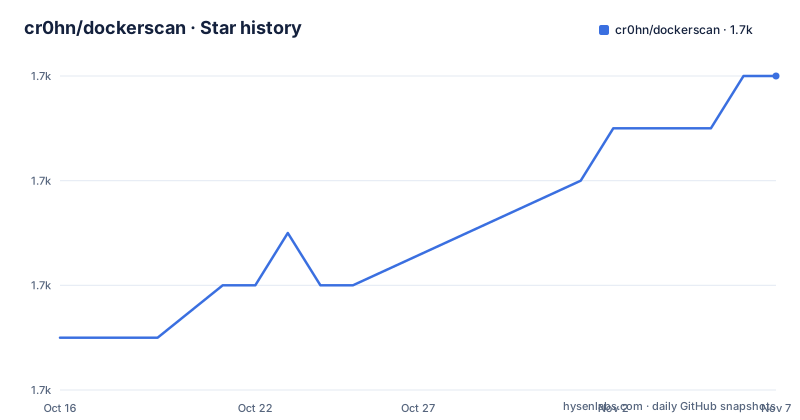
Star history
- cr0hn/dockerscan1,728 ★ · +5
| Repository | 2026-10-16 | 2026-11-07 |
|---|---|---|
| cr0hn/dockerscan | 1.7k | 1.7k |
5 Stars in the last 22 days, measured from the daily GitHub snapshot. Compare with other projects
Editorial analysis
It scans images and registries, not just the Dockerfile
DockerScan v2 is described as a next-generation security scanner for Docker containers and images, completely rewritten in Go. The rewrite matters for the reason it usually matters, the project lists concurrent scanning with goroutines, a low memory footprint of roughly 50 to 100MB, and a single binary with no dependencies.
The scanning surface is broader than a lint on a Dockerfile. The tool works against Docker images and Docker registries, and it also inspects the host and the daemon, because the CIS benchmark module checks host configuration, Docker daemon hardening, file and directory permissions, container image best practices and runtime security validation. The runtime analysis module goes further, auditing Linux capabilities for dangerous ones such as CAP_SYS_ADMIN and CAP_NET_ADMIN, checking that a seccomp profile is filtering syscalls, verifying AppArmor and SELinux, detecting privileged containers, checking namespace isolation for PID, IPC, network and user namespaces, and looking for container escape indicators.
The stated basis for the design is recent supply chain attack research, the CIS Benchmark and NIST SP 800-190, and the project says the scanner is extensible through a plugin architecture for custom scanners.
The repository layout matches a tool with several subsystems: cmd/ holds the command entry points, internal/ and pkg/ the implementation, data/ the data files, and scripts/ the helper scripts. The Go module is github.com/cr0hn/dockerscan/v2 and it requires Go 1.25.0.
Five scanner modules with very different opinions about risk
The module list is where you can see what the tool considers a finding, and it is worth reading as a statement of priorities.
The CIS module is the compliance one, with 80 or more automated controls spread across host configuration security, daemon hardening, file and directory permissions, image best practices and runtime security validation.
The supply chain module looks for the things that show up in attacks rather than in benchmarks. It detects imageless containers, which are images with no actual layers, and the README attaches a figure of 4M or more found on Docker Hub. It detects cryptocurrency miners, with a figure of 120K or more malicious image pulls attached, and backdoored libraries, with the xz-utils and liblzma incidents named. It validates image signatures using Notary or Cosign, scans documentation for phishing content aimed at the person running the image, and identifies malicious network destinations such as command and control servers, mining pools and Tor nodes.
The secrets module is the largest pattern set, 40 or more patterns, covering cloud credentials for AWS, GCP and Azure, tokens for GitHub, GitLab and Bitbucket, keys for OpenAI, Anthropic and Hugging Face, payment keys for Stripe, PayPal and Square, messaging and mail tokens, JWT and OAuth tokens, private keys in RSA, SSH, PGP, EC and DSA form, database connection strings, Docker registry authentication tokens, and unknown secrets caught by Shannon entropy analysis above a threshold of 4.5.
The vulnerability module is the one that was broken until v2.1.0, and it names the CVEs it looks for, including the runc container escape CVE-2024-21626, several BuildKit issues, the Docker Desktop RCE issues, and end-of-life base images.
v2.1.0 exists because v2.0.6 reported zero package CVEs
This is the single most important thing in the README, and it is presented as a warning at the top of the file. Versions 2.0.6 and earlier silently report zero package CVEs. A query bug made the package vulnerability check fail on every scan and discard the error, so the older binaries always show zero package CVE findings regardless of the image or the database. The README says upgrading to v2.1.0 or later is strongly recommended, because it is the first version where package CVE detection actually works.
That failure mode is the dangerous kind. A scanner that reports zero findings looks exactly like a clean image, and a team that wired it into a pipeline would have had a green build and no signal.
The v2.1.0 release overhauled the CVE data pipeline and the package matching. The CVE database is now generated from the official MITRE cvelistV5 daily snapshots instead of the NVD API, which removes the API dependency, the API keys and the rate limits. Package to CVE matching was rewritten around a dpkg-style version comparator following Debian Policy 5.6.12, with per vendor and product version ranges, so that a package is matched to the CVEs that actually affect its version rather than to the product as a whole.
The v2.0.6 release on 2026-06-11 is therefore a version you should not run, and v2.0.5 from 2026-01-08 is worse. The repository was last pushed to on 2026-10-19, well after the fixed release.
Exit codes and SARIF are what make it usable in a pipeline
The reporting design is aimed at automation rather than at a human reading a table.
There is JSON output for machine consumption, and SARIF for code scanning tools, with the README naming the GitHub Security tab, Azure DevOps, VS Code extensions and the GitLab security dashboards as the destinations. The command line output is colour coded by severity, and the exit codes are defined so a pipeline can act on them: 0 for clean, 1 for warnings, 2 for critical.
That three way split is the feature to notice. A pipeline that treats any non-zero exit as failure has thrown away the distinction between a warning and a critical finding, and the usual fix is to fail only on 2, which means a repository full of medium findings can be merged.
The two SQLite drivers in the dependency list, one the cgo version and one the pure Go modernc version, are there for the local database of vulnerability data, and the Makefile builds a second binary called nvd2sqlite next to the scanner itself, which is the tool that builds that database from the upstream data.
The comparison section in the README exists too, and the documentation is structured around use cases rather than around the module list, so it is worth skimming for the case closest to yours.
The licence is the constraint, and it is not open source
The repository badge says Proprietary and the licence classification is a custom one, so this is not an OSI open source project despite being publicly readable and buildable.
The terms are described in one bullet in the README: Source-Available, free for internal, educational, research, and non-competing commercial use. Read that carefully, because the exclusion is the operative part. Internal use inside a company is fine. Educational and research use is fine. Commercial use is fine as long as your product does not compete with a commercial scanning product. If you are building a scanning service, that is the case the licence targets.
That is a narrower grant than MIT, and it differs from the norm for a security tool that people are expected to build from source. There is also a practical consequence for a project you contribute to: your contribution is made to a repository whose licence you do not control, and the licence file in the repository is the one that applies, so read it rather than inferring terms from the fact that the code is on GitHub.
The comparison with the usual open source position is the honest frame here. A permissive licence would let a company vendor the scanner inside a commercial product without asking, and this one does not.
Building from source produces two binaries and a stale version string
The Makefile is straightforward. The build target compiles the scanner from./cmd/dockerscan into bin/, and it also compiles the nvd2sqlite helper from./cmd/nvd2sqlite, so a local build gives you the tool and the database builder. A build-all target cross-compiles for linux and darwin on amd64 and arm64, and windows on amd64, and the linker flags strip the binary and stamp a version into the internal config package.
make buildThere is a detail to check before you trust a locally built binary. The Makefile sets VERSION=2.0.0, while the published release is v2.1.0 from 2026-07-13. So a binary you build from the current branch stamps itself as 2.0.0, which is the version range the README warns about, even though the code on disk contains the fixed package CVE logic. If your pipeline or your notes record a version, take it from the release you downloaded rather than from the string in the binary, and confirm the build is at or after the v2.1.0 tag.
The dependency set is a reasonable picture of what the tool does. The Docker client library at v28.5.2 with the credential helpers is how it talks to registries and reads your login, the distribution reference package parses image references, moby/go-archive unpacks image layers, containerd/errdefs handles error types, tablewriter renders the table output, and the two SQLite drivers back the local vulnerability database.
What the scanner can and cannot tell you
It is worth being clear about the shape of the findings, because the modules promise a lot.
The supply chain detection is pattern and heuristic based. Imageless containers, mining payloads, backdoored libraries and malicious network destinations are recognised by signatures and by the content of layers and documentation. That means a genuinely novel attack passes, and it means a legitimate image can trip a rule, so the output needs a human in the loop for the finding classes that are about intent rather than about a known bad version.
The CIS module and the runtime analysis module need access to the host and the Docker daemon, because they check daemon configuration, capabilities, seccomp and the mandatory access control state. A scan of a registry on another machine cannot produce those results, so the completeness of a report depends on where the scan runs.
The performance figures in the README are claims rather than measurements you can check: 10x faster than Python alternatives, concurrent scanning with goroutines, and a memory footprint of 50 to 100MB. They are plausible for a Go implementation with a local database, and they are the kind of number you should benchmark on your own images rather than adopt.
The practical boundary is that DockerScan reports on what it can see of an image, a registry and a host. It does not tell you whether the running application is safe, and the exit code tells you what the scanner found, not what an attacker can do.
Editorial conclusion
DockerScan fits a security team that wants one binary to check an image registry for known vulnerabilities, embedded credentials, risky runtime settings and the CIS Docker benchmark, and that wants the result as SARIF in its existing code scanning dashboard. It does not fit a vendor whose product competes with a commercial scanning product, since that use is excluded by the source available licence, and it does not fit anyone still on a 2.0.x build who has not read the warning about the package CVE bug. Verify three things first: that you are on v2.1.0 or later, that the binary you run is the release build rather than one compiled from a checkout whose Makefile still says VERSION=2.0.0, and that your CI treats exit code 1 and exit code 2 differently, because the tool distinguishes warnings from critical findings and a pipeline that treats both as failure has thrown away that information.
Frequently asked questions
Which version of DockerScan should I use?
Use v2.1.0 or later. The README warns that versions 2.0.6 and earlier silently report zero package CVEs, because a query bug failed on every scan and discarded the error, so older binaries show no package findings regardless of the image or the database. v2.1.0 was released on 2026-07-13.
Does DockerScan need an API key for vulnerability data?
Not since v2.1.0. The CVE database is built from the official MITRE cvelistV5 daily snapshots instead of the NVD API, so there is no API dependency, no API key and no rate limit. The Makefile builds a separate helper binary, nvd2sqlite, for turning upstream data into the local database.
What licence does DockerScan use?
A proprietary, source available licence rather than an open source one. The README describes it as free for internal, educational, research, and non-competing commercial use, and the repository is badged as proprietary, so commercial use that competes with a commercial scanning product is excluded. Read the LICENSE file for the exact terms.
Can I run DockerScan in a CI pipeline?
Yes. It emits JSON and SARIF, with SARIF aimed at the GitHub Security tab, Azure DevOps, VS Code extensions and the GitLab security dashboards. Exit codes are 0 for clean, 1 for warnings and 2 for critical, so a pipeline can fail on critical findings while still reporting warnings.
How do I build DockerScan from source?
The Makefile build target compiles the scanner from ./cmd/dockerscan into bin/ and also builds the nvd2sqlite helper from ./cmd/nvd2sqlite. The module is github.com/cr0hn/dockerscan/v2 and requires Go 1.25.0. Note that the Makefile sets VERSION=2.0.0 while the fixed release is v2.1.0, so check the tag you build from rather than the version string in the binary.
Official sources
Add this badge to your README
If you maintain this project, the badge below links readers to this analysis and shows its maintenance status from the daily GitHub snapshot. Paste the markdown into your README; add ?metric=license or ?metric=stars to the image URL for a different field.

[](https://hysenlabs.com/projects/cr0hn-dockerscan)Star history chart for your README
[](https://hysenlabs.com/projects/cr0hn-dockerscan)Was this useful?