three-nebula is a particle engine that stays still until you update it
WebGL based particle system engine for three.js
At a glance
- What is it?
- three-nebula is a WebGL particle system engine that sits alongside three.js, with emitters, initializers and behaviours, JSON scene definitions, and a separate WebGPU entry point. Its one hard rule is that nothing moves until you call system.update() once per frame, which is the detail that trips up every first-time user.
- Who is it for?
- Adopt three-nebula when your three.js scene needs effects rather than objects, a smoke plume or a spell effect, and you want the emitter, initializer and behaviour model rather than a hand written buffer of particles. Do not adopt it if you need physics that a rigid body engine provides, since this library integrates particle motion with an euler or similar integration type and does not model forces on rigid bodies.
- Can I use it commercially?
- Yes. MIT is a permissive licence: you can use, modify and sell software built on it, as long as you keep its copyright and licence notices.
- Is it still maintained?
- Yes. The repository last received commits 16 days ago.
- What is it written in?
- Mainly JavaScript, according to GitHub's language statistics.
Answers come from the project's GitHub data, last synced on November 7, 2026, and from our analysis. They are not legal advice.
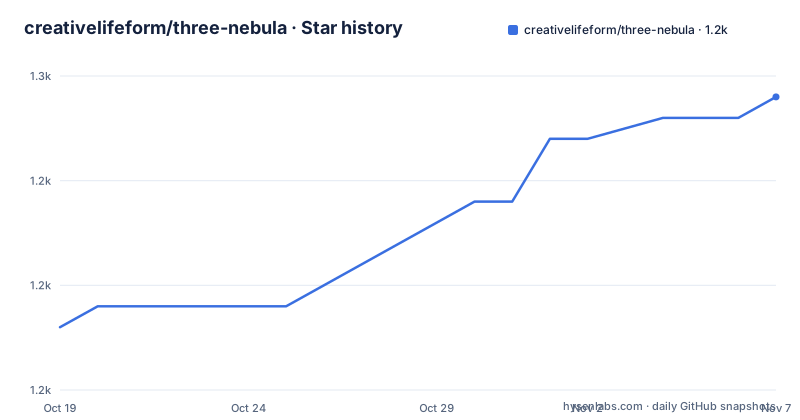
Star history
- creativelifeform/three-nebula1,249 ★ · +11
| Repository | 2026-10-19 | 2026-11-07 |
|---|---|---|
| creativelifeform/three-nebula | 1.2k | 1.2k |
11 Stars in the last 19 days, measured from the daily GitHub snapshot. Compare with other projects
Editorial analysis
A particle engine that assumes you own the frame loop
three-nebula is described as a WebGL based 3D particle engine designed to work alongside three.js, and the repository badge shows it built and tested against [email protected]. It is an engine, not a three.js plugin, so it sits beside your scene rather than inside it.
The design decision that defines the library is stated in one line of the usage section: however you build a system, the one thing to remember is to drive it from your render loop by calling system.update() once per frame, and nothing animates until you do.
That is unusual enough to be worth a second look, because most particle systems in a three.js scene are wired into the render loop for you. Here the library is passive. It owns the particle state, the initializers, the behaviours and the renderers, but it does not own time. If your application already has a loop, you call the update inside it.
const animate = () => {
  system.update();
  requestAnimationFrame(animate);
};
requestAnimationFrame(animate);
The upside is that there is no hidden clock, no internal render loop to fight with, and the same system can be stepped in a test. The downside is a first run that renders a static cloud of particles and looks broken.
Emitters, initializers and behaviours are the three pieces
The model has three layers, and they map onto the three questions you ask when designing an effect.
An emitter produces particles at a rate, and it owns the initializers that set each new particle up. Initializers are the birth-time properties: where the particle starts, how heavy it is, how big it is, how long it lives. A Rate is constructed with a Span for the particle count range and another Span for the interval, so the emitter is emitting between 4 and 16 particles with an interval around 0.01.
Behaviours are the per-frame properties, the things that change while the particle lives. Alpha fading, scale, colour, and forces are all behaviours.
emitter
  .setRate(new Rate(new Span(4, 16), new Span(0.01)))
  .setInitializers([
    new Position(new PointZone(0, 0)),
    new Mass(1),
    new Radius(6, 12),
    new Life(3),
    new RadialVelocity(45, new Vector3D(0, 1, 0), 180),
  ])
  .setBehaviours([
    new Alpha(1, 0),
    new Scale(0.1, 1.3),
    new Color(new THREE.Color(0xff0000), new THREE.Color(0x0000ff)),
  ])
  .emit();
A Position takes a zone, and PointZone is one of them, so a particle is born at a point rather than a single coordinate. A RadialVelocity takes a speed, a direction vector and a spread angle, which is how a cone of particles is produced.
The three layer split is what makes the library composable. Behaviours are independent of the emitter, so the same fading behaviour works for smoke and for sparks.
A whole system can be defined as JSON
The second way in is data. The feature list calls out the ability to instantiate three-nebula particle systems from JSON objects, and the usage section shows a definition of the same system in declarative form, with emitters as an array and each emitter carrying rate, position, initializers and behaviours.
const json = {
  preParticles: 500,
  integrationType: 'euler',
};
Each initializer and each behaviour in the JSON is a type name plus a properties object, and the type name is the class name, Mass, Life, BodySprite, Radius, Alpha, Color, Scale, Force. The properties are the constructor arguments in object form, so Mass with min and max of 1 is a fixed mass, and Alpha with alphaA of 1 and alphaB of 0 fades from opaque to transparent.
The system is then created asynchronously.
System.fromJSONAsync(json, THREE).then(system => {
  console.log(system);
});
Two fields in that object are worth understanding. preParticles reserves a pool size up front, and integrationType selects how the engine integrates motion over a step, with euler named in the example. The rest of the object shows how a JSON document can describe a scene with two emitters positioned at opposite x coordinates, each with its own colour ramp and its own force.
For a team that wants effects described by designers or loaded from a server, that is the capability that matters, because the effect stops being code.
The WebGPU build lives behind its own entry point
The feature list mentions optional WebGPU rendering through a batched GPURenderer, and the installation section confirms that three-nebula ships ES module, CommonJS and UMD builds.
The packaging shows how the two are kept apart. The main export points at the WebGL build, with an import condition resolving to the mjs file and a require condition to the cjs file, and a separate subpath for WebGPU with its own type declarations and its own mjs and cjs files.
"exports": {
  ".": {
    "types": "./dist/types/index.d.ts",
    "import": "./dist/three-nebula.mjs",
    "require": "./dist/three-nebula.cjs"
  },
  "./webgpu": {
    "types": "./dist/types/webgpu/index.d.ts",
    "import": "./dist/three-nebula-webgpu.mjs",
    "require": "./dist/three-nebula-webgpu.cjs"
  }
}
A separate entry point rather than a flag is the right shape for this. The WebGPU renderer is described as batched, which implies a different pipeline and a different cost profile, and a project that never touches it should not pay for it in bundle size or in type checking. The repository carries a dedicated tsconfig.webgpu.json and vite.webgpu.config.js, and the type declarations for the WebGPU build are produced by a separate script rather than by the main tsc pass.
For a team evaluating the WebGPU path, the question to answer first is whether the batched renderer covers the effect you need, because it is optional and therefore not the default path.
Installing it next to three.js
The installation section is short, which is a sign that the packaging is conventional.
npm i --save three three-nebulaThe two are installed together because three is declared as a peer dependency. The library does not bundle its own copy of three, so a project with two copies of three in its dependency tree will have renderer and object identity problems that are hard to trace back to this.
A single package install is also possible, which the README shows separately as npm i --save three-nebula, and for a script tag setup there is a UMD build.
<script type='text/javascript' src='node_modules/three-nebula/dist/three-nebula.umd.js'></script>The package manifest also lists unpkg and jsdelivr pointing at the same UMD file, so a CDN hosted build is available without a build step at all.
The README states the library works with any bundler, naming Vite, webpack and Rollup, or straight from a script tag. The repository has its own Vite configuration for the library build and a separate one for the sandbox, and the sandbox directory holds the quickstart example that is also published as a CodeSandbox at three-nebula-quickstart-kz6uv.
The documentation is published separately as an API reference, and the project site at three-nebula.org carries the examples gallery.
Visual regression and a README that checks itself
The scripts in the package manifest show how the project guards itself, and two of them are unusual.
The first is the visual regression harness in the vr/ directory. There is a script to capture all reference renders, one to capture baselines, one to diff and one to build a montage, and the package exposes them as vr, vr:baseline, vr:diff and vr:montage. A particle engine is exactly the kind of project where a unit test can pass while the picture is wrong, since a behaviour that changes the colour ramp or the spread angle is not going to fail an assertion on a number. Comparing rendered frames catches that.
The second is the readme:check-three script, which runs scripts/sync-readme-three-version.mjs in check mode, with a companion sync script. The README carries a three version badge, and the check exists so that the badge and the supported version cannot drift apart from the code. It is also part of the ci:src script, which runs the version check, two typechecks, the lint and the coverage.
The rest of the toolchain is ordinary and modern. The build is Vite, with a separate type build via tsc, tests run under vitest with a coverage script, and the lint step runs a format check, oxlint over src and test, and madge with the --circular flag to detect dependency cycles in the source.
There is a husky directory for git hooks, a .prettierrc for formatting and an .oxlintrc.json for the linter configuration, and the CI workflow badge in the README is backed by a coveralls badge for coverage reporting.
Version 13 and a tight coupling to three.js
The repository is not archived, and the last push was on 2026-10-16. The recent releases are v13.3.0, named Helix, on 2026-09-19, v13.2.0, described as a RibbonRenderer refinement, on 2026-09-12, and v13.1.0, described as Emitter Hierarchy, on 2026-09-11.
The release names are worth reading as a roadmap. Emitter Hierarchy means emitters can be nested, RibbonRenderer refinement means a specific renderer got attention, and the two releases are days apart, so the project is moving fast on features rather than consolidating.
The three.js coupling is the thing to plan around. The library is built and tested against a specific three version, [email protected], and the README badge shows the same number. The internal import of three is a peer dependency, so the version you run is the version you choose, but the engine is verified against one release.
The licence is MIT, in a LICENSE.md file, and the package is published to npm as three-nebula with the version in the manifest matching the release tag.
For a project that is already on a three.js version, the check that matters before upgrading is whether a compatible three release exists, because the engine is versioned in lockstep with it in practice even though the peer dependency range does not say so.
Editorial conclusion
Adopt three-nebula when your three.js scene needs effects rather than objects, a smoke plume or a spell effect, and you want the emitter, initializer and behaviour model rather than a hand written buffer of particles. Do not adopt it if you need physics that a rigid body engine provides, since this library integrates particle motion with an euler or similar integration type and does not model forces on rigid bodies. Verify first that the three.js version in your project matches the one the engine is built and tested against, that you call system.update() in your render loop, and that the entry point you import is the one your bundler resolves, since the package exposes a separate subpath for the WebGPU build.
Frequently asked questions
Why do my three-nebula particles not move?
Nothing animates until you drive the system yourself. The library expects you to call system.update() once per frame from your render loop, typically inside a requestAnimationFrame callback, and it deliberately does not run its own loop.
How do I install three-nebula?
Run npm i --save three three-nebula, because three is declared as a peer dependency and must be installed alongside it. A script tag build is published too, at node_modules/three-nebula/dist/three-nebula.umd.js.
What is the difference between initializers and behaviours in three-nebula?
Initializers set a particle up when it is born, such as Position, Mass, Radius, Life and RadialVelocity, while behaviours change it while it lives, such as Alpha, Scale, Color and Force. The emitter holds both lists.
Can I define a particle system in JSON?
Yes. The library can instantiate systems from JSON objects, with emitters carrying rate, position, initializers and behaviours, and each entry given as a type name plus a properties object. The system is then created with System.fromJSONAsync(json, THREE).
Does three-nebula support WebGPU?
Optionally, through a batched GPURenderer. It is published under the separate three-nebula/webgpu export path with its own type declarations, so a project that does not use it does not bundle it.
Which three.js version does three-nebula support?
The library is built and tested against [email protected], and the README carries a badge with that version. A check script, readme:check-three, runs in CI so the documented version cannot drift from the code.
Official sources
Add this badge to your README
If you maintain this project, the badge below links readers to this analysis and shows its maintenance status from the daily GitHub snapshot. Paste the markdown into your README; add ?metric=license or ?metric=stars to the image URL for a different field.

[](https://hysenlabs.com/projects/creativelifeform-three-nebula)Star history chart for your README
[](https://hysenlabs.com/projects/creativelifeform-three-nebula)Was this useful?