Material Tailwind: Material Design components rebuilt as copyable Tailwind markup
@material-tailwind is an easy-to-use components library for Tailwind CSS and Material Design.
At a glance
- What is it?
- Two npm packages, one for React and one for plain HTML, that translate Google's Material Design into Tailwind classes. The component set is broad, the releases are quiet, and the docs live on a separate site.
- Who is it for?
- Material Tailwind is at its best when a team needs Material Design styling without Material UI's dependency and wants Tailwind utility classes in the markup rather than a styled component tree, and its HTML package is the faster route for a Rails, Django or PHP application that has no build step for components.
- Can I use it commercially?
- Yes. MIT is a permissive licence: you can use, modify and sell software built on it, as long as you keep its copyright and licence notices.
- Is it still maintained?
- Yes. The repository last received commits 178 days ago.
- What is it written in?
- Mainly TypeScript, according to GitHub's language statistics.
Answers come from the project's GitHub data, last synced on October 18, 2026, and from our analysis. They are not legal advice.
Star history
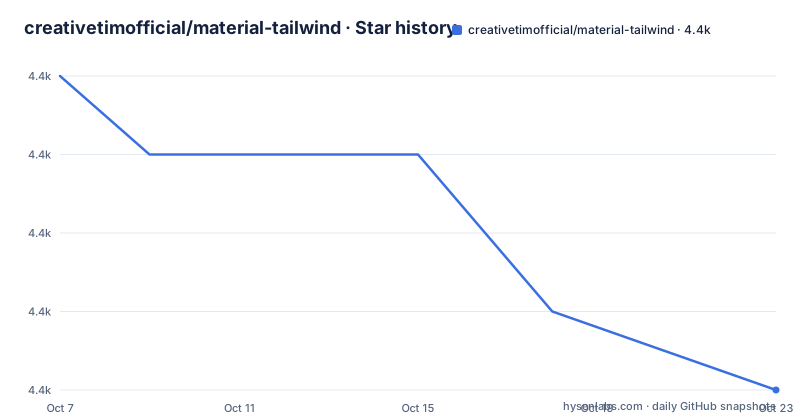
- creativetimofficial/material-tailwind4,360 ★ · -3
| Repository | 2026-10-07 | 2026-10-18 |
|---|---|---|
| creativetimofficial/material-tailwind | 4.4k | 4.4k |
-3 Stars in the last 11 days, measured from the daily GitHub snapshot. Compare with other projects
Editorial analysis
Two npm packages rather than one library
The first thing to understand about this project is that it publishes two packages, and the README treats them as separate products. `@material-tailwind/react` carries a version badge of 2.1.10, and `@material-tailwind/html` carries 2.2.3. Each has its own npm page, its own licence badge and its own downloads badge.
The split is not cosmetic. The React package gives you components to import and render. The HTML package gives you markup with Tailwind classes, which you paste into a template in whatever server side language you already use. For a Rails or Django application that has no component build step, the HTML package is the one that matters, and for a React application the React package is the one that avoids copy and paste drift.
Both are MIT licensed, and the repository is TypeScript. The project description in `package.json` states it plainly: Material Tailwind is an easy-to-use components library for Tailwind CSS inspired by Material Design.
The consequence of that design is that the library is markup rather than behaviour in most cases. What you get is the class names that produce a Material looking button, plus the structure to put around them, and for a design that is already decided that is exactly what is missing from a bare Tailwind project.
The component catalogue, read as a scope document
The README is mostly a component gallery, and the gallery is the most informative part of it. The list covers Accordion, Alert, Avatar, Badge, Breadcrumbs, Button, Button Group, Card, Checkbox, Chip, Collapse, Carousel, Dialog, Drawer, Icon Button, Input, Form, List, Menu, Navbar and Popover, with each entry linking to its own documentation page on material-tailwind.com and its own thumbnail image.
Reading that as a scope document rather than a feature list tells you what this library is and is not. It is the Material component set that a dashboard or an admin panel actually uses. There is no date picker, no data grid, no slider, no stepper, no tooltip in that visible set. Those are precisely the components that carry real interactive logic, and they are the ones where a library earns its keep by hiding state handling rather than by handing you class names.
So the honest characterisation is this. Material Tailwind removes the tedium of building a Material looking surface area once, and it hands you back raw utility classes that you can then edit, extend or throw away. It is a starting point you are meant to modify, not a dependency you never touch.
The documentation link for the React package is the installation page at material-tailwind.com/docs/react/installation, and the README says that page has the full documentation.
Building the packages from this repository
This repository is not only the library. It is also the documentation site, which explains the shape of the tree: `pages/`, `routes/`, `public/`, `styles/` and `docs-content/` belong to the Next.js site, `documentation/` and `widgets/` hold the documentation app itself, and `packages/` holds the published code.
The `package.json` reflects that split. It is the site manifest, with scripts for `next dev`, `next build`, `next start` and `next lint`, plus a `sitemap` script wired into the build. The two library builds are delegated to the workspace:
pnpm --filter ./packages/material-tailwind-react build
pnpm --filter ./packages/material-tailwind-html build
and `pnpm-workspace.yaml` at the root is what makes those filters resolve. There is also a `build:html` and `build:react` script that wrap those two commands, so the intent is that each package builds independently.
For a contributor this means the cost of setup is a pnpm install and a working Next.js site, not just a component library build. The type declarations at the repository root in `index.d.ts`, alongside `tsconfig.json` and `tsconfig.tsbuildinfo`, suggest the root project also emits or checks types.
What the releases actually say
The GitHub releases are three beta tags from a single week in February 2025, and they are small. v3.0.0-beta.6, published on 2025-02-13, says only: fix exports issue. v3.0.0-beta.5, also on 2025-02-13, fixes type definitions on import from NPM in NextJS and fixes the name for the global object MaterialTailwind. v3.0.0-beta.4, from 2025-02-12, adds support for the value `menu` as an initial state on the Dropdown component.
Those three entries are more informative than they look. The first two are packaging problems, which is what you would expect from a major version rewrite where the import surface and the global object name both changed. The third is a small API addition to a component that needed a third initial mode beyond closed and open.
What is missing is equally informative. There is no changelog covering the jump from the 2.x line to 3.0.0, no accessibility audit note, no browser support matrix, and no statement of what broke for existing users. The README badges still advertise 2.1.10 and 2.2.3, which suggests the documentation site and the release tags are not being kept in step.
The last push was on 2026-04-28. That is recent enough to call the repository active, but with no releases in the last year and no changelog to consult, upgrading is an exercise in reading the source rather than in reading release notes.
Why copy markup rather than import a component
The comparison that matters here is with Material UI, not with other Tailwind libraries. Material UI ships React components with a theme object, a CSS-in-JS layer or an extracted stylesheet, and a documented API for overriding colours, typography and shape. It is a design system with a theming contract.
Material Tailwind deliberately gives you the opposite. There is no theme object to configure, because there is no runtime styling layer: the components are Tailwind classes, and your `tailwind.config.js` is where any change happens. The repository carries a `tailwind.config.js` and a `postcss.config.js`, which are the two files you would touch to make the library's output match a design system of your own.
The trade is real in both directions. In exchange for losing the theme contract, you gain markup you fully own. Once a button is a `<button>` with a list of utility classes in your template, restyling it means editing that template, and a design change never requires anyone to understand a provider tree or a theme merge order.
The second comparison is with Flowbite or daisyUI, which are also Tailwind component collections. Those lean on Tailwind plugin syntax and CSS custom properties, so they fit inside a Tailwind config in a way this library does not. Material Tailwind's pitch is closer to a documentation gallery you copy from, which is a real advantage when you want a specific look immediately and a limitation when you want a coherent token system.
What to check before you commit to it
Start with the installation page for the specific package. The README routes React users to material-tailwind.com/docs/react/installation and says full documentation lives there, which means dependency requirements, Tailwind version and content configuration are documented off the repository rather than in it.
Then check version alignment. The README badges say 2.1.10 for React and 2.2.3 for HTML, while the newest tags are 3.0.0 betas. Those numbers cannot both be the current recommendation, and the beta entries about exports and type definitions suggest the 3.x line changed how you import things. Working out which line the documentation assumes is the first task, and it is not answered anywhere in this repository.
Third, look at the documentation site dependencies in `package.json`. The site pulls in FullCalendar, TipTap, Lexical, ApexCharts, Heroicons, Floating UI and DocSearch, which tells you the docs demo quite advanced widgets even where the component library itself is simple. That gap between what the docs can demonstrate and what the library ships is worth keeping in mind.
Finally, expect to own the accessibility work. The repository has no accessibility statement, and components copied as markup carry only the ARIA attributes visible in the snippet you copied. `CONTRIBUTING.md` and `CODE_OF_CONDUCT.md` are present, but neither is a component a11y guarantee.
Editorial conclusion
Material Tailwind is at its best when a team needs Material Design styling without Material UI's dependency and wants Tailwind utility classes in the markup rather than a styled component tree, and its HTML package is the faster route for a Rails, Django or PHP application that has no build step for components. Skip it if you want a design system you extend through themable tokens, because the value here is a fixed visual language copied from documentation pages, not a theming API. Before adopting, open the installation page for the package you plan to use and check which version the docs assume, since the README badges read 2.1.10 and 2.2.3 while the newest tags are 3.0.0-beta releases from February 2025.
Frequently asked questions
What is the difference between @material-tailwind/react and @material-tailwind/html?
They are two separate packages from the same project. The React package provides components you import and render, while the HTML package provides Material Design markup written in Tailwind classes that you paste into a template in another language, such as Rails or Django.
Which version of Material Tailwind should I install?
The README badges advertise 2.1.10 for the React package and 2.2.3 for the HTML package, while the newest GitHub tags are 3.0.0-beta releases published in February 2025. The beta notes mention export and type definition fixes, so check the installation page for the package you want before pinning a version.
Can I theme Material Tailwind components to match my own design system?
There is no theme object or provider to configure, because the components are Tailwind utility classes rather than a styled component tree. Theming happens in your own `tailwind.config.js` and by editing the markup, which gives full ownership of the styles and removes the runtime theming contract Material UI provides.
Official sources
Add this badge to your README
If you maintain this project, the badge below links readers to this analysis and shows its maintenance status from the daily GitHub snapshot. Paste the markdown into your README; add ?metric=license or ?metric=stars to the image URL for a different field.

[](https://hysenlabs.com/projects/creativetimofficial-material-tailwind)Star history chart for your README
[](https://hysenlabs.com/projects/creativetimofficial-material-tailwind)Was this useful?