URP Volumetric Fog: volumetric lighting for Unity URP lights
Unity package for versions 2022.3 and Unity 6 and above. Adds support to render volumetric lighting for both the main and additional lights in URP. Compatible with URP render graph in Unity 6 and above.
At a glance
- What is it?
- URP Volumetric Fog is a Unity package that adds volumetric lighting to the Universal Render Pipeline, including spot and point lights, shadows and cookies. It is a good fit for a Unity 2022.3 LTS or Unity 6 project that already uses URP, and a poor fit for WebGL, multipass VR or scenes that need transparent surfaces to blend with fog.
- Who is it for?
- Adopt URP Volumetric Fog when your project already runs the Universal Render Pipeline on Unity 2022.3 LTS or Unity 6 and needs light shafts from spot or point lights that the pipeline does not give you. Leave it alone when the target is WebGL, when multipass VR is a requirement, or when transparent objects have to blend with the fog, since that case is listed as not blending correctly.
- Can I use it commercially?
- Yes. MIT is a permissive licence: you can use, modify and sell software built on it, as long as you keep its copyright and licence notices.
- Is it still maintained?
- Yes. The repository last received commits 23 days ago.
- What is it written in?
- Mainly C#, according to GitHub's language statistics.
Answers come from the project's GitHub data, last synced on November 7, 2026, and from our analysis. They are not legal advice.
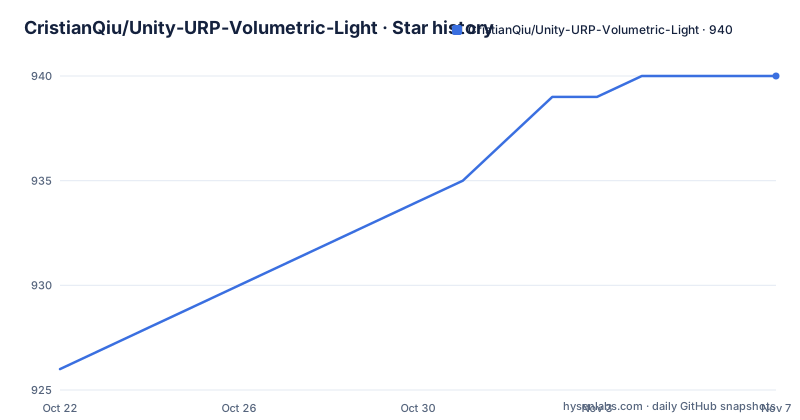
Star history
- CristianQiu/Unity-URP-Volumetric-Light940 ★ · +14
| Repository | 2026-10-22 | 2026-11-07 |
|---|---|---|
| CristianQiu/Unity-URP-Volumetric-Light | 926 | 940 |
14 Stars in the last 16 days, measured from the daily GitHub snapshot. Compare with other projects
Editorial analysis
Light shafts for URP, which the pipeline does not ship on its own
URP Volumetric Fog is a Unity package that adds support for volumetric lighting to both the main light and the additional lights in the Universal Render Pipeline. The problem it addresses is narrow and real: a URP project with a spotlight shining through a dusty corridor gets a lit cone on surfaces but no volume of light in the air between them. This package fills that gap.
The target users are Unity developers already on URP, since the package assumes the render pipeline is installed and correctly set up before it is added. It is a C# package with a Runtime folder, an Editor folder and a Shaders folder, published as a Unity package named com.cqf.urpvolumetricfog under the display name URP Volumetric Fog.
The package description states it supports additional lights, shadows and cookies, and that render graph support is available for Unity 6 and above. Those three terms set the scope precisely: this is not a fog volume system in the general sense, but a way to make existing URP lights scatter visibly.
The setup is a renderer feature, a volume override and a per light component
Three separate pieces of configuration are involved, and missing any one of them is the usual reason nothing appears on screen.
The first is a volumetric fog renderer feature added to the URP Renderer. The second is a volume in the scene carrying an override named Custom->Volumetric Fog, and the Enabled checkbox inside it must be ticked because fog is off by default. Post-processing has to be enabled both on the camera and on the URP Renderer before the volume has any effect.
The third piece applies only to spot and point lights. The component VolumetricAdditionalLight has to be attached to each light that should contribute to the fog, which means the main light works through the volume alone while every additional light needs the component. The documentation also suggests adjusting volume parameters or raising light intensity if the fog is still not visible, which is an admission that the default look is subtle rather than obvious.
Installing through the Unity Package Manager from a git URL
There is no console installation. The project states that the recommended way to install the package is through the package manager in Unity, and that URP must be installed and set up in the project before you start.
Inside the editor, open Window and then Package Manager, click the + symbol in the top left corner and choose Install package from git URL. The URL to paste is the repository address itself.
https://github.com/CristianQiu/Unity-URP-Volumetric-Light.gitAfter the install completes, the package manifest in the repository shows the identifiers that decide compatibility with your editor.
  "name": "com.cqf.urpvolumetricfog",
  "version": "0.5.91",
  "displayName": "URP Volumetric Fog",
  "unity": "2022.3",
  "unityRelease": "18f1",
The manifest targets Unity 2022.3 at release 18f1, and the stated requirement range covers any Unity version after 2022.3 LTS up to Unity 6000.6.
Rendering paths, graphics APIs and what the author could not test
The compatibility story is unusually explicit for a Unity package, and it splits into two halves. On the graphics API side, the project states it is verified in DirectX11, DirectX12, OpenGLES3, OpenGLCore and Vulkan. On the rendering path side, it works in forward, deferred, forward+ and deferred+.
The performance guidance then narrows that list. The documentation states that on the forward and deferred paths, performance can be heavily affected when multiple additional lights are added, and recommends Forward+ or Deferred+ for the best performance where additional lights are needed. So the path list is a compatibility list, not an equal recommendation.
There is a similar split for VR. Single pass VR rendering is supported, but the project says this is verified by users rather than by the author, who states he does not work on VR. Consoles are untested as well: Switch 1/2 and PS4 are not tested, while Steam Deck, Xbox One/XSX and PS5 are verified by users as of v0.5.6. Realtime and mixed lights are supported, APV support covers Unity 2023.1 and later, and perspective and orthographic projection are both handled.
Transparent surfaces, baked lights and the fog distance limit
The limitations section is where a graphics package earns trust, and this one lists its problems plainly.
Transparent objects are not blended correctly with fog. That single line decides whether the package fits a project: any scene where glass or particles need to sit inside a lit volume will look wrong, and the TODO list names better transparency support as future work rather than a fix.
Fully baked lights are only supported through APV, so a project relying entirely on baked lighting depends on the APV path and on Unity 2023.1 or later. Fog is rendered only up to a certain distance from the camera, which means a large interior with a distant light source will not show fog at that range. More noise can be noticed in some light regions at certain view angles.
Two platform exclusions complete the list. Multipass VR rendering is not supported, and WebGL is not supported at all, with an issue link given for the latter. WebGL support appears again in the TODO section alongside density volumes, noise and self shadowing, which describes what is planned rather than what exists.
One known bug ties volumetric shadows to the Transparent Receive Shadows setting
There is a single entry under known bugs, and it involves the URP Renderer rather than the package itself. When Transparent Receive Shadows is off in the URP Renderer, volumetric shadows from lights behave incorrectly. The suggested fix is to turn the setting on if you hit the problem.
That is worth knowing before debugging begins, because the symptom appears in the lighting and the cause lives in a renderer option that has nothing to do with fog. The author links an issue for the behaviour, so the details sit with the issue tracker rather than in the package documentation.
The TODO section also names further improvements on performance and quality, including quarter resolution rendering, reprojection and better transparency support. Quarter resolution and reprojection are the two entries a graphics programmer would look for first, since both reduce the cost of sampling a volume along the view ray. Neither is in the current release.
One maintainer, version 0.5.91 and an MIT licence file
The package is distributed under the MIT licence, with the text in LICENSE.md at the repository root and the same file referenced from the manifest. The manifest points to the README for documentation and to CHANGELOG.md for the change history, both of which exist in the repository alongside the package manifest.
The maintenance picture is unusual in one respect. The last push was on 2026-10-16, and the tagged releases include 0.5.91 from 2026-09-07, 0.5.9 from 2026-03-21 and 0.5.8 from 2025-09-11. Code is moving recently, but the version numbers move in small steps, and the author describes the project as something he returns to in his spare time. He also states he works on it alongside Siesta Games studio on Empire in Decay, and plans to release a new version in the future with material used in that game.
For a studio that depends on this in a shipped title, the practical consequence is that you are depending on one person with a stated part-time schedule and a public intention to keep going. That is a risk to plan for, not a reason to avoid it.
Editorial conclusion
Adopt URP Volumetric Fog when your project already runs the Universal Render Pipeline on Unity 2022.3 LTS or Unity 6 and needs light shafts from spot or point lights that the pipeline does not give you. Leave it alone when the target is WebGL, when multipass VR is a requirement, or when transparent objects have to blend with the fog, since that case is listed as not blending correctly. Before committing, check that the rendering path is Forward+ or Deferred+, because the documentation says performance suffers with multiple additional lights on forward and deferred, and confirm the version you install against v0.5.91, since the package identifier and the 2022.3/18f1 manifest entry decide which Unity editor versions accept it.
Frequently asked questions
How do I install URP Volumetric Fog in Unity?
Open Window and then Package Manager in the editor, click the + symbol in the top left corner and choose Install package from git URL, then paste the repository git URL and install. URP has to be installed and set up in the project before you do this.
Which Unity versions does URP Volumetric Fog support?
The package requires any Unity version after 2022.3 LTS up to Unity 6000.6, and the package manifest declares unity 2022.3 with unityRelease 18f1. Render graph support is available for Unity 6 and above.
Why is the volumetric fog not showing up in my scene?
The fog is disabled by default, so the Enabled checkbox in the Custom->Volumetric Fog volume override must be ticked, post-processing has to be enabled on both the camera and the URP Renderer, and a volumetric fog renderer feature must be added to the URP Renderer. Spot and point lights also need the VolumetricAdditionalLight component to contribute.
Does URP Volumetric Fog work with WebGL or VR?
WebGL is not supported, and multipass VR rendering is not supported either. Single pass VR rendering is supported, but the project says that support was verified by users rather than by the author.
Which rendering path should I use for the best performance?
Forward+ or Deferred+ is recommended when you need additional lights, because the documentation states that on forward and deferred paths performance can be heavily affected by multiple additional lights.
Official sources
Add this badge to your README
If you maintain this project, the badge below links readers to this analysis and shows its maintenance status from the daily GitHub snapshot. Paste the markdown into your README; add ?metric=license or ?metric=stars to the image URL for a different field.

[](https://hysenlabs.com/projects/cristianqiu-unity-urp-volumetric-light)Star history chart for your README
[](https://hysenlabs.com/projects/cristianqiu-unity-urp-volumetric-light)Was this useful?