Project NOMAD: An Offline-First Knowledge Server Built on Docker
Project NOMAD is an offline-first knowledge and education server. Wikipedia, thousands of books, courses, maps, and optional local AI, all running on hardware you own with no internet required.
At a glance
- What is it?
- Project NOMAD is a self-hosted, offline-first knowledge and education server that orchestrates Kiwix, Kolibri, Ollama, and other containerized tools. This review covers its architecture, install process, hardware demands, and where it falls short.
- Who is it for?
- Adopt Project NOMAD if you need a self-contained, offline knowledge base and are comfortable with Docker and Debian-based Linux. Avoid it if you want a lightweight, low-spec solution or require Windows native support.
- Can I use it commercially?
- Yes. Apache-2.0 is a permissive licence: you can use, modify and sell software built on it, as long as you keep its copyright and licence notices.
- Is it still maintained?
- Yes. The repository received new commits within the last day.
- What is it written in?
- Mainly TypeScript, according to GitHub's language statistics.
Answers come from the project's GitHub data, last synced on November 15, 2026, and from our analysis. They are not legal advice.
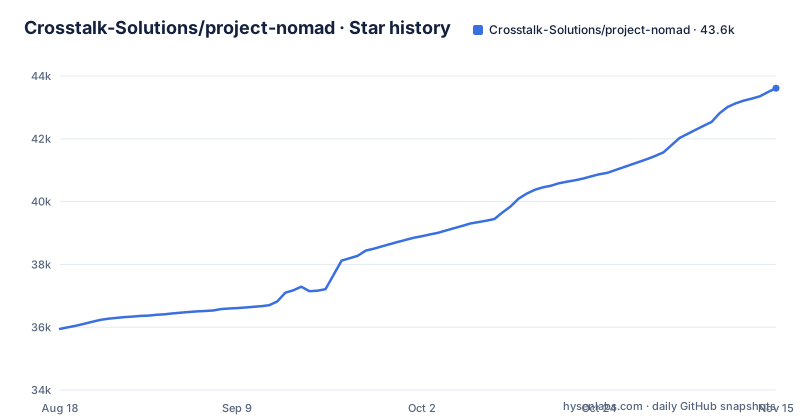
Star history
- Crosstalk-Solutions/project-nomad43,612 ★ · +7,665
| Repository | 2026-08-18 | 2026-11-15 |
|---|---|---|
| Crosstalk-Solutions/project-nomad | 35.9k | 43.6k |
7,665 Stars in the last 89 days, measured from the daily GitHub snapshot. Compare with other projects
Editorial analysis
What Problem Does Project NOMAD Solve?
Project NOMAD addresses a specific gap: access to knowledge and educational resources when the internet is unavailable or unreliable. It is for users who want Wikipedia, books, courses, maps, and even local AI on hardware they own, without depending on a cloud provider. The README positions it as a 'knowledge and education server' that is 'offline-first.' The target audience is not the casual user; it is someone willing to run a terminal-based installer and manage a Docker-based system. The project explicitly contrasts itself with 'offline survival computers' that run on bare-minimum hardware, stating that NOMAD is 'quite the opposite' and encourages a 'beefy, GPU-backed device' for AI features. So, if you need a portable, self-contained library that works in a disconnected environment, this is the problem it tackles.
Architecture: A Command Center Orchestrating Containers
The core mechanism is a management UI called the 'Command Center' and an API that orchestrates a collection of containerized tools via Docker. The README states that NOMAD 'handles installation, configuration, and updates for everything.' This is not a monolithic application; it is a supervisor that spins up and manages separate services. The built-in capabilities are each powered by a specific open-source project: Kiwix for offline Wikipedia and ZIM files, Kolibri for Khan Academy courses, ProtoMaps for offline maps, CyberChef for data tools, FlatNotes for notes, and Ollama with Qdrant for AI chat and semantic search. The data flow is that the Command Center provides a unified interface to these containers, and the user accesses everything through a browser. This design means that NOMAD's reliability depends on Docker's health and the individual containers' stability, which is a trade-off: you get modularity but also a more complex failure surface.
Installation: A Terminal-Based Script with Docker Underneath
Installation is strictly for Debian-based systems, with Ubuntu 26.04 LTS recommended, but 24.04 LTS and Debian 12 also supported. The quick install is a single command that downloads and runs a shell script: `curl -fsSL https://raw.githubusercontent.com/Crosstalk-Solutions/project-nomad/refs/heads/main/install/install_nomad.sh -o install_nomad.sh && sudo bash install_nomad.sh`. This requires sudo or root privileges. After installation, you access the interface at `http://localhost:8080` or `http://DEVICE_IP:8080`. For advanced users, there is a Docker Compose template that you copy into a `docker-compose.yml`, customize, and run with `docker compose up -d`. The README warns this is 'recommended for advanced users only' because it requires familiarity with Docker and manual configuration. Windows users are directed to a community-supported WSL2 install guide that covers native Docker and Docker Desktop.
Hardware Demands: Lightweight Core, Heavy AI Appetite
The README is explicit about the hardware split. The barebones management application itself is 'very lightweight,' with minimum specs of a 2 GHz dual-core processor, 4 GB RAM, and 5 GB free disk space. However, to run LLMs and AI tools, the optimal specs jump to a Ryzen 7 or Core i7, 32 GB RAM, an RTX 3060 or better, and 250 GB of SSD storage. This is a stark difference. The project's stance is that NOMAD is hardware-agnostic, but the AI features are resource-hungry. This is a genuine limitation: if you are on a low-power device like a Raspberry Pi (which is not mentioned but often used for offline projects), the AI tools will be unusable. The README also notes that the AI chat can use OpenAI API compatible software such as LM Studio or llama.cpp instead of Ollama. So, the core server is light, but the full experience is not.
Content and AI: What You Get and How It Works
The information library is powered by Kiwix, which lets you download offline Wikipedia, medical references, survival guides, and ebooks. The education platform uses Kolibri to provide Khan Academy courses with progress tracking and multi-user support. Offline maps come from ProtoMaps, which are downloadable regional maps for offline viewing and search. The AI assistant uses Ollama for local model download and chat, with Qdrant for semantic search and RAG over uploaded documents. There is also a 'Supply Depot' that acts as a one-click app catalog for additional tools like PDF tools and password managers, plus the ability to run custom Docker containers. The system includes a built-in benchmark tool with a community leaderboard for comparing hardware performance.
Limitations and Failure Modes
The most obvious limitation is the hardware requirement for AI. If you install NOMAD on a machine that meets minimum specs, the AI chat will not work well or at all. According to the README, a model's memory comes from VRAM with a discrete GPU and from system RAM without one, which is why the AI hardware figures are so much higher. Another failure mode is the reliance on a stable internet connection during installation. The README states that a 'stable internet connection (required during install only)' is needed, which is fine for initial setup but means you cannot install NOMAD in a fully offline environment without pre-staging Docker images. Also, the project is Debian-only; if you are on Fedora or Arch, the quick install does not apply. The Docker Compose advanced install requires manual configuration, and a misconfiguration could leave the system non-functional. Finally, the project is not a single binary; it is a collection of services, so a failure in one container (e.g., Qdrant) could degrade the AI features without breaking the whole server.
Alternatives and Maintenance Considerations
A direct alternative is setting up Kiwix and Kolibri manually on a server without an orchestration layer. The difference is that you would manage each service separately, update them individually, and handle networking and storage yourself. NOMAD's value is in the unified Command Center and automatic updates, which reduce that operational overhead. Maintenance cost is a key factor: NOMAD has opt-in automatic updates for core software, installed apps, and offline content, on a schedule you control. That is a plus, but it also means you are trusting the project's update mechanism to not break your containers. The project is licensed under Apache-2.0, which is permissive, so you can modify and redistribute it, but you should check the licenses of the bundled tools (e.g., Kiwix, Kolibri) for their own terms. The repository shows recent releases (v1.35.1 as of October 2026), indicating active development, but you should verify the update path before relying on it in a production or long-term deployment.
Editorial conclusion
Adopt Project NOMAD if you need a self-contained, offline knowledge base and are comfortable with Docker and Debian-based Linux. Avoid it if you want a lightweight, low-spec solution or require Windows native support. Before deploying, verify your hardware meets the optimal specs for AI, check the install script's assumptions about your network and sudo access, and confirm the community-supported WSL2 path matches your Windows setup. The project's value depends on your willingness to manage a Docker-based stack and its hardware appetite.
Frequently asked questions
What is Project NOMAD for?
It is a self-contained, offline-first knowledge and education server: offline Wikipedia, medical references, ebooks, Khan Academy courses with progress tracking, regional maps, note taking, data tools, and an optional local AI chat with document upload and semantic search. Everything runs on hardware you own and is reached through a browser at a local address.
how to install project nomad
On a Debian based system, run the quick install, which needs sudo or root, and then open a browser to http://localhost:8080 or http://DEVICE_IP:8080. Ubuntu 26.04 LTS is the recommendation, with 24.04 LTS and Debian 12 also supported, and the setup wizard guides the first configuration.
how to install project nomad on windows
The project points Windows users at a WSL2 install guide that it describes as a community-supported path, covering native Docker and Docker Desktop install routes. The quick install script itself is marked for Debian based operating systems only.
how large is project nomad
NOMAD itself needs about 5 GB of disk and under 1 GB of RAM, and the minimum specification asks for 4 GB of system memory with 5 GB free, or 10 GB to install comfortably. Adding the AI Assistant brings the install to roughly 25 GB, and the recommended hardware list asks for 32 GB of memory and at least 250 GB of free disk on an SSD.
is project nomad safe
The quick install downloads install_nomad.sh from the main branch of the GitHub repository and runs it with sudo, so the script you execute is whatever that branch holds at that moment. The repository is Apache-2.0 licensed, and the stack it orchestrates is built from containerized third party projects including Kiwix, Kolibri, ProtoMaps, CyberChef, FlatNotes, Ollama and Qdrant.
What is the NOMAD program?
In this repository NOMAD is the server product rather than a grant or a study program. Its management layer is the Command Center, which orchestrates containerized tools through Docker, and it also ships a System Benchmark that scores hardware and posts results to a community leaderboard at benchmark.projectnomad.us.
Official sources
Where developers are discussing it
Posts on Hacker News, dev.to and Lobsters that link to this repository, found by our scan of those communities. 0 in the last 30 days; newest first.
- Project NOMAD self-contained offline knowledge server packed with critical toolsHacker News · Sep 28, 2026 · 2 points · 0 comments
Add this badge to your README
If you maintain this project, the badge below links readers to this analysis and shows its maintenance status from the daily GitHub snapshot. Paste the markdown into your README; add ?metric=license or ?metric=stars to the image URL for a different field.

[](https://hysenlabs.com/projects/crosstalk-solutions-project-nomad)Star history chart for your README
[](https://hysenlabs.com/projects/crosstalk-solutions-project-nomad)Was this useful?