MineContext: local screen capture, two activated models, and a version gap
MineContext is your proactive, context-aware AI partner (Context Engineering + ChatGPT Pulse).
At a glance
- What is it?
- MineContext is an Apache-2.0 Python project that captures screen context, stores it on the local disk, and pushes summaries to a homepage. Its setup path, the two models it needs activated, and the gap between its declared version and its released version describe its current state more precisely than its feature list does.
- Who is it for?
- MineContext fits a Mac or Windows user who wants screen history captured locally and is willing to hold an API key and activate two models before the first capture works. It does not fit a Linux desktop, a multi-source document pipeline, or anyone who needs the reported version to match the release tag.
- Can I use it commercially?
- Yes. Apache-2.0 is a permissive licence: you can use, modify and sell software built on it, as long as you keep its copyright and licence notices.
- Is it still maintained?
- Activity is slowing. The repository last received commits 6 months ago.
- What is it written in?
- Mainly Python, according to GitHub's language statistics.
Answers come from the project's GitHub data, last synced on November 14, 2026, and from our analysis. They are not legal advice.
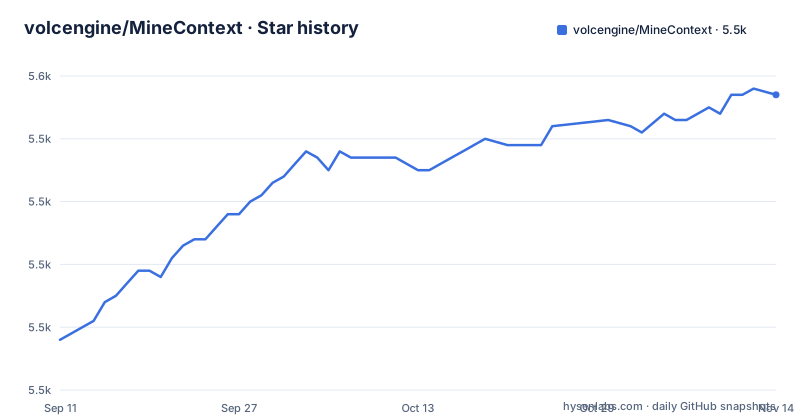
Star history
- volcengine/MineContext5,547 ★ · +39
| Repository | 2026-09-11 | 2026-11-14 |
|---|---|---|
| volcengine/MineContext | 5.5k | 5.5k |
39 Stars in the last 64 days, measured from the daily GitHub snapshot. Compare with other projects
Editorial analysis
Screenshots are the current input, and everything else is future support
MineContext is described as a proactive context-aware AI partner, and the mechanism it names today is screenshots plus content comprehension. Multi-source multimodal input is listed as future support rather than current capability: documents, images, videos, code, and external application data. The four stated features are effortless collection, proactive delivery, intelligent resurfacing, and a context engineering architecture. Collection is the base layer, and its claim is volume without a mental tax, delivered through storage management designed for large amounts of context. Delivery is the visible part, where summarized content such as daily and weekly summaries, tips, and to-do lists is pushed to your homepage. Resurfacing happens during creation, pulling relevant context forward without flooding the screen. The architecture layer claims the whole lifecycle of multimodal, multi-source data, from capture, processing, and storage through management, retrieval, and consumption, and says that pipeline produces six types of intelligent context. The six types are not enumerated in that section, so the count is stated but the list is not.
One API key is not enough, because two models have to be activated
Setup stops at a model choice, and the path through it is specific. The application prompts for an API key on launch, and services from Doubao, OpenAI, and custom models are supported, which covers any local model or third party service compatible with the OpenAI API format. The README suggests LMStudio for running local models, and states a preference for the Doubao model on the grounds of both cost and performance. A Doubao key is generated in the API Management Interface, and the key alone does not finish the job: two models have to be activated in the Model Activation Management Interface, a visual language model and an embedding model.
Visual Language Model: Doubao-Seed-1.6-flash
Embedding Model: Doubao-embedding-vision
The split matters because the two roles sit at opposite ends of the pipeline. Reading a screenshot needs the visual language model, and storing and retrieving what was read needs embeddings. An account with a valid key and an active embedding model can still leave the visual side unable to interpret an image, and the reverse holds as well.
Installation is a signed download, and the first run installs a backend
For the desktop app, installation means taking a build from the latest release, and that release carries two installers:
MineContext-0.1.8.dmg
MineContext-0.1.8-setup.exe
The .dmg is the Mac build and the setup .exe is the Windows build. Starting from v0.1.5 the Mac build is Apple notarized, so the quarantine attribute no longer has to be disabled, and anyone on an older version is sent back to the 0.1.4 documentation for those instructions. Then there is the wait. On first launch the application installs its backend environment, which the README puts at about two minutes. It is the first thing to check when a first launch appears to hang. The tree also shows what the packaged application is made of: an opencontext/ directory for the Python side, src/ and frontend/ for the rest, build.sh and build.bat as the packaging scripts, an opencontext.spec file at the root, and config/ for settings.
The declared version and the released version are two different numbers
Two version numbers exist for one project and they do not agree. The project metadata in pyproject.toml declares version 0.1.0, while the published releases are v0.1.8 dated 2026-01-28, v0.1.7 dated 2025-12-25, and 0.1.6 dated 2025-11-18. The gap is worth holding onto before filing anything, because the version declared in pyproject.toml does not match the release tags. The same metadata file classifies the project as Development Status 4 - Beta, names Python 3.10 through 3.13 in its classifiers, and sets requires-python to 3.10 or newer. The default branch is main, the repository is not archived, and the last push is dated 2026-05-07, so commits have landed since the January release without a newer tag following them. The README also reserves one section comparing the project with ChatGPT Pulse and another with Dayflow, which is how its authors place the category, and points at a sibling project called OpenViking, an open source context database for agents that unifies memories, resources, and skills.
One console script, and a wheel that ships only the opencontext directory
The Python packaging is small and explicit. A single console script is declared, mapped to a module entry point, and the wheel target packages one directory:
[project.scripts]
opencontext = "opencontext.cli:main"[tool.hatch.build.targets.wheel]
packages = ["opencontext"]The build backend is hatchling. Anything outside opencontext/ therefore does not travel in the wheel, which leaves src/, config/, and examples/ as source tree files rather than installed package files. The service layer is FastAPI with uvicorn, matching the README's separate sections for building the backend, installing dependencies, running the server, and a backend debugging step. Development tooling is an optional extra instead of a requirement: black at 24.8.0 or newer, isort at 5.13.0 or newer, and pre-commit at 3.6.0 or newer, with a .pre-commit-config.yaml at the top of the tree. Black is configured to a line length of 100 with target versions from py310 through py313, so the formatting baseline lives in the metadata instead of being left to defaults. Local data goes to a fixed path that needs no configuration:
~/Library/Application Support/MineContext/DataTwo vector stores, two PDF readers, and a library for repairing model output
The dependency list is the clearest statement of what the system does. Screenshots come from mss, with pillow and imagehash for handling and comparing them. Vector storage appears twice, chromadb and qdrant-client, so two index backends sit behind one retrieval job. Document handling has two PDF paths, pypdf and pypdfium2 at 4.30.0 or newer, alongside openpyxl for spreadsheets and python-docx at 1.0.0 or newer for Word files. ddgs covers search, playwright covers browser automation, and python-multipart is there for upload endpoints. The model clients are openai for the OpenAI API protocol, plus volcengine and volcengine-python-sdk with the ark extra for the Doubao path. One entry deserves a second look: json-repair, which exists to repair malformed model output before it is parsed, a concession that generated text arrives broken often enough to need a dedicated library. The supporting cast is pydantic, loguru, pyyaml, jinja2, and pandas. Each item maps onto one part of the multimodal claim, and the total is the running cost of that claim.
The examples folder names the processor shapes the system expects
The examples/ directory is the closest thing to an interface description, and its file names carry the contract. Three processor shapes are visible there: screenshots, documents, and weblinks, in the files `example_screenshot_processor.py`, `example_document_processor.py`, and `example_weblink_processor.py`. Two of the remaining files are pipeline steps rather than sources, `example_screenshot_to_insights.py` turning a capture into insights and `example_todo_deduplication.py` handling repeated to-do entries. The last pair are maintenance utilities, `verify_folder_monitor.py` and `regenerate_debug_file.py`. Two more top level entries belong to the same story. `hook-opencontext.py` is a hook script sitting at the repository root, and `config/` sits beside it. The practical consequence is that adding a source of context means writing a processor in that shape, and the deduplication example is the place to look when a to-do list grows the same item twice.
A one dependency package.json sitting next to a Python project
The JavaScript side of the tree is minimal and easy to misread. The root package.json carries exactly one dependency, undici on a caret range, and it is paired with a package-lock.json, so the Node side is a piece of plumbing rather than a general frontend toolchain. The interface itself lives in frontend/, while the entire data pipeline lives on the Python side. The architecture is therefore split by process instead of by layer, and the two manifests do not describe the same thing, which matters if you go looking for a Node build step and find one HTTP client. The rest of the top level is documentation and governance: SECURITY.md for disclosure, CONTRIBUTING.md, LICENSE under Apache-2.0, and a Chinese README beside the English one in README_zh.md. The project also asks for contributors and points its community at a WeChat, Lark, and Red Note group, a Discord server, a community best practices page, an issue tracker, and a feedback form.
Editorial conclusion
MineContext fits a Mac or Windows user who wants screen history captured locally and is willing to hold an API key and activate two models before the first capture works. It does not fit a Linux desktop, a multi-source document pipeline, or anyone who needs the reported version to match the release tag. Before installing, confirm which provider you will use, activate both the visual language model and the embedding model, and allow for the two minute backend install on first launch.
Frequently asked questions
Where does MineContext store the screen data it collects?
By default everything is stored locally under ~/Library/Application Support/MineContext/Data. If you point it at a local model that speaks the OpenAI API protocol, the data does not leave your local environment.
What do I need before MineContext will start working?
An API key entered on first launch, plus two activated models when you use Doubao: the visual language model Doubao-Seed-1.6-flash and the embedding model Doubao-embedding-vision. The first run also installs a backend environment, which takes about two minutes.
Can MineContext run entirely on local models?
Yes. Custom model services based on the OpenAI API protocol are supported, so fully local models can be used and any data does not leave your local environment. The README suggests LMStudio for running local models.
Which downloads does the MineContext release page offer?
A .dmg for Mac and a setup .exe for Windows, both at v0.1.8. Starting from v0.1.5 the Mac build is Apple notarized, so the quarantine attribute no longer has to be disabled; older versions point back to the 0.1.4 documentation.
Official sources
Add this badge to your README
If you maintain this project, the badge below links readers to this analysis and shows its maintenance status from the daily GitHub snapshot. Paste the markdown into your README; add ?metric=license or ?metric=stars to the image URL for a different field.

[](https://hysenlabs.com/projects/volcengine-minecontext)Star history chart for your README
[](https://hysenlabs.com/projects/volcengine-minecontext)Was this useful?