Bloom Behavioral Evaluation Framework for LLM Researchers
bloom - evaluate any behavior immediately 🌸🌱
At a glance
- What is it?
- Bloom generates behavior-specific LLM evaluation scenarios, runs conversations, and judges the resulting transcripts from seed configurations. This standalone repository is frozen, and the README directs new projects to the Meridian Labs version.
- Who is it for?
- Researchers with Python 3.11 or later who need configurable behavioral evaluations can adopt this frozen release for its documented pipeline, while new projects should use the Meridian Labs successor. Before installation, verify the required provider credentials, seed configuration, expected API usage, and whether the successor preserves compatibility with your saved configurations.
- Can I use it commercially?
- Yes. MIT is a permissive licence: you can use, modify and sell software built on it, as long as you keep its copyright and licence notices.
- Is it still maintained?
- Activity is slowing. The repository last received commits 6 months ago.
- What is it written in?
- Mainly Python, according to GitHub's language statistics.
Answers come from the project's GitHub data, last synced on November 6, 2026, and from our analysis. They are not legal advice.
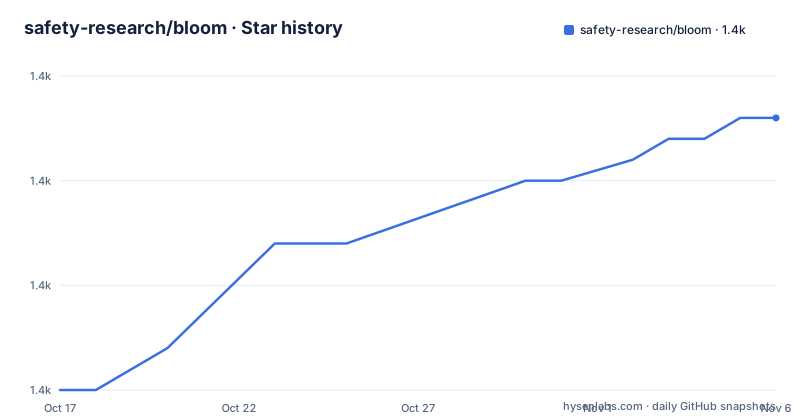
Star history
- safety-research/bloom1,428 ★ · +13
| Repository | 2026-10-17 | 2026-11-06 |
|---|---|---|
| safety-research/bloom | 1.4k | 1.4k |
13 Stars in the last 20 days, measured from the daily GitHub snapshot. Compare with other projects
Editorial analysis
Bloom's target behavior and evaluation scope
Bloom addresses the problem that a fixed question list cannot fully describe whether an LLM behaves consistently in a particular situation. It starts with a seed configuration that names a target behavior, such as sycophancy, self-preservation, or political bias, and can include example transcripts to guide generation. The intended users are AI researchers, safety teams, and engineers who need repeatable experiments around model behavior rather than a benchmark limited to predefined prompts.
The seed also controls experimental scope. The number of base scenarios comes from `ideation.num_scenarios`, while `variation_dimensions` selects conditions such as `noise` and `emotional_pressure`. Each selected dimension needs a description in `behaviors.json`. The README's example requests five base scenarios and two variations per base scenario, producing 15 evaluations. That is more targeted than running one prompt repeatedly, although it does not prove that the generated suite covers every relevant context.
Bloom distinguishes conversation evaluation from `simenv` rollout with tool calls. It can also target a direct LiteLLM identifier or a short model name defined in `bloom-data/models.json`. The seed therefore controls both behavior and the evaluation population. Model identifier, examples, variation dimensions, scenario count, modality, and any sweep parameters all influence the result.
A reproducibility boundary follows from that design. Bloom evaluations are generated from the seed rather than selected from a fixed suite. According to the README, users should cite the full seed configuration when reporting an evaluation because changing examples, generated scenarios, or variation settings can change what the run measures.
From seed.yaml to scored transcripts
Bloom exposes four named stages. Understanding analyzes the target behavior and its examples. Ideation generates diverse scenarios based on that analysis. Rollout executes conversations with the configured model. Judgment scores whether the target behavior appeared and evaluates additional transcript qualities. Running stages separately can help inspect or resume a workflow, but the basic `bloom run` command orchestrates the full sequence.
The configuration and data files have distinct roles. `seed.yaml` is the main experiment definition. `models.json` maps short model names, while `behaviors.json` defines supported behavior descriptions, including the dimensions used for targeted variations. Generated work and results are organized under directories such as `bloom-data/` and `bloom-results/`. The repository includes templates, schemas, behavior examples, and configurable prompts as package data, so initialization has bundled defaults available.
For multiple-model comparison, the README directs users to generate understanding and ideation once, create a sweep with `resume: "run_id"` and `resume_stage: "rollout"`, then vary `rollout.target` as a sweep parameter. This applies the same generated scenarios to different models rather than allowing each run to invent a new set. The mechanism is important, since model results are easiest to compare when scenario generation is held constant.
Bloom can invoke stages as a Python library through `run_pipeline(config=config)` or call `run_understanding` and `run_ideation` directly. The command-line and Python interfaces therefore expose both complete and partial execution. The README does not document a separate rollback command, migration tool for old results, or conversion from standalone Bloom results to the Meridian Labs format.
Installing Bloom and running the first evaluation
Bloom requires Python 3.11 or later according to `pyproject.toml`. Installation from the standalone GitHub repository can use pip:
pip install git+https://github.com/safety-research/bloom.gitThe README also documents uv as an alternative:
uv pip install git+https://github.com/safety-research/bloom.gitAfter installation, initialize a workspace. The README states that this creates configuration from the bundled defaults:
bloom initAdd credentials to `.env`, then load them into the shell. The repository's `.env.example` lists variables for Anthropic, OpenAI, and OpenRouter:
export ANTHROPIC_API_KEY=
export OPENAI_API_KEY=
export OPENROUTER_API_KEY=
The quick-start sequence loads the file and runs the pipeline against the configuration directory:
source .env
bloom run bloom-data
The reader should see the first run create output under `bloom-results/`. Before treating that output as meaningful, edit `bloom-data/seed.yaml` to choose the behavior, rollout target, modality, scenario count, and variation dimensions. Bloom will otherwise use its generated workspace defaults. API access is required for real rollouts, while provider costs and exact call volume are not documented.
Inspecting stage output and model conversations
Bloom lets an operator execute each stage directly. The following commands use the same configuration directory as the full pipeline:
bloom understanding bloom-data
bloom ideation bloom-data
bloom rollout bloom-data
bloom judgment bloom-data
This separation is useful when diagnosing an experiment, but it does not eliminate configuration errors. The selected variation dimensions, for example, must have descriptions in `behaviors.json`. Running ideation before understanding has produced suitable scenario data can also leave a stage without the inputs it expects. The README does not claim that stage commands repair incomplete workspaces automatically.
Transcripts are stored by behavior under `bloom-results/{behavior_name}/`. The documented viewer accepts a port and results directory:
npx @isha-gpt/bloom-viewer --port 8080 --dir ./bloom-resultsThere is also an interactive chat command for manual inspection:
bloom chat --system-prompt "You are a helpful assistant" --model claude-sonnet-4Manual transcripts are saved under `bloom-results/manual/` by default. This mode helps examine a model's behavior directly, but it is not the same as the reproducible seed-driven pipeline. The chat command accepts `--reasoning-effort` values of `low`, `medium`, or `high`. Extended-thinking support is documented for Claude and OpenAI o-series models and requires `temperature: 1.0`.
Sweeps, program calls, and model comparison costs
Weights & Biases integration supports repeated experiments through sweep configuration. A researcher can create a sweep and then start an agent:
wandb sweep examples/sweeps/self-preferential-bias.yaml
wandb agent <sweep-id>
The sweep configuration specifies `bloom sweep` as its command and reads parameters from `wandb.config` rather than a local seed file. This changes the configuration source and requires attention to the sweep definition. The documented debug form is `bloom sweep --debug`.
Programmatic use is concise. Configuration loading and pipeline execution are available through these imports:
from bloom.core import run_pipeline
from bloom.utils import load_config

config = load_config("bloom-data/seed.yaml")
run_pipeline(config=config)
Individual stage imports are also documented:
from bloom.stages.step1_understanding import run_understanding
from bloom.stages.step2_ideation import run_ideation

run_understanding(config=config)
run_ideation(config=config)
The main upgrade cost is operational rather than merely installing a new package. A seed-based result depends on the seed, behavior definitions, model identifier, generation configuration, and provider responses. Weights & Biases also introduces account and experiment-management requirements, although authentication details are not included in the README. Neither the README nor `pyproject.toml` documents a production stability guarantee, backward-compatibility policy, or migration guide between the standalone and Meridian Labs versions.
Bloom evaluation limits and the Meridian boundary
The largest limitation is the boundary between generated coverage and meaningful behavioral evidence. Bloom can create varied prompts, but the README does not explain how scenarios are selected for quality, how duplicates are removed, or what statistical properties the generated suite has. Variation is controlled by named dimensions, yet a generated suite can still reflect assumptions made in the seed and bundled prompts. Results should not be treated as exhaustive proof that a behavior is absent or stable.
Judgment is also an automated assessment. The README says that scoring covers behavior presence and additional qualities, but it does not publish calibration results, judge agreement figures, or a method for manually auditing false positives and false negatives. Transcript review remains relevant, particularly when a score affects a release decision. The project provides an interactive viewer, but it does not document score adjudication workflows.
There is a more immediate repository-level boundary. The README states that Bloom is frozen at its last standalone release and will not receive updates, while new features and fixes will land with Meridian Labs at `meridianlabs-ai.github.io/petri_bloom`. The last push was on 2026-05-07. The repository is not archived, but the explicit frozen notice controls expectations about future fixes.
A fixed benchmark is a real alternative when a known, stable prompt set and comparable published scores matter more than adaptive coverage. Bloom instead favors configurable generation and seed citation. Another alternative is manual transcript review, which avoids automated ideation and judgment but does not scale consistently. Bloom is the wrong choice when a fixed benchmark protocol is required, when generated prompts cannot be accepted into the evaluation record, or when support for new fixes is necessary.
Bloom licensing, tests, and adoption judgment
The repository declares an MIT license in `pyproject.toml` and includes a `LICENSE` file. That designation indicates the project's stated licensing model, but software users still need to review license text and dependency terms for their intended distribution. Bloom depends on LiteLLM, PyYAML, and Weights & Biases, so adopting the package also means accepting and managing those dependencies.
The project includes tests using mocked API responses. Its documented test command is:
pytest tests/ -vThe README states that these tests verify the pipeline without making real API calls. It does not claim that they validate live provider behavior. Formatting and linting are handled by Ruff, with type checking through `ty`:
ruff check src/ --fix
ruff format src/
ty check
Researchers should choose this standalone release when they need the documented Python API or CLI and can operate a frozen package. They should not select it for a new project that depends on forthcoming fixes. The first checks should be Python 3.11 compatibility, provider credential availability, the exact seed configuration, and compatibility with the Meridian Labs successor before importing existing experiment workflows.
Editorial conclusion
Researchers with Python 3.11 or later who need configurable behavioral evaluations can adopt this frozen release for its documented pipeline, while new projects should use the Meridian Labs successor. Before installation, verify the required provider credentials, seed configuration, expected API usage, and whether the successor preserves compatibility with your saved configurations.
Frequently asked questions
What behaviors can Bloom evaluate?
The README gives sycophancy, self-preservation, and political bias as examples. It also supports example transcripts and configurable variation dimensions.
How do I install and run Bloom?
Install it from the GitHub repository, run `bloom init`, load credentials from `.env`, and run `bloom run bloom-data`. The repository requires Python 3.11 or later.
Will this Bloom repository receive new updates?
The README says the standalone repository is frozen and will not receive updates. It directs new features and fixes to Meridian Labs at `meridianlabs-ai.github.io/petri_bloom`.
Why should a Bloom evaluation include its seed configuration?
Bloom generates evaluation suites from seed settings rather than relying only on fixed prompts. The README says full seed configurations should be cited for reproducibility.
Official sources
Add this badge to your README
If you maintain this project, the badge below links readers to this analysis and shows its maintenance status from the daily GitHub snapshot. Paste the markdown into your README; add ?metric=license or ?metric=stars to the image URL for a different field.

[](https://hysenlabs.com/projects/safety-research-bloom)Star history chart for your README
[](https://hysenlabs.com/projects/safety-research-bloom)Was this useful?