GDSS: A CSS-like styling layer for Godot 4 that works alongside the built-in theme system
Godot-stylesheet. Experimental plugin
At a glance
- What is it?
- GDSS is an experimental Godot 4 plugin that lets you write UI themes as stylesheets with variables, state selectors, and animated transitions. It is opt-in per node, so it complements rather than replaces Godot's native theming, though it carries real compromises around stylebox animation.
- Who is it for?
- Adopt GDSS if you are a Godot 4 developer who finds theme editing tedious and wants a single-file, CSS-like system with variables, state selectors, and live editor feedback. Avoid it if you rely on animating hover or pressed states on nodes like Tree, ItemList, or TabBar, because that is disabled.
- Can I use it commercially?
- Yes. MIT is a permissive licence: you can use, modify and sell software built on it, as long as you keep its copyright and licence notices.
- Is it still maintained?
- Yes. The repository last received commits 5 days ago.
- What is it written in?
- Mainly GDScript, according to GitHub's language statistics.
Answers come from the project's GitHub data, last synced on October 23, 2026, and from our analysis. They are not legal advice.
Star history
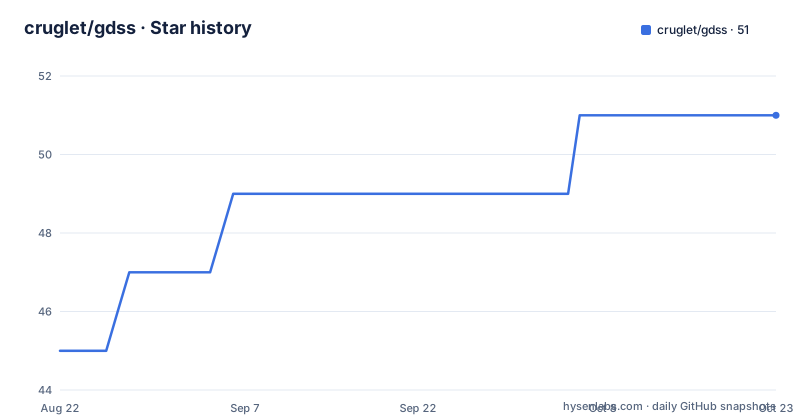
- cruglet/gdss51 ★ · +6
| Repository | 2026-08-22 | 2026-10-23 |
|---|---|---|
| cruglet/gdss | 45 | 51 |
6 Stars in the last 62 days, measured from the daily GitHub snapshot. Compare with other projects
Editorial analysis
What GDSS solves and who it is for
Godot's native theme system is powerful but tedious. You edit resources, set overrides per node, and often repeat values across many places. GDSS aims to replace that with a stylesheet file that reads like CSS. You define a selector for a node type, list its colors, padding, borders, and corners, and the plugin applies it to matching nodes. The intended user is a Godot 4 developer who wants to centralize UI styling and reuse values through variables. The README explicitly suggests using GDSS in tandem with Godot's vanilla styling, not as a full replacement. That is a honest framing: the plugin is opt-in per node, so it never interferes with existing themes. If you are happy with Godot's theme editor, GDSS may add little. If you have a large UI with many repeated colors or corner radii, the stylesheet approach can cut down on copy-paste.
How the language works: selectors, states, classes, and variables
The stylesheet language is deliberately CSS-like. A base selector targets a node type: `Button { ... }`. You can group selectors with commas: `Panel, PanelContainer { ... }`. State blocks use a colon prefix, like `:hover` or `:pressed`, and they can be grouped too. Classes are named variants nested inside a selector, such as `GhostButton { ... }`, and you assign them to individual nodes in the Inspector. They cascade on top of the base selector, which means you can define a generic button style and then a ghost variant that overrides only the background and border. Variables come in three scopes: `@global` is shared and settable from code, `@instance` can be overridden per node, and plain `var` is file-local. You reference any of them with `$name`. This lets you define an accent color once and use it in multiple selectors, or change it at runtime from GDScript. The README gives a concrete example: `@global var accent: "#8e00ff"` and then `bg_color: $accent` inside a button state. That is a clean mechanism for keeping a theme consistent.
Getting started: plugin setup and the editor workflow
Installation is straightforward. You copy the `addons/gdss` directory into your project, enable the plugin in Project Settings > Plugins, and reload the project. The editor appears as a bottom dock, but you can switch it to a full main-screen tab. To style a node, select it and set its GDSS mode in the Inspector under the Theme group: `Enable` styles the node, `Inherit` follows its parent, and `Disable` opts out. If you enable a container and leave its children on Inherit, the whole subtree is styled at once. The Inspector shows the resolved Effective state beneath the dropdown. The stylesheet is saved to `res://theme.tgdss` by default, and you can change that path in Project Settings > GDSS > Storage. The editor includes syntax highlighting, error checking with click-to-jump, autocompletion, an outline panel, go-to-definition for variables, find and replace, multiple cursors, and comment toggling. Changes apply live in the editor, which is a major time-saver when iterating on a theme. The workflow is: write a selector, assign it to a node, and see the result immediately.
The core mechanism: style values, methods, and transitions
GDSS does not just map CSS properties to Godot theme items. It computes values through a set of methods. You can write `bg_color: linear_gradient($accent, darken($accent, 0.3), -45)` to create a gradient from a variable and a darkened version of it. Other methods include `radial_gradient`, `mix`, `lighten`, `saturate`, `desaturate`, `grayscale`, `invert`, `complement`, `contrast`, `hsv`, `hsv_shift`, `alpha`, `rgba`, `clamp`, and `texture`. Methods can be nested, so you can build complex colors from simple primitives. The `blur` method frosts a panel's backdrop by blurring whatever is behind it and tinting it. `liquid_blur` builds on that with an iOS/macOS-style refraction that bends and magnifies the backdrop through the edges, plus a swept edge glow. That is ported from the LiquidGlass project, which is a notable dependency. Transitions animate between states using `transition_time`, `transition_func` (LINEAR, QUINT, ELASTIC, etc.), and `transition_type` (EASE_IN, EASE_OUT, etc.). This is where the plugin's main limitation appears: animating between states is disabled on certain nodes, such as Tree, ItemList, and TabBar, because of how Godot renders multiple instances of the same stylebox. The README points to a Godot engine pull request that might fix it, but until that lands, you cannot get smooth state transitions on those widgets.
A real limitation: stylebox animation is broken for multi-instance nodes
The most concrete trade-off is the disabled state animation on nodes that draw multiple instances of the same stylebox. The README names Tree, ItemList, and TabBar as the most prominent examples. The cause is internal to Godot's stylebox rendering, and there is no straightforward solution short of writing custom versions of those nodes. This is a hard blocker if your UI depends on animated hover or pressed states in a file list or a tab bar. The plugin's author is honest about this, and it is a good example of why experimental plugins need scrutiny. If your UI is mostly buttons and panels, you will not hit this. But if you use those widgets heavily, GDSS may force you to fall back to Godot's native theme system for them, which defeats the purpose of a unified stylesheet. The README also notes that GDSS is not native, so it uses imperfect workarounds and compromises. That is a candid warning, not a marketing line.
Schemes and runtime API: switching themes from code
GDSS supports named sets of variable overrides called schemes, declared with `@scheme name { ... }`. A scheme only lists variables that differ from the base, so anything omitted falls back to the base `@global` value. You can switch or animate between schemes from code using `GDSS.set_scheme(...)`. This is useful for dark and light themes, or for a highlight mode in a UI. The runtime API also lets you drive globals and per-instance variables from GDScript. The README shows an example of animating a global variable, and every node that references it restyles automatically. That is a powerful mechanism for dynamic theming, such as a color picker that changes an accent color in real time. The `@meta` block holds theme metadata like `name`, `description`, and `default_scheme`, readable with `GDSS.get_theme_meta(...)`. This gives you a way to package a theme as a self-contained asset with metadata, which is a step beyond plain Godot theme resources.
Maintenance and licensing: what you are signing up for
The repository is MIT-licensed, which is permissive and lets you modify and redistribute the plugin without restriction, though you should check the included license file for exact terms. The project is described as experimental and under active development, with recent releases at 0.8.1, 0.8.0, and 0.7.4. That cadence suggests a fast-moving codebase. The README warns to expect rough edges and asks users to report issues. There is no mention of a stable API, so you should expect breaking changes between minor versions. The plugin also depends on a port of the LiquidGlass project, which is MIT-licensed, but you should verify the exact license text in the repository if you plan to redistribute. The editor is a built-in dock, so it is part of the plugin, not a separate tool. Upgrade cost is moderate: you will need to re-test your stylesheets after each release, and you may need to adjust syntax if the language changes. The documentation button in the editor is the only source of extra detail, and the README is the primary reference. There is no separate wiki or extensive docs, so you may have to experiment to learn advanced behavior.
Editorial conclusion
Adopt GDSS if you are a Godot 4 developer who finds theme editing tedious and wants a single-file, CSS-like system with variables, state selectors, and live editor feedback. Avoid it if you rely on animating hover or pressed states on nodes like Tree, ItemList, or TabBar, because that is disabled. Before adopting, verify that your target Godot version is supported, test the plugin on a small UI subtree, and check the linked engine pull request for progress on the stylebox animation issue. The plugin is MIT-licensed and under active development, so budget for breaking changes as releases move past 0.8.1.
Frequently asked questions
How do I install and enable GDSS in a Godot 4 project?
Download the plugin from the asset library or copy addons/gdss into your project, enable GDSS in Project Settings under Plugins, and reload when prompted. The stylesheet is saved to res://theme.tgdss by default, and the path can be changed in Project Settings under GDSS then Storage.
What do Enable, Inherit and Disable do on a node in GDSS?
They are the per-node modes set in the Inspector under the Theme group. Enable styles the node, Inherit follows its parent, and Disable opts out. The Inspector shows the resolved Effective state, and enabling a container while its children stay on Inherit styles a whole subtree at once.
Why does GDSS not animate states on some Godot nodes?
Animating between states is disabled on nodes where stylebox rendering behaves badly in Godot, most visibly on nodes that draw multiple instances of the same stylebox such as Tree, ItemList and TabBar. The documentation says there is no straightforward fix short of custom nodes, and points at a Godot engine pull request.
What kinds of variables can a GDSS stylesheet define?
Three: @global, which is shared and settable from code, @instance, which can be overridden per node, and a plain var that is file-local, all referenced with $name. Named @scheme blocks list only the variables that differ from the base and can be switched from code with GDSS.set_scheme, while @meta holds theme metadata readable through GDSS.get_theme_meta.
Official sources
Add this badge to your README
If you maintain this project, the badge below links readers to this analysis and shows its maintenance status from the daily GitHub snapshot. Paste the markdown into your README; add ?metric=license or ?metric=stars to the image URL for a different field.

[](https://hysenlabs.com/projects/cruglet-gdss)Star history chart for your README
[](https://hysenlabs.com/projects/cruglet-gdss)Was this useful?