Godot Game Template: the boilerplate a Godot project keeps rewriting
Generic template for Godot games
At a glance
- What is it?
- Godot Game Template is a starter project for Godot games that ships two addons, one for scene management and settings and one for debug shortcuts, plus a project layout and a CI setup. It suits a team starting a new Godot game, and it is a template you copy rather than a package you depend on.
- Who is it for?
- Adopt Godot Game Template when you are starting a Godot project and would otherwise rebuild scene transitions, a settings menu, localisation and a CI pipeline yourself, because the addons cover those and the repository keeps them updated against new Godot releases. Do not adopt it as a dependency, since it is a template you copy into your own repository, so the maintenance burden is yours from the first commit.
- Can I use it commercially?
- Yes. MIT is a permissive licence: you can use, modify and sell software built on it, as long as you keep its copyright and licence notices.
- Is it still maintained?
- Yes. The repository last received commits 139 days ago.
- What is it written in?
- Mainly GDScript, according to GitHub's language statistics.
Answers come from the project's GitHub data, last synced on November 7, 2026, and from our analysis. They are not legal advice.
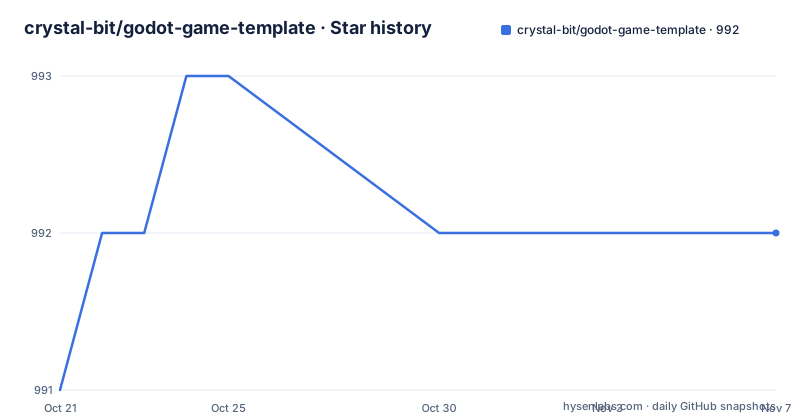
Star history
- crystal-bit/godot-game-template992 ★ · +1
| Repository | 2026-10-21 | 2026-11-07 |
|---|---|---|
| crystal-bit/godot-game-template | 991 | 992 |
1 Stars in the last 17 days, measured from the daily GitHub snapshot. Compare with other projects
Editorial analysis
Three pieces, one of which is the template itself
Godot Game Template, also GGT in short, is a simple generic starter project for Godot games, and it provides a solid base for quick iterations. The pitch in the README is that you make games and the template handles the boring stuff.
It is composed of multiple parts. There is the ggt-core addon, the ggt-shortcuts addon, and the Godot project boilerplate, which is this repository itself.
That split is the design decision that makes the template usable rather than merely a starting point. The addons can be lifted into an existing project that already has its own structure, and the boilerplate is the example project that shows how to use them. A template that is only a directory of files forces you to either adopt all of it or none of it, and a Godot project you did not write is a Godot project you will spend a day untangling.
The stated audience is stated with unusual precision. It worked well when used by small teams in game jams, but it should be generic enough to work for mid sized teams as well. The games built on it back that up: an Android and iOS game, a browser game, another Android and HTML5 title, and two 2025 games on Itch.io, one also targeting HTML5, Windows, Linux and macOS.
The licence is MIT, the primary language is GDScript, and there is an online demo on itch.io. The last push to the main branch was on 2026-06-21, the same day as the release for Godot 4.7 support.
What ggt-core actually provides
ggt-core is the larger of the two addons, and its feature list is the reason to use it rather than write your own.
Scene management with transitions and an optional progress bar. Parameter passing between scenes. Multithreaded scene loading, with a single threaded loading fallback for web exports. Settings for audio volume across the Master, SFX and BGM buses, language selection, resolution scale, an FPS limit and vsync, persisted through Godot's ConfigFile. And gettext localisation setup with two languages, English and Italian, with a bash script to sync all the .po files with a single command, and the invitation to add languages through a pull request.
The multithreaded loading with a web fallback is the detail that shows the template was written by people who shipped a browser game. A threaded load is fine on desktop and a disaster on the web, where the main thread is the render thread and blocking it stalls the page. The fallback exists because a template that only works on desktop is not much of a template when the engine's most attractive export target is HTML5.
The settings list is equally opinionated in a useful way. Master, SFX and BGM as separate buses is a decision about mixing, and it means a player can turn the music down without touching the sound effects. Resolution scale and an FPS limit together are the two knobs that decide whether a 2D game holds frame rate on a low end machine, and having them in the same settings menu, persisted through ConfigFile, means a player configures them once.
The gettext setup matters more than it looks. Localisation in Godot is not automatic, and doing it by hand means a translation table, a language picker, and a way to keep the table in sync with the source strings. The bash script is the answer to the third of those.
The shortcuts addon, and how it stays out of release builds
ggt-shortcuts is the smaller addon, and its whole purpose is the developer loop.
It provides debug shortcuts mapped to keyboard keys, for restart on R, pause frame on P, advance frame on a full stop, speed up the time scale with shift, and quit on Q. They are easily configurable through the Godot Input Map, so the keys are not hard coded.
Then there is the part that separates this from a debugging helper: automatic shortcuts removal for release builds. The shortcuts exist in the development build and are stripped from the shipped one.
That matters more than it might sound. A restart shortcut in a shipped game is a way for a player to reach a broken state, and a frame-advance shortcut is a way to step through a cutscene that was never meant to be stepped through. Stripping them by default means the template does not leave a development affordance in a shipped artefact, and the developer does not have to remember to remove it.
The pause and advance frame pair is the one to look at if you are doing anything with cutscenes or physics. Being able to advance a single frame and see what a collision actually did is a debugging capability that a normal run does not give you, and having it on a key you can reach from the game screen rather than from a separate debug build is the difference between using it and not bothering.
The repository tree shows the addons under an addons/ directory, alongside assets/, builds/, default_bus_layout.tres, export_presets.cfg, project.godot, resources/, scenes/, license.txt and a release.sh script.
The scene change API, and how parameters travel
The API is a small set of static calls on a GGT object, and the parameter passing is the part worth understanding.
Changing a scene is one line:
GGT.change_scene("res://scenes/gameplay/gameplay.tscn")And with the progress bar, a second argument:
GGT.change_scene("res://scenes/gameplay/gameplay.tscn", {
  "show_progress_bar": true
})
The parameters ride along in the same dictionary:
var params = {
  "level": 4,
  "skin": "dark"
}
GGT.change_scene("res://scenes/gameplay/gameplay.tscn", params)
And the loaded scene reads them back through the current scene data:
# gameplay.gd

func _ready():
    var params = GGT.get_current_scene_data().params
    print(params.level) # 4
    print(params.skin)  # 'dark'
   # setup your scene here
The pattern is a dictionary passed by value and exposed as an object on the other side, so a scene reads params.level rather than params['level']. That is a small ergonomic choice with a real effect on how a scene reads, because the dictionary is a plain Godot Dictionary and the attribute access is a template.
Waiting for the transition is also handled, and the note explains the state of the world during it. All the tree is already paused during scene transitions, so if you need to wait for the graphic transition to completely disappear before calling some code you can await a signal:
# gameplay.gd

func _ready() -> void:
    if GGT.is_changing_scene(): # this will be false for the starting scene or if you start the scene with "Run current scene" or F6 shortcut during development
        await GGT.scene_transition_finished
    # activate your game logic here
    pass
And restarting the current scene reuses the old params, or takes new ones:
GGT.restart_scene() # old params will be reusedvar new_params = {
"level": 5,
}
GGT.restart_scene_with_params(new_params)The boilerplate: CI, theming and input handling
The third part is the project layout, and it is where the team-level value sits.
There are GitHub Actions workflows for automatic builds and web deploy on GitHub Pages after each commit, thanks to the godot-ci project, and you can also use a manual workflow dispatch, or use a local release.sh script to export multiple targets, Windows, Linux, Mac and so on, with a single command, or you can export manually from Godot as usual.
Three ways to ship the same build is generous, and each covers a different case. The Actions workflow is for a team that wants every commit to produce a playable web build. The manual dispatch is for a release moment. The local script is for a developer who does not want to push to ship a build. Exporting from the Godot editor itself covers the case where you want to see exactly what the editor produces.
The project structure follows Godot best practices and naming conventions, and there are placeholder menu and gameplay scenes with support for keyboard, gamepad or touch inputs. That last point is a design decision with a cost, since supporting three input schemes means the placeholder scenes have to handle all three, but it means a game started from this template can be handed to someone who wants to play on a phone.
The theming is the other piece. There is a preconfigured global theme for control nodes, and you tweak resources/theme/theme-main.tres and every control node inherits from it. That is the difference between a theme you configure once and a theme you edit in six places, and for a project that a team shares, one file is the only version that survives a month of work.
The top level of the repository shows the rest: default_bus_layout.tres for the audio buses the settings refer to, export_presets.cfg for the export configuration, assets/, resources/ and scenes/ directories, and the project.godot file itself.
Editorial conclusion
Adopt Godot Game Template when you are starting a Godot project and would otherwise rebuild scene transitions, a settings menu, localisation and a CI pipeline yourself, because the addons cover those and the repository keeps them updated against new Godot releases. Do not adopt it as a dependency, since it is a template you copy into your own repository, so the maintenance burden is yours from the first commit. Before you copy it, check the Godot version it targets, since the release history tracks Godot support explicitly, with a 4.7 release in June 2026 and earlier ones for 4.5, and decide how you want the debug shortcuts to behave in a release build.
Frequently asked questions
What does the Godot Game Template include?
It is composed of three parts: the ggt-core addon, the ggt-shortcuts addon, and the Godot project boilerplate itself. ggt-core provides scene management with transitions and an optional progress bar, parameter passing between scenes, multithreaded scene loading with a single threaded fallback for web exports, settings for audio, language, resolution scale, FPS limit and vsync persisted through ConfigFile, and gettext localisation with English and Italian. ggt-shortcuts provides debug keys for restart, pause frame, advance frame, time scale and quit.
How do I change scene and pass parameters with Godot Game Template?
Call `GGT.change_scene("res://scenes/gameplay/gameplay.tscn")`, and add a dictionary as the second argument for parameters or for the show_progress_bar option. The loaded scene reads them with `GGT.get_current_scene_data().params`, and you can await `GGT.scene_transition_finished` if you need to wait for the transition to disappear.
Do the debug shortcuts end up in a release build?
No. ggt-shortcuts provides automatic shortcuts removal for release builds, so the restart, pause frame, advance frame, time scale and quit keys are stripped from the shipped version. The keys themselves are configurable through the Godot Input Map.
How do I start a project from the Godot Game Template?
Two ways. You can create a new repository using the GitHub template, clone it locally and open it in Godot with GDScript. Or you can download the source code zip from the releases page, unzip it and open the project in the Godot Engine.
Official sources
Add this badge to your README
If you maintain this project, the badge below links readers to this analysis and shows its maintenance status from the daily GitHub snapshot. Paste the markdown into your README; add ?metric=license or ?metric=stars to the image URL for a different field.

[](https://hysenlabs.com/projects/crystal-bit-godot-game-template)Star history chart for your README
[](https://hysenlabs.com/projects/crystal-bit-godot-game-template)Was this useful?