LocustDB trades consistency and joins for ingest speed
Blazingly fast analytics database that will rapidly devour all of your data.
At a glance
- What is it?
- LocustDB is an experimental Rust analytics database that loads CSVs and ingests at a rate the author documents in billions of records per second on a desktop, but it explicitly gives up durability guarantees, high QPS and joins to get there. It is a research project with a real binary and a real library, and the README tells you exactly which database questions it will refuse.
- Who is it for?
- Use LocustDB when you are loading large CSV or gzipped CSV dumps, running analytical scans over them repeatedly, and can accept that a node failure may return incomplete results and that small amounts of data may be lost during ingestion. Do not use it as a system of record, as an OLTP store taking high-QPS point writes, or for anything needing large joins or precise top n, since those are listed as non-goals.
- Can I use it commercially?
- Check first. The repository uses a licence we do not classify automatically, so read its LICENSE file before any commercial use.
- Is it still maintained?
- Activity is slowing. The repository last received commits 6 months ago.
- What is it written in?
- Mainly Rust, according to GitHub's language statistics.
Answers come from the project's GitHub data, last synced on November 6, 2026, and from our analysis. They are not legal advice.
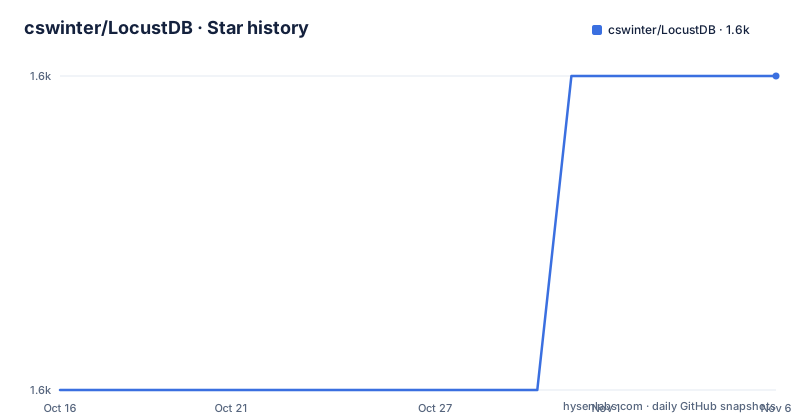
Star history
- cswinter/LocustDB1,648 ★ · +1
| Repository | 2026-10-16 | 2026-11-06 |
|---|---|---|
| cswinter/LocustDB | 1.6k | 1.6k |
1 Stars in the last 21 days, measured from the daily GitHub snapshot. Compare with other projects
Editorial analysis
A CSV loader first, a database second
The fastest way to understand LocustDB is to read the example command in the README, because it is a local binary pointed at a file, not a server you connect to.
./locustdb --load test_data/nyc-taxi.csv.gz --tripsThat loads a gzipped CSV of the New York taxi ride dataset with a built in ingestion schema and starts a repl. No configuration file, no schema migration, no connection string. The `--trips` flag exists specifically to configure the ingestion schema for that 1.46 billion row taxi ride dataset, which the README links for download.
CSV handling has one sharp edge worth planning around. When loading `.csv` or `.csv.gz` files with `--load`, the first line is assumed to be a header naming the columns, and the type of each column is derived automatically. The README warns that this inference might break for columns containing a mixture of numbers, strings and empty entries. For mixed columns you have two options: clean the data, or declare the schema yourself.
The explicit `--schema` option takes a comma separated list of types and, optionally, names. Valid types are `s` or `string`, `i` or `integer`, `ns` for a nullable string and `ni` for a nullable integer. The README gives both shapes, a bare list such as `int,string,string,string,int` and a named one such as `name:s,age:i,country:s`. If your dump has an empty-int column or a numeric column with stray text, this is the fix.
The `--table` option names the table that `--load` populates, defaulting to `default`, so a single run can hold more than one imported file set.
The help output is the real configuration surface
Every knob LocustDB has is visible in the `--help` output pasted into the README, and each one maps to a real operational decision.
`--mem-limit-tables <GB>` caps the in-memory size of tables in GiB and defaults to 8. That is the memory ceiling for the cached tables, and it is the first number to set deliberately on a machine with a known budget.
`--partition-size <ROWS>` sets rows per partition when loading new data, defaulting to 65536. This option controls the number of rows assigned to each partition when new data is loaded.
`--readahead <MB>` sets how much data to load at a time when reading from disk during queries, in MiB, defaulting to 256. This is the knob that matters most on spinning disks, and it pairs with the `--seq-disk-read` flag, which the README says improves performance on HDD and can hurt performance on SSD.
`--mem-lz4` keeps data cached in memory lz4 encoded. The stated effect is a decrease in memory usage and in query speed, which makes it the switch to reach for when `--mem-limit-tables` is not enough.
`--threads <INTEGER>` sets the number of worker threads and defaults to the number of cores, shown in the help text as 12 on the machine that produced the paste.
Two flags are demo conveniences rather than general features: `--trips` and `--reduced-trips` both configure ingestion schemas for the taxi dataset, the latter selecting a subset of columns.
Persisting to disk needs a raised file descriptor limit
Adding `--db-path <PATH>` persists data in LocustDB's internal storage format, which the README says allows fast queries from disk after the initial load.
The operational warning that follows is the one to act on. When creating or opening a persistent database, LocustDB opens a lot of files and might crash if the limit on open files is too low. On Linux you check the current limit with `ulimit -n` and raise it, for example to 4096.
ulimit -n 4096That is the kind of requirement that does not appear in a benchmark and does appear in an incident report. The cause is visible in the dependency list: `lz4_flex` for compression, `pco` for a columnar compression format, `blake2` for hashing and `capnp` for serialisation, alongside `csv` and `flate2` for input. A columnar, compressed, partitioned layout with a separate compression utility crate in the workspace is a design that favours many files over few large ones.
From source, the Rust toolchain is required, and the README's build-and-run command goes straight to a release binary rather than a separate build step:
cargo run --release --bin repl -- --load test_data/nyc-taxi.csv.gz --reduced-tripsThe `--release` flag is called out as necessary for optimal performance, and `cargo test` and `cargo bench` run the test suite and benchmarks. The repository contains `bench_results/` and `memsize_results/` directories, so the performance claims have published artefacts behind them.
The non-goals section is the most useful part of the README
Most database READMEs list what a system does. LocustDB lists what it will not do, and it does so at the level of guarantees rather than features.
Strong consistency and durability guarantees are a non-goal, with three stated consequences: small amounts of data may be lost during ingestion, when a node is unavailable queries may return incomplete results, and results returned by queries may not represent a consistent snapshot.
High QPS is a non-goal, stated as LocustDB not efficiently executing queries that insert or operate on small amounts of data.
Full SQL support is a non-goal. All data is append only and can only be deleted or expired in bulk. And the query restriction is the sharp one: LocustDB does not support queries that cannot be evaluated independently by each node, which the README expands as large joins, complex subqueries, precise set sizes and precise top n.
That last bullet is a distributed execution constraint, not a missing feature. A query each node can evaluate alone can be fanned out and merged without coordination; a global join or an exact top n cannot, and supporting it would mean shipping results between nodes, which is exactly the overhead this design avoids.
The README also lists support for cost inefficient or specialised hardware as a non-goal and states plainly that LocustDB does not run on GPUs.
All of this is framed as conditional on the system not being production ready yet, at which point the framing says these become distractions at best, if not wholly incompatible with the main goals.
Rust, embedded or served, with cloud storage in the dependency tree
LocustDB is a Rust workspace, described in `Cargo.toml` as an embeddable high-performance analytics database on edition 2021, with crate types `cdylib` and `rlib`. Those two artefact types tell you both intended uses at once: a dynamic library for embedding, a Rust library for linking.
The README lists three deployment shapes it should be usable with minimal configuration or schema setup: a highly available distributed analytics system continuously ingesting data and executing queries, a commandline tool or repl for loading and analysing data from CSV files, and an embedded database or query engine included in other Rust programs via cargo.
The dependency list shows the breadth. `actix-web` and `actix-cors` provide the served surface, `clap` handles the command line, `prometheus` gives metrics, and there are four cloud storage clients: `azure_storage` with `azure_core`, `azure_identity` and `azure_storage_blobs` at 0.19.0, plus `google-cloud-storage` 0.24. Object store ingestion for blob storage alongside CSV load is a capability the README does not document in the usage section but the dependencies clearly implement.
Local workspace crates are `locustdb-compression-utils`, `locustdb-derive` and `locustdb-serialization`, each with its own version and `path` dependency, so compression, derive macros and serialisation are separated rather than piled into the core crate. There is also a `locustdb-client/` directory and an optional `pyo3` extension module with the `extension-module` feature, which points at Python bindings. An `export.py` and a `wandb_data_import.py` at the root suggest import and export paths for external tooling.
Licensing needs a look: `Cargo.toml` declares `license-file = "LICENSE"` rather than an SPDX identifier, and GitHub classifies the repository licence as Other. There is a CHANGELOG, CONTRIBUTING, a `rust-toolchain` pin file and `git_hooks/`.
How to evaluate the performance claims
The performance claims in this project come with a specific structure, and the right way to read them is to follow the structure.
The README describes LocustDB as experimental and pointing to set a new standard for query performance and storage efficiency on commodity hardware. It then links two posts by the author, Clemens Winter: one on how to analyse billions of records per second on a single desktop PC, and one on how to read hundreds of millions of records per second from a single disk. Those are the author's own write-ups, dated 2018, and they are the primary source for any number you see quoted about LocustDB.
The goals section makes qualitative claims rather than benchmarks: best-in-class query performance on commodity hardware for data both cached in memory and read from disk, automatic compression ratios described as spectacular, minimal indexing overhead, and new data available for queries within seconds. Storage efficiency is described as configurable against performance, which is the flag pair that implements it: `--mem-lz4` for memory, `--seq-disk-read` for read pattern.
The repository supports the evaluation loop. `bench_results/` and `memsize_results/` hold committed output, `benches/` holds the benchmarks, and `cargo bench` reruns them. If you are evaluating this, run those on your own hardware rather than reading a figure from 2018.
State of the code matters for the interpretation. The default branch is `master`, the repository is not archived, and the last push was on 2026-04-23. Tagged releases stop earlier: v0.4.3 on 2024-04-04, v0.4.4 on 2024-04-08 and v0.4.6 on 2024-04-10, while `Cargo.toml` is already at version 0.5.6. So the tagged release stream is roughly two years behind the working tree, and the help text in the README still prints LocustDB 0.2.1. Anyone adopting this is adopting a moving `master`.
Editorial conclusion
Use LocustDB when you are loading large CSV or gzipped CSV dumps, running analytical scans over them repeatedly, and can accept that a node failure may return incomplete results and that small amounts of data may be lost during ingestion. Do not use it as a system of record, as an OLTP store taking high-QPS point writes, or for anything needing large joins or precise top n, since those are listed as non-goals. Before you rely on the numbers, read the two linked write-ups by Clemens Winter on analysing billions of records per second and reading hundreds of millions from a single disk, because those are the author's own claims and the last push was on 2026-04-23 with tagged releases only reaching v0.4.6 in 2024, so you are evaluating an experimental system, not a supported one.
Frequently asked questions
How do I load a CSV file into LocustDB?
Run `./locustdb --load test_data/nyc-taxi.csv.gz --trips` from a release binary on x64 Linux, including WSL. The first line is treated as a header and column types are inferred automatically, which the README warns can fail on columns mixing numbers, strings and empty entries.
Why does LocustDB crash when I open a persistent database?
Because it opens a lot of files, so the operating system limit on open files may be too low. Check the current limit with `ulimit -n` and raise it, for example `ulimit -n 4096`, before starting with `--db-path`.
Can LocustDB run joins and subqueries?
No, and it is listed as a non-goal. LocustDB does not support queries that cannot be evaluated independently by each node, which includes large joins, complex subqueries, precise set sizes and precise top n. Data is append only and can only be deleted or expired in bulk.
Is LocustDB production ready?
The README calls it experimental and lists strong consistency, durability, high QPS and full SQL as non-goals, saying these become distractions once it is production ready. Tagged releases reach v0.4.6 from 2024-04-10 while the repository Cargo.toml is at 0.5.6, with the last push on 2026-04-23.
How do I build LocustDB from source?
Install Rust through rustup, clone `https://github.com/cswinter/LocustDB.git`, then run `cargo run --release --bin repl -- --load test_data/nyc-taxi.csv.gz --reduced-trips`. The release flag is called out as necessary for optimal performance, and `cargo test` and `cargo bench` run the tests and benchmarks.
Official sources
Add this badge to your README
If you maintain this project, the badge below links readers to this analysis and shows its maintenance status from the daily GitHub snapshot. Paste the markdown into your README; add ?metric=license or ?metric=stars to the image URL for a different field.

[](https://hysenlabs.com/projects/cswinter-locustdb)Star history chart for your README
[](https://hysenlabs.com/projects/cswinter-locustdb)Was this useful?