hekate and Nyx: a graphical bootloader for hacked Nintendo Switch consoles
hekate - A GUI based Nintendo Switch Bootloader
At a glance
- What is it?
- The most complete homebrew bootloader for the Nintendo Switch, written in C, with a touchscreen GUI, an ini-driven boot configuration, partition and emuMMC tooling, and paired hekate and Nyx releases.
- Who is it for?
- hekate is the piece of the Switch homebrew stack that other tools assume exists. The configuration reference in the README is complete enough to write a full `hekate_ipl.ini` from scratch.
- Can I use it commercially?
- Yes, with conditions. GPL-2.0 is a copyleft licence: if you distribute software that includes it, you must release that software's source code under the same licence. Running it internally without distributing it does not trigger that obligation.
- Is it still maintained?
- Yes. The repository last received commits 14 days ago.
- What is it written in?
- Mainly C, according to GitHub's language statistics.
Answers come from the project's GitHub data, last synced on November 25, 2026, and from our analysis. They are not legal advice.
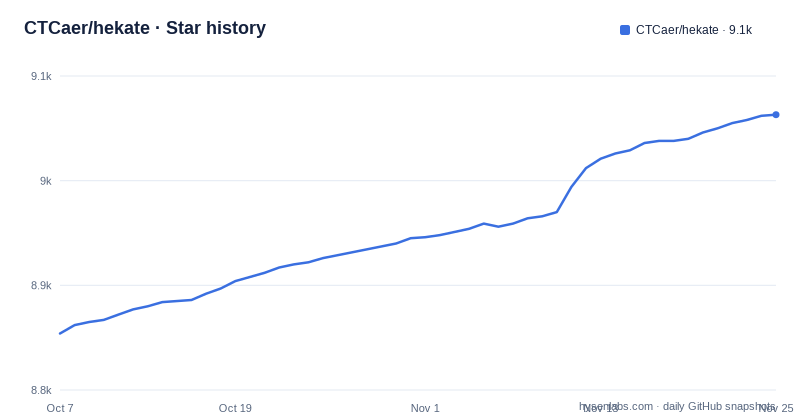
Star history
- CTCaer/hekate9,063 ★ · +209
| Repository | 2026-10-07 | 2026-11-25 |
|---|---|---|
| CTCaer/hekate | 8.9k | 9.1k |
209 Stars in the last 49 days, measured from the daily GitHub snapshot. Compare with other projects
Editorial analysis
What the bootloader actually does at boot time
hekate is a custom bootloader for the Nintendo Switch, and Nyx is its graphical environment: a launcher with a touchscreen, Joycon input, launcher-style icons, and background and colour themes. The README describes the whole package as bootloader, firmware patcher, tools and more, which undersells the scope. The feature list covers booting HOS as custom firmware from Sys or Emu, official firmware from Sys, and Stock Sys, plus Android and Linux payloads, which is the part that makes it more than a bootloader.
The operational pieces matter as much as the boot entry. There is a payload launcher, eMMC and emuMMC backup and restore tools, an SD card partition manager that prepares an SD card for any combination of Switch, Android and Linux, an emuMMC creation and migration manager, a flasher for Switch Android and Linux, USB mass storage that turns the console into an SD or eMMC reader, and a USB gamepad mode that exposes the Joycons as a HID controller. There is also a hardware and peripherals info screen covering SoC, fuses, RAM, display, touch, eMMC, SD, battery, PSU and charger.
Underneath, it is C built against devkitARM with NVIDIA's Tegra boot chain in mind. The `Makefile` refuses to run without `DEVKITARM` set, and its object list gives you a decent map of the source: hardware drivers for `bpmp`, `sdram`, `minerva`, `fuse`, `kfuse`, `sdmmc`, `emmc` and `bq24193`, OS loaders for `l4t`, `hos`, `pkg1`, `pkg2`, `pkg3` and `secmon_exo`, and libraries for `lz4`, `blz`, FatFs and `elfload`.
TARGET := hekate
BUILDDIR := build
OUTPUTDIR := output
SOURCEDIR = bootloader
In the repository, source lives under `bootloader/`, the Tegra components under `bdk/`, and the GUI under `nyx/`.
The bootloader folder and the files that must not go missing
The README documents the on-SD layout as a table, which is unusual and useful. The `bootloader/` directory is the main folder, and inside it `hekate_ipl.ini` holds the main configuration and the boot entries that appear in the Launch menu, while `nyx.ini` configures the GUI. `patches.ini` is where you add external patches and can be skipped, with a template at `./res/patches_template.ini`.
Some entries are load-bearing and the README says so with an emphasis marker on `bootloader/sys/`. That folder holds hekate and Nyx system modules: `emummc.kipm` for emulated eMMC, `libsys_lp0.bso` for sleep mode, `libsys_minerva.bso` for DRAM frequency training, `nyx.bin` for the GUI itself, `res.pak` for its resource bundle, and `thk.bin`, the Atmosphere Tsec Hovi keygen. The same folder has an `l4t/` subdirectory for firmware relevant to L4T, which is the Android and Linux side.
Alongside those, `bootlogo.bmp` is your startup logo, used when no `logopath` key is configured and safe to skip, `bootloader/res/` holds Nyx resources such as `background.bmp` and the default `icon_switch.bmp` and `icon_payload.bmp`, `bootloader/screenshots/` receives Nyx screenshots, and `bootloader/libtools/` is listed as reserved. `update.bin` is the other one to understand: if a newer version exists it gets loaded at boot, and it is normally there for modchips, auto updated and created at first boot.
The `bootloader/payloads/` folder feeds the Payloads menu, and the README is precise that all CFW bootloaders, tools and Linux payloads are supported there, but autoboot only works for payloads included in an ini. `bootloader/ini/` holds individual configs for the More configs menu, again with autoboot support, and the files are ASCII ordered, which matters because the autoboot list can be read from that folder.
Configuring hekate through the config section of hekate_ipl.ini
Global configuration lives in the special `[config]` section of `hekate_ipl.ini`, and every other section in the file is a boot entry that has to be edited by hand. Nyx exposes most of those settings under Options (noticker and bootprotect can be edited via the ini only), so the GUI is an editor for that one section rather than for the whole file.
The keys are documented as a table, and a few are worth explaining in plain terms. `autoboot=0` disables autoboot or takes an entry number to boot automatically. `autoboot_list=0` chooses whether the autoboot entry is read from `hekate_ipl.ini` or from the ini folder. `bootwait=3` sets the seconds you have to hold a volume button to reach the menu, capped at 20, and setting it to 0 also disables the bootlogo. `autohosoff=1` covers waking from an RTC alarm, showing the logo and powering off, with a value of 2 for no logo and an immediate power off.
Three more keys are worth knowing. `autonogc=1` automatically applies the nogc patch if unburnt fuses are found and a HOS of 4.0.0 or later is booted. `updater2p=0` forces an update of the reboot2payload binary to hekate when needed, which matters for RCM-based boot flows. And `bootprotect=1` protects the bootloader folder by disallowing reading or editing it from HOS, which is the setting you want if the console can run anything that a user might run.
Two more are cosmetic but explain the startup screen: `backlight=100` sets the screen backlight level on a 0 to 255 scale, and `noticker=0` draws an animated line during a custom bootlogo showing the time left before the menu, with 1 disabling it.
autoboot=0
bootwait=3
autohosoff=1
autonogc=1
backlight=100
Those five lines are the whole global configuration for most people. There is also a template at `./res/hekate_ipl_template.ini` if you would rather start from a complete file than a blank one.
Boot entries as key and value combinations
A boot entry is a sequence of replacements rather than a single binary path, and the README's table for entries is a component-by-component list. `warmboot={FILE path}` replaces the warmboot binary, `secmon={FILE path}` replaces the security monitor, `kernel={FILE path}` replaces the kernel, and `kip1={FILE path}` replaces or adds a kernel initial process, with several allowed. A folder form, `kip1={FOLDER path}/*`, loads every .kip and .kip1 inside a directory.
Entries live in plain text that you can read, diff and comment. The README also uses a small notation for the file itself: square brackets are boot entries, curly braces are captions, a hash is a comment, and a bare newline is a cosmetic blank line in the ini.
A separate table covers boot entry combinations for Exosphere specifically.
Payload storage is documented as its own section, and it is straightforward: payloads go in `bootloader/payloads/` and appear in the Payloads menu. The catch, as noted above, is autoboot, which only applies to payloads referenced from an ini, not to files dropped in the folder.
Release cadence driven by Nintendo firmware versions
hekate and Nyx ship together, and each release title pairs the two versions: hekate v6.5.4 with Nyx v1.9.4 on 2026-09-28, hekate v6.5.3 with Nyx v1.9.3 on 2026-06-16, and hekate v6.5.2 with Nyx v1.9.2 on 2026-03-19. The repository's last push was on 2026-09-28, the same date as the v6.5.4 tag. Before relying on a boot entry for a given firmware version, read the notes for the current release.
Scale, licensing and what the README leaves out
Some context that the README does not spell out. hekate has around 8,700 stars and 680 forks, it is licensed GPL-2.0, it is written in C, and it carries 40 open issues at the moment.
The README is unusually complete for a homebrew project: full folder and file tables, every global configuration key, boot entry tables for both CFW paths, payload storage, and a Nyx configuration section for `nyx.ini`. There is also a separate `README_BOOTLOGO.md` in the tree, so custom bootlogo work is documented on its own rather than squeezed into the main file. Build prerequisites are stated plainly, which is rarer: `DEVKITARM` must be exported or the Makefile stops with an explicit error.
The practical read is that hekate is the stable, well-documented centre of a wider ecosystem rather than a standalone tool. Its own repository is in good shape; the volatility is upstream, in firmware releases and in the CFW projects that must be updated to match them.
Editorial conclusion
hekate is the piece of the Switch homebrew stack that other tools assume exists. The configuration reference in the README is complete enough to write a full `hekate_ipl.ini` from scratch. Start there, use the Nyx Options menu for the global keys, and check which firmware version the current hekate release supports before assuming a boot entry will work.
Frequently asked questions
What is hekate and Nyx on the Nintendo Switch?
hekate is a custom bootloader for the Nintendo Switch and Nyx is its graphical interface. The pair boots custom firmware, official firmware and stock, launches payloads for Linux and Android, and provides partition, emuMMC backup and hardware inspection tools through a touchscreen menu.
How do I configure hekate through hekate_ipl.ini?
Global settings go in the `[config]` section of `bootloader/hekate_ipl.ini`, which is also editable from Nyx under Options. Keys include `autoboot`, `bootwait`, `autohosoff`, `autonogc`, `updater2p`, `backlight`, `noticker` and `bootprotect`. Every other section in the file is a boot entry and has to be edited manually. A template lives at `./res/hekate_ipl_template.ini`.
Why does hekate not boot the latest Switch firmware?
Check the current release before assuming support. hekate and Nyx ship as paired releases, the latest being hekate v6.5.4 with Nyx v1.9.4 on 2026-09-28, and the README keeps a separate table of boot entry combinations for Exosphère.
What does the bootloader/sys folder need to contain?
The README marks it as important. It holds `emummc.kipm` for emulated eMMC, `libsys_lp0.bso` for sleep mode, `libsys_minerva.bso` for DRAM frequency training, `nyx.bin` for the GUI, `res.pak` for Nyx resources and `thk.bin`, the Atmosphere Tsec Hovi keygen, plus an `l4t/` subdirectory for the Linux and Android side.
Official sources
Add this badge to your README
If you maintain this project, the badge below links readers to this analysis and shows its maintenance status from the daily GitHub snapshot. Paste the markdown into your README; add ?metric=license or ?metric=stars to the image URL for a different field.

[](https://hysenlabs.com/projects/ctcaer-hekate)Star history chart for your README
[](https://hysenlabs.com/projects/ctcaer-hekate)Was this useful?