Cucumber Expressions: A Human-Friendly Alternative to Regex for Step Definitions
Human friendly alternative to Regular Expressions
At a glance
- What is it?
- Cucumber Expressions replace regular expressions with a simpler syntax for matching Gherkin steps. This review covers its syntax, parser design, multi-language support, and where it falls short.
- Who is it for?
- Adopt Cucumber Expressions if you write or maintain Cucumber step definitions and want to avoid regex escaping and readability issues. Skip it if you need the full power of regex, such as lookaheads or backreferences, or if your team already has a large regex-based step library.
- Can I use it commercially?
- Yes. MIT is a permissive licence: you can use, modify and sell software built on it, as long as you keep its copyright and licence notices.
- Is it still maintained?
- Yes. The repository received new commits within the last day.
- What is it written in?
- Mainly Java, according to GitHub's language statistics.
Answers come from the project's GitHub data, last synced on November 14, 2026, and from our analysis. They are not legal advice.
Star history
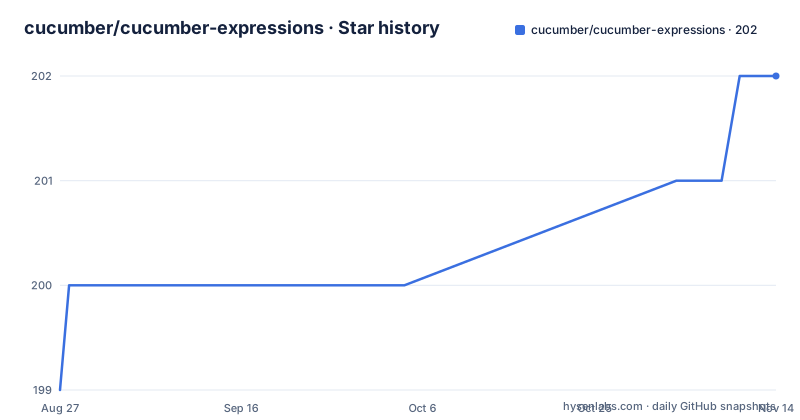
- cucumber/cucumber-expressions202 ★ · +3
| Repository | 2026-08-27 | 2026-11-14 |
|---|---|---|
| cucumber/cucumber-expressions | 199 | 202 |
3 Stars in the last 79 days, measured from the daily GitHub snapshot. Compare with other projects
Editorial analysis
What Problem It Solves and Who It's For
Cucumber Expressions address a specific pain point: writing step definitions with regular expressions is error-prone and hard to read. A step like "I have 42 cucumbers" requires a regex like ^I have (\d+) cucumbers$ in Java, with backslashes and anchors. Cucumber Expressions replace that with {int}, giving you "I have {int} cucumbers". This is aimed at teams using Cucumber for behavior-driven development, particularly those who write step definitions in Java, JavaScript, Python, Ruby, Go, or .NET. The project is not a standalone tool; it is a library embedded in Cucumber's test runners. The README describes it as "an alternative to Regular Expressions with a more intuitive syntax," which is accurate for simple cases. The target user is a developer or QA engineer who wants to focus on the business language of a scenario rather than on regex syntax.
The Core Syntax: Curly Braces and Parameter Types
The syntax is built around curly braces that denote parameter types. The most common is {int}, which matches an integer and converts it to a number automatically. Other built-in types include {string}, {float}, {word}, and {anonymous}, though the README itself does not list them all; the full documentation is at the Cucumber site. The key difference from regex is that you write the literal text of the step and insert these placeholders. The parser then compiles that expression into a matching pattern internally. This means no escaping of special characters like parentheses or brackets. For example, a step with parentheses in the text, such as "I have (many) cucumbers", would be written as "I have (many) cucumbers" in a Cucumber Expression, and the parentheses are treated as literal characters. In regex, those parentheses would need to be escaped. This is a significant readability win for step definitions that contain punctuation.
How the Parser Works: Inspired by a Tiny Compiler
The README reveals an important architectural detail: the parser design was inspired by a tutorial called "Tiny-Compiler-Parser" by Yehonathan Sharvit. This suggests that the expression parser is built as a small compiler, likely tokenizing the input and building an abstract syntax tree before generating the final matching code. The ARCHITECTURE.md file exists in the repository. Based on this, you can infer that the parser is not a simple regex wrapper; it has its own grammar. This design allows for consistent behavior across all language implementations, because each language port follows the same parser structure. The trade-off is that adding new parameter types requires modifying the parser in every language, which is a maintenance burden the project accepts. The recent releases, including v20.1.0 in August 2026, show that this parser is actively maintained.
Getting It Running: What the Material Shows
The README does not include installation instructions or code examples. It points to the full documentation at https://cucumber.io/docs/cucumber/cucumber-expressions for syntax and usage. Based on the repository layout, this is a Java library, given the primary language is Java, but the GitHub Actions workflows show test suites for Go, Java, JavaScript, Python, Ruby, and .NET. This means you can use Cucumber Expressions in any of these languages, but you need to add the dependency from the language-specific package manager. For Java, that would be a Maven or Gradle dependency on the cucumber-expressions artifact. For JavaScript, it would be an npm package. The exact version numbers are available in the releases, with v20.1.0 as the latest. Since the README lacks a quickstart, you must consult the external documentation to learn how to write your first expression. That is a minor friction point for new users.
A Genuine Limitation: When Regex Is Still Necessary
Cucumber Expressions are not a full replacement for regular expressions. They are designed for common cases like numbers, strings, and words. If your step requires a complex pattern, such as a date format like YYYY-MM-DD, a UUID, or a pattern with alternation like "cat or dog", you cannot express that with a built-in parameter type. You would need to define a custom parameter type, which requires additional code and knowledge of the API. The documentation mentions custom parameter types, but the README does not cover them. Also, regex features like lookaheads, backreferences, and non-capturing groups are not available. For teams that rely on such patterns, Cucumber Expressions become a constraint rather than a convenience. The project's own inspiration from other BDD tools like Turnip and Behat suggests that the syntax is intentionally limited to keep it simple, but that simplicity is a double-edged sword.
The Real Alternative: Regular Expressions and Their Trade-offs
The obvious alternative is to stick with regular expressions, which Cucumber has supported from the start. The difference in approach is fundamental: regex is a general-purpose pattern language, while Cucumber Expressions are a domain-specific language for step matching. Regex gives you full control, but at the cost of readability and escaping. For example, matching a quoted string in regex requires something like "([^"]*)", while a Cucumber Expression uses {string}. The trade-off is that regex is more powerful, but Cucumber Expressions are more maintainable for typical step definitions. Another alternative is to use a combination: keep regex for complex steps and use Cucumber Expressions for simple ones. Cucumber allows both in the same project, so you are not forced to choose. The documentation likely explains how to mix them, but the README does not. This hybrid approach is a pragmatic choice for teams migrating gradually.
Maintenance and Upgrade Cost
The project is under active maintenance, with the last push on 2026-08-05 and a release the same day. The version history shows a jump from v19.0.1 to v20.0.0 in June 2026, then a patch v20.1.0 in August. This indicates a stable release cadence, but major version bumps suggest breaking changes. For a library like this, upgrading may require updating your Cucumber runner as well, since the expression parser is tightly integrated. The multi-language support means that fixes are rolled out across all implementations, which is good for consistency but means you must track releases in your specific language. The MIT license is permissive, so you can use it in commercial projects without restrictions, but you must include the copyright notice. There is no mention of a migration guide in the README, so you should check the release notes for each major version before upgrading. The maintenance cost is low for the library itself, but the learning curve for custom parameter types is a real investment.
Editorial conclusion
Adopt Cucumber Expressions if you write or maintain Cucumber step definitions and want to avoid regex escaping and readability issues. Skip it if you need the full power of regex, such as lookaheads or backreferences, or if your team already has a large regex-based step library. Before adopting, verify that your language's implementation supports all the parameter types you need, especially custom transformers, and check the version compatibility with your Cucumber runner. The project is actively maintained with recent releases, but the syntax is intentionally limited, so weigh that against your step complexity.
Frequently asked questions
What is Cucumber Expressions?
An alternative to Regular Expressions with a more intuitive syntax, described in the repository as a human friendly alternative to Regular Expressions. Full documentation with syntax, usage examples, and an interactive playground is hosted at cucumber.io.
Which languages does cucumber-expressions support?
Six, each with a CI test workflow and a top-level directory: dotnet, go, java, javascript, python, and ruby. Java is the declared primary language, and a testdata directory sits at the root outside all six implementation trees.
Where did the Cucumber Expressions syntax come from?
It was inspired by similar expression syntaxes in other BDD tools, specifically Turnip by Jonas Nicklas, Behat by Konstantin Kudryashov, and Behave by Jens Engel, who are thanked for implementing those libraries. The parser design was inspired by Yehonatan Sharvit's Tiny-Compiler-Parser tutorial.
Where is the architecture of cucumber-expressions documented?
In ARCHITECTURE.md at the repository root, linked from the README under its own heading. Release procedure lives in RELEASING.md and the change record in CHANGELOG.md, while user-facing syntax documentation is on the cucumber.io site rather than in the repository.
What is the current version of cucumber-expressions?
v20.1.0, published August 5, 2026. The tags before it are v20.0.0 from June 11, 2026 and v19.0.1 from May 22, 2026, so the major version moved from 19 to 20 in under a month and the README does not say what changed.
Official sources
Add this badge to your README
If you maintain this project, the badge below links readers to this analysis and shows its maintenance status from the daily GitHub snapshot. Paste the markdown into your README; add ?metric=license or ?metric=stars to the image URL for a different field.

[](https://hysenlabs.com/projects/cucumber-cucumber-expressions)Star history chart for your README
[](https://hysenlabs.com/projects/cucumber-cucumber-expressions)Was this useful?