custom-cards/button-card: A Lovelace Card That Replaces the Whole Default Button Row
❇️ Lovelace button-card for home assistant
At a glance
- What is it?
- button-card is a Home Assistant Lovelace custom card that turns a single entity into a configurable button with templates, JavaScript, custom actions and CSS control. It is powerful, and that power is exactly where new users get stuck.
- Who is it for?
- Adopt button-card if you already run Lovelace dashboards and want one entity tile to carry state colouring, custom actions, per-state icons and reusable templates without writing a custom frontend card. Avoid it if you want a zero-configuration dashboard, or if your layout needs are simple enough that the built-in entities card already reads well; the configuration surface here is large and the README alone will not teach it.
- Can I use it commercially?
- Yes. MIT is a permissive licence: you can use, modify and sell software built on it, as long as you keep its copyright and licence notices.
- Is it still maintained?
- Yes. The repository last received commits 44 days ago.
- What is it written in?
- Mainly TypeScript, according to GitHub's language statistics.
Answers come from the project's GitHub data, last synced on October 22, 2026, and from our analysis. They are not legal advice.
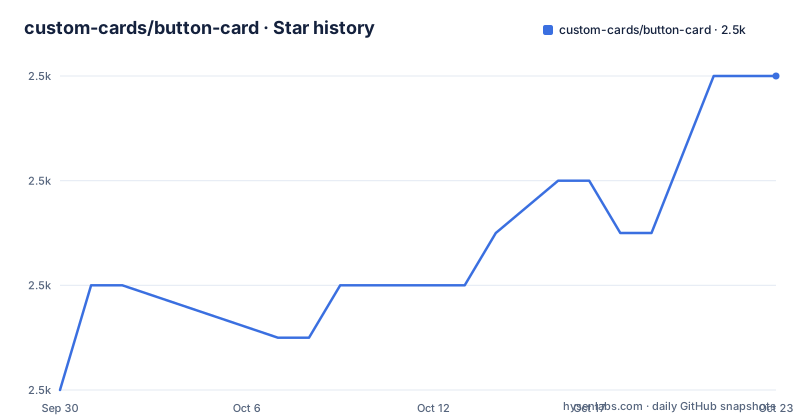
Star history
- custom-cards/button-card2,514 ★ · +6
| Repository | 2026-09-30 | 2026-10-22 |
|---|---|---|
| custom-cards/button-card | 2.5k | 2.5k |
6 Stars in the last 22 days, measured from the daily GitHub snapshot. Compare with other projects
Editorial analysis
The problem button-card solves on a Lovelace dashboard
Home Assistant's built-in entity rows show a name, a state and maybe an icon. That is fine until you want one tile to do something specific: colour itself by the brightness of a lamp, swap icon and colour per state, open a confirmation dialog before unlocking a door, or fire three service calls from a single tap. The built-in cards do not expose that level of control, and writing a custom frontend card means shipping and maintaining TypeScript.
button-card sits in that gap. The README describes it as "a lovelace custom card called button-card for your entities with a LOT of configuration options", and the list that follows is the actual scope: works with any entity, six actions on tap, hold or double click, separate icon actions, momentary press and release actions, three card-specific actions, state display, custom colours, custom state definitions, aspect ratio, JavaScript templates, custom CSS, multiple layouts, sensor unit redefinition and colour types. It is aimed at people who already build dashboards and have hit the ceiling of the stock cards.
The trade-off is honest: every one of those options is something you configure by hand in YAML. There is no visual editor described in the README. If you want a dashboard that configures itself, this is the wrong direction.
How the card is structured: actions, states and templates
The card is a single Lovelace resource. You declare it in a dashboard view with the type custom:button-card and an entity, and everything else is optional configuration layered on top.
Actions are the clearest part of the design. The README lists six available actions on tap, hold or double click: none, toggle, more-info, navigate, url, assist and call-service. Clicking the icon specifically can run a different action that takes precedence over the card action. If you use press_action and release_action, the README states they replace the default actions, which matters because a momentary button and a toggle button are different interaction models and you cannot have both on the same element.
Beyond the built-in actions, three card-specific actions exist: javascript, multi-actions and toast. Those are where the card stops being a styled entity row and becomes a small scripting surface. JavaScript templates are supported, and the card also supports native blink and icon rotation animations, confirmation popups, and password or PIN protection for actions.
State handling is the other half. You can define custom states with their own colour, icon and style, so a single entity can look different across its state machine. Colour can be applied to the icon only or the card only via color_type, and with card colouring the font colour adjusts automatically. For lights, colour can follow the RGB value or temperature. Sensors can have their units redefined or hidden.
Layout is configurable too: custom icon size, width and height, aspect ratio, and multiple layout options plus custom layouts. The card also supports haptics on the iOS companion app.
Installing button-card through HACS and a first working card
The README links to HACS and carries the HACS default badge, which is the documented distribution path. The repository also ships a hacs.json file and a dist build produced by rollup, so the card is installed as a frontend resource rather than as a Python integration.
Start by installing HACS itself if it is not already present, then add button-card from the HACS frontend section. The README points at the HACS site for the integration's own setup; it does not restate those steps. After installation, Home Assistant needs the card registered as a Lovelace resource, which HACS handles when it adds the frontend module.
The README does not print a minimal card example, so any dashboard configuration has to be assembled from the option names it lists. The card type is custom:button-card, it works with any entity, and the README lists tap_action with the actions none, toggle, more-info, navigate, url, assist and call-service, plus color_type with the values icon and card. Those option names are the whole vocabulary available here; the README gives no filled-in YAML to copy, so treat any card you write as your own construction from that list rather than as an example from the project.
One documented interaction rule is worth reading closely before you build anything: if you use press_action and release_action, the README states they replace the default actions. That means a momentary control and a tap or hold control are mutually exclusive on the same element, and you have to choose which model the tile follows.
If the card does not appear after installation, the usual cause is the Lovelace resource not being loaded, not a problem with the YAML itself. The README does not document a rollback procedure for a failed upgrade.
Where button-card becomes the wrong tool
The configuration surface is the limitation. Six actions across three gesture types, three card-specific actions, JavaScript templates, custom state definitions, custom CSS, multiple layout modes and custom layouts all interact. The README lists them; it does not walk through how they compose. A template that returns the wrong value, or a javascript action with a syntax error, is a browser-console problem rather than a card-level error message. If you are not comfortable opening developer tools in the frontend, debugging a broken dashboard will be slow.
The second limitation is the dependency on a custom frontend resource. button-card is not part of Home Assistant core, so it is one more thing that can break on a Home Assistant upgrade and one more thing you have to keep current. The last push to the repository was on 2026-09-09, and the most recent stable release listed is v7.0.1 from 2025-11-13, with v7.1.0-dev.1 and v7.1.0-dev.2 published on 2026-04-21. That means the newest published artifacts are development releases, and anyone who wants stability should be reading the stable documentation rather than the dev documentation, since the README links both.
Finally, the card is per-entity. If your goal is a dense grid of many entities with uniform styling, the stock entities card or a purpose-built layout card may get you there with far less YAML. button-card earns its cost when a specific tile needs behaviour that other cards do not offer.
button-card against bubble-card and the built-in entity row
The most common comparison question is button-card against bubble-card, and the difference is in the model rather than the feature list. button-card is entity-centric: you configure one card per entity, and the styling, actions and states belong to that entity. bubble-card is a pop-up and card system built around its own styling language and a different interaction pattern, with cards designed to open pop-ups and control other cards. If your dashboard idea is "tap this tile and a panel slides up with controls", that is closer to bubble-card's premise. If your idea is "this one tile should look and behave exactly this way across five different states", button-card is the more direct fit.
The built-in entity row is the other alternative, and it is free in the sense that it ships with Home Assistant and needs no custom resource. It gives you a name, a state and a toggle. It does not give you per-state icons with per-state colours, JavaScript templates, confirmation popups, PIN protection, momentary press and release actions, or custom CSS. The honest comparison is not which is better but how much behaviour you actually need. If you cannot name a state, action or style that the entity row fails to express, you do not need button-card yet.
Maintenance cost, licence and version discipline
button-card is MIT licensed. The LICENSE file is at the repository root, and the package.json also declares "license": "MIT". In practical terms that is a permissive licence: you can use, modify and redistribute the card, and the repository's own build tooling (rollup, Babel, eslint, TypeScript) is all present if you want to fork and build it yourself. This is not legal advice, and if you redistribute a modified card you should read the LICENSE file rather than this paragraph.
Upgrade cost is the more relevant number. The card is distributed as a compiled frontend module, so upgrading means replacing the resource and reloading the dashboard. The repository ships a CHANGELOG.md and uses semantic-release tooling, including @semantic-release/changelog and conventional-changelog-conventionalcommits, which means release notes are generated from commit messages. That is useful, but it also means the changelog is only as descriptive as the commits behind it.
Watch the stable versus dev split. The README links two documentation sites, one for stable and one for dev, and the release list shows dev builds published months after the last stable release. If you install from HACS, confirm which channel you are on before you copy configuration from the dev documentation, because options documented there may not exist in the stable build you are running. The repository does not document a downgrade path if a version change breaks your dashboard.
Editorial conclusion
Adopt button-card if you already run Lovelace dashboards and want one entity tile to carry state colouring, custom actions, per-state icons and reusable templates without writing a custom frontend card. Avoid it if you want a zero-configuration dashboard, or if your layout needs are simple enough that the built-in entities card already reads well; the configuration surface here is large and the README alone will not teach it. Before you commit, verify three things: that your Home Assistant version loads the card after a HACS install, that the stable documentation at custom-cards.github.io/button-card matches the version you installed, and that you are comfortable debugging JavaScript template errors in the browser console, because the card's template system fails there rather than in the UI.
Frequently asked questions
How do I add a button card to a Home Assistant dashboard?
Install button-card through HACS, then add a card to a view using the card type custom:button-card with an entity, since the README states the card works with any entity. Every other option is layered on top from the README's configuration list.
How do I install custom button card in Home Assistant?
The README lists support for HACS and carries the HACS default badge, so HACS is the documented installation path. The repository also ships hacs.json and a dist build produced by rollup, which is what HACS loads as a frontend resource.
What is a button card?
In this project it is a Lovelace custom card for Home Assistant that renders a configurable button for any entity. The README describes it as a card for your entities with a lot of configuration options, including custom actions, states, colours and layouts.
How does button-card compare with bubble-card?
Both are custom Lovelace cards, but button-card is entity-centric: one card is configured per entity, with its own actions, states and styling. bubble-card is not described in this repository's README, so the comparison here is limited to that difference in model rather than a feature-by-feature list.
What are the alternatives to the Home Assistant button card?
The built-in entity row ships with Home Assistant and needs no custom resource, but it does not offer per-state icons and colours, JavaScript templates, confirmation popups or PIN protection. bubble-card takes a different approach built around pop-ups and its own styling system.
How do I use button card in Home Assistant?
Declare the card in a Lovelace view with the type custom:button-card and an entity, then add options from the README's list such as tap_action, color_type, custom state definitions and JavaScript templates. The README does not include a step-by-step walkthrough, so its option list is the reference.
Official sources
Add this badge to your README
If you maintain this project, the badge below links readers to this analysis and shows its maintenance status from the daily GitHub snapshot. Paste the markdown into your README; add ?metric=license or ?metric=stars to the image URL for a different field.

[](https://hysenlabs.com/projects/custom-cards-button-card)Star history chart for your README
[](https://hysenlabs.com/projects/custom-cards-button-card)