UserLAnd: full Linux distributions on Android without root
Main UserLAnd Repository
At a glance
- What is it?
- An Android app that runs a complete Linux distribution or a single application in the userland, installable like any other app, with the actual distributions and scripts living in a family of separate asset repositories.
- Who is it for?
- UserLAnd is the right tool for one specific job: putting a real Debian or similar environment on a phone that will never be rooted, and treating it as an installed app rather than a hacking exercise.
- Can I use it commercially?
- Not without permission. GitHub finds no licence file in the repository, and without a licence all rights are reserved by default: you may read the code but not reuse it. Check the README, or ask the authors, before using it.
- Is it still maintained?
- Yes. The repository last received commits 4 days ago.
- What is it written in?
- Mainly Shell, according to GitHub's language statistics.
Answers come from the project's GitHub data, last synced on October 23, 2026, and from our analysis. They are not legal advice.
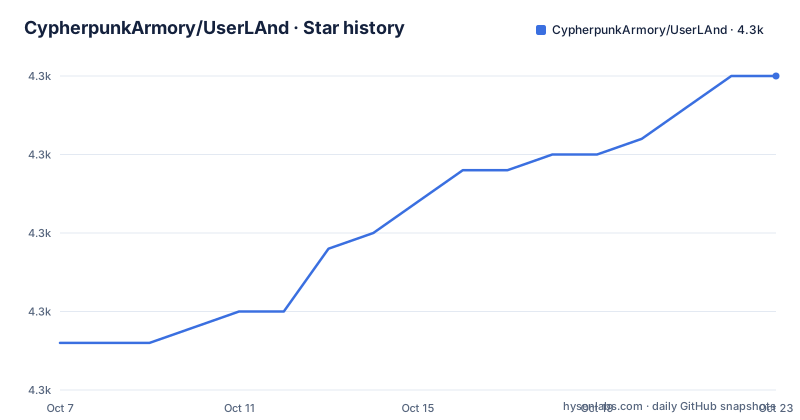
Star history
- CypherpunkArmory/UserLAnd4,325 ★ · +17
| Repository | 2026-10-07 | 2026-10-23 |
|---|---|---|
| CypherpunkArmory/UserLAnd | 4.3k | 4.3k |
17 Stars in the last 16 days, measured from the daily GitHub snapshot. Compare with other projects
Editorial analysis
What UserLAnd actually puts on the phone
The README describes the project as the easiest way to run a Linux distribution or application on Android, and the three feature bullets are short enough to quote without softening them. UserLAnd runs full Linux distributions or specific applications on top of Android, it installs and uninstalls like a regular app, and no root is required.
That third point is the whole design constraint and it explains most of what the project does. A rooted setup can chroot into a real root filesystem, mount pseudo filesystems and get very close to a native Linux system. Without root none of that is available, so UserLAnd has to work inside the unprivileged user space Android grants to an ordinary application. That is why it presents itself as an app rather than a terminal environment, and why installation is a normal Android install instead of a setup script.
The distinction between the two capabilities in the feature list is worth holding on to. Running a single application is a much smaller problem than running a full distribution, and a project that advertises both is promising two different levels of fidelity. A full distribution means package managers, system libraries and a real filesystem tree, all inside a sandbox Android did not design for. The README does not quantify how complete that environment is, and it does not claim to.
For comparison, the README positions the project against nothing in particular, which is itself informative. Termux, the closest Android Linux project people reach for, is a terminal-first environment. UserLAnd is distribution-first. Readers comparing the two should hold that distinction rather than treating them as substitutes.
Where the code ends and the asset repositories begin
The single most important thing to understand about this repository is that it is not self contained. Its own description is simply Main UserLAnd Repository, and the README states directly that the assets UserLAnd depends on, and the scripts that build them, are contained in other repositories.
The split has two layers. Common assets shared by every distribution and application live in CypherpunkArmory/UserLAnd-Assets-Support. Distribution or application specific assets live in repositories named for the target, so the Debian assets are in CypherpunkArmory/UserLAnd-Assets-Debian. The naming convention is consistent and predictable, which is a small kindness to anyone trying to locate the piece they need.
That has a practical consequence for anyone evaluating or building the project. If you want to know what a given distribution actually contains, the answer is not in this repository, and the repository does not pretend otherwise. Contributions to a new distribution belong in a new asset repository with its own build scripts, not in the Android app. It is an unusual layout for a project with more than 4,000 stars, and it is also a sensible one if you accept the premise that a distro image is a build artifact rather than source.
The README also links a Getting Started page in the project wiki rather than describing usage here. So this repository documents what the project is and where its parts live, and delegates the actual first run to the wiki.
The Gradle skeleton tells you what kind of project this is
The recorded file tree is short and entirely about the Android application. There is a `gradlew` and `gradlew.bat` pair for the wrapper, `build.gradle`, `settings.gradle`, `gradle.properties` and a `gradle/` directory, alongside an `app/` module that holds the application itself. A `CustomLibrary/` directory sits next to a `UserLAndLibrary` entry and a `.gitmodules` file, which together suggest that at least part of the library layer lives in a submodule rather than in this tree.
That is the whole picture, and it is worth noting how little it is. The repository carries no source for a kernel, no root filesystem archives and no provisioning logic, because all of that belongs to the asset repositories. GitHub classifies the project as Shell, which fits an Android application that spends most of its time downloading, unpacking and launching a prepared Linux userland rather than implementing one.
Two details round out the picture. The feature graphic at the top of the README is served from a `fastlane/metadata/android/en-US/images` path inside the repository, which means the Google Play listing metadata is versioned here even though the fastlane directory is not in the recorded tree. And `.gitignore` plus the submodule file together suggest a build that expects external content to be fetched rather than fully self contained.
None of this is criticism so much as orientation. If you open this repository expecting to read how a Linux distribution is assembled, you will find a Gradle project. The assembly logic is in `UserLAnd-Assets-Support`.
Distribution channels, and the licensing question the README skips
UserLAnd is distributed the way a mainstream Android app is, through two channels linked from the README. The first is F-Droid, under the package identifier `tech.ula`, which matters because F-Droid builds from source and is where privacy-minded Android users look. The second is Google Play, under the same identifier. Both links are present, and both point at the same app identity.
The project also links an issue center for bug reports and feature requests, with templates hosted there. With only 7 open issues recorded against more than 4,000 stars and 561 forks, that is a low ratio worth reading carefully. It can mean the project is stable, it can mean users report elsewhere, and it can mean the issue tracker moved. The README does not explain it, so the honest reading is that the number alone does not settle the question.
The licensing situation is the one genuine gap in the documentation. The licence field for this repository is empty, and no licence file appears in the recorded tree. For a project distributed through F-Droid, which requires a free software licence for inclusion, that mismatch is worth resolving by asking rather than assuming. Nothing in the README states terms, and this article will not guess at them. If the licence question matters to you, the answer has to come from the maintainers or from the asset repositories, which are separate codebases with their own terms.
What the activity record says about the project now
The repository is not archived, its default branch is `master`, and the last recorded push is 2026-09-22. So the codebase is being touched, but the magnitude of that work is not visible from the summary: there are no published releases on this repository, no release notes and no version history to read. A reader who wants to know what changed recently has to fall back on commit history.
That absence has a second effect. Because releases are not published here, the question of which UserLAnd build corresponds to which asset repository revision is not answered by the repository itself. If you are pinning assets for a deployment, you have to do that bookkeeping outside GitHub.
Set against the scale of the project, the numbers are otherwise healthy for its size: more than 4,200 stars, 561 forks and a low open issue count. The feature graphic, the F-Droid listing and the Play listing all exist, which means packaging is being maintained for real users rather than just for a source snapshot.
What the project does not offer is a self contained answer to how any of it works. The README is four short sections covering what the project is, where to report problems, where to start using it and where the assets live. For a project with this many users, that is a thin documentation surface, and the wiki carries the load that the repository does not.
Editorial conclusion
UserLAnd is the right tool for one specific job: putting a real Debian or similar environment on a phone that will never be rooted, and treating it as an installed app rather than a hacking exercise. Its split repository structure is the thing to understand before anything else, because this repository holds the Android application and the Gradle build while the distributions, root filesystem archives and build scripts live in UserLAnd-Assets-Support and the per distribution repositories such as UserLAnd-Assets-Debian. Two things a reader should not expect to find here are a licence statement and a release history; the recorded tree has no licence file and no releases are published on this repository. Install the `tech.ula` package from F-Droid or Google Play, then follow the Getting Started wiki, and pick the asset repository for the distribution you actually want before assuming the app ships one.
Frequently asked questions
Can I run Linux on my Android phone without root access?
Yes, and that is the stated design of this project. The README lists running full Linux distributions or specific applications on top of Android, installing and uninstalling like a regular app, and no root required as its three features.
How to use UserLAnd on Android?
Install the app from F-Droid or Google Play under the package identifier `tech.ula`, then follow the Getting Started page in the project wiki, which the README links as the starting point rather than documenting the steps itself.
Is UserLAnd free?
The README states no pricing and no licence terms, and this repository records an empty licence field, so it cannot answer the question either way. What it does document is that the app is available through F-Droid and Google Play.
Which is better, Termux or UserLAnd?
This project's README does not compare itself to Termux, so the answer has to come from the two projects' own descriptions. UserLAnd's stated goal is running full Linux distributions or specific applications without root, installed like an app.
Official sources
Add this badge to your README
If you maintain this project, the badge below links readers to this analysis and shows its maintenance status from the daily GitHub snapshot. Paste the markdown into your README; add ?metric=license or ?metric=stars to the image URL for a different field.

[](https://hysenlabs.com/projects/cypherpunkarmory-userland)Star history chart for your README
[](https://hysenlabs.com/projects/cypherpunkarmory-userland)Was this useful?