ImageGlass 10: a cross-platform image viewer that gates its licence tiers
🏞 A fast, open-source, modern image viewer for 90+ formats – including WEBP, GIF, SVG, AVIF, JXL, HEIC and more – built for smooth browsing across Windows, macOS, and Linux.
At a glance
- What is it?
- ImageGlass is a C# image viewer for Windows, macOS and Linux that renders 90+ formats and offers a Classic tier alongside paid Pro plans. Version 10 was rebuilt for speed and cross-platform support, and the pricing table sits directly in the README.
- Who is it for?
- Adopt ImageGlass if you need one viewer that handles WEBP, JXL, HEIC, AVIF, SVG and raw files on Windows, or if you want an open-source viewer you can inspect and build yourself with Visual Studio 2026. Do not adopt it if you are on macOS Intel (version 10 requires Apple Silicon arm64), on a Wayland-only Linux desktop (the stated requirement is X11 x64), or if you need to embed it in a closed product without confirming the terms on the pricing page.
- Can I use it commercially?
- Check first. The repository uses a licence we do not classify automatically, so read its LICENSE file before any commercial use.
- Is it still maintained?
- Yes. The repository last received commits 3 days ago.
- What is it written in?
- Mainly C#, according to GitHub's language statistics.
Answers come from the project's GitHub data, last synced on November 13, 2026, and from our analysis. They are not legal advice.
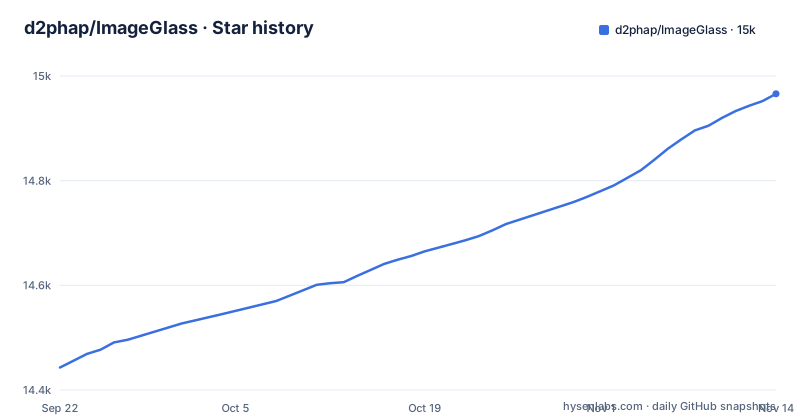
Star history
- d2phap/ImageGlass14,952 ★ · +509
| Repository | 2026-09-22 | 2026-11-13 |
|---|---|---|
| d2phap/ImageGlass | 14.4k | 15k |
509 Stars in the last 52 days, measured from the daily GitHub snapshot. Compare with other projects
Editorial analysis
The gap ImageGlass fills: one viewer for formats Windows Photos will not open
Windows ships a viewer that opens JPEG, PNG and not much else without a codec pack. Photographers and designers end up with three or four tools open at once: one for HEIC from a phone, one for JXL or AVIF exports, one for SVG assets, one for raw files. ImageGlass targets that fragmentation directly. The README lists 90+ formats out of the box, naming WEBP, JXL, SVG, HEIC, AVIF and HDR, plus raw images, and it claims native SVG and SVGZ vector rendering.
The audience is narrow but real. It is for people who browse folders of images rather than edit them: photographers culling a shoot, designers checking exported assets, anyone who wants arrow-key navigation through a directory without a loading spinner. The README describes the project as "primarily a photo viewer" with "some focused editing capabilities", and that framing is honest. Rotate, flip, crop, resize and a colour picker are present. This is not a Lightroom replacement and the project does not present it as one.
The cross-platform claim is newer than the Windows one. Version 10 is the release line that added macOS and Linux, and the README's system requirements make the boundaries explicit rather than glossing them.
Avalonia, caching and Turbo mode: what the version 10 rewrite changed
Version 9 is a Windows application with an optional WebView2 Runtime dependency. Version 10 is the rebuild: the README points to a news post titled "rebuilt for speed and cross-platform support", and 10.0.6.906 added Linux .AppImage support.
The performance features are described at a high level rather than with numbers. The README names "hardware-aware smart caching" and "super-fast image browsing with Turbo mode" but does not define what Turbo mode does differently or what caching policy it applies. That is a documentation gap worth noting: if you are choosing a viewer on rendering speed, the README will not settle the question for you.
What is concrete is the format and rendering surface. Animated GIF, WEBP and SVG playback are listed. Colour management and "basic HDR support" are listed, with the qualifier "basic" doing real work. Window modes include Frameless, Window Fit and Full screen. Zoom modes are described as cursor-precise with configurable interpolation, which matters when you are inspecting pixel-level detail in a screenshot or a scan.
The extension model is the part with the clearest architecture. Plugins and external tools connect through ImageGlass.SDK, a separate repository, and EXIF metadata viewing is delegated to ExifGlass, another separate repository. So the viewer core stays focused and the metadata and extension surface lives outside it.
Installing ImageGlass and opening a folder of mixed formats
The README directs users to the download page at imageglass.org/download, and it warns in a security notice to download only from official sources, warning about fake GitHub profiles, forks and Gists. The repository also states that the only authentic GitHub spaces are d2phap/ImageGlass and the ImageGlass Organization. Take that seriously: the README describes automated campaigns standing up fake profiles to distribute compromised packages.
What the repository does document is building from source. The develop branch holds the latest commits; the prod branch holds the final stable release. Version 10 lives in the source folder.
git clone https://github.com/d2phap/ImageGlass.git
cd ImageGlass
git checkout develop
After cloning, the README says to use Visual Studio 2026 for a Windows build.
For a first real use, the workflow the README implies is folder-based. Open a directory containing HEIC, JXL, AVIF and SVG files together, then use the frame navigation and zoom controls to move through them. Animated format playback and SVG rendering are a quick way to confirm the install is doing what you expected.
Where ImageGlass 10 will not run, and where the free tier stops
The system requirements for version 10 are specific and they exclude a lot of machines. Windows 10 or 11, x64 or arm64, build 17763 or later. macOS 14 or later on Apple Silicon arm64 only, which means Intel Macs are out for version 10. Linux Desktop X11 x64, which means a Wayland-only session is not a stated supported configuration. Version 9 is Windows-only and the README lists it separately with an optional WebView2 Runtime dependency, so anyone on an Intel Mac or a Wayland desktop is effectively looking at a different product.
The licensing split is the second constraint, and it is unusual enough to spell out. The README's pricing table shows four plans: Pro Individual and Pro Team (one-time purchase links), Pro Business, and Classic (linked to the download page), and managed deployment with preset configs is Pro only. Full terms are at imageglass.org/pricing.
The repository's LICENSE file is listed at the top level but the license field reads NOASSERTION, so the authoritative statement of terms is the pricing page, not the repository metadata. If your organisation needs to ship or bundle the binary, the tier decision comes before the technical evaluation, not after it.
One more boundary: the README notes that the custom file type icon pack is not available for the Store release. Small, but it is the kind of thing people discover after installing from the wrong channel.
How it compares to nomacs and to the Windows Photos app
The closest open-source comparison in the same category is nomacs, another free cross-platform image viewer. The difference in approach is the format surface and the extension model. ImageGlass is written in C#, with plugins and external tools routed through ImageGlass.SDK and EXIF handling pushed out to ExifGlass, so if you already write .NET, its extension path needs no new language.
The comparison against Windows Photos is not really about features. It is about formats and about what the software does with your data. Windows Photos needs codec packages for HEIC and will not open JXL or AVIF without help. ImageGlass claims those formats out of the box. On the other side, Windows Photos is preinstalled, updated by the OS and has no licence question attached. ImageGlass asks you to choose a tier.
If you only ever open JPEG and PNG, none of this matters and the built-in viewer wins on effort. ImageGlass earns its place when the folder in front of you contains formats the default tool refuses.
Maintenance, release cadence and what upgrading between v10 builds costs
The repository is not archived and the last push was on 2026-10-31, so the project is being worked on now. The release history supports that: 10.0.5.825 on 2026-08-25, 10.0.6.906 on 2026-09-05 adding Linux .AppImage support, and the 10.1 beta (10.1.0.1021-beta) on 2026-10-21.
The README's Pro Individual and Pro Team links are one-time purchases; check imageglass.org/pricing for which versions each plan covers before buying.
On the build side, the repository keeps two branches with distinct roles, develop for latest commits and prod for the final stable release, and two source trees, source for version 10 and v9 for version 9. Anyone maintaining a fork carries both until v9 is dropped.
The security notice is also a maintenance cost, in an odd way. Because the README documents active impersonation campaigns against this project, verifying the download source is not a one-time setup step. It is part of every update.
Who should adopt ImageGlass, and who should not
Adopt it if your problem is format coverage on Windows and you want a viewer that is not tied to a codec pack. Adopt it if you want to read the source. Adopt it if you write .NET and want to extend a viewer through ImageGlass.SDK rather than start from scratch.
Do not adopt it if you are on an Intel Mac, since version 10 requires macOS 14+ on Apple Silicon arm64. Do not adopt it if your Linux desktop is Wayland-only, because the stated requirement is X11 x64. Do not adopt it if you need to redistribute it inside a closed product without first checking the licence terms on the pricing page, since the repository licence field reads NOASSERTION. And do not adopt it as an editor: the README describes it as primarily a photo viewer with some focused editing capabilities, and that is the ceiling.
What to verify before installing: your OS and architecture against the version 10 system requirements, your use case against the Classic versus Pro tier table at imageglass.org/pricing, and the download URL against the README's warning about fake repositories.
Editorial conclusion
Adopt ImageGlass if you need one viewer that handles WEBP, JXL, HEIC, AVIF, SVG and raw files on Windows, or if you want an open-source viewer you can inspect and build yourself with Visual Studio 2026. Do not adopt it if you are on macOS Intel (version 10 requires Apple Silicon arm64), on a Wayland-only Linux desktop (the stated requirement is X11 x64), or if you need to embed it in a closed product without confirming the terms on the pricing page. Before you commit, verify three things: which tier your use case falls under on imageglass.org/pricing, that your macOS or Linux machine matches the version 10 system requirements, and that you downloaded the installer from imageglass.org rather than a mirror, since the README warns that fake repositories impersonate the project.
Frequently asked questions
What does ImageGlass do?
It is an open-source image viewer for Windows, macOS and Linux that the README describes as primarily a photo viewer, with some focused editing tools such as rotate, flip, crop, resize and a colour picker. It supports 90+ image formats out of the box, including WEBP, JXL, SVG, HEIC, AVIF and raw images.
Is ImageGlass free for commercial use?
The README's pricing table shows four plans, Classic, Pro Individual, Pro Team and Pro Business, with full terms at imageglass.org/pricing. The repository's licence field reads NOASSERTION, so the pricing page is the authoritative statement of terms.
Is ImageGlass safe to use?
The README carries a security notice stating that automated campaigns stand up fake GitHub profiles and Gists to distribute compromised packages. It says to download only from imageglass.org and that the only authentic GitHub spaces are d2phap/ImageGlass and the ImageGlass Organization. The README does not assess the safety of the official binaries themselves.
How to install ImageGlass?
The README directs users to imageglass.org/download and warns against fake GitHub profiles, forks and Gists. Building from source means cloning the repository, using the develop branch and the source folder, with Visual Studio 2026 for Windows builds.
Is ImageGlass open source?
Yes. The README and repository description call it open-source, and the repository contains the source for version 10 in the source folder and version 9 in the v9 folder. Note that the repository's licence metadata field reads NOASSERTION, so the pricing page states the terms more clearly than the repository does.
Official sources
Add this badge to your README
If you maintain this project, the badge below links readers to this analysis and shows its maintenance status from the daily GitHub snapshot. Paste the markdown into your README; add ?metric=license or ?metric=stars to the image URL for a different field.

[](https://hysenlabs.com/projects/d2phap-imageglass)Star history chart for your README
[](https://hysenlabs.com/projects/d2phap-imageglass)Was this useful?