UnityCsReference hands you Unity's C# source to read, not to fork
Unity C# reference source code.
At a glance
- What is it?
- This repository is the C# part of the Unity engine and editor, published for reference only under terms that forbid modifying or redistributing the code, with no pull requests accepted. It is a snapshot of Unity 7000.0.0a12, laid out the way Unity's own tree is laid out, and it is useful for reading rather than building.
- Who is it for?
- It fits developers who want to know how Unity's managed layer is organised and cannot ask the vendor, and it does not fit anyone who needs to patch, redistribute or ship this code, or who wants a supported engine build, because the grant stops at reading and no build instructions exist.
- Can I use it commercially?
- Check first. The repository uses a licence we do not classify automatically, so read its LICENSE file before any commercial use.
- Is it still maintained?
- Yes. The repository last received commits 2 days ago.
- What is it written in?
- Mainly C#, according to GitHub's language statistics.
Answers come from the project's GitHub data, last synced on November 14, 2026, and from our analysis. They are not legal advice.
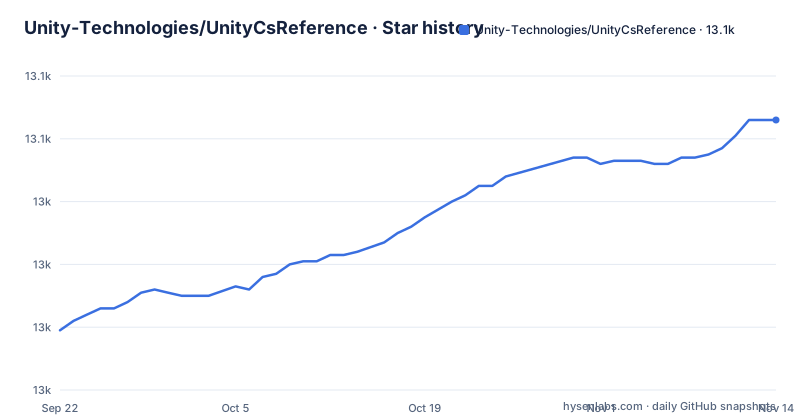
Star history
- Unity-Technologies/UnityCsReference13,066 ★ · +67
| Repository | 2026-09-22 | 2026-11-14 |
|---|---|---|
| Unity-Technologies/UnityCsReference | 13k | 13.1k |
67 Stars in the last 53 days, measured from the daily GitHub snapshot. Compare with other projects
Editorial analysis
Only the C# half of the engine ships here
This repository holds the C# part of the Unity engine and editor source code, and the C++ that the rest of the engine is written in is not in it. That single boundary shapes every use you can have of the tree. You can read how the managed layer is organised, what the editor's own scripts look like, and how those scripts call down, but you cannot cross to the native side from this checkout, so questions that live in C++ stay unanswered here. The same boundary reappears in the modification offer: a licence to change Unity's source is described as covering C# and C++ together, so the half published here does not become editable on its own. Anyone auditing Unity's internals should treat this as one volume of a set and note that the missing volume is not distributed publicly under any terms the project states.
Reference only: you may read, not modify or redistribute
The permission is narrow enough to state in one line: the terms of use do not permit you to modify or redistribute the C# code, in either source or binary form. Read is the whole grant. Forking the project, applying a patch, vendoring the files into your own package, or compiling them into a shipped binary all fall outside it. The route out is named too: if you want to modify Unity's source code, which is described as C# and C++, contact Unity sales for a commercial source code licence. The consequences are practical. If you are here to learn patterns, keep the files out of your product. If you are here to ship, stop early, because the licence terms and the product decision are different conversations and a contract conversation with the vendor is the only documented way to move from reading to changing. The warranty position is stated as well, on an AS IS BASIS WITHOUT WARRANTY OF ANY KIND, EXPRESS OR IMPLIED, so nothing you learn here is promised to be accurate or fit for any purpose.
The folder layout follows Unity's tree and shifts between versions
The layout is stated to match Unity's own source tree layout, and the same note warns that it can and will change between different Unity versions. Those paths are therefore not a stable interface. They reflect how Unity is organised internally for one build, which is exactly what makes the tree readable as documentation and exactly what makes it fragile as a target. A script that opens a file by path, a tutorial that links to one, or a review that diffs two paths will all be affected when the engine reorganises, and nothing in the tree promises a compatibility shim or a deprecation path for the old location. Pin your reading to the commit you looked at and treat any path you cite as version specific. If you are comparing behaviour across versions, a move is a second difference to account for on top of whatever the code itself changed, so separate the relocation from the edit.
The snapshot says 6000.7.0b2, a beta with no release list
The version sits in the title line itself: Unity 7000.0.0a12. The a suffix marks an alpha, so what you are reading is pre-release code from a version that had not reached final at this snapshot. The repository carries no GitHub releases, so that heading and the commit you are on are the only version markers, and there is no published tag series to point at. The repository is not archived and its last push is dated 31 October 2026, so it does keep moving. The consequence is about timing. Because the snapshot is an alpha and the layout changes between versions, the file you find today is a statement about one pre-release build rather than about the version you will target, and master may already have moved by the time you finish reading. Record the commit, and re-check anything load bearing against a released version of your own before you act on it.
Pull requests are declined, so the bug reporter is the only channel
Contributions are closed. The project states that it does not take pull requests at this time and asks that anything resembling a bug be filed with the Unity Bug Reporter, with a support article on submitting a bug report linked from the same place. The split is meaningful: you can report what you found, you cannot propose the fix here, and you should not plan on a change arriving in this repository because of your report. The tree is a broadcast rather than a conversation, so a discovery routes to a vendor support channel with its own turnaround and its own gates. Paired with the AS IS warranty disclaimer, the effect is that nothing you turn up here obliges Unity to change it. The practical use is diagnostic and personal. If you hit a reproducible fault in a project, take what you learned and file it through the reporter rather than opening a pull request that has already been refused.
Third-party components carry their own notices
The repository includes third-party code, and that code is subject to third-party-notices.txt rather than only to the Unity terms. The distinction matters because a vendored component can come from another project with its own licence and its own conditions, and nothing in the tree tells you which is which without opening that file. The top level makes the split visible, with LICENSE.md, README.md and third-party-notices.txt sitting alongside the code directories, so the notices are meant to be read rather than discovered later. Form the habit early: when you trace a behaviour into a directory that looks like a dependency rather than an engine module, find out which terms govern it before you quote it, copy it, or build on it. The reference only restriction is a rule about Unity's own C# code, and it is not a safe assumption for every file you open. For those files the notices file, not the repository heading, is where the terms are.
A solution file, but no documented build
The only tooling pointer is a path: the C# solution sits at Projects/CSharp/UnityReferenceSource.sln. That tells a programmer with a capable IDE where to open the tree, and it is the only build related instruction given. There is no documented command that builds the engine, no named output, and no statement that the solution yields a usable engine or editor. The top level reinforces the picture, with Editor, Runtime, Modules, Tools, External, Projects and an artifacts directory next to the two licence documents and the README. So a checkout gives you the managed source in Unity's arrangement, a solution to inspect it in an editor, and terms that stop short of redistribution. Compiling this yourself is not a documented outcome, so if your goal is a working engine build, this repository is the wrong starting point and the commercial source licence is the route the project names. If your goal is to understand design decisions, expect to spend the time reading.
Editorial conclusion
It fits developers who want to know how Unity's managed layer is organised and cannot ask the vendor, and it does not fit anyone who needs to patch, redistribute or ship this code, or who wants a supported engine build, because the grant stops at reading and no build instructions exist. Before you rely on it, read the reference only licence linked from the README, check third-party-notices.txt for the specific component you are looking at, and record the commit you read, since the snapshot is an alpha whose layout shifts between Unity versions.
Frequently asked questions
Which is better for Unity, C# or C++?
This repository only answers half of that. It holds the C# part of the Unity engine and editor source code, so it can show you how the managed layer is written and organised, while the C++ side of the engine is not in this checkout. A licence to modify Unity's source code is described as covering C# and C++ together.
Which C# version is Unity compatible with?
The documentation does not state a C# language version. What it pins is the engine build, labelled Unity 7000.0.0a12 in the README heading, and it notes that the folder and file layout matches Unity's source tree layout and can change between different Unity versions. For the language version of your own project, check Unity's own documentation rather than this reference tree.
Can I modify or redistribute code from UnityCsReference?
No. The terms of use do not permit you to modify or redistribute the C# code, in either source or binary form, and the code may be used for reference purposes only. To modify Unity's source code, C# and C++, the project directs you to contact Unity sales for a commercial source code licence.
Where is the C# solution in UnityCsReference?
The C# solution is in Projects/CSharp/UnityReferenceSource.sln. The repository gives no build command or build output, so the solution is stated as the location of the source rather than as a route to a built engine.
Why can I not send a pull request to UnityCsReference?
The project states that it does not take pull requests at this time, and asks instead that anything that looks like a bug be filed using the Unity Bug Reporter. The software is also provided on an AS IS BASIS WITHOUT WARRANTY OF ANY KIND, EXPRESS OR IMPLIED.
Official sources
Add this badge to your README
If you maintain this project, the badge below links readers to this analysis and shows its maintenance status from the daily GitHub snapshot. Paste the markdown into your README; add ?metric=license or ?metric=stars to the image URL for a different field.

[](https://hysenlabs.com/projects/unity-technologies-unitycsreference)Star history chart for your README
[](https://hysenlabs.com/projects/unity-technologies-unitycsreference)Was this useful?