DeskRPG: A Self-Hosted Pixel-Art Office Where AI NPCs Do Your Bidding
2D pixel art multiplayer virtual office game — create characters, join channels, chat with AI NPCs, and collaborate in real-time
At a glance
- What is it?
- DeskRPG turns a 2D pixel-art office into a multiplayer workspace with AI NPCs, task boards, and meetings. It is a niche tool for teams that want playfulness over plain chat, but its OpenClaw dependency and unlicensed state demand careful checks.
- Who is it for?
- Adopt DeskRPG if you want a playful, self-hosted workspace and are willing to manage an OpenClaw gateway for any AI feature to work. Skip it if you need a production-grade collaboration tool or if you cannot accept the NOASSERTION license.
- Can I use it commercially?
- Check first. The repository uses a licence we do not classify automatically, so read its LICENSE file before any commercial use.
- Is it still maintained?
- Yes. The repository last received commits 3 days ago.
- What is it written in?
- Mainly TypeScript, according to GitHub's language statistics.
Answers come from the project's GitHub data, last synced on October 21, 2026, and from our analysis. They are not legal advice.
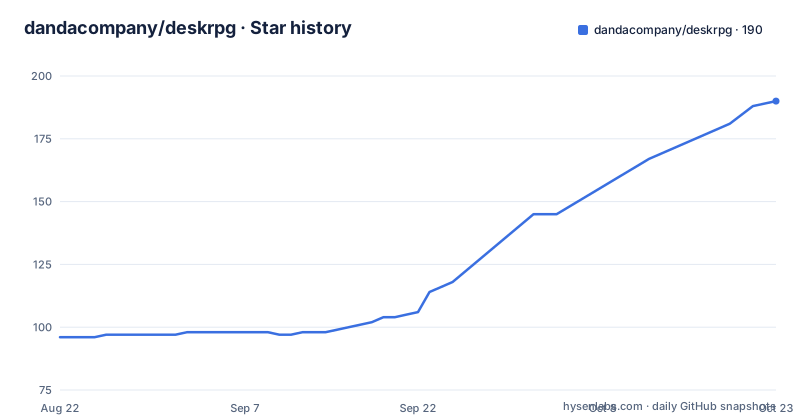
Star history
- dandacompany/deskrpg188 ★ · +92
| Repository | 2026-08-22 | 2026-10-21 |
|---|---|---|
| dandacompany/deskrpg | 96 | 188 |
92 Stars in the last 60 days, measured from the daily GitHub snapshot. Compare with other projects
Editorial analysis
What DeskRPG Actually Solves
DeskRPG is a 2D pixel-art virtual office that you can self-host. It solves a specific problem: making remote collaboration feel less like a list of chat windows and more like a shared physical space. You create an LPC-based character, walk around a live office map, and interact with AI NPCs that are connected to OpenClaw agents. The intended user is someone who wants a playful workspace, not another plain chat room. This is not a general-purpose team chat tool. It is a niche product for teams or hobbyists who want to bring a game-like layer to work coordination. The README positions it as an alternative to the usual text-based collaboration, and it is honest about that scope.
The Architecture: Channels, NPCs, and OpenClaw as the Brain
DeskRPG is built around channels, which are shared office spaces. Each channel has a map from a template, and characters enter that space. The core mechanism is the connection between in-world NPCs and OpenClaw agents. OpenClaw acts as the gateway that provides the AI reasoning. Without it, NPC hiring, task automation, and AI meetings do not work. The data flow is straightforward: you configure an OpenClaw gateway URL and token in the app's channel settings, then bind NPCs to available agents. Tasks move through states (waiting, in progress, stalled, completed) and NPCs can be nudged to continue. Reports are delivered in-world, with the NPC walking over to the player. This is a clever design choice: the AI is not embedded in DeskRPG itself but delegated to an external service. That keeps the core app lighter but introduces a hard dependency.
Six Ways to Start, From npm to Docker Compose
The README offers six setup options. The simplest is the npm runtime: run `npx deskrpg init` and then `npx deskrpg start`. That stores state under `~/.deskrpg/` with a SQLite database by default. For a full repo run, you clone, run `npm install`, copy `.env.example` to `.env.local`, then `npm run setup` (PostgreSQL) or `npm run setup:lite` (SQLite), and finally `npm run dev`. Docker users get three compose files: `docker-compose.yml` for PostgreSQL, `docker-compose.openclaw.yml` for the full stack with OpenClaw, and `docker-compose.lite.yml` for SQLite. Each requires setting `JWT_SECRET` and, in the PostgreSQL cases, `POSTGRES_PASSWORD`. The OpenClaw stack also needs `OPENCLAW_TOKEN`. The port differs: repo dev runs on 3000, Docker on 3102. This variety is useful, but it also means you have to choose carefully based on your database preference and whether you need AI.
The OpenClaw Dependency Is the Real Cost
The biggest limitation is that AI features are not optional extras. They are the heart of the product. The README states that until you complete provider and model onboarding in the OpenClaw dashboard, NPC hiring, task automation, and AI meetings will not work. That means you are not just installing DeskRPG; you are also running and configuring a second system. The integrated Docker stack helps by bundling OpenClaw, but you still have to open the OpenClaw dashboard, set up a provider and model, and then paste the gateway URL and token back into DeskRPG. This is a two-system configuration that can fail at several points. If OpenClaw has an outage or you misconfigure the token, your NPCs become decoration. For a team that just wants a chat tool, this is a heavy prerequisite. The README is transparent about this, but the complexity is real.
Where DeskRPG Is the Wrong Tool
DeskRPG is not a replacement for a serious project management tool. The task board is basic, with states like waiting, in progress, stalled, and completed, but there is no mention of due dates, assignments to human users, or integrations with external trackers. The meetings are AI-driven and channel-scoped, but they depend on OpenClaw and produce notes stored in the header. If you need structured workflows, audit trails, or compliance features, this is not the tool. Also, the map editor is browser-based and supports Tiled-style workflows, but that is a niche skill. For a team that does not want to design maps or manage AI agents, the setup cost outweighs the benefit. The README itself notes that login is required even with an invite code, so it is not an anonymous access tool. That is a deliberate boundary, but it may surprise someone expecting a quick demo.
A Real Alternative: Plain Chat with Bot Integrations
The most direct alternative is a standard team chat platform like Slack or Discord with bot integrations. Those tools give you real-time messaging, file sharing, and a mature ecosystem of bots that can handle tasks and meetings without a pixel-art layer. The difference in approach is fundamental: DeskRPG spatializes collaboration, making presence and movement part of the experience, while chat tools abstract away space entirely. If you want AI assistance, Slack bots or Discord bots can connect to the same OpenClaw or other agent frameworks without requiring a custom map or character creation. The trade-off is that you lose the playful, embodied interaction. DeskRPG is a deliberate choice for that playfulness, but it comes at the cost of complexity and a narrower feature set. For most teams, a chat tool with bots is easier to adopt and maintain.
Maintenance, Upgrades, and License Caveats
The project is under active development, with recent releases in April and May 2026. The npm package is published as `deskrpg`, and Docker images are tagged by version, so you can pin a release by changing `DESKRPG_IMAGE`. That is a good sign for upgrade discipline. However, the license is listed as NOASSERTION, which means the repository does not declare a standard open-source license. That is a serious issue for adoption. You cannot assume you have the right to use, modify, or redistribute the code without explicit permission. The README does not clarify this. Before any production use, you must contact the maintainers to get a clear license. The maintenance cost includes keeping OpenClaw updated and configured, not just DeskRPG itself. The state is stored in SQLite or PostgreSQL, and the npm install path keeps mutable data under `~/.deskrpg/`, which is easy to back up but also easy to lose if you forget it exists.
Editorial conclusion
Adopt DeskRPG if you want a playful, self-hosted workspace and are willing to manage an OpenClaw gateway for any AI feature to work. Skip it if you need a production-grade collaboration tool or if you cannot accept the NOASSERTION license. Before adopting, verify the license status with the maintainers, test the OpenClaw integration end to end, and confirm that the browser-based map editor and task board meet your workflow needs. The project is actively developed, but its AI core is only as reliable as the OpenClaw setup you configure.
Frequently asked questions
What is deskrpg and does it include an AI agent runtime?
It is a self-hosted 3D miniature office where agent profiles sit at desks, answer when mentioned, hold meetings and work kanban cards. It does not bundle an agent runtime: it attaches to a Hermes gateway you already run, so existing profiles come across with nothing to migrate.
How do I start deskrpg with npm?
Run npx deskrpg init and then npx deskrpg start, and open http://localhost:3000. Mutable state is written under ~/.deskrpg/, including a .env.local and a SQLite database at data/deskrpg.db. Use version 2026.9.20 or later, since earlier npm releases fail to start under node_modules.
Which docker compose file should I use for deskrpg?
The one at docker/docker-compose.external.yml, passed with -f on every command including down and logs. The compose file at the repository root is the Hostinger one-click stack, which publishes no HTTP port and defaults COOKIE_SECURE to true, so a plain docker compose up gives you nothing to connect to.
Can I run deskrpg with SQLite instead of PostgreSQL?
Yes. After cloning and npm install, run npm run setup:lite instead of npm run setup, then npm run dev. The SQLite database is stored at data/deskrpg.db. PostgreSQL is the recommended choice for multiple users or a more durable database.
How do meetings work in deskrpg?
Each office map has a meeting space you can walk into. Meeting mode keeps the original room and characters, fades walls that block the camera and follows the current speaker, with floor control, hand raising and exportable minutes available.
How do I add an agent to the deskrpg office?
Register a Hermes gateway by address, or let the setup wizard discover a local or SSH-reachable install, check the plugin and register its profiles. You can then hire AI NPCs bound to those profiles and edit each NPC's SOUL.md from the web, choosing model, provider, toolsets and reasoning effort per NPC.
Official sources
Add this badge to your README
If you maintain this project, the badge below links readers to this analysis and shows its maintenance status from the daily GitHub snapshot. Paste the markdown into your README; add ?metric=license or ?metric=stars to the image URL for a different field.

[](https://hysenlabs.com/projects/dandacompany-deskrpg)Star history chart for your README
[](https://hysenlabs.com/projects/dandacompany-deskrpg)