Moonfin Core: A Flutter-based Jellyfin and Emby client that spans TV, mobile, desktop, and web
A premium Jellyfin Client for Android Mobile, Android TV, iOS, Linux, MacOS, Tizen, tvOS, Web, and Windows
At a glance
- What is it?
- Moonfin Core is a cross-platform media client for Jellyfin and Emby, built on Flutter. It targets Android, iOS, Windows, macOS, Linux, web, Android TV, Apple TV, and experimental Tizen, with a single shared codebase.
- Who is it for?
- Adopt Moonfin Core if you need one client for Jellyfin and Emby across many device types and want features like offline downloads, retro games, and multi-server merging. Avoid it if you rely on Tizen for production use, since it is experimental.
- Can I use it commercially?
- Yes, with conditions. GPL-2.0 is a copyleft licence: if you distribute software that includes it, you must release that software's source code under the same licence. Running it internally without distributing it does not trigger that obligation.
- Is it still maintained?
- Yes. The repository received new commits within the last day.
- What is it written in?
- Mainly Dart, according to GitHub's language statistics.
Answers come from the project's GitHub data, last synced on October 23, 2026, and from our analysis. They are not legal advice.
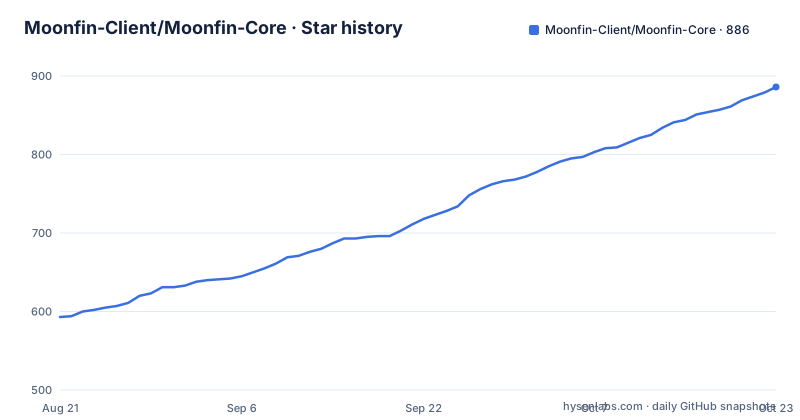
Star history
- Moonfin-Client/Moonfin-Core886 ★ · +293
| Repository | 2026-08-21 | 2026-10-23 |
|---|---|---|
| Moonfin-Client/Moonfin-Core | 593 | 886 |
293 Stars in the last 63 days, measured from the daily GitHub snapshot. Compare with other projects
Editorial analysis
The problem Moonfin solves: one client for every screen in a Jellyfin or Emby setup
Jellyfin and Emby users typically juggle multiple clients. A phone app, a TV app, a desktop app, and a web player each with different interfaces and feature sets. Maintenance is a burden, and behavior drifts between platforms. Moonfin attacks that by shipping a single Flutter codebase to phones, tablets, desktops, TVs, and the browser. The README states that Android TV and Apple TV ship from this same codebase with a TV-tuned interface and D-pad navigation. The target user is someone who wants a consistent experience across a media server household, without learning a different app per device. The project also targets users who want more than basic playback, such as offline downloads, ebook reading, and retro game emulation, all in one client.
Architecture: one Flutter codebase, multiple native backends
Moonfin is built with Flutter, and the repository layout shows a single core project. The README emphasizes that a single shared codebase powers phones and tablets, Windows, macOS, Linux, Android TV, Apple TV, web, and experimental Tizen. The key architectural point is that each platform has its own native backend for playback. On iOS, Apple TV, and macOS, playback goes through AetherEngine. Android and Android TV use native Media3 by default, with libmpv as a backup. Windows and Linux use libmpv. Web uses the browser's own player. This means the UI layer is shared, but the playback engine is not. The trade-off is clear: you get one UI codebase, but you still have to test playback behavior per platform, because codec support and performance will differ. The README claims Dolby Vision Profile 7 direct plays on both Apple and Android TV, converted in real time instead of transcoded. That is a specific claim, but the actual mechanism is not detailed in the material. You would need to consult the wiki's Playback and Codecs page to verify how that conversion works.
Getting it running: releases, AUR, and building from source
The README gives concrete installation paths. For most users, you download a platform artifact from the Releases page. Android and Android TV use an APK named `Moonfin_Android_v<version>.apk`. iOS uses an IPA. Windows has an EXE, macOS a DMG. Linux offers multiple formats: AppImage, deb, rpm, snap, flatpak, and tarball, for both x64 and ARM64. Arch Linux users can install from the AUR with `yay -S moonfin`, or with `paru` or `pamac build`. For web, the app is served as a PWA by the Moonbase server plugin, which you would install on your Jellyfin or Emby server. Building from source requires Flutter stable 3.41+ and Dart 3.11+. The commands are straightforward: `git clone`, `cd Moonfin-Core`, `flutter pub get`. The README points to a wiki page for per-platform build commands. That is a gap: the core commands are there, but the platform-specific steps, such as signing or setting up the Tizen toolchain, are not in the README. You must visit the wiki.
Feature breadth: offline, ebooks, retro games, and multi-server merging
Moonfin packs a lot of features into one client. Offline downloads come in original or server-transcoded quality, with automatic folder organization and offline subtitles. That is a differentiator for users who travel or have unreliable connections. The client also reads ebooks and audiobooks: EPUB, MOBI, AZW/AZW3, PDF, and comic archives, plus M4B audiobooks with chapter navigation. Retro games are browsed and played in-app from a server game library, with native libretro playback, gamepad support, and synced save states. Multi-server unified library merges content from several Jellyfin and Emby servers into one browsable, searchable UI. That is useful for households with multiple servers or users with separate libraries. The feature list also includes trickplay scrubbing, Cinema Mode, segment skipping, casting over Google Cast, DLNA, and AirPlay, SyncPlay, and personal ratings. The sheer number of features is impressive, but it also raises a concern: each feature adds complexity and potential for bugs. The README does not provide testing details or stability guarantees beyond the platform status table.
Platform support and its sharp edges
The platform support table is specific. Android 6.0 (API 23) and up, iOS 16.0 and up, Apple TV tvOS 17.0, macOS 14.0 Sonoma, Windows 10 x64 and ARM64, Linux with GTK 3+ and CMake 3.13+ but Wayland only, and web as an installable PWA. Tizen 6.0+ is experimental. The Linux Wayland-only constraint is a real limitation. Users on X11 or older Linux setups cannot run it. The Tizen status is experimental with real limitations, listed on the Installation wiki page. That is honest, but it means Samsung TV users should not expect a polished experience. The Windows ARM64 support is notable, as many clients skip it. The iOS 16 minimum is moderate; older devices are excluded. The macOS Sonoma minimum means Intel Macs on older macOS are out. These are concrete boundaries that should be checked against your hardware before adoption.
Limitations and failure modes: what the README does not promise
The README makes ambitious claims, but it also has gaps. It does not mention performance numbers, memory usage, or startup times. It does not describe what happens when a server goes offline during a SyncPlay session or a download. The multi-server merge feature sounds powerful, but the README does not explain how conflicts are resolved if two servers have the same media item with different metadata. The Dolby Vision Profile 7 conversion is described as real-time, but the computational cost on the client device is not addressed. On low-end Android devices, that conversion could be heavy. The README also does not specify whether the web PWA works with all browsers or just Chromium-based ones. The Tizen experimental status is a clear failure mode: do not rely on it for daily use. The Linux Wayland-only constraint is another. If you are on X11, Moonfin is not for you. The README does not provide a fallback or a workaround for those cases.
Alternatives: how Moonfin compares to the official Jellyfin apps
The obvious alternative is the official Jellyfin client, which is available for Android, iOS, web, and other platforms, but not as a single unified codebase. The official Jellyfin apps are separate projects for each platform, with different feature sets and development cadence. Moonfin's approach is different: one codebase, one UI, but multiple native playback backends. That means the UI experience is consistent, but the playback engine varies. The official Jellyfin apps often use the platform's native player, similar to Moonfin's approach, but they do not offer features like retro games, ebook reading, or a built-in admin panel. Another alternative is Emby's own client, which is closed-source and tied to the Emby server. Moonfin supports both Jellyfin and Emby, which is a differentiator. If you are a user who wants a single client for both server types, Moonfin is one of the few options. The trade-off is that Moonfin is a third-party project, so you depend on its maintenance and community support, whereas official clients have the backing of the server project.
Maintenance, licensing, and what to verify before adopting
Moonfin is licensed under GPL-2.0. That is a strong copyleft license, which means if you modify and distribute the client, you must release your changes under the same license. For personal use, this is not a concern, but for a company distributing a modified version, it has implications. The project is actively maintained, with the latest release 2.5.1 pushed on 2026-08-28, and releases roughly every two weeks based on the recent history. That is a good sign for maintenance, but the README does not document a migration path for upgrades. The wiki likely covers that, but it is not in the README. Before adopting, verify that your server versions meet the minimums: Jellyfin 10.8.0+ and Emby 4.8.0.0+. Also check the wiki's Playback and Codecs page for the exact codec support per platform, especially if you rely on Dolby Vision or bitstream audio passthrough. And if you plan to use Tizen, confirm the experimental limitations are acceptable for your use case. The README does not state whether the app auto-updates, so you should plan to manually check releases or use the in-app update check feature mentioned in the features list.
Editorial conclusion
Adopt Moonfin Core if you need one client for Jellyfin and Emby across many device types and want features like offline downloads, retro games, and multi-server merging. Avoid it if you rely on Tizen for production use, since it is experimental. Before adopting, verify the playback backend on your target platform, especially for Dolby Vision Profile 7 and bitstream audio, and check the wiki's Playback and Codecs page. Also confirm your server versions meet the minimums: Jellyfin 10.8.0+ and Emby 4.8.0.0+.
Frequently asked questions
Can I use Moonfin on Fire TV?
Yes. Fire TV is listed with full support and a Fire OS 6 minimum, and it ships from the same Flutter codebase as Android TV with a TV-tuned interface and D-pad navigation, running the same native backend as Android TV. Its download row points at an Amazon appstore listing rather than the Play Store.
How to install Moonfin on LG TV?
The platform table does not list LG televisions. It covers Android and Android TV/Google TV at Android 7.0 (API 24), Fire TV at Fire OS 6, and Apple TV at tvOS 17.0, and the web target needs the Moonbase server plugin. Anything outside those rows has no stated minimum version or download on the page.
Which is better, Jellyfin or Moonfin?
They sit at different layers. Moonfin is a client for Jellyfin and Emby servers, with full support for Jellyfin 10.8.0 and above and Emby 4.8.0.0 and above, and the page does not rank itself against other clients. One repository, Moonfin-Core, builds it for all nine listed platforms.
Official sources
Add this badge to your README
If you maintain this project, the badge below links readers to this analysis and shows its maintenance status from the daily GitHub snapshot. Paste the markdown into your README; add ?metric=license or ?metric=stars to the image URL for a different field.

[](https://hysenlabs.com/projects/moonfin-client-moonfin-core)Star history chart for your README
[](https://hysenlabs.com/projects/moonfin-client-moonfin-core)Was this useful?