Bonsai 2 needs a forked llama.cpp, accepts an unsupported reasoning level, and ships two vocabularies for one budget
GitHub describes it as Bonsai Demo. The repository metadata lists Shell as its primary language. The metadata lists the Apache-2.0 license. This article stays within the project description and details documented in the GitHub repository README.
At a glance
- What is it?
- Bonsai-demo is a Shell-first installer and launcher for the PrismML Bonsai 2 27B weights, Apache-2.0 licensed, wrapping a llama.cpp fork plus an MLX path for Apple Silicon. Its own numbers disagree in three places: the headline size, the packing the installer downloads, and the reasoning effort labelled unsupported while still being accepted.
- Who is it for?
- Bonsai-demo suits you if you want the Bonsai 2 27B weights running on your own machine, on Metal, CUDA, Vulkan, ROCm or plain CPU, and you are willing to let the installer fetch a forked llama.cpp rather than a stock one. Two things decide whether it works out.
- Can I use it commercially?
- Yes. Apache-2.0 is a permissive licence: you can use, modify and sell software built on it, as long as you keep its copyright and licence notices.
- Is it still maintained?
- Yes. The repository last received commits 3 days ago.
- What is it written in?
- Mainly Shell, according to GitHub's language statistics.
Answers come from the project's GitHub data, last synced on October 23, 2026, and from our analysis. They are not legal advice.
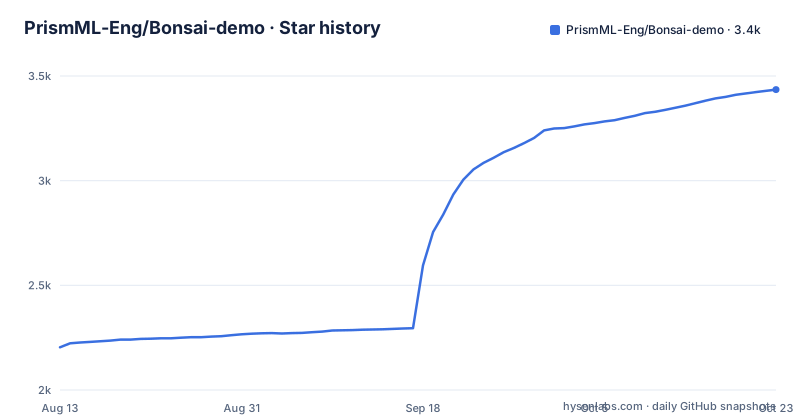
Star history
- PrismML-Eng/Bonsai-demo3,435 ★ · +1,231
| Repository | 2026-08-13 | 2026-10-23 |
|---|---|---|
| PrismML-Eng/Bonsai-demo | 2.2k | 3.4k |
1,231 Stars in the last 71 days, measured from the daily GitHub snapshot. Compare with other projects
Editorial analysis
Two published sizes, and the installer takes the larger one
The headline for the default model says 27B-class reasoning in ternary weights at 5.9 GB. Further down, the same model is described as 1.75 bits per weight in the `PTQ1_0` packing, with a second packing called `PQ2_0` that trades 1.3 GB for faster prompt processing and is what the demo downloads by default.
So the file you get is not the one the headline measures. The installer section is explicit about its own figure: `setup.sh` fetches the llama.cpp binaries for your machine plus the Bonsai 2 27B weights, 7.8 GB in the `PQ2_0` packing the demo defaults to, together with the vision projector. The two published numbers differ by more than the packing alone accounts for, and the extra is described as the projector rather than as weights.
That packing choice is also the performance knob. Faster prompt processing is what you buy with the extra gigabyte, and MODEL-FORMATS.md is where the two formats are meant to be compared.
Stock llama.cpp cannot open these files, so the fork is not optional
One line settles the runtime question: Bonsai 2 needs the demo's llama.cpp binaries from the PrismML fork, because stock llama.cpp cannot run these files. Both formats are affected. The GGUF band needs the fork, the MLX 2-bit band needs the fork, and the project notes that as of now rather than promising it is temporary.
`./setup.sh` is the mechanism that resolves it, fetching the right binaries for your machine. That makes the installer the place where the fork decision is made for you, and it is also why the repository declares Shell as its primary language: what lives here is a fetch, a build and a launcher sequence rather than a library.
The supported platforms are named in the same breath as the fork requirement: Mac on Metal, Linux and Windows on CUDA, Vulkan or ROCm, and CPU as the floor. Backend and model format compatibility is pushed into a separate document, BACKEND-SUPPORT.md, which the opening line of the file points at before anything else.
Reasoning effort low is accepted, then behaves like xhigh
The sampling guidance ends with a documented refusal that is still not enforced. The model uses `xhigh` reasoning effort by default, `medium` is recommended for shorter responses and a balance of speed and accuracy, and `low` is stated as not supported, with the warning that when selected the model will behave close to `xhigh`.
That is the shape to plan around. A selector offering low does not fail and does not warn loudly, it just gives you the default behaviour under a name that promises less work. Anything driving the UI or an API client has to filter the value itself.
The same block recommends a generous output limit, `-n 16384` or more on the command line and `max_tokens` for the API, because the model reasons before it answers and a small cap ends generation mid-thought. A simple system prompt is given as `You are a helpful assistant`.
One thinking budget, two spellings, and two different flag surfaces
The Apple Silicon path has two flag vocabularies for the same idea, and the file is careful about which is which. The bounded server run is shown as `./scripts/start_mlx_server.sh --thinking-budget 8192 --max-tokens 32768`, and the note in parentheses says these are server flags, not `run_mlx.sh` flags. API clients then use `thinking_budget`, which is the MLX spelling, and are told explicitly not to use llama-server's `thinking_budget_tokens`.
So there are at least four names to keep straight: `--thinking-budget` and `--max-tokens` on the server script, `thinking_budget` in MLX API calls, and `thinking_budget_tokens` on the llama-server side which is the one to avoid.
The MLX route also has its own environment, `.venv-vlm`, with native `mlx-vlm==0.7.2` inside it, and re-running `./setup.sh` is how an older environment gets upgraded. The launcher can also be selected through `BONSAI_BACKEND=mlx` when starting Open WebUI.
Open WebUI will not attach to a server that is already running
The integration notes carry a refusal with a reason attached: Open WebUI refuses to reuse an existing server on its MLX port for Bonsai 2 because its loader cannot be verified, and the instruction is to stop it first so the launcher can start the tested runtime.
A verifier that cannot verify is the whole reason. The safe behaviour would be to say so; refusing to reuse the port is the cautious choice, but it means the common sequence of leaving a server up and reloading the UI does not work here. The same paragraph closes by noting that none of this updates LM Studio's separately bundled MLX runtime, so a second runtime on the same machine stays where it was.
The tension to hold in mind is that the environment section states no model-selection variables are needed for Bonsai 2 27B, since that is what a plain `./setup.sh` downloads and runs, while every launcher is configured through environment variables. Model choice is simple; process control is not.
The installer is not only a download, and two variables decide how much you get
The setup step is described as installing and downloading only, and then the sentence right after it lists what else it does: it sets up Open WebUI and the code interpreter, which add a few GB more and most of the wait.
Both extras have switches, and both are environment variables read before setup runs.
git clone https://github.com/PrismML-Eng/Bonsai-demo.git
cd Bonsai-demo
./setup.sh
Setting `BONSAI_OPENWEBUI=0` or `BONSAI_CODE_INTERPRETER=0` skips the matching component, so anyone who wants only a terminal does not need the web interface at all. A single prompt can be asked without a server ever starting.
./scripts/run_llama.sh -p "What is the capital of France?"For chat, vision and tools, the server is started separately and opened at http://localhost:8080. Windows has its own path in PowerShell, which sets an execution policy for the process before running `setup.ps1` and `scripts\start_llama_server.ps1`.
A Python project with an empty package list and one exactly pinned extra
The Python side is a shell around a native build. pyproject.toml names the project bonsai-demo at version 0.1.0, requires Python 3.11 up to but not including 3.13, and lists four dependencies: `huggingface-hub` at 1.5.0 or newer, cmake, ninja and setuptools.
The last line of that file is unusual. The setuptools configuration sets `packages = []`, so nothing is installed as an importable package; there is no library here to depend on.
There is exactly one optional dependency group, webui, and it pins `open-webui==0.10.2` with no range at all. The comment above it gives the reason in two sentences: that version is the one the demo is validated against and the first one carrying the `CHAT_RESPONSE_MAX_TOOL_CALL_ITERATIONS` loop cap that the scripts rely on, and it asks for deliberate bumps with a re-run of the lock file rather than implicit ones. The version in that file describes the demo wrapper, not the 27B model it downloads.
Thirteen documents and four whitepapers sit at the root
The root is mostly documentation. Beside the README there are AGENTS.md and AGENT-DEMO.md, BACKEND-SUPPORT.md, Bonsai1_README.md, FAQ.md, KV-CACHE.md, MODEL-FORMATS.md, OPENWEBUI.md, PROMPT-CACHE.md, SPECULATIVE.md, TOOLS.md, VISION.md, environment_variables.md, plus assets, demos, scripts, tests and a community-benchmarks directory that collects results from other people's hardware and invites submissions.
Four whitepapers sit in that pile as PDFs, covering 1-bit Bonsai 8B, Bonsai 2 27B, the earlier 27B and the 8B ternary model. The earlier model line is documented separately: Bonsai 1-bit and Ternary-Bonsai at 27B, 8B, 4B and 1.7B are covered in Bonsai1_README.md rather than in the default path.
AGENTS.md gets its own sentence in the README, describing it as a guide written for agents that covers hardware-specific knobs, defaults and what to ask the user. The repository publishes no releases, so none of this is versioned: the default branch is main and the last push is dated 2026-09-29.
Editorial conclusion
Bonsai-demo suits you if you want the Bonsai 2 27B weights running on your own machine, on Metal, CUDA, Vulkan, ROCm or plain CPU, and you are willing to let the installer fetch a forked llama.cpp rather than a stock one. Two things decide whether it works out. Hardware coverage, which the repository defers to BACKEND-SUPPORT.md and to a guide written for agents that will tell you which knobs matter on your machine, so check that page before the 7.8 GB download starts. And expectations about the numbers: the demo runs a 27B-class model in ternary weights that the project says retains 98.2 percent of its FP16 intelligence, and those are the project's own published figures rather than anything you can verify from the repository. Plan for the installer to build an environment, not just copy a file. It pulls in Open WebUI and a code interpreter that account for most of the wait, and both can be turned off by environment variable before you start.
Frequently asked questions
Which models does the Bonsai demo run?
Bonsai 2 27B is the default, and a plain ./setup.sh downloads it. It ships as GGUF for llama.cpp and as an MLX 2-bit format for Apple Silicon, both published under the prism-ml organisation on Hugging Face. The earlier Bonsai 1-bit and Ternary-Bonsai sizes, 27B, 8B, 4B and 1.7B, are documented separately in Bonsai1_README.md.
What hardware does Bonsai 2 27B run on?
The demo targets Mac on Metal, Linux and Windows on CUDA, Vulkan or ROCm, and plain CPU. On Apple Silicon the text, image and tool-call paths go through native mlx-vlm==0.7.2 inside a .venv-vlm environment. Backend and model format compatibility is deferred to BACKEND-SUPPORT.md.
How much does setup.sh download?
It fetches the llama.cpp binaries for your machine and the Bonsai 2 27B weights, 7.8 GB in the PQ2_0 packing the demo defaults to, plus the vision projector. It also sets up Open WebUI and the code interpreter, which add a few GB more and most of the wait. Setting BONSAI_OPENWEBUI=0 and BONSAI_CODE_INTERPRETER=0 skips them.
Can stock llama.cpp run the Bonsai 2 files?
No. The README states that stock llama.cpp cannot run these files and that Bonsai 2 needs the binaries from the PrismML fork of llama.cpp, which ./setup.sh installs for your machine. Both the GGUF and the MLX 2-bit band are listed as needing the fork for now.
What sampling settings should I use with Bonsai 2 27B?
In thinking mode the table gives temperature 1.0, top_p 0.95, top_k 20, min_p 0.05, presence_penalty 0.0 and repetition_penalty 1.0. In instruct or non-thinking mode it gives temperature 0.7, top_p 0.80, min_p 0.0 and presence_penalty 1.5. The start scripts already apply the thinking-mode values, so these matter only when you call the model from your own client.
Does Bonsai 2 27B handle images and tool calls?
Yes for both. Vision accepts photos, screenshots and PDFs on llama.cpp and on MLX, described in VISION.md. Tool calling is native OpenAI-style tool_calls with full round-trips, and MCP servers are available in both demo interfaces, described in TOOLS.md. The context window is quoted as 262K tokens, with a hybrid-attention backbone named as the reason it stays practical on device.
Official sources
Add this badge to your README
If you maintain this project, the badge below links readers to this analysis and shows its maintenance status from the daily GitHub snapshot. Paste the markdown into your README; add ?metric=license or ?metric=stars to the image URL for a different field.

[](https://hysenlabs.com/projects/prismml-eng-bonsai-demo)Star history chart for your README
[](https://hysenlabs.com/projects/prismml-eng-bonsai-demo)Was this useful?