ols: a language server for the Odin programming language
Language server for Odin
At a glance
- What is it?
- ols is a language server for Odin that indexes your collections, drives the Odin checker for diagnostics and offers hover, completion, references and semantic tokens through a per-workspace ols.json. It suits Odin developers who want editor support beyond the compiler, and the project states plainly that it is still in early development and tracks the master branch of Odin.
- Who is it for?
- Adopt ols if you write Odin and want hover, completion, references and checker diagnostics in your editor, and you are willing to keep the server aligned with the master branch of Odin. Skip it if you need a stable language server contract, since the project describes itself as still in early development and ships dev-dated and nightly releases rather than semver ones.
- Can I use it commercially?
- Yes. MIT is a permissive licence: you can use, modify and sell software built on it, as long as you keep its copyright and licence notices.
- Is it still maintained?
- Yes. The repository last received commits 6 days ago.
- What is it written in?
- Mainly Odin, according to GitHub's language statistics.
Answers come from the project's GitHub data, last synced on November 7, 2026, and from our analysis. They are not legal advice.
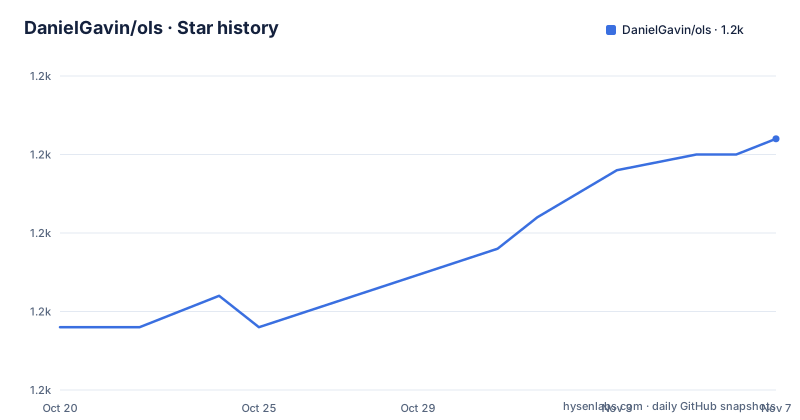
Star history
- DanielGavin/ols1,226 ★ · +12
| Repository | 2026-10-20 | 2026-11-07 |
|---|---|---|
| DanielGavin/ols | 1.2k | 1.2k |
12 Stars in the last 18 days, measured from the daily GitHub snapshot. Compare with other projects
Editorial analysis
A language server that tracks Odin's master branch
ols is a language server for the Odin programming language, written in Odin, and the primary language of the repository is Odin itself. Two lines at the top of the documentation set the expectations. The project is still in early development, and it is made to be up to date with the master branch of Odin. The second point explains the release naming, since the published releases are dev-2026-10 on 2026-10-12, nightly on the same day, and dev-2026-08 on 2026-08-30, which is a schedule keyed to the language's own development rather than to a versioned API. The licence is MIT and the last push was on 2026-10-14. For a language with a small ecosystem, a language server written in that same language is a reasonable bet, since the author can follow the compiler's own changes as they land.
Building it, and the builtin folder problem
The build is two scripts, one per platform family:
cd ols

# for windows
./build.bat
# To install the odinfmt formatter
./odinfmt.bat

# for linux and macos
./build.sh
# To install the odinfmt formatter
./odinfmt.sh
There is a catch that trips up a first run, and the documentation calls it out directly. In order for `ols` to find symbols for builtin types and procedures, the `builtin` folder in the repository needs to be located next to the `ols` binary. The alternative is to specify the path to that folder using the `OLS_BUILTIN_FOLDER` environment variable. Since the repository root does have a `builtin/` directory, the working setup is either to run the binary from a place where that folder sits beside it, or to export the variable. Without it the server starts but cannot resolve the core library, which is the usual cause of completions that only ever offer your own symbols.
ols.json is how the server learns about your project
To index your files the language server has to know about your collections, and that knowledge arrives through an `ols.json` file at the root of your workspace, or through configuration from the editor. The example is dense with the options that matter:
{
	"$schema": "https://raw.githubusercontent.com/DanielGavin/ols/master/misc/ols.schema.json",
	"collections": [
		{ "name": "custom_collection", "path": "c:/path/to/collection" }
	],
	"enable_semantic_tokens": false,
	"enable_document_symbols": true,
	"enable_hover": true,
	"enable_snippets": true,
	"profile": "default",
	"profiles": [
		{ "name": "default", "checker_path": ["src"], "defines": { "ODIN_DEBUG": "false" }},
		{ "name": "linux_profile", "os": "linux", "checker_path": ["src/main.odin"], "defines": { "ODIN_DEBUG": "false" }},
		{ "name": "mac_profile", "os": "darwin", "arch": "arm64", "defines": { "ODIN_DEBUG": "false" }},
		{ "name": "windows_profile", "os": "windows", "checker_path": ["src"], "defines": { "ODIN_DEBUG": "false" }}
	]
}
The profiles array is the interesting part. Each profile can carry an `os`, an `arch`, a `checker_path` and a `defines` map, and the top-level `profile` key selects which one is active. That means the same workspace can describe a linux build, a darwin build on arm64 and a windows build, and the server can be told to check a different entry point per target.
The checker does the real work, and it is optional
The features that give ols its value are the ones that lean on the Odin compiler rather than on the server's own parser. `enable_checker_only_saved` limits checking to the package being saved and is on by default, which keeps large projects responsive. `enable_compiler_semantics` turns on compiler semantics for reporting type information, and the documentation marks it as experimental and under active development, with a hard requirement: it needs an `odin` built with `-export-semantics`. On top of that sits `enable_checker_on_change`, which calls the checker on the package being edited once typing pauses, using the unsaved text of open documents, and that needs an `odin` with `-overlay`. The pause is controlled by `checker_on_change_delay`, which defaults to 400 milliseconds. `enable_fade_untaken_when_branches` fades the branches of `when` statements the checker did not take, also requiring `-export-semantics`, and it is on by default. So the capability ladder is: a plain server gives you parsing and symbols, and the compiler integration gives you the interesting diagnostics, at the cost of building a special Odin.
A long list of on and off switches
The option list runs to several dozen entries, and the defaults are not all the same. The features enabled by default include `enable_format` for formatting with `odinfmt`, `enable_hover`, `enable_document_symbols`, `enable_references`, `enable_document_highlights`, `enable_document_links` for following documentation links on ctrl+click, `enable_completions`, `enable_completion_matching` to match types and pointers when passing arguments, `enable_unused_imports_reporting`, `enable_procedure_snippet` to add a parenthesis after a completed procedure name, `enable_checker_only_saved`, `enable_fade_untaken_when_branches` and `enable_parser_errors` for real-time diagnostics from `core:odin/parser`. Off by default are `enable_hover_layout`, which shows the memory layout of types on hover, computed by ols from the resolved types for the configured profile arch, and explicitly experimental because the reported layout may not always match the compiler. `enable_unused_imports_on_change` is also off by default, with the note that it can slow editing in large files.
Editor support, and the one that needs a snippet-capable client
The documentation covers clients in detail, with a section each for VS Code, Sublime, Vim, Neovim, Emacs, Helix and Micro, and the `editors/` directory in the repository holds the corresponding integrations. Two features need client snippet support, and the documentation says so directly. `enable_fake_methods` turns on fake methods completion and is described as currently highly experimental, requiring client snippet support. `enable_procedure_snippet` uses snippets when completing procedures by adding a parenthesis after the name, is enabled by default, and also requires client snippet support. The `enable_comp_lit_signature_help` feature provides signature help for composite literals when instantiating structs, with the caveat that it will not display correctly on some editors such as VS Code, and a companion option puts the help in the documentation so it can be rendered as markdown in editors that show the label on one line without colour.
Odin's own toolchain points at where the errors are
A few options exist to make the server agree with the compiler rather than with the server's opinion. `odin_command` specifies the location of your Odin executable rather than relying on the environment path, which matters when you have several Odin installations, one per project. `odin_root_override` lets you specify a custom `ODIN_ROOT` that ols will use to look for Odin core libraries when implementing custom runtimes, which is the setting you need if you are working on Odin itself or on a runtime of your own. `checker_args` passes extra arguments to the checker, and `enable_checker_workspace_diagnostics` runs all workspace diagnostics using `odin check`, with the documentation calling it experimental and warning it may cause problems, and pointing instead at the `checker_path` feature to explicitly tell ols which projects to check. That preference for explicit project lists over a blanket workspace check is a sensible default for a large repository.
Editorial conclusion
Adopt ols if you write Odin and want hover, completion, references and checker diagnostics in your editor, and you are willing to keep the server aligned with the master branch of Odin. Skip it if you need a stable language server contract, since the project describes itself as still in early development and ships dev-dated and nightly releases rather than semver ones. Before configuring it, place the builtin folder next to the ols binary or point `OLS_BUILTIN_FOLDER` at it, and remember that the experimental features have real prerequisites, with compiler semantics needing an `odin` built with `-export-semantics` and on-change checking needing one with `-overlay`.
Frequently asked questions
How do I build the Odin language server ols?
Run ./build.sh on Linux and macOS or ./build.bat on Windows, and run ./odinfmt.sh or ./odinfmt.bat to install the odinfmt formatter.
Why does ols not find built-in Odin types and procedures?
The builtin folder in the repository needs to be located next to the ols binary, or you can specify the path to that folder with the OLS_BUILTIN_FOLDER environment variable.
How do I configure ols for my Odin project?
Place an ols.json file at the root of your workspace, or configure it from your editor. The file lists your collections, the individual feature switches, and a profiles array where each profile can set an os, an arch, a checker_path and defines, with the top-level profile key selecting the active one.
What does the enable_compiler_semantics option require?
It is experimental and under active development, and it needs an odin built with -export-semantics. The related enable_fade_untaken_when_branches also needs -export-semantics, while enable_checker_on_change needs an odin with -overlay.
Which editors does ols support?
The documentation has a section for each of VS Code, Sublime, Vim, Neovim, Emacs, Helix and Micro, and the repository carries an editors directory with the corresponding integrations.
Official sources
Add this badge to your README
If you maintain this project, the badge below links readers to this analysis and shows its maintenance status from the daily GitHub snapshot. Paste the markdown into your README; add ?metric=license or ?metric=stars to the image URL for a different field.

[](https://hysenlabs.com/projects/danielgavin-ols)Star history chart for your README
[](https://hysenlabs.com/projects/danielgavin-ols)Was this useful?