lolPing desktop ping wheel for Windows, macOS and X11
League of Legends ping wheel for your Windows desktop. Hold Alt, drag, and ping anywhere, with the original animations and sounds.
At a glance
- What is it?
- lolPing puts a configurable League of Legends ping wheel over any application without reading or controlling the game. It supports Windows and experimental macOS and X11 Linux builds.
- Who is it for?
- Adopt lolPing if you want recognizable League-style pings over your desktop and in captured streams, and you can accept unsigned installers, platform permissions and manual update recovery. Do not choose it if you need a supported Wayland client, automated game detection on Linux or a utility that communicates with League.
- Can I use it commercially?
- Check first. The repository uses a licence we do not classify automatically, so read its LICENSE file before any commercial use.
- Is it still maintained?
- Yes. The repository last received commits 13 days ago.
- What is it written in?
- Mainly TypeScript, according to GitHub's language statistics.
Answers come from the project's GitHub data, last synced on November 7, 2026, and from our analysis. They are not legal advice.
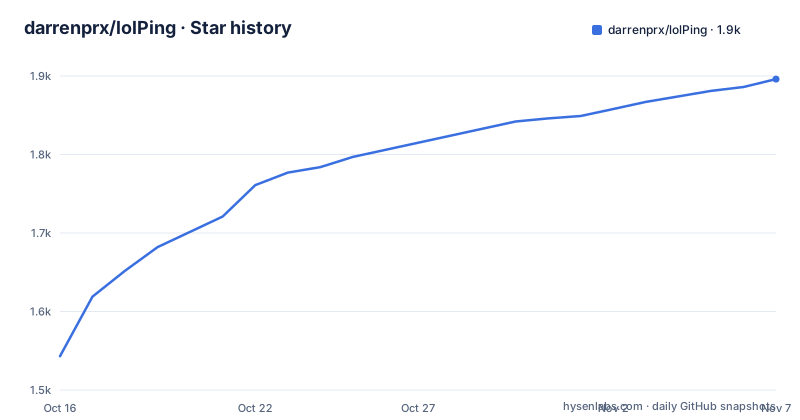
Star history
- darrenprx/lolPing1,896 ★ · +353
| Repository | 2026-10-16 | 2026-11-07 |
|---|---|---|
| darrenprx/lolPing | 1.5k | 1.9k |
353 Stars in the last 22 days, measured from the daily GitHub snapshot. Compare with other projects
Editorial analysis
What lolPing adds to the Windows desktop
lolPing addresses a specific gap between League of Legends and the rest of a computer. It presents eight League-style pings, including Enemy Missing, Need Vision and On My Way, over any open application and across multiple monitors. The intended user is a player or streamer who wants those signals available while switching from the game to Discord, a browser or another desktop application. Because the wheel is rendered as part of the desktop experience, it also appears in whole-screen capture, so viewers of a Discord or OBS capture can see it.
The README explicitly describes lolPing as a desktop toy that does not read, change or hook into League. It is therefore not a companion interface that synchronizes with the League client or reads match state. Its value comes from presenting visual signals over the desktop, not from controlling or monitoring the game.
The main interaction is direct. Hold Alt, drag the pointer, and release over a wheel slice. Releasing in the centre, right-clicking or pressing Esc cancels the gesture. Ctrl plus drag opens a separate emote wheel, which can contain League emotes or user-selected images. A configurable enable shortcut defaults to `Ctrl + Alt + P`, while the tray provides settings, quitting and restarting the input helper.
The project is aimed first at Windows 11, 64-bit systems. Windows 10 may work, but the README says it is not tested there. The macOS build is experimental, while the source tree also contains an X11 Linux port. Those labels describe different levels of platform confidence and should not be treated as equivalent support.
How lolPing handles desktop input and display
The repository layout identifies an Electron application with a TypeScript and React settings interface, plus a native input helper. The Electron side is associated with the main entry `out/main/index.js`, while Fluent UI packages are used for the settings interface. Electron Builder packages the platform applications and Electron Updater supports updates from version 0.5 onward.
The interaction depends on reading global keyboard and mouse input rather than receiving normal input inside one application window. The platform-specific helper under `native/hook-helper` is consequently an important boundary between the desktop overlay and operating-system input events. On Linux, the documented requirements make this dependency more explicit: a genuine X11 session, XInput 2.1, XTest and a compositor are required. Wayland, including XWayland inside Wayland, is not supported.
The documentation describes the wheel as visible above applications and on every monitor. Whole-screen capture includes it, which is an explicit feature for streamers. Pings can be resized, timed, muted and paused. The setting `Keep my last ping on screen` leaves the newest ping visible until the next ping or until lolPing is paused.
The wheel editor can rearrange the default signals and add Bait, Vision Cleared or the upside-down Enemy Missing. The default wheel begins with Danger at the top and continues clockwise through Push, On My Way, All In, Assist Me, Need Vision, Enemy Missing and Enemy Vision. The emote wheel has eight slots and can be edited in settings.
Input detection has concrete limits. `Pause in fullscreen apps` is enabled by default so a fullscreen game retains its own input handling. Detection applies to fullscreen applications on Windows and does not identify windowed games. With an auto-hiding taskbar, only borderless fullscreen counts. Linux lacks Caps Lock triggers and automatic fullscreen-game detection.
Installing lolPing and placing the first Windows ping
The supported installation route is the release artifact, not an npm package. The `package.json` marks the package private, so installing `lolping` through a package registry is not a documented installation path.
For Windows, download `lolPing-Setup-<version>.exe` from the latest release, run it, and follow the README's SmartScreen instruction. The installer is not code-signed, so Windows may display `Windows protected your PC`. The documented action is to select `More info`, then `Run anyway`. After installation, lolPing opens settings and moves to the tray.
The first real use requires no configuration file. Hold Alt, drag anywhere on the desktop, and release over the intended ping slice. Click the tray icon to open settings and change the wheel, sounds, size, duration or input behavior.
Developers can run the source workflow with the repository's documented npm scripts:
npm ci
npm run dev
These commands install the locked dependencies and start `electron-vite dev`. They are development commands, not a replacement for the release installer.
The Windows packaging command is:
npm run distIt builds the native helper, builds the Electron application and invokes `electron-builder --win --publish never`. The `--publish never` option means that this packaging command does not publish the result.
macOS permissions and experimental X11 Linux support
The macOS route requires Apple Silicon, meaning M1 or later, and macOS 13 or later. Download `lolPing-<version>-arm64.dmg`, open it and drag lolPing into Applications. Because the application is not signed with a fixed developer identity, macOS can require an explicit override and may reset Accessibility permission after each update.
If macOS reports the application as damaged, the README gives this command:
xattr -dr com.apple.quarantine /Applications/lolPing.appThis removes quarantine metadata from the installed application. It is documented for the unsigned-build problem. lolPing also requests Accessibility access to read mouse and keyboard input. Once granted, pinging begins. The settings window walks through this permission requirement.
Linux support is tied to X11 rather than the general desktop category. The source build requires Node.js 22.12+, a C++20 compiler and the X11 development packages named by the README:
npm ci
npm run dist:linux
The packaging command builds the helper, builds the Electron application and invokes the Linux packaging target. The README points to `docs/linux.md` for package usage, desktop shortcut conflicts, tray requirements, HiDPI behavior and manual updates. Upstream releases may not yet contain this port.
A native XWayland session does not make the application Wayland-compatible. Linux users still need the documented X11 environment, and Caps Lock triggers and automatic fullscreen-game detection are unavailable.
Configuration choices and input conflicts
lolPing allows the trigger key to be Alt, Ctrl, Shift, Win, Caps Lock, Mouse 4, Mouse 5 or another selected key. That flexibility can conflict with shortcuts in games, screen capture software and communication tools. The README addresses one collision through `Alt + click places a ping`, which is off by default so ordinary Alt-click shortcuts keep working.
A custom key still types when tapped, and its letter can appear when the key comes up. Holding it alone does not repeat. The emote trigger can be changed or turned off. `Ctrl + click places an emote` is disabled by default. These defaults reduce interference, but any customized shortcut should be checked against the software used during a stream or game session.
`Pause in fullscreen apps` provides a separate safeguard. When enabled, the gesture system does nothing in a detected fullscreen application, preserving clicks for the game. The limitation is that windowed games are not detected. Borderless fullscreen may also be missed when the taskbar auto-hides.
Custom images can be added to the emote wheel. The README does not document accepted formats, size limits or behavior for an invalid image. It also does not assign a licensing policy for imported images. Those details need to be checked in the settings implementation and the `LICENSE` file before distributing a customized build.
Updates, maintenance and licensing inconsistencies
The repository is not archived, and its last push was on 2026-10-16. Recent releases include v0.5.1 on 2026-10-12, v0.5.0 on 2026-10-08 and v0.4.0 on 2026-10-05. This confirms recent repository activity, but it does not establish equal support for every platform. The macOS release has had limited use on real Macs, and the Linux port is experimental.
Updates differ by version and platform. Upgrades from v0.4 or earlier require one manual download. From v0.5 onward, lolPing updates itself. macOS may still require Accessibility permission to be removed and granted again because the application lacks a stable signing identity. Linux manual update details are delegated to `docs/linux.md`.
The licensing facts conflict. Repository metadata labels the project as having a custom license that GitHub cannot classify and points to `LICENSE`, while `package.json` declares `"license": "MIT"` and the README includes an MIT license badge. The actual `LICENSE` file should be checked before redistribution or organizational use. The badge alone is not enough to resolve the discrepancy.
Unsigned distribution also creates support work. Windows SmartScreen requires a manual override, macOS needs privacy permission handling, and Linux requires a specific X11 stack. These are installation and maintenance costs for anyone distributing or supporting the application.
Editorial conclusion
Adopt lolPing if you want recognizable League-style pings over your desktop and in captured streams, and you can accept unsigned installers, platform permissions and manual update recovery. Do not choose it if you need a supported Wayland client, automated game detection on Linux or a utility that communicates with League. Before installation, check the platform requirements, inspect `LICENSE`, and verify the download comes from the project's releases page.
Frequently asked questions
How do I install and use lolPing on Windows?
Download `lolPing-Setup-<version>.exe` from the latest GitHub release and run it. Because the installer is not code-signed, Windows may show SmartScreen; after installation, hold Alt, drag and release over a ping slice.
Does lolPing work with League of Legends or modify the game?
The README describes lolPing as a desktop overlay that does not read, change or hook into League of Legends. It displays pings over other applications and includes them in whole-screen capture.
Does lolPing support Linux and Wayland?
The Linux port requires a genuine X11 session with XInput 2.1, XTest and a compositor. Wayland sessions, including XWayland inside Wayland, are not supported yet.
Official sources
Add this badge to your README
If you maintain this project, the badge below links readers to this analysis and shows its maintenance status from the daily GitHub snapshot. Paste the markdown into your README; add ?metric=license or ?metric=stars to the image URL for a different field.

[](https://hysenlabs.com/projects/darrenprx-lolping)Star history chart for your README
[](https://hysenlabs.com/projects/darrenprx-lolping)Was this useful?