Obsidian Git commits on a timer, and mobile is experimental
Integrate Git version control with automatic commit-and-sync and other advanced features in Obsidian.md
At a glance
- What is it?
- obsidian-git puts a real Git repository around an Obsidian vault and adds scheduled commit-and-sync plus source control, history and diff views. Desktop gets the full set; mobile support is experimental, and the author calls the mobile Git implementation very unstable.
- Who is it for?
- Adopt obsidian-git if you keep notes in an Obsidian vault, want history without leaving the editor, and run a normal desktop install where a native Git binary is reachable. Do not adopt it on a phone or on a Snap or Flatpak build of Linux.
- Can I use it commercially?
- Yes. MIT is a permissive licence: you can use, modify and sell software built on it, as long as you keep its copyright and licence notices.
- Is it still maintained?
- Yes. The repository last received commits 10 days ago.
- What is it written in?
- Mainly TypeScript, according to GitHub's language statistics.
Answers come from the project's GitHub data, last synced on November 14, 2026, and from our analysis. They are not legal advice.
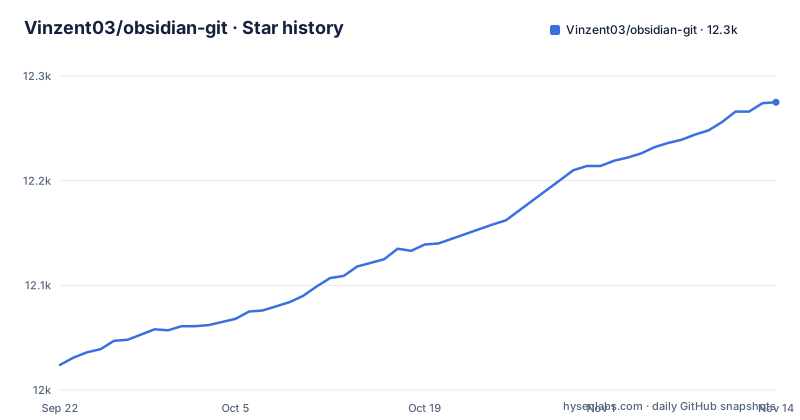
Star history
- Vinzent03/obsidian-git12,275 ★ · +251
| Repository | 2026-09-22 | 2026-11-14 |
|---|---|---|
| Vinzent03/obsidian-git | 12k | 12.3k |
251 Stars in the last 53 days, measured from the daily GitHub snapshot. Compare with other projects
Editorial analysis
A schedule pulls on startup, then commits whatever changed
obsidian-git treats an Obsidian vault as a Git working directory and puts the Git cycle inside the editor instead of a terminal. Two automatic behaviours do most of the work: commit-and-sync runs commit, pull and push on a schedule, and auto-pull runs when Obsidian starts. For a vault edited across several machines, that is the whole proposition. Every change lands in a commit without you leaving the app or opening a shell.
This is a community plugin for Obsidian.md, and setup instructions, including the mobile path, live in the documentation at publish.obsidian.md/git-doc.
The repository layout tells you what you are installing before you do. src/ holds the plugin source, docs/ and images/ hold the supporting material, styles.css styles the views, and manifest.json is the file Obsidian reads to list the plugin in the first place. tests/ and vitest.config.ts sit next to them, and package.json runs vitest for tests.
One setting decides whether a bare Commit stages your whole vault
The Commit action does not always do what its name suggests. It commits staged changes whenever anything is staged. When nothing is staged, the behaviour is handed to a setting named Stage all changes when nothing is staged: either every change in the vault gets staged and committed in one step, or the command stops and leaves the working tree alone.
That toggle is the difference between a one keystroke workflow and a deliberate one. Turned on, a bare Commit picks up whatever Obsidian wrote, including plugin settings, workspace files and anything a sync client dropped into the vault. Turned off, a bare Commit does nothing until you stage something, which is the safer choice for a vault holding files you do not control.
The actions menu holds explicit alternatives so you do not have to reason about the toggle: staged-only, all changes, and, on desktop, amending the previous commit. Individual files have their own commands, Stage current file and Unstage current file.
Two entries in the same palette deserve a second look. Discard all changes is described as discarding all changes in the repository, and the command list also includes one labelled CAUTION: Delete repository.
Editor signs review hunks, and they are desktop only
Three views sit beside the editor. The Source Control View, opened with Open source control view, is where you stage, unstage, commit and diff files. The History View, opened with Open history view, shows commit history with message, author, date and changed files; author and date are disabled by default and can be enabled in the settings. The Diff View opens from the source control view or from the Open diff view command.
Signs in the editor are the most granular of the three, and the most conditional. They mark added, modified and deleted lines and hunks, let you stage and reset changes straight from a sign, and add commands to move between hunks and stage or reset the hunk under the cursor. They must be turned on in the plugin settings, and the README marks them desktop only.
The consequence is that the in-editor signs are not available on a phone. The README points at a separate Version History Diff plugin for detailed per-file history as well.
isomorphic-git replaces the binary on mobile, so SSH, rebase and submodules go away
On desktop the plugin talks to a native Git installation. On mobile, the README calls the Git implementation very unstable.
Submodule support is desktop only and opt-in.
The README opens by warning that the plugin is highly unstable on mobile, and recommends trying other syncing services.
The README's own answer for mobile users is a different product. It names GitSync, available on Android and iOS, and says explicitly that it is not associated with this plugin.
Snap and Flatpak break the filesystem access the plugin needs
On Linux the plugin's relationship to the filesystem is the whole decision, and two packaging formats carry an explicit warning.
Snap is not supported, and the reason given is its sandboxing restrictions. Flatpak is not recommended, on the grounds that it does not have access to all system files; the README notes that many issues are being fixed but that problems remain, especially with more advanced setups. The recommended route is an AppImage or a full access installation through the system's own package manager.
The README says remaining issues show up especially with more advanced setups.
Authentication can need separate work as well. Depending on the Git service, HTTPS or SSH credentials may require further setup, and the README points at a standalone authentication guide for that. Read it first when a push fails after a pull that reported success.
Source builds require Node 24 and pnpm 11
Contributors do not install the packaged plugin, they build it. The engines field in package.json states the floor, and it is a high one for a plugin repository.
    "engines": {
        "node": ">=24",
        "pnpm": ">=11"
    },
The scripts show the shape of the workflow. esbuild.config.mjs is the bundler, with separate dev and production modes, and vitest runs the tests. The all script chains the checks in the order the maintainer wants them run:
        "test": "vitest run",
        "test:watch": "vitest",
        "test:coverage": "vitest run --coverage",
        "all": "pnpm run tsc && pnpm run svelte && pnpm run format && pnpm run lint && pnpm run test"
Type checking runs through tsc with noEmit, the Svelte views are checked separately by svelte-check, formatting is enforced by prettier, and linting uses eslint over src, tests and the vitest config. pnpm-workspace.yaml and pnpm-lock.yaml at the top level show a workspace setup, so those two version floors are requirements rather than suggestions. All of this applies only if you intend to change the source; everyone else goes through the community plugin directory.
2.40.0, 2.41.0 and 2.41.1 landed inside three weeks
This project ships often. Version 2.41.0 was released on 2026-10-01, 2.41.1 on 2026-10-02 and 2.42.0 on 2026-10-18, and the last push to master landed on 2026-10-30. That cadence matters more here than in most plugins, because this one acts on your files without asking. A change in the commit or pull path arrives whether or not you chose to take it.
Version handling is scripted rather than manual. The commit-and-tag-version configuration names three files it rewrites on a release: package.json, manifest.json and versions.json, and the versions.json entry carries its own updater pointing at version-bump.cjs. manifest.json is the file Obsidian reads to decide what to offer as an update, so a version that drifts out of line there is what leaves a user on an old build.
The licence is MIT and the repository carries a plain LICENSE file with no separate contributor agreement in the top-level entries. For a plugin whose job is writing commits into a directory you care about, the licence is the easy part. The automatic schedule is the part worth configuring deliberately, because commit-and-sync with default settings commits all changes.
Editorial conclusion
Adopt obsidian-git if you keep notes in an Obsidian vault, want history without leaving the editor, and run a normal desktop install where a native Git binary is reachable. Do not adopt it on a phone or on a Snap or Flatpak build of Linux. Before switching on the schedule, decide what Stage all changes when nothing is staged should do for your vault, because with it on a bare Commit stages and commits every change. Version 2.42.0 shipped on 2026-10-18, so pin a specific version if an automatic commit cycle makes you nervous.
Frequently asked questions
What is obsidian-git?
A community plugin for Obsidian.md that puts Git inside your vault: it commits, pulls and pushes on a schedule, auto-pulls when Obsidian starts, and adds source control, history and diff views. The project's own description is integrating Git version control with automatic commit-and-sync and other advanced features in Obsidian.md.
How do you install the obsidian-git plugin?
Setup instructions, including the mobile path, are in the documentation at publish.obsidian.md/git-doc, with a separate authentication guide covering HTTPS and SSH credentials on desktop.
How do you use obsidian-git day to day?
Commit-and-sync with default settings commits all changes, pulls and pushes, and a variant of that command also closes the Obsidian window on desktop. You can commit staged changes only, commit all changes, or stage and unstage individual files, and Open source control view, Open history view and Open diff view open the three views.
Can you set up obsidian-git on Android?
The mobile section is labelled experimental, and the README calls the mobile Git implementation very unstable and recommends other syncing services instead. Submodule support is desktop only. GitSync is named as an alternative available on Android and iOS.
Is obsidian-git safe for your notes?
The plugin works on your vault as a real Git repository, and its command palette includes Discard all changes, described as discarding all changes in the repository, plus a command labelled CAUTION: Delete repository. It is MIT licensed. On mobile the README calls the plugin highly unstable.
Official sources
Add this badge to your README
If you maintain this project, the badge below links readers to this analysis and shows its maintenance status from the daily GitHub snapshot. Paste the markdown into your README; add ?metric=license or ?metric=stars to the image URL for a different field.

[](https://hysenlabs.com/projects/vinzent03-obsidian-git)Star history chart for your README
[](https://hysenlabs.com/projects/vinzent03-obsidian-git)Was this useful?