Surya OCR: layout, reading order and tables from a single 689M model
OCR, layout analysis, reading order, table recognition in 90+ languages
At a glance
- What is it?
- Surya is Datalab's open OCR stack for 90+ languages, and version 2 shares one inference manager across layout, recognition and table extraction and spawns the model server for you. Here is what the install actually requires, and where the model licence bites.
- Who is it for?
- Surya fits teams that need layout, reading order and table structure out of mixed documents in many languages, and that can give it either an NVIDIA GPU with Docker and the NVIDIA Container Toolkit or a llama-server binary on CPU or Apple Silicon. It does not fit anyone who wants a pure pip install with no inference server, or a company whose funding or revenue is above the $5M line in the model licence and is not prepared to buy a commercial licence.
- Can I use it commercially?
- Yes. Apache-2.0 is a permissive licence: you can use, modify and sell software built on it, as long as you keep its copyright and licence notices.
- Is it still maintained?
- Yes. The repository last received commits 1 day ago.
- What is it written in?
- Mainly Python, according to GitHub's language statistics.
Answers come from the project's GitHub data, last synced on November 13, 2026, and from our analysis. They are not legal advice.
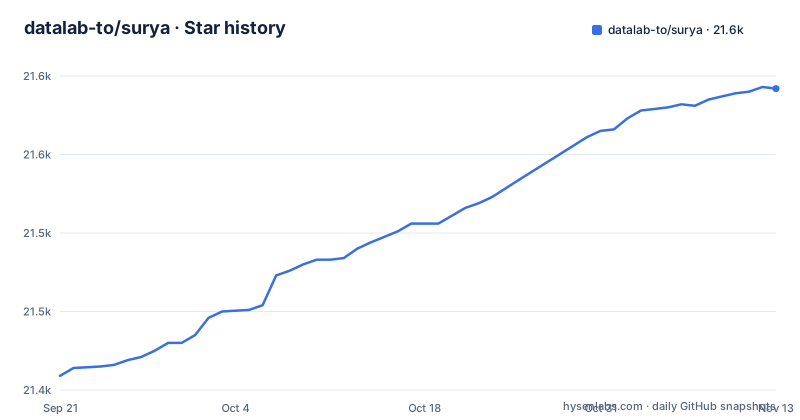
Star history
- datalab-to/surya21,592 ★ · +183
| Repository | 2026-09-21 | 2026-11-13 |
|---|---|---|
| datalab-to/surya | 21.4k | 21.6k |
183 Stars in the last 53 days, measured from the daily GitHub snapshot. Compare with other projects
Editorial analysis
What Surya does that a plain OCR call does not
Most OCR libraries answer one question: what characters are on this page. Surya answers four. The README lists text detection, OCR, layout analysis with reading order, and table recognition as separate capabilities, and the repository ships a CLI entry point for each one in pyproject.toml: surya_detect, surya_ocr, surya_layout and surya_table. The distinction matters when the document is a newspaper page, a scanned tax form or handwritten notes, all of which appear in the README's example table with four annotated views per row: detection, OCR, layout and reading order.
The target user is someone building a document pipeline who has already discovered that character-level accuracy is not the hard part. Column order, headers, and the difference between a table cell and a paragraph are the hard part, and Surya treats them as first-class outputs rather than post-processing. The model is 689M parameters; the README reports 85.9 on OmniParseBench, the highest of the open models under 1B parameters it has scored, 83.7% on olmOCR-bench, and 74.9% on an internal 91-language benchmark set. Those are the project's own figures from its own README; treat them as a starting point for your own evaluation, not as a result you can assume transfers to your scans.
One VLM behind three predictors, and the server it spawns
The v2 architecture collapses what used to be separate model calls into a single inference manager. The README's migration example shows the pattern: you construct a SuryaInferenceManager, hand it to a RecognitionPredictor, and call the predictor with an image. The same manager instance is shared across LayoutPredictor, RecognitionPredictor and TableRecPredictor, so layout, OCR and table extraction are not three independent model loads.
That manager is also the piece that talks to the inference backend. According to the README, Surya auto-spawns the server on first use, and the backend is either vllm on an NVIDIA GPU or llama.cpp on CPU and Apple Silicon. If you already run a server, you can point the manager at it instead:
export SURYA_INFERENCE_URL=http://host:port/v1This is a real architectural commitment. Surya is not a library that loads weights into your process and runs forward passes. It is a client to a serving process, which is why the install section below has prerequisites that go beyond pip. The upside is that the same code path works on a workstation with a GPU and on an Apple laptop. The cost is that a failure in the server is a failure in your pipeline.
Installing Surya and running a first recognition pass
The package installs from PyPI under the name surya-ocr, which is not the same as the repository name. The README gives the command directly:
pip install surya-ocrBefore that install is useful, you need an inference backend. On an NVIDIA GPU the README requires Docker plus the NVIDIA Container Toolkit, because vllm runs in a container. On CPU or Apple Silicon you need the llama-server binary from llama.cpp, which on macOS comes from Homebrew:
brew install llama.cppOn other platforms the README points at the llama.cpp releases page rather than giving a package manager command. Once a backend is available, the README's v2 example is the shortest path to a real result. It constructs the manager, which auto-spawns vllm or llama-server, then runs recognition on a single image:
from surya.inference import SuryaInferenceManager
from surya.recognition import RecognitionPredictor

manager = SuryaInferenceManager()
rec = RecognitionPredictor(manager)
predictions = rec([image])
What you get back is not the v1 shape. The README states that text_lines became blocks with an html field, that layout output dropped top_k and added count, and that table_rec dropped is_header, colspan and rowspan from cells. If you are porting existing code, read those three notes before you debug anything else, because the failure will look like missing data rather than a renamed key.
Where Surya is the wrong tool
The install story is the first limitation, and it is not a small one. There is no supported path where pip install surya-ocr is sufficient. On a GPU host you need Docker and the NVIDIA Container Toolkit configured before the first call succeeds; on CPU you need a llama-server binary that pip will not provide. If your deployment target is a serverless function with a read-only filesystem and no container runtime, Surya does not fit without rearchitecting around an external inference endpoint, which is why the README documents SURYA_INFERENCE_URL in the first place.
The second limitation is the licence split, which is easy to miss because the repository badge says Apache-2.0. That badge covers the code. The README states plainly that the model weights use a modified AI Pubs Open Rail-M license, free for research, personal use, and startups under $5M funding or revenue, with broader commercial licensing handled through Datalab's pricing page. A company above that threshold cannot simply adopt Surya because the code is permissive. Two licences, two sets of obligations, and the one that governs the thing you actually want to run is the restrictive one.
The third is scope. Surya is built for documents. The README's examples are a newspaper, a reference book, a math paper, a government form, a handwritten letter, a corporate document and a Japanese tax form. If your input is a photograph of a street sign, a receipt with three words, or a screen capture of a UI, the layout and reading-order machinery is overhead you are paying for in model size and startup time. A line-level detector is the right shape for that job, and the README notes that Datalab ships smaller models for line-level text detection and OCR error detection, which is a hint about where the 689M model is not the answer.
Surya against a general-purpose vision model API
The obvious alternative is calling a hosted multimodal model with a page image and asking for structured output. The difference in approach is not accuracy, it is where the structure comes from. A general vision model returns text you then have to parse into regions, columns and cells, and the parsing is your problem. Surya returns layout regions, reading order and tables as HTML from the model itself, and the CLI entry points in pyproject.toml (surya_layout, surya_table) exist precisely because those are distinct outputs rather than a text blob.
The trade is operational. A hosted API needs no Docker, no NVIDIA Container Toolkit, no llama-server binary, and no GPU capacity planning. Surya needs all four, in exchange for running on your own hardware and not sending documents to a third party. That exchange is the whole decision. If your documents are public and your volume is low, the hosted route is less work. If your documents are contracts, forms or anything with a data residency constraint, the local route is the point.
Datalab itself offers both. The README describes a managed platform that uses Surya, its highest-accuracy model Chandra and other models, with about 5,000 free convert pages every month and a public playground. So the honest framing is not Surya versus a competitor; it is Surya self-hosted versus Datalab's own hosted service, and the README gives you the signup link rather than a comparison table.
Maintenance, upgrades and the two licences
The repository is not archived, and the last push was on 2026-10-29. The recent release history shows v0.23.0 (Surya 2.5) on 2026-10-29, v0.22.1 on 2026-07-20, and v0.22.0 on 2026-07-17, with v0.22.0 titled Model servers. The pyproject.toml constrains torch to >=2.7.0,<3, transformers to >=5.12.1, and opencv-python-headless to exactly 4.11.0.86, so an upgrade can move several large dependencies at once.
Upgrade cost is concentrated in the output schema. The README's own migration notes list three breaking changes between v1 and v2: text_lines to blocks, layout's top_k removed and count added, and table_rec losing is_header, colspan and rowspan from cells. Anything downstream that reads those keys needs editing, and any test fixtures captured under v1 will need regenerating. Treat the v1 to v2 move as a rewrite of your parsing layer rather than a version bump.
On licensing, the split is the thing to get right. The code is Apache-2.0, per both the repository metadata and pyproject.toml. The weights are under a modified AI Pubs Open Rail-M license, and the README defines the free tier as research, personal use, and startups under $5M funding or revenue. Note that the threshold is written as funding or revenue, not both, and that the README does not define which period the figure covers. This is not legal advice; if your organisation is near that line, read MODEL_LICENSE in the repository and Datalab's pricing page before you build on it.
Editorial conclusion
Surya fits teams that need layout, reading order and table structure out of mixed documents in many languages, and that can give it either an NVIDIA GPU with Docker and the NVIDIA Container Toolkit or a llama-server binary on CPU or Apple Silicon. It does not fit anyone who wants a pure pip install with no inference server, or a company whose funding or revenue is above the $5M line in the model licence and is not prepared to buy a commercial licence. Before committing, check the output schema migration notes if you have v1 code, since text_lines became blocks and the layout and table_rec fields changed.
Frequently asked questions
How do I install Surya OCR?
Install the package with pip install surya-ocr, then provide an inference backend: Docker plus the NVIDIA Container Toolkit for vllm on an NVIDIA GPU, or the llama-server binary from llama.cpp for CPU and Apple Silicon. Surya spawns the server on first use.
How do I use Surya OCR in Python?
The README's v2 example constructs a SuryaInferenceManager, passes it to a RecognitionPredictor, and calls the predictor with a list of images. The same manager instance is shared across LayoutPredictor, RecognitionPredictor and TableRecPredictor.
Can Surya point at an inference server I already run?
Yes. The README states that Surya auto-spawns the server on first use, and that you can point it at an existing server via SURYA_INFERENCE_URL=http://host:port/v1.
What changed between Surya v1 and v2?
SuryaInferenceManager replaces FoundationPredictor and is shared across the three predictors. The output schemas also changed: text_lines became blocks with an html field, layout dropped top_k and added count, and table_rec dropped is_header, colspan and rowspan from cells.
What licence covers the Surya model weights?
The code is Apache-2.0, but the README states the model weights use a modified AI Pubs Open Rail-M license, free for research, personal use, and startups under $5M funding or revenue. Broader commercial licensing goes through Datalab's pricing page.
Official sources
Add this badge to your README
If you maintain this project, the badge below links readers to this analysis and shows its maintenance status from the daily GitHub snapshot. Paste the markdown into your README; add ?metric=license or ?metric=stars to the image URL for a different field.

[](https://hysenlabs.com/projects/datalab-to-surya)Star history chart for your README
[](https://hysenlabs.com/projects/datalab-to-surya)Was this useful?