DayFlow Calendar: A Framework-Agnostic Full Calendar with Drag-and-Drop and Plugin Architecture
Project brief: A lightweight and elegant React/Vue/Angular/Svelte full calendar(big-calendar) component.
At a glance
- What is it?
- DayFlow is a TypeScript calendar component for React, Vue, Angular, and Svelte, offering multiple views, mobile support, and a plugin system. This review examines its architecture, setup, and trade-offs based on the repository material.
- Who is it for?
- DayFlow suits teams building a calendar UI across multiple frameworks who want a single codebase for daily, weekly, monthly, yearly, and mobile views with drag-and-drop. It is not for you if you need a calendar with built-in timezone management, recurring events, or server-side synchronization, as none are mentioned in the README.
- Can I use it commercially?
- Yes. MIT is a permissive licence: you can use, modify and sell software built on it, as long as you keep its copyright and licence notices.
- Is it still maintained?
- Yes. The repository last received commits 1 day ago.
- What is it written in?
- Mainly TypeScript, according to GitHub's language statistics.
Answers come from the project's GitHub data, last synced on November 14, 2026, and from our analysis. They are not legal advice.
Star history
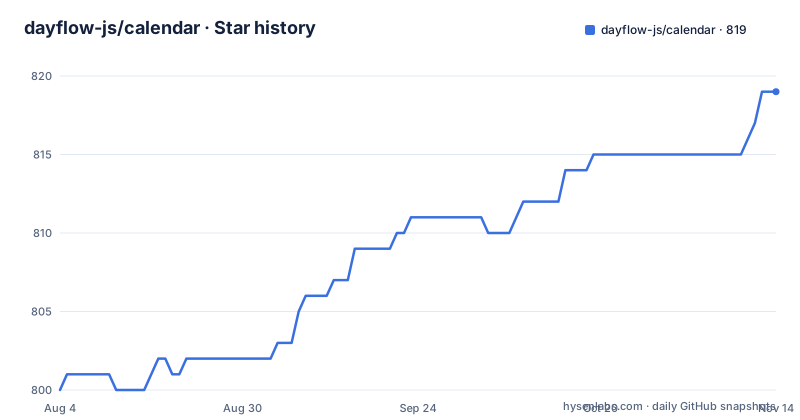
- dayflow-js/calendar819 ★ · +19
| Repository | 2026-08-04 | 2026-11-14 |
|---|---|---|
| dayflow-js/calendar | 800 | 819 |
19 Stars in the last 102 days, measured from the daily GitHub snapshot. Compare with other projects
Editorial analysis
The Problem DayFlow Solves
The component is not a simple date picker. It is a full calendar with daily, weekly, monthly, and yearly views, plus two distinct yearly formats: Fixed-Week and Year-Canvas. That variety suggests the library targets scheduling applications, not just event display. The presence of drag-and-drop and resize support, shown in embedded videos, points to use cases like project planning or resource allocation where users need to move events around. If your application only needs a read-only calendar, this feature set may be more than you need, but it is there if you want it.
Architecture: Plugin System and Framework Bindings
The data flow is not described in the README. There is no mention of how events are passed in, whether it uses a reactive store, or how it syncs with an external backend. Based on the repository, you can assume you provide an array of event objects, and the calendar renders them. But the exact shape of those objects, the date format, and the callback signatures for drag-and-drop are not specified. This is a limitation for evaluation: you cannot judge how well it integrates with your existing data model without reading the source code or trying it.
Getting It Running: Installation and Initial Setup
What the README does mention is the view types and the detail panel options. You can choose between a popup and a dialog for event details, which is a configurable option. Dark mode support is listed, so there is likely a theme prop or a CSS variable set. The 'Easy to resize and drag' feature implies that event objects have start and end dates that can be modified via mouse or touch. The mobile views for day, year, week, and month are also listed, meaning the component responds to screen size or has a mobile-specific mode. Without a config reference, you will have to rely on trial and error to find the right prop names.
Mobile Support and View Variety: What It Actually Offers
The drag-and-drop and resize features are demonstrated in videos, but the README does not specify whether they work on touch devices. The mobile view support implies they do, but it is not confirmed. If you need a calendar where users can drag events on a tablet, you will need to test this yourself. The detail panel options, popup and dialog, give you control over the event editing flow, but again, the API for customizing these panels is not documented.
Limitations and Failure Modes
A failure mode is the multi-framework approach itself. When a library supports four frameworks, the features may not be perfectly aligned across all of them. A drag-and-drop feature might work flawlessly in React but have quirks in Svelte. The README does not provide a compatibility matrix. Also, the 'lightweight' claim is unverified. The bundle size is not published, and with four framework bindings, the core package could be heavier than a single-framework alternative. If bundle size is a hard requirement, you need to measure it yourself.
Comparing to a Single-Framework Alternative
Another alternative is to use a framework-specific calendar like React Big Calendar for React, which is a popular choice. The difference is that React Big Calendar is React-only, so you cannot reuse it in a Vue project. DayFlow's value proposition is the cross-framework compatibility. But that value only materializes if the component behaves identically in each framework, and the README does not demonstrate that. You would need to run a test project in each framework to verify.
Maintenance, Licensing, and Upgrade Considerations
The maintenance cost for you as a user is the time spent learning the API without a guide. The project's own maintenance is active, but the documentation is not. This is a trade-off: you get a fresh, possibly well-architected library, but you must invest in reverse-engineering it. The MIT license gives you freedom to modify and redistribute, but you should verify that the license covers the test files and any assets.
Editorial conclusion
DayFlow suits teams building a calendar UI across multiple frameworks who want a single codebase for daily, weekly, monthly, yearly, and mobile views with drag-and-drop. It is not for you if you need a calendar with built-in timezone management, recurring events, or server-side synchronization, as none are mentioned in the README. Before adopting, verify the plugin API's stability and check the GitHub issues for unresolved bugs, since the README offers no migration guide or detailed configuration reference.
Frequently asked questions
How do I install the DayFlow calendar?
The published package is @dayflow/core, which the README links on npm. The repository itself is a pnpm workspace whose root package is private, so cloning it and running npm install is not the documented route. The library targets React, Vue, Angular and Svelte, and the README contains no install command or import example.
Which views does the DayFlow calendar offer?
Five view types are named: day, week, month, year with a fixed week layout, and year with a year canvas layout. There are also two mobile variants covering day and year, and two more covering week and month, plus two event detail panel options, a detail popup and a detail dialog, and dark mode support.
Does DayFlow sync with an external calendar server?
The repository ships an examples/caldav-proxy/ folder and an examples/sync-connectivity/ folder, which suggests a CalDAV path and a sync layer. The README's feature list does not mention either server side calendars or CalDAV, so the examples are the only evidence of that capability.
What version is DayFlow on?
The newest release tags are v3.7.3 dated 2026-09-19, v3.7.2 dated 2026-09-16 and v3.7.1 dated 2026-09-01. The root package.json is private and its version field reads 3.1.2, because the published artifact is the @dayflow/core package inside the workspace. A version:update script propagates versions across packages.
How do you build and test the DayFlow repository?
The build runs pnpm recursively across the workspace, four packages at a time. The demo and dev server use Vite with packages/core/vite.config.ts. Tests are vitest run plus the Angular package's own test command, and type checking covers the workspace and the test-kit project. Linting and formatting use oxlint and oxfmt, and lefthook installs the git hooks.
Official sources
Add this badge to your README
If you maintain this project, the badge below links readers to this analysis and shows its maintenance status from the daily GitHub snapshot. Paste the markdown into your README; add ?metric=license or ?metric=stars to the image URL for a different field.

[](https://hysenlabs.com/projects/dayflow-js-calendar)Star history chart for your README
[](https://hysenlabs.com/projects/dayflow-js-calendar)Was this useful?