Kizzy: an Android app that drives your Discord Rich Presence from a gateway connection
A Discord Rich Presence manager for Android fully written in Kotlin. Made with jetpack compose and material3
At a glance
- What is it?
- Kizzy is a Kotlin and Jetpack Compose Android app for managing Discord Rich Presence, with 300 plus predefined presets, custom images and links, app and media detection, and a preview inside the app. It talks to the Discord Gateway over a websocket, and the project warns about that explicitly, and about third party clones of the app.
- Who is it for?
- Kizzy fits an Android user who wants their phone's current app, media or game reflected in a Discord Rich Presence and wants to write their own presence configurations with their own images. It is the wrong tool if you are not on Android, since the minimum SDK badge is 27, and the wrong choice if you are not comfortable with an app that holds a Discord gateway connection on your phone.
- Can I use it commercially?
- Yes, with conditions. GPL-3.0 is a copyleft licence: if you distribute software that includes it, you must release that software's source code under the same licence. Running it internally without distributing it does not trigger that obligation.
- Is it still maintained?
- Yes. The repository last received commits 162 days ago.
- What is it written in?
- Mainly Kotlin, according to GitHub's language statistics.
Answers come from the project's GitHub data, last synced on November 7, 2026, and from our analysis. They are not legal advice.
Star history
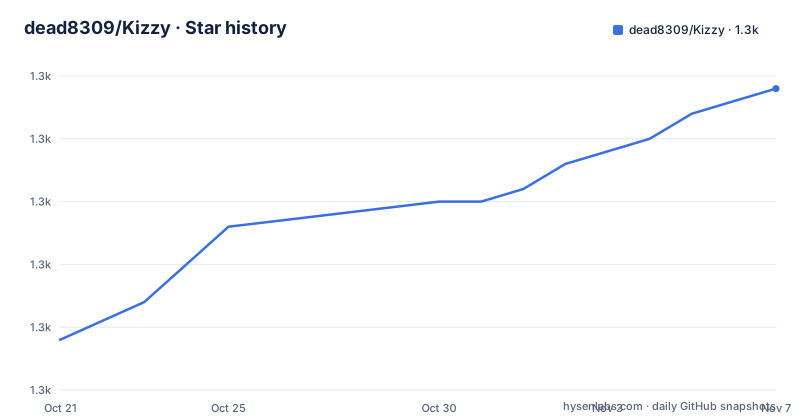
- dead8309/Kizzy1,294 ★ · +20
| Repository | 2026-10-21 | 2026-11-07 |
|---|---|---|
| dead8309/Kizzy | 1.3k | 1.3k |
20 Stars in the last 17 days, measured from the daily GitHub snapshot. Compare with other projects
Editorial analysis
What Rich Presence is, and what this app adds to it
Discord Rich Presence is the feature that shows what you are playing or doing as a line of text, and sometimes an image, under your name in Discord. The library of things you can display is fixed by Discord, so the interesting question for an app like this is what it lets you compose.
Kizzy is a Discord Rich Presence manager for Android fully written in Kotlin, made with Jetpack Compose and Material 3. The feature list in the README is the specification. It has clickable buttons, detects the current running app, detects the current playing media, supports optional timestamps, and supports a custom status. It can save and load presence configs, it has a Material You theme, and it ships translations. There is an easy setup guide, 300+ predefined presets, and the ability to create custom configs with your own images and links. It can preview the RPC in the app itself, it runs in the background even when the screen is off, and it supports gifs, external URLs where you give a URL pointing to an image on the web and Discord shows it, and images from the gallery.
Two of those deserve emphasis. The preview RPC feature means the app can show you what the presence will look like before it goes live, which is what makes the 300 plus presets usable rather than a guessing game. And the external URL support is the one that changes what the 300 plus presets are for: if the image can be an arbitrary URL, the preset gallery is a starting set rather than a closed catalogue, and the constraint moves from what Kizzy ships to what the image host allows.
The project is not trying to be a Discord client. It is a controller for one specific Discord capability, on one specific platform, and the whole design follows from that.
The gateway connection, and the two warnings in the download section
The download section of the README carries two warnings, and they are the most important content in the document.
The first is about copies. If you are thinking about downloading a Kizzy clone or app from any third-party service other than the ones listed in the repository, think again, because the project cannot be held responsible for any issues that may arise with your account as a result, and the advice is to stay on the trusted download links for the genuine app.
That warning is specific to this project, and it exists because a Discord token on an Android device is a credential, and a third party APK asking for it is a credential theft vector. The topic tags confirm the mechanism, with discord, discord-rpc, rich-presence and websocket among them, and the module layout includes a gateway/ directory, so the app maintains a websocket connection to the Discord Gateway.
The second warning is about that connection itself. The app uses the Discord Gateway connection, and the README says to use it at your own risk. It then adds context: people have been using custom rich presence for the past 4-5 years and there is still no case of an account getting terminated.
That is the project stating a risk without being able to quantify it. The gateway is the same connection the official Discord client uses, and a third party client speaking it is the sort of thing that can change policy at any time without notice. The project is candid that it cannot promise the behaviour will continue, and the presence of the 4-5 year history in the warning is an argument from history rather than a guarantee.
If your account matters to you, that is the consideration that should decide whether you install this at all, and the README puts the choice in the reader's hands rather than burying it.
A modular Compose codebase with one directory per feature
The repository layout shows a large Android project organised by feature, and it is one of the more legible structures in this kind of app.
There is an app/ module for the application itself, and then a long list of feature modules: feature_about, feature_apps_rpc, feature_console_rpc, feature_crash_handler, feature_custom_rpc, feature_experimental_rpc, feature_home, feature_logs, feature_media_rpc, feature_profile, feature_rpc_base, feature_settings and feature_startup. Each of these is a separate Gradle module for one screen or one concern, which is the current recommendation for Compose applications and is what lets the experimental features be removed without touching the rest.
The layering underneath is the other half. There are common/ for shared utilities, data/ for the data layer, domain/ for the domain layer, color/ and theme/ for the Material You and Material 3 theming, and gateway/ for the Discord Gateway connection. The build logic lives in build-logic/ as a convention plugin, and the top level has build.gradle.kts, settings.gradle.kts, gradle.properties and the gradle wrapper files.
The feature list maps directly onto the module names, which makes the codebase easy to reason about. feature_apps_rpc is the running app detection, feature_media_rpc is the playing media detection, feature_custom_rpc is the custom configs, feature_experimental_rpc is the experimental bucket, feature_console_rpc is for consoles, and feature_logs is the log view. feature_crash_handler and feature_startup are infrastructure, and feature_rpc_base is the shared Rich Presence base that the others build on.
The topic tags list the techniques in use, and they are consistent with the layout: hilt-android for dependency injection, retrofit for the API layer, mvvm for the view model pattern, jetpack-compose and material-3 for the UI, and websocket for the gateway connection.
Two ancillary directories are worth noting. The fastlane/ directory means release metadata is managed for automated distribution, and .idea/ is committed, which is unusual but a choice some Android developers make so that the IDE configuration is shared.
Building from source with Android Studio
The build section of the README is short, and the prerequisites are the interesting part. For building the app locally you need Android Studio, and familiarity with Gradle, Kotlin and Jetpack Compose. That second prerequisite is the honest one. A person who has never built an Android app will not get this one working from the README alone, and the app is a modern Compose application rather than a simple one.
The clone is standard:
git clone https://github.com/dead8309/Kizzy.gitAnd then the README gives three steps rather than a command line. Open Android Studio, import the project, and click on Build and Run. The build uses the gradlew and gradlew.bat wrapper scripts at the top level, so a Gradle installation is not needed on the machine.
The minimum SDK is visible in the badges at the top of the README, which show a minimum SDK of 27. That corresponds to the system requirements section, which says the OS range is Android 8.1 through 14, with a note that Android 14 may have some bugs with the experimental features. RAM is listed as 3GB minimum.
The system requirements section also carries a caveat worth reading. The project asks you to keep in mind that all systems are different and may have their own bugs, and to create an issue if you find one, with a link to the issue templates. For an app whose job involves reading the running application on a device, that variability is expected rather than exceptional, since the behaviour of foreground app detection and media detection depends on the manufacturer's system image.
The documentation is split across two places. The quickstart points at a QuickStart Guide on kizzydocs.vercel.app, and the getting started section points at the same docs site for the setup guide. The project homepage is kizzy.vercel.app, and the README links a Discord server badge for community support.
Licence, terms of service and the credit chain
The licence section is unusually explicit about what the GPL does and does not permit here. Kizzy is an open source project under the GNU GPL 3.0 Open Source License, which allows you to use, reference and modify the source code for free, but does not allow the modified and derived code to be distributed and sold as closed-source commercial software.
There is a second document. The README links a Terms Of Service file, pinned in the repository at a specific commit hash, for more information. A project with a GPL-3.0 code licence and a separate terms of service document is a combination you will want to read rather than assume, because the two can say different things about what use of the built app is permitted, and the terms document is the one that would speak to the distributed artefact rather than the source.
The credit section is worth reading for a different reason. Kizzy stands on a lot of other people's work, and the README names each piece and what it was used for. Read You and Seal are credited for the UI components. Material Color Utilities is credited, which is what makes the Material You dynamic theming possible. Rich-Presence-U is credited for the Nintendo and Wii U games data, Logra for the logs UI, Xbox-Rich-Presence-Discord for the Xbox games data, and Monet for the Material 3 palettes.
Those last three are the ones with a practical dimension. The 300+ predefined presets are not all invented for Kizzy; some of the game data comes from other Rich Presence projects, which means the catalogue depends on upstream data sources that Kizzy does not control, and that the games listed in a given preset can change without a Kizzy release. A preset you rely on may reference an image that stops resolving.
The translation effort is organised through a GitHub issue rather than a translation platform, with a Contribute for Translation link pointing at issue 2. That is a simple model that works for a project of this size, and it does mean translation coverage depends on whoever shows up.
On maintenance, the repository is not archived and the last push was on 2026-05-30. The most recent releases are 6.2 and 6.1, both on 2025-12-15, and 6.0 on 2025-06-29, so the release history shows a major version every few months and a patch in between, and the last push came several months after the newest tag.
Editorial conclusion
Kizzy fits an Android user who wants their phone's current app, media or game reflected in a Discord Rich Presence and wants to write their own presence configurations with their own images. It is the wrong tool if you are not on Android, since the minimum SDK badge is 27, and the wrong choice if you are not comfortable with an app that holds a Discord gateway connection on your phone. Before installing, get the APK from the GitHub releases rather than a third party copy, as the README warns clones can cause account problems, and read TERMS_OF_SERVICE.md, since the GPL-3.0 grant on the code and the project's own terms are two separate things.
Frequently asked questions
What does Kizzy do on Android?
It manages Discord Rich Presence on Android 8.1 through 14. It detects the current running app and the current playing media, supports clickable buttons, optional timestamps, a custom status, gifs, external image URLs and gallery images, and it includes 300+ predefined presets plus the ability to save and load your own configs.
Is it safe to install Kizzy?
The README carries two warnings: do not install a clone or third party copy, use the GitHub release link, and note that the app uses the Discord Gateway connection and is to be used at your own risk. It adds that custom rich presence has been used for 4-5 years with no case of an account being terminated.
How do I build Kizzy from source?
Clone the repository with git clone, then open it in Android Studio, import the project and use Build and Run. The prerequisites are Android Studio and familiarity with Gradle, Kotlin and Jetpack Compose, and the project ships the Gradle wrapper so no separate Gradle install is needed.
What licence is Kizzy under?
GNU GPL 3.0, which the README explains allows you to use, reference and modify the source for free but does not allow modified and derived code to be distributed and sold as closed-source commercial software. The repository also holds a separate Terms Of Service document linked from the licence section.
Official sources
Add this badge to your README
If you maintain this project, the badge below links readers to this analysis and shows its maintenance status from the daily GitHub snapshot. Paste the markdown into your README; add ?metric=license or ?metric=stars to the image URL for a different field.

[](https://hysenlabs.com/projects/dead8309-kizzy)Star history chart for your README
[](https://hysenlabs.com/projects/dead8309-kizzy)Was this useful?