zero-ui: a web interface for a self-hosted ZeroTier controller
ZeroUI - ZeroTier Controller Web UI - is a web user interface for a self-hosted ZeroTier network controller.
At a glance
- What is it?
- ZeroUI is a React and Express front end for the ZeroTier controller API, deployed with Docker Compose and Caddy in front for HTTPS. It is more complete than the ztncui project that inspired it, but the README states plainly that it is no longer actively maintained and points to ZTNet instead.
- Who is it for?
- Adopt zero-ui if you already run a self-hosted ZeroTier controller, want a mobile friendly rule editor and a UI that speaks the ZeroTier Central API so existing CLI tooling keeps working, and you are prepared to maintain it yourself.
- Can I use it commercially?
- Yes, with conditions. GPL-3.0 is a copyleft licence: if you distribute software that includes it, you must release that software's source code under the same licence. Running it internally without distributing it does not trigger that obligation.
- Is it still maintained?
- Activity is slowing. The repository last received commits 7 months ago.
- What is it written in?
- Mainly JavaScript, according to GitHub's language statistics.
Answers come from the project's GitHub data, last synced on November 7, 2026, and from our analysis. They are not legal advice.
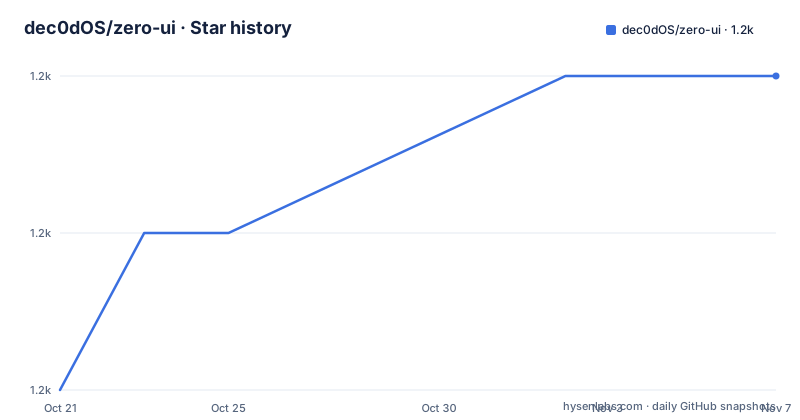
Star history
- dec0dOS/zero-ui1,179 ★ · +2
| Repository | 2026-10-21 | 2026-11-07 |
|---|---|---|
| dec0dOS/zero-ui | 1.2k | 1.2k |
2 Stars in the last 17 days, measured from the daily GitHub snapshot. Compare with other projects
Editorial analysis
A controller API with no interface of its own
ZeroTier's controller is the part of ZeroTier that owns the network definition, the member list and the rules that decide who may talk to whom. When you self-host it, you get an API and a data directory, and the interface to it is whatever you put in front.
ZeroUI is that interface. It is a web user interface for a self-hosted ZeroTier network controller, and it does exactly one thing: talk to the controller API and present it as a web application.
The implementation is a straightforward split. The frontend is a lightweight single page application built with React and Material UI, and it is mobile friendly, which matters if you are changing firewall rules from a phone. The backend is NodeJS with Express, and it stores its own state in Lowdb, a JSON file database. The deployment is Docker and Docker Compose, with Caddy in front providing HTTPS and automatic certificate renewal.
That architecture is the reason the project is easy to run. The backend is a thin layer that translates browser requests into controller API calls, the controller keeps its own state in its own directory, and ZeroUI keeps its preferences in a JSON file. Neither knows much about the other, and both can be replaced independently.
The repository layout follows the split too, with a backend/ directory, a frontend/ directory, docker/ holding the image build, docs/ with the screenshots page, a CHANGELOG.md, and a yarn.lock at the root, since the project is a Yarn workspace with backend and frontend as the two packages.
What ZeroUI does differently from ztncui
The project is explicit that it was inspired by ztncui, and it is explicit about why it exists. It was developed to address the current limitations of self-hosted network controllers, and it says that some of the issues in ztncui cannot be resolved because of the core architecture of that project.
The differences it claims are specific rather than cosmetic.
ZeroUI is a lightweight single page application built with React, which it presents as an improved user experience and as mobile friendly. It is compatible with the ZeroTier Central API, which is the interesting one, because it means CLI tools and custom applications written for ZeroTier Central can manage your self-hosted networks. That compatibility turns ZeroUI from a private admin panel into a front end for an API shape that already has tooling around it.
It also implements controller-specific workarounds for issues in the ZeroTier repository that ZTNCUI does not address. The project is candid that ZTNCUI cannot fix them because of its architecture, and the specific issues are linked in the documentation.
The third claim is completeness. ZeroUI supports almost all network controller features, including a rule editor, and the README says development is ongoing with regular updates and new features expected. That sentence is worth weighing against the maintenance notice at the top of the same document, since the two statements were written at different times.
For anyone choosing between controller UIs, the alternative the project itself points to is ZTNet, described as well maintained and by a different author. ztncui remains the other option in this space, and ZeroUI's argument against it is architectural rather than a list of missing features.
A one-minute install on a fresh VPS
The recommended installation is Docker with Docker Compose, and the README describes it as a one-minute installation for a fresh VPS.
The first step is a project directory:
mkdir -p /srv/zero-ui/
cd /srv/zero-ui/
Then you fetch the compose file, either way:
wget https://raw.githubusercontent.com/dec0dOS/zero-ui/main/docker-compose.ymlcurl -L -O https://raw.githubusercontent.com/dec0dOS/zero-ui/main/docker-compose.ymlBefore you start the containers you replace YOURDOMAIN.com with your own domain and set the admin credentials, ZU_DEFAULT_PASSWORD, in the compose file. A domain is needed for the HTTPS setup, and the documentation suggests DuckDNS as a way to get one for free.
The remaining steps are the standard ones. Pull the image with docker pull dec0dos/zero-ui, start everything with docker compose up -d --no-build, and watch the logs with docker compose logs -f, which you stop with CTRL-C.
The firewall step is the one people miss, and the ports are named explicitly: 80/tcp, 443/tcp and 9993/udp. With ufw on Ubuntu or Debian:
ufw allow 80/tcp
ufw allow 443/tcp
ufw allow 9993/udp
Or with iptables:
iptables -A INPUT -p tcp --dport 80 -j ACCEPT
iptables -A INPUT -p tcp --dport 443 -j ACCEPT
iptables -A INPUT -p udp --dport 9993 -j ACCEPT
The UDP port is ZeroTier's own traffic, so the container is not a plain web server that you can lock down to HTTP. You then open https://YOURDOMAIN.com/app/ and you have an HTTPS instance with automated certificate renewal.
Three containers: ZeroTier, ZeroUI and Caddy
The compose file is where the design becomes concrete, and it is worth reading rather than copying blindly.
The zerotier service runs the controller image zyclonite/zerotier:1.10.6, with a volume for /var/lib/zerotier-one and two environment variables. ZT_OVERRIDE_LOCAL_CONF=true lets the container manage its own configuration, and ZT_ALLOW_MANAGEMENT_FROM=0.0.0.0/0 opens the management API to any source address, which is necessary for the ZeroUI container to reach it and is also the setting you would want to think about twice if you expose the controller port.
The zero-ui service runs dec0dos/zero-ui:latest, depends on zerotier, and shares the same /var/lib/zerotier-one volume as well as a ./data volume for the application directory. It points at the controller with ZU_CONTROLLER_ENDPOINT=http://zerotier:9993/, keeps ZU_SECURE_HEADERS=true, and in the shipped file sets ZU_DEFAULT_USERNAME=admin and ZU_DEFAULT_PASSWORD=zero-ui, which is exactly the credential you are told to change.
The third service is https-proxy, a Caddy container that reverse proxies from your domain to zero-ui:4000, with its own data volume for certificates and ports 80 and 443 published.
Two details stand out. The controller's 9993 is exposed on TCP inside the network and published on UDP for the outside, which is the split ZeroTier needs, since the management API is HTTP and the network traffic is not. And the shared zerotier-one volume means the controller and the UI see the same authtoken.secret, which is how ZU_CONTROLLER_TOKEN can be sourced from a file rather than copied by hand.
If you would rather not use Caddy, the documentation tells you how to remove it: take the https-proxy service out of the compose file, set ZU_SECURE_HEADERS to false, and change the zero-ui expose into ports so the port is published directly.
The environment variables that shape the deployment
The reference table of environment variables is the closest thing this project has to an API documentation, and a few entries deserve attention.
ZU_SERVE_FRONTEND defaults to true, and setting it to false turns the ZeroUI instance into a REST API for your ZeroTier controller only. That is the interesting mode, because it means the same backend that serves the browser interface can sit behind your own frontend or behind a script, and it pairs with the Central API compatibility claim.
ZU_SECURE_HEADERS defaults to true and enables helmet on the Express side. Turning it off is part of the documented way to run without the Caddy proxy, and it is worth being clear with yourself that the secure headers are then gone.
ZU_CONTROLLER_ENDPOINT defaults to http://localhost:9993/ and points at the ZeroTier controller API. ZU_CONTROLLER_TOKEN defaults to reading the value from /var/lib/zerotier-one/authtoken.secret, which is the right default in a container setup with a shared volume, since the token is generated by the controller and rotating it is then a controller-side operation.
ZU_DEFAULT_USERNAME and ZU_DEFAULT_PASSWORD are unset by default, and the compose file sets admin and zero-ui, and they are only applied on the first run. ZU_DATAPATH points at data/db.json for the Lowdb file. ZU_DISABLE_AUTH, defaulting to false, turns authentication off, and that is the setting to leave alone on anything reachable from a network you do not control, because the UI can change your network rules. LISTEN_ADDRESS defaults to 0.0.0.0 for the Express server, and NODE_ENV is the usual Node setting.
Tooling, and the honest maintenance picture
The development setup is a Yarn workspace with husky, commitlint, commitizen, prettier, lint-staged and standard-version. The scripts in the package manifest show the whole loop: format with prettier, lint across the workspaces, build the frontend, and release with standard-version followed by a tagged push and a changelog commit. The package version is 1.5.8, and the CHANGELOG.md at the root records the history. There is a local development mode that runs the frontend with fast refresh and the backend under nodemon, and a container build and run pair for testing the image without the compose stack.
Now the part that matters for an adoption decision, and it is at the very top of the README in a callout marked IMPORTANT. The project is no longer being actively maintained due to personal commitments, and the README says it is stable and currently does not need much active development. If you are looking for a well maintained alternative, the project recommends ZTNet.
The repository is not archived, and the last push was on 2026-04-03, and there are no GitHub releases, so the versions live in the changelog and in the package version rather than in tags. The topic list on the repository includes docker, nodejs, react, sd-wan, sdn, vpn, zerotier and zerotier-controller.
So the honest summary is this. ZeroUI is a complete, well structured tool with a straightforward deployment and a good default setup, and the author has said plainly that it is finished rather than abandoned, which is a fair position for a self-hosted tool that most people run once and leave alone. What you are signing up for is unmaintained code, and the project's own recommendation tells you where to go if that is not acceptable.
Editorial conclusion
Adopt zero-ui if you already run a self-hosted ZeroTier controller, want a mobile friendly rule editor and a UI that speaks the ZeroTier Central API so existing CLI tooling keeps working, and you are prepared to maintain it yourself. Do not adopt it for new work if you want upstream maintenance, because the README states that development has stopped due to personal commitments and recommends ZTNet instead, and do not deploy it with the default credentials or with ZU_DISABLE_AUTH set on a network you do not control. Before you start, change ZU_DEFAULT_PASSWORD in docker-compose.yml, set ZU_CONTROLLER_TOKEN to the value in your controller's authtoken.secret, keep the Caddy proxy and ZU_SECURE_HEADERS on, and open 80/tcp, 443/tcp and 9993/udp in your firewall.
Frequently asked questions
What is ZeroUI and what does it manage?
It is a web user interface for a self-hosted ZeroTier network controller, built as a React single page application over an Express backend that talks to the ZeroTier controller API. The backend stores its own state in a Lowdb JSON file.
How do I install zero-ui with Docker Compose?
Create a directory, download the docker-compose.yml from the repository, replace YOURDOMAIN.com with your domain and change ZU_DEFAULT_PASSWORD, then run docker pull dec0dos/zero-ui, docker compose up -d --no-build and docker compose logs -f. Open https://YOURDOMAIN.com/app/ afterwards, with ports 80/tcp, 443/tcp and 9993/udp open in your firewall.
Is zero-ui still maintained?
The README states that the project is no longer being actively maintained due to personal commitments, while also saying it is stable and does not need much active development. It recommends ZTNet as a well maintained alternative, and the last push was on 2026-04-03.
Can I use zero-ui without the web interface?
Yes. Setting ZU_SERVE_FRONTEND to false disables frontend serving and turns the instance into a REST API for your ZeroTier controller, and the project is compatible with the ZeroTier Central API, so CLI tools and custom applications built for Central can manage your networks.
How do I turn off the Caddy proxy and HTTPS in zero-ui?
Remove the https-proxy service from docker-compose.yml, set ZU_SECURE_HEADERS to false, and change the zero-ui port expose into ports so the port is published directly. Without the proxy, the helmet secure headers are gone as well.
Official sources
Add this badge to your README
If you maintain this project, the badge below links readers to this analysis and shows its maintenance status from the daily GitHub snapshot. Paste the markdown into your README; add ?metric=license or ?metric=stars to the image URL for a different field.

[](https://hysenlabs.com/projects/dec0dos-zero-ui)Star history chart for your README
[](https://hysenlabs.com/projects/dec0dos-zero-ui)Was this useful?