Deckhouse: a Kubernetes platform that manages itself
Kubernetes platform from Flant
At a glance
- What is it?
- Deckhouse is a Kubernetes distribution that takes over the boring parts of running a cluster, the node software, the core components and the add-ons for scaling, observability, security and service mesh, and it produces identical clusters across public clouds, private clouds and bare metal. The catch is in the edition split, because several integrations people want most are in the commercial build.
- Who is it for?
- Deckhouse fits an organisation running many clusters across several infrastructures, where uniformity, an automatic upgrade path and a single add-on catalogue matter more than the freedom to pick every component yourself. It does not fit a single cluster or a small team, where a managed control plane or a plain distribution is less to operate, and it does not fit a team that needs vSphere or OpenStack integration and will not pay for the commercial edition.
- Can I use it commercially?
- Check first. The repository uses a licence we do not classify automatically, so read its LICENSE file before any commercial use.
- Is it still maintained?
- Yes. The repository last received commits 2 days ago.
- What is it written in?
- Mainly Go, according to GitHub's language statistics.
Answers come from the project's GitHub data, last synced on November 6, 2026, and from our analysis. They are not legal advice.
Star history
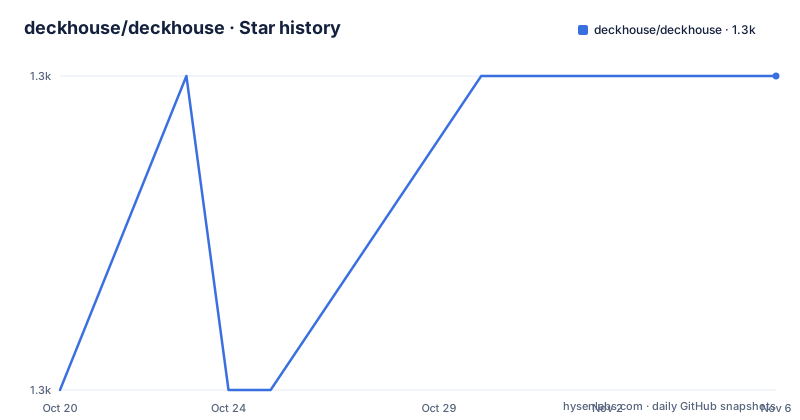
- deckhouse/deckhouse1,338 ★ · +1
| Repository | 2026-10-20 | 2026-11-06 |
|---|---|---|
| deckhouse/deckhouse | 1.3k | 1.3k |
1 Stars in the last 17 days, measured from the daily GitHub snapshot. Compare with other projects
Editorial analysis
What the platform is and who it is for
Deckhouse is described as an open source platform for managing Kubernetes clusters in a fully automatic and uniform fashion, and the word uniform is doing the real work in that sentence. It creates homogeneous clusters and then keeps them that way, supplying the add-ons an organisation actually needs for auto-scaling, observability, security and service mesh, and it manages the system software on the nodes and the Kubernetes platform components as well. The audience is an organisation with infrastructure spread across several places, a public cloud, a private cloud, a set of bare metal servers, and a rule that every cluster has to look the same. The value proposition is a short one in the README, a couple of command line calls and eight minutes to a production-ready cluster, and the certification note in the same paragraph says the platform has passed the CNCF conformance programme for Kubernetes 1.26 through 1.30.
The open edition and the commercial editions
This is the part of the adoption decision that has to be read carefully, because the two are not simply a paid tier on top of the same thing. The open edition is free and open source. The commercial versions are bought with a paid subscription, their source code is also open, but the README is explicit that they are neither open source nor free to use, and they can be evaluated with thirty-day tokens issued through the project website. What the subscription actually adds is a list of substantial capabilities: OpenStack and vSphere integration, the Istio service mesh, multitenancy, enterprise-level security, BGP support, instant autoscaling, local DNS caching, and a selectable timeframe for platform upgrades. Two of those are worth pausing on. If your infrastructure runs on vSphere or OpenStack, the open edition does not include the integration, and the upgrade window is a control plane feature that most platform teams will want.
Two building blocks, and why they matter
Deckhouse is built on an upstream version of Kubernetes, and everything it adds sits on top of that, so the platform is not a fork and the API surface you know still works. The added functionality comes from two building blocks, both developed by the same organisation and both in the dependency list of the main module. The first is shell-operator, the framework used to create Kubernetes operators, and the README points at a conference talk for the details. The second is addon-operator, which packs those operators into modules and manages them, which is the mechanism behind the module system. Understanding those two names explains most of the repository layout, because a module in this design is a bundle of operators and their configuration rather than a container image in the usual sense.
What the repository contains
The tree is large and organised by role. The modules directory holds the add-ons themselves, deckhouse-controller is the component that reconciles the cluster state, and dhctl is the command line tool used to install and manage the platform. The candi directory holds the machine images and configuration for the nodes, and global-hooks holds the hooks that run across the whole cluster rather than inside a module. The library directories are separated by language, a Go library, a shell library, a Helm library and a Python library, which is a telling detail about how much of this platform is still shell and templates. The build and release machinery sits in the werf files, with a giterminism configuration and a cleanup file, and the versions are described in release.yaml and editions.yaml, which is where the open and commercial editions are told apart. Around that are the ordinary things, a Taskfile, a Makefile, a linting configuration, a gitleaks configuration and a renovate configuration.
How the version numbers work
The recent releases show the shape of the scheme. The tags are v1.76.15 from 2026-09-25, v1.77.1 from 2026-09-18 and v1.76.14 from 2026-09-14, and the important observation is that two branches are being released at once, a 1.76 line that is taking patch releases and a 1.77 line that has just started. That is the behaviour you want from a platform whose whole purpose is uniform, automatic upgrades, because it means there is a stable line to pin to and a newer line to move to when you are ready. The commercial feature of a selectable upgrade timeframe belongs to the same design, letting an operator decide how quickly a cluster rolls forward. The release changelogs live in a directory in the repository rather than in a single file, which is the usual arrangement for a project with several release lines, and the last push to the branch was on 2026-10-15.
Where Deckhouse is the wrong tool
The honest answer is that a platform of this kind earns its cost only when you have a fleet. The value comes from the same clusters appearing everywhere and from the platform handling the boring lifecycle, and a team with one cluster and three applications will not extract much from a distribution that ships a control plane of its own, a module system, a node image pipeline and an upgrade cadence to manage. For that case a managed control plane from a cloud provider does the same NoOps work with less of your attention, and a plain upstream distribution gives you the same behaviour with none of the platform layer. A second limitation is the edition split described earlier, where the integrations and the enterprise features are paid, which means the free edition is not simply a smaller version of the same platform.
Deckhouse next to vanilla Kubernetes and next to a managed control plane
There are three ways to run Kubernetes and the difference between them is who owns the lifecycle. Vanilla Kubernetes on an upstream distribution puts you in charge of the control plane, the node images and the upgrade schedule, and it gives you the least opinionated system and the most work. A managed control plane from a public cloud removes the control plane from your hands, and it removes it along with the uniformity, because the add-ons, the ingress and the identity integration are the cloud provider's choices. Deckhouse sits in the third position, owning the lifecycle of the whole cluster and the add-ons while remaining infrastructure agnostic, so the same cluster definition produces the same cluster on AWS, on Azure and on a rack of bare metal servers. If you have many clusters in many places, that third position is the only one that answers the problem.
Licence, community and where the project stands
The licence of the repository is a custom one, in a file at the root, and GitHub cannot categorise it, so anyone planning to build on the code should read it rather than assume a standard grant. That sits oddly beside the commercial editions, whose source is in the same place but which the README says are not open source and not free, and a company that wants to modify the platform itself is in a different legal position from a company that wants to run it. Around the code there is an ordinary set of community artefacts, a code of conduct, a contribution guide, a security policy, a maintainers file and a separate community document, with support through GitHub issues and discussions and two Telegram chats, one in English and one in Russian. The release cadence in the tags is steady, and the project is not a hobby, which is the main reassurance for a platform a team will depend on for years.
Editorial conclusion
Deckhouse fits an organisation running many clusters across several infrastructures, where uniformity, an automatic upgrade path and a single add-on catalogue matter more than the freedom to pick every component yourself. It does not fit a single cluster or a small team, where a managed control plane or a plain distribution is less to operate, and it does not fit a team that needs vSphere or OpenStack integration and will not pay for the commercial edition. Before adopting it, read the edition comparison and the licence file, because the open edition is free and open source while the commercial editions share an open repository but are neither, and check the certification range in the README against the Kubernetes version you intend to run.
Frequently asked questions
What is Deckhouse Platform?
It is an open source platform for managing Kubernetes clusters automatically and uniformly, supplying the add-ons for auto-scaling, observability, security and service mesh, and it can create identical clusters across public clouds, private clouds and bare metal.
What do the commercial Deckhouse editions add to the open one?
OpenStack and vSphere integration, the Istio service mesh, multitenancy, enterprise-level security, BGP support, instant autoscaling, local DNS caching and a selectable timeframe for platform upgrades. Their source is open, but the README says they are neither open source nor free to use.
How is Deckhouse built on top of Kubernetes?
It follows an upstream version of Kubernetes and adds its functionality through two building blocks, shell-operator to create Kubernetes operators and addon-operator to pack those operators into modules and manage them.
Where can a Deckhouse cluster be deployed?
On public clouds such as AWS, GCP, Microsoft Azure and OVH Cloud, on self-hosted cloud solutions including OpenStack and vSphere, and on bare metal servers, with the integration for some of those being part of the commercial editions.
Has Deckhouse passed Kubernetes conformance testing?
The README states that it has passed the CNCF Certified Kubernetes Conformance Program certification for Kubernetes 1.26 to 1.30, and that the platform is based on an upstream version of Kubernetes.
Which licence does the Deckhouse repository use?
A custom licence in the LICENSE file at the repository root, which GitHub does not categorise as a standard identifier, and the commercial editions are separately licensed and are not open source.
Official sources
Add this badge to your README
If you maintain this project, the badge below links readers to this analysis and shows its maintenance status from the daily GitHub snapshot. Paste the markdown into your README; add ?metric=license or ?metric=stars to the image URL for a different field.

[](https://hysenlabs.com/projects/deckhouse-deckhouse)Star history chart for your README
[](https://hysenlabs.com/projects/deckhouse-deckhouse)Was this useful?